Tutorial 5: Using Multiple Opcodes in RCC Workers
Overview
This tutorial shows you how to create a time demux component. The time demux component receives I/Q sample data that has time stamps interleaved within it. It recovers the original data stream and writes it out while also providing a second stream that contains only the timestamps. Having the data separated allows additional processing by tools expecting “just data”; for example, plotting an FFT. The example RCC platform used in this tutorial is rocky9, but different development hosts can be used. If you are using a development host other than Rocky Linux 9, replace rocky9 with the relevant name (example, ubuntu20_04).
Tutorial Objectives
The purpose of this tutorial is to demonstrate how to use multiple opcodes in an RCC worker and builds on OpenCPI Tutorial 4: Using Third-party Libraries in RCC Workers, “Using Third Party Libraries in RCC Workers”.
This tutorial shows you how to:
Create the time demux component specification (properties and ports).
Create the time demux worker C++ code using a skeleton file and build the worker for the target platform.
Create, build, and run the unit test for the RCC worker on the target platform.
It demonstrates how to use the RCC authoring model to:
Create a worker OWD XML file
Create a worker start method
Access worker data ports
Use worker method result values to communicate worker states to the OpenCPI framework
The objectives of this tutorial are to learn how RCC workers can:
Use different protocols on different ports with a nonstandard input:output port ratio (1:2 vs. 1:1)
Process incoming data based on message type (OpCode); in this case, I/Q data with timestamps
This tutorial also reiterates:
C++ conventions for accessing port data and properties
Framework interactions: RCC_ADVANCE vs. RCC_OK
After running this tutorial, you should understand how to use the RCC authoring model, manage multiple opcodes in an RCC worker, and use the OpenCPI unit test suite on an RCC worker implementation of a simple OpenCPI component.
What’s Provided for This Tutorial
The OpenCPI built-in tutorial project ocpi.tutorial provides source code for the following tutorial items:
The time_demux.rcc worker, written according to the API for the RCC (C++ source code) authoring model.
The unit test file test_data_generator.cxx written in C++.
The unit test Makefile
The unit test bash shell script verify.sh
The ocpi.tutorial tutorial project also provides the XML source for all of the assets used to build and run the example component, worker and tests.
Instructions for copying these items from the ocpi.tutorial project into the “demo” tutorial project are provided in the relevant sections of this document. The source code for these items is also available as text in the relevant sections of this document that you can copy and paste into the relevant files following the instructions given in the section.
Note: when copying and pasting text from this document, be sure to remove any line breaks in code or command lines.
Prerequisites to Using This Tutorial
This tutorial (Tutorial 5) has the same system prerequisites as Tutorial 1: Component-based Development. See Prerequisites to Using This Tutorial for details.
Before you begin this tutorial, you should have successfully completed Tutorials 1 through 4.
Documentation References
The documents listed in the following table provide detailed information about subjects discussed in this tutorial. The documents listed here are not required reading for this tutorial but will likely be of interest for more in-depth learning.
Create New Project
As we did in Tutorials 3 and 4, we’ll create a new, clean project for Tutorial 5; we’ll call it DemoProject5. This project has the same requirements as the project we created for Tutorial 3 and 4.
To create the new project with ocpidev, use the following command:
ocpidev create project DemoProject5 --register -D ocpi.assets
Create Components Library
We can use the top-level components/ directory as our library like we did in Tutorials 3 and 4.
To create the components library with ocpidev, run the following command in the DemoProject5 directory:
ocpidev create library components
Create Component
Like we did in Tutorials 3 and 4, we need to create the OCS (OpenCPI Component Specification) for our time demux function that defines its properties and ports.
Create Component Spec
As we did for the peak_detector and complex_mixer components, we’ll create the time demux component spec in the components library.
To create the component spec with ocpidev, run the following command from the DemoProject5/components directory:
ocpidev create component time_demux
The command creates the component spec time_demux-comp.xml in components/time_demux.comp. We’ll add properties and ports to the component spec in the next step.
Add Properties and Ports
The time_demux component function needs to define these properties:
The Current_Second property, which indicates the current second of the minute according to the system clock, from 0 to 59.
The Message_Read property, which keeps track of the number of messages read by a worker.
The Bytes_Read property, which keeps track of the number of bytes read by a worker.
All of these status properties will be written by the component’s worker implementation, so they are all volatile properties. You can read more about how the framework interprets these attributes in the OpenCPI Component Development Guide.
The time_demux component has a somewhat more complex port configuration than the components we’ve worked with in previous tutorials. It requires one “mux” input port that receives both time and data input, one “time” output port for passing the time data to other components using the iqstream_with_sync OPS and one “data” output port that passes the data to other components using the iqstream OPS.
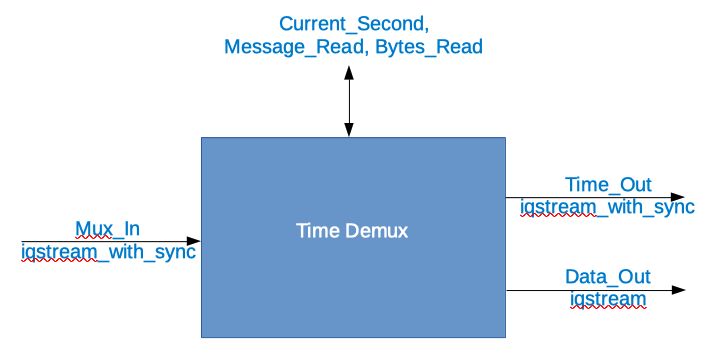
Figure 126: Time Demux Port Configuration
The incoming combined (in-band timestamp) data format is described in the ocpi.core OPS iqstream_with_sync_protocol.xml, found in $OCPI_ROOT_DIR/projects/core/specs/.
The outgoing data format is described in the ocpi.core OPS iqstream_protocol.xml, found in $OCPI_ROOT_DIR/projects/core/specs/.
The outgoing time format is also iqstream_with_sync.
Note that:
There are volatile flags on all status properties
Most attributes don’t need to be set if “False”
Output ports are producers
To add the properties and ports to the component spec using the command line, open the component spec components/time_demux.comp/time_demux-comp.xml with a text editor.
Now replace the contents with the following XML:
<ComponentSpec>
   <!-- Add property and port elements here -->
   <Property name="Current_Second" type="ULong" volatile="true"></Property>
   <Property name="Messages_Read" type="ULongLong" volatile="true"></Property>
   <Property name="Bytes_Read" type="ULongLong" volatile="true"></Property>
   <Port name="Mux_In" protocol="iqstream_with_sync_protocol"></Port>
   <!-- Port order matters here - first port in the SPEC file -->
   <Port name="Time_Out" producer="true" protocol="iqstream_with_sync_protocol"></Port>
   <Port name="Data_Out" producer="true" protocol="iqstream_protocol"></Port>
</ComponentSpec>
Create Worker
Recall from Tutorial 3: Developing an RCC Worker that we implemented a run method for the peak_detector worker. This is the only required method in the RCC authoring model. We also implemented a start method for the worker; this method, along with the initialize, release and stop methods, is optional. Our time demux component also needs to implement a start method.
In Tutorial 3: Developing an RCC Worker, we created an RCC worker, which generated an rcc/ subdirectory with the worker’s OWD XML file and a “skeleton” source code file in the C++ language that we updated to include the C++ code for the worker. We’ll do the same thing here for our time_demux worker. And, because the OpenCPI framework needs to know about any optional “Control Plane” methods that exist in worker source code and because we need to supply a start method in our time demux worker code, we also need to update the RCC worker OWD after we create it to indicate the presence of this method.
For the time_demux worker, the steps, then, are as follows:
Create the worker OWD and skeleton file
Edit the worker OWD to indicate the presence of a start method
Write the C++ code that uses the RCC authoring model
Edit the worker skeleton file to add the C++ code
Build the worker for target platform
Create Worker OWD and Skeleton File
To create the time_demux worker with ocpidev, run the following command in the DemoProject5/components/ directory:
ocpidev create worker time_demux.rcc
Edit Worker OWD
Recall from Tutorial 1: Component-based Development that RCC worker OWDs generated by ocpidev don’t generally need to be updated. In this case, however, we need to add the ControlOperations attribute that indicates our worker will have a start method; because the run method is mandatory, its presence is assumed. You can read more about this attribute and the Control Plane in general in the OpenCPI Component Development Guide.
To add these attributes to the OWD from the command line, in DemoProject5, open components/time_demux.rcc/time_demux.xml with a text editor.
Now replace the contents with the following XML:
<RccWorker language='c++' spec='time_demux' controlOperations="start" version="2">
</RccWorker>
Update RCC Worker Skeleton File
Now we’ll add the C++ source code to the time_demux.cc skeleton file. To do this, you can either:
Copy the tutorial project’s time_demux.cc reference file directly into your DemoProject5/components/time_demux.rcc/ subdirectory, overwriting the skeleton file.
Open the skeleton file for editing and copy/paste the code provided below to it.
You can choose to do one or the other. Doing both is redundant.
Copy Tutorial Project Reference File
To copy the file directly from the tutorial project, navigate to the time_demux.rcc/ subdirectory in DemoProject5 and then use the command:
cp $OCPI_ROOT_DIR/projects/tutorial/components/time_demux.rcc/time_demux.cc .
Edit Worker Skeleton File
To edit the worker skeleton file from the command line, navigate to the components/time_demux.rcc/time_demux.cc file and open it with a text editor.
Now replace the contents with the following code:
// Note: This file uses C++11; you must add the proper compiler command line to the Makefile
//       for each target platform, e.g:
// RccExtraCompileOptionsCC_centos7+=--std=c++11

#include <cstring>
#include <iostream>
#include "time_demux-worker.hh"

using namespace OCPI::RCC; // for easy access to RCC data types and constants
using namespace Time_demuxWorkerTypes;

class Time_demuxWorker : public Time_demuxWorkerBase {
static const bool verbose = false;

RCCResult start() {
   // Guarantee that only Time opcode is sent on Time_Out port:
   Time_Out.setDefaultOpCode(Iqstream_with_syncTime_OPERATION);
   return RCC_OK;
}

// Internal helper function to manipulate counters
void increment_counters(size_t bytecount) {
   ++properties().Messages_Read;
   properties().Bytes_Read += bytecount;
}

RCCResult run(bool /*timedout*/) {
   // determine if end of file
   if (Mux_In.eof()) {
   Data_Out.setEOF();
   Time_Out.setEOF();
   return RCC_FINISHED;
   }
   // Determine opcode
   switch (Mux_In.opCode()) {
      case Iqstream_with_syncIq_OPERATION:
      {
      const size_t num_of_elements = Mux_In.iq().data().size();
      // Insert IQ opcode logic here (update properties, allocate output, copy sequence, send)
      if (verbose) std::cerr << "Received " << num_of_elements << " " << sizeof(IqstreamIqData) << "-byte values." << std::endl;
      increment_counters(Mux_In.length());
      Data_Out.iq().data().resize(num_of_elements);
      const auto *iptr = Mux_In.iq().data().data();
                  /*     ^      ^    ^      ^------ The Iqstream_with_syncIqData structs
                     +     |      |    \------------- The argument of the IqOp (returns Mux_InPort::IqOp::DataArg object)
                     +     |      \------------------ The opcode (returns Mux_InPort::IqOp object)
                     +     \------------------------- The port
                     */
      auto *optr = Data_Out.iq().data().data();
            /*     ^        ^    ^      ^------ The IqstreamIqData structs
               +     |        |    \------------- The argument of the IqOp (returns Data_OutPort::IqOp::DataArg object)
               +     |        \------------------ The opcode (returns Data_OutPort::IqOp object)
               +     \--------------------------- The port
               */
      for (size_t i = 0; i < num_of_elements; ++i, ++iptr, ++optr) {
         //  *optr++ = *iptr++; // Does not work; structs are different type!
         optr->I = iptr->I;
         optr->Q = iptr->Q;
      }
      Data_Out.advance();
      } // case statement anonymous block for stack variables
      break;
      case Iqstream_with_syncTime_OPERATION:
      // Insert Time opcode logic here (update properties, copy scalar, send)
      increment_counters(sizeof(uint64_t));
      properties().Current_Second = static_cast<uint32_t>(Mux_In.Time().time() >> 32);
      if (verbose) std::cerr << "Timestamp: " << properties().Current_Second << std::endl;
      Time_Out.Time().time() = Mux_In.Time().time();
   /* ^        ^      ^------ The single uint64_t (no need for wrapper class providing length, etc.)
      + |        \------------- The opcode (returns Time_Out::TimeOp object)
      + \---------------------- The port
      */
      Time_Out.advance();
      break;
      default: // Iqstream_with_syncSync_OPERATION and any unknowns
      // do nothing (but record message received)
      increment_counters(0);
   } // opcode switch
   Mux_In.advance();
   return RCC_OK; // Cannot use RCC_ADVANCE because both output ports never used in a single cycle.
}
}; // end class Time_demuxWorker

TIME_DEMUX_START_INFO
// Insert any static info assignments here (memSize, memSizes, portInfo)
// e.g.: info.memSize = sizeof(MyMemoryStruct);
TIME_DEMUX_END_INFO
Build Worker
Now we need to compile the time_demux worker for the platform on which we want to run it; for this tutorial, it’s our development host.
To build the worker with ocpidev, run the following command from the DemoProject5 directory:
ocpidev build worker time_demux.rcc
Create Unit Test
Like we did in Tutorials 3 and 4, we’ll generate an OpenCPI test suite (aka “unit test”) for our time demux worker.
To create the unit test with ocpidev, run the following command from the DemoProject5/components directory:
ocpidev create test time_demux
Edit Test Suite Description
Like we did for the worker tests in Tutorial 3: Developing an RCC Worker and Tutorial 4: Using Third-party Libraries in RCC Workers, we need to add the script names and the necessary parameter values for the scripts to the OpenCPI test suite description (OTSD) (aka “unit test description”) for the time demux worker. This worker uses different scripts than what we’ve seen in Tutorial 3: Developing an RCC Worker and Tutorial 4: Using Third-party Libraries in RCC Workers. This is done in order to use two different opcodes, because the Time() data is separated from the .iq() data using Time_Out and Data_Out.
To edit the test suite description on the command line, open the components/time_demux.test/time_demux-test.xml file with a text editor.
Now replace the contents with the following XML:
<!-- This is the test xml for testing component "time_demux" -->
<tests useHDLFileIo='false'>
   <input port='Mux_In' script='test_data_generator' messagesInFile='true'/>
   <output port='Data_Out' script='verify.sh'/>
   <output port='Time_Out' script='verify.sh'/>
   <property test='true' name='START' value='0'/>
   <property test='true' name='SAMPLES' value='256'/>
   <property test='true' name='IFILE' type="String" value='gen/mytestdata'/>
</tests>
Copy Unit Test Scripts from Tutorial Project
Now we’ll copy the following reference test scripts from the ocpi.tutorial project that are required for our unit test suite:
verify.sh - the file that has a copy of the results that should be generated by the operation. The results that are generated are compared against it to verify that the test ran correctly.
Makefile - the file that provides ocpidev information necessary for the test to run on certain operating systems.
test_data_generator.cxx - the file that generates the I/Q sample data that has time stamps interleaved within it. That data is processed by time_demux.cc.
To copy these files:
Open a second tab in your terminal.
Navigate to the /components/time_demux.test/ directory in DemoProject5:
cd components/time_demux_test/
Use the following commands to copy the test files from the ocpi.tutorial project’s components/time_demux.test/ directory to your local DemoProject5/components/time_demux.test/ directory:
cp $OCPI_ROOT_DIR/projects/tutorial/components/time_demux.test/verify.sh .
cp $OCPI_ROOT_DIR/projects/tutorial/components/time_demux.test/Makefile .
cp $OCPI_ROOT_DIR/projects/tutorial/components/time_demux.test/test_data_generator.cxx .
Build Unit Test
Now we’ll build the unit test for the target platform, which is our development host for this tutorial.
To build the unit test with ocpidev, run the following command from the components/time_demux.test/ directory in DemoProject5:
ocpidev build test
Run Unit Test
Now we’ll run the unit test for the time demux worker.
To run the test and view the output from the command line, browse to time_demux.test/ and run the following ocpidev command:
ocpidev run test --only-platform $OCPI_TOOL_PLATFORM
If the unit test runs successfully, the following text is displayed:
======== Preparing for execution on available platforms with available built workers and assemblies for time_demux:
Probing for available local platforms:
Local platforms are: rcc-0-rocky9
Generating execution scripts for each platform that can run.
Generating run script for platform: rocky9
======== Running and verifying test outputs on available platforms for time_demux:
Performing test cases for local.DemoProject5.time_demux on platform rocky9. Functions are: run verify
Executing case case00.00 using worker time_demux.rcc on platform rocky9...
Execution succeeded, time was 00:00:01 (1 seconds).
Verifying case case00.00 for worker time_demux.rcc using script on output file: case00.00.time_demux.rcc.Time_Out.out
Checking time:
Verification for port Time_Out: PASSED
Verifying case case00.00 for worker time_demux.rcc using script on output file: case00.00.time_demux.rcc.Data_Out.out
Checking data:
Verification for port Data_Out: PASSED
Tutorial Summary
Now that you’ve completed this tutorial, you should be able to create and program a worker with one or more opcodes. In other existing OpenCPI projects, you should also be able to understand how the RCC workers communicate and operate even if they have more than two opcodes.