Gpi (gpi)
Design
The GPI device worker reads the GPIO pins present on an embedded platform. It is configured for general purpose input.
A block diagram representation of the implementation is given in Figure 186:
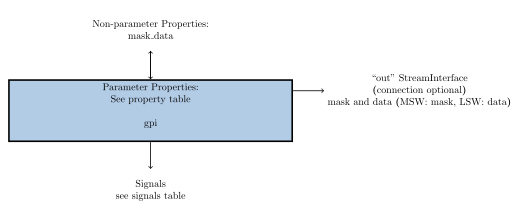
Figure 186: gpi block diagram.
Interface
<HdlDevice Language="vhdl" Spec="gp_in-spec.xml" Version="2" libraries='util misc_prims'>

  <Property Name="NUM_INPUTS" Type="uChar" Parameter="true" Default="1" Description="Number of GP Inputs. The max number of GP Inputs supported is 16."/>

  <Property Name="USE_DEBOUNCE" Type="bool" Parameter="true" Default="false" Description="Enable/Disable build-time inclusion of debounce circuit."/>

  <Property Name="CLK_RATE_HZ" Type="double" Parameter="true" Default="100e6" Description="The clock rate of the clock feeding the debounce circuit in Hz."/>

  <Property Name="DEBOUNCE_TIME_PSEC" Type="double" Parameter="true" Default="1e10" Description="The desired debounce time for the debounce circuit in picoseconds."/>

  <Property Name="EDGE_MODE" Type="bool" Parameter="true" Default="false" Description="Enable/Disable build-time inclusion of edge detector circuit."/>

  <Property Name="RISING" Type="bool" Parameter="true" Default="true" Description="
    True - Selects the edge detector's rising edge output.
    False - Selects the edge detector's falling edge output."/>

  <Property Name="USE_TOGGLE" Type="bool" Parameter="true" Default="false" Description="Enable/Disable build-time inclusion of toggle circuit."/>

  <Property Name="EVENT_MODE" Type="bool" Parameter="true" Default="false" Description="
    True - Output port data valid only when there is a change in the data to be sent the output port.
    False - Output port data valid every clock cycle."/>

  <Property Name="mask_data" Type="uLong" Volatile="true" Description="Bitfield
    containing the data read from the GPIO pins and the mask. The mask allows
    knowledge of which GPIO pins changed since the previous read cycle. The MSW
    must be the mask and LSW must be the data. The mask is the current data XOR
    the previous data."/>

  <StreamInterface Name="out" DataWidth="32" insertEOM="true"/>

  <Signal Input="gpi_pin" Width="NUM_INPUTS"/>

</HdlDevice>
Implementations
gpi(HDL)
Dependencies
The dependencies to other elements in OpenCPI are:
assets/hdl/devices/gpi.hdl/gpi.vhd
assets/primitives/misc_prims/edge_detector/src/edge_detector.vhd
assets/primitives/misc_prims/debounce/src/debounce.vhd
assets/hdl/devices/gpi_em.hdl/gpi_em.vhd
assets/primitives/util_prims/set_clr/src/set_clr.vhd
Limitations
Limitations of gpi are:
None.
Testing
Tested platforms include xsim.
The gpi device worker unit test has five test cases and utilizes the gpi_em device emulator. The first case tests the gpi device worker by toggling GPIO pins on and then off with the debounce circuit, edge detector circuit, and toggle circuit disabled. Test case two toggles the pins on and off with only the debounce circuit enabled. The third test case toggles the pins on and off with only the edge detector circuit enabled. Test case four toggles the pins on, off, on, and then off with only the toggle circuit enabled. The fifth test case tests toggling the GPIO pins on, off, and then on with the debounce circuit, edge detector circuit, and toggle circuit enabled.
The gpi_em device emulator uses the data received from a data source to write the GPIO pins.
The generate.py script generates the input data for the gpi_em device emulator and the verify.py script checks the output file for expected length and data contents.