AXI Transport Performance Tuning Guide
Introduction
The analog-to-digital converter (ADC) in a software-defined radio (SDR) receive path produces digital samples at a specific rate. If the downstream path from the ADC is unable to process samples fast enough, even for short, intermittent periods, then buffers fill up, back pressure is exerted, and the ADC is forced to drop samples. Likewise, the digital-to-analog converter (DAC) expects to be provided with samples at a specific rate. If the upstream path providing samples to the DAC is unable to do so fast enough, the DAC will “underrun”. Both ADC sample drops and DAC underruns are undesirable, but an untuned system will be unable to achieve a high data rate without exhibiting both.
Common technologies used within SDRs are the Xilinx Zynq and Ultrascale+ platforms. These are System on Chip (SoC) devices featuring an embedded ARM processor and Field Programmable Gate Array (FPGA) on the same die. These are capable devices that usually run a Linux based operating system. OpenCPI workers may either be implemented in the Programmable Logic (PL) or within the Processing System (PS). Control software will usually reside within the PS. The Control Plane and Data Plane operate over the system AXI busses.
The focus of this document is the transfer of data over the data plane, between the PS and PL, with explanations of factors which contribute to performance bottlenecks and techniques to optimize performance on Zynq and Ultrascale+ platforms are explored. Some concepts covered within this document overlap with the Ethernet Transport Performance Tuning Guide and are repeated here for convenience of reading. This document is aimed at all OpenCPI developers as performance is affected by all aspects of a system, including applications, components and platform support.
References
The documents listed in the following table are referenced within the document.
Title |
Link |
OpenCPI Ethernet Transport Performance Tuning Guide |
|
OpenCPI Platform Development Guide |
|
OpenCPI SDP Buffer Workaround Notes |
|
OpenCPI Installation Guide |
|
Zynq 7000 SoC Technical Reference Manual (UG585) |
|
Zynq UltraScale+ Device Technical Reference Manual (UG1085) |
Background
This section describes the approach used to test throughput, an explanation of the data transfer mechanism between PS & PL on a Xilinx SoC.
Performance Measurement Approach
An OpenCPI application for testing performance exists within the OSP for the Ettus X310, called “perf”. This can be re-used, with slight modification, to measure the performance on other platforms. The test allows support for DMA transfers between PS and PL in both directions.
The modifications required to make the perf application operate on other platforms are:
Modify perf.xml to remove the instance of ocpi.core.dgrdma_config_proxy
Modify smoketest_assy.xml to ensure a suitable container is used to build a bitfile. In our case it was possible to simply remove defaultcontainers=”” such that the default base config will be used, which connects external ports to the default platform interconnect.
Test Application Overview
The test exercises the interface between PS and PL with a simple memcpy operation performed on the data in software. The memcpy operation is deliberately chosen to provide some level of software load during the test. The measurements should not be considered the expected throughput within other applications, since additional software loading, such as data processing, reading or writing data to disk will affect performance.
The test application includes two workers, perfmeas.rcc and perftest.hdl, each with a tx and rx port. A simplified block diagram of the test application is shown in Simplified Block Diagram of Performance Test.
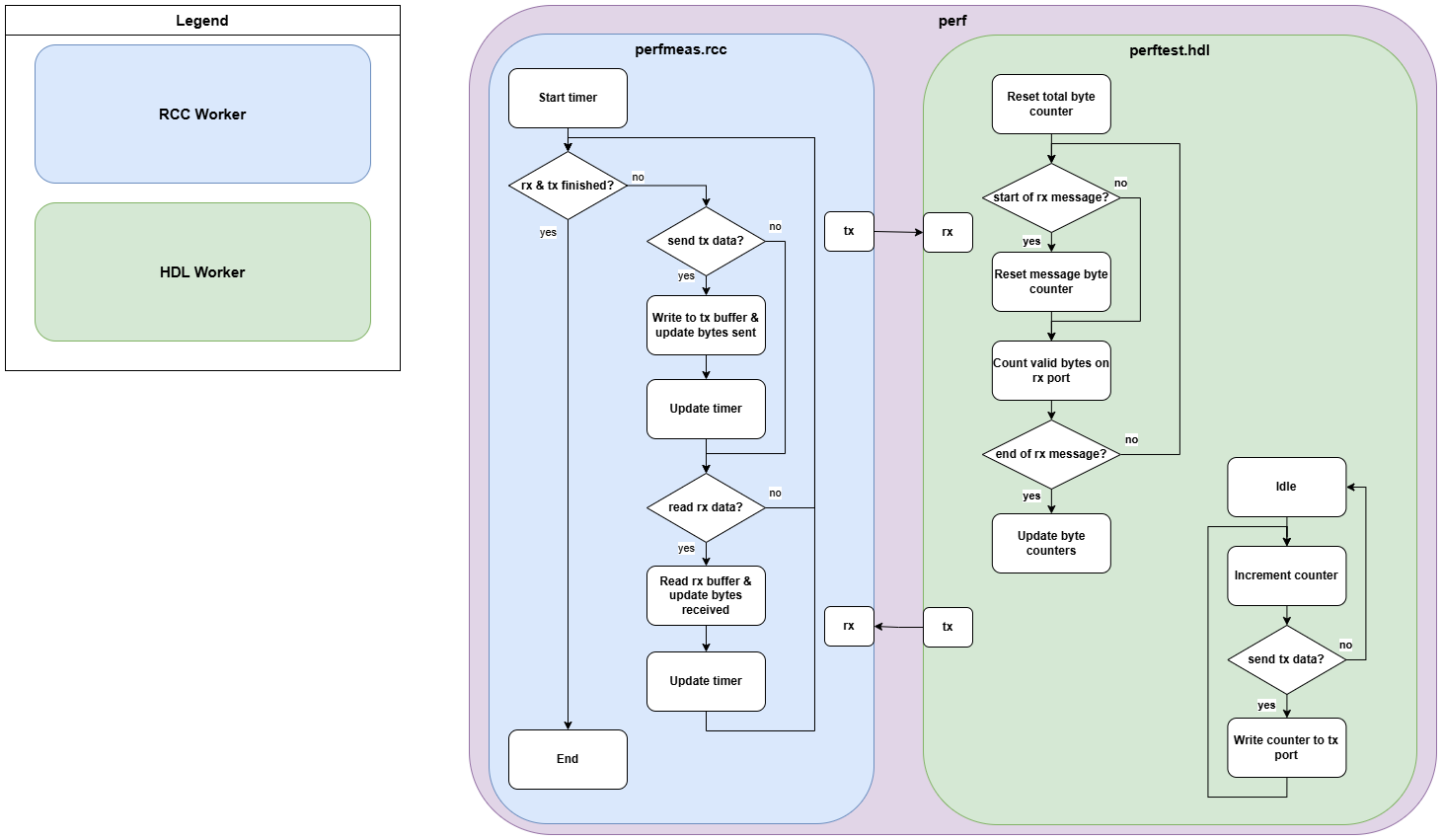
Figure 39: Simplified Block Diagram of Performance Test
The data width of each port is adjusted to match the width of the data plane for the platform on which it is executed. Data is sent from tx to rx between each component as messages of a variable length, controllable via properties, such that the message length can be adjusted to the maximum possible for the data plane width for the given platform. Both workers include properties to specify the number of messages to send and receive for each test.
The perfmeas.rcc worker is responsible for measuring throughput in each direction and the application will stop once the perfmeas.rcc worker determines there is no more data to send or receive on its ports. The run condition for this worker is set such that it will run if either of the ports are ready, to support independent tests in each direction. The worker contains a number of properties to control the test and report the throughput performance, as shown in Table 77:.
Property |
Description |
Direction |
rx_exp_message_words |
Set by the user to control the number of words in an rx message |
PL to PS |
rx_exp_messages |
Set by the user to control the number of rx messages to receive |
PL to PS |
tx_message_words |
Set by the user to control the number of words in a tx message |
PS to PL |
tx_messages |
Set by the user to control the number of tx messages to send |
PS to PL |
rx_messages |
Number of messages the worker has received on its rx port |
PL to PS |
rx_bytes |
Number of bytes the worker has received on its rx port |
PL to PS |
rx_last_message_bytes |
Number of bytes in the previous message on its rx port |
PL to PS |
tx_messages_sent |
Number of messages sent on its tx port |
PS to PL |
tx_bytes_sent |
Number of bytes sent on its tx port |
PS to PL |
memcpy_data |
Set true to read and write data to the port buffers. |
Both |
elapsed_s |
Elapsed time since the worker started, updated on every rx and tx message |
Both |
up_rate_mbit_s |
Data rate for the tx port |
PS to PL |
down_rate_mbit_s |
Data rate for the rx port |
PL to PS |
In the workers’ start method, the worker creates data to send on the tx port so it is ready to send during the test; the same data is always sent. The last operation of the start method is to start a timer, which is then used to determine the elapsed time during the test.
The perftest.hdl is responsible for generating data at its tx port and consuming data at its rx port as fast as possible. It contains properties to allow control over the data sent on the tx port and to report information about the data received on the rx port, as shown in Table 78:, however these are not used to calculate the throughput.
Property |
Description |
Direction |
rx_messages |
Number of messages the worker has received on its rx port |
PS to PL |
rx_bytes |
Number of bytes the worker has received on its rx port |
PS to PL |
rx_last_message_bytes |
Number of bytes in the previous message on its rx port |
PS to PL |
tx_beats |
Set by the user to control the number of words in a tx message |
PL to PS |
tx_messages |
Set by the user to control the number of tx messages to send |
PL to PS |
tx_message_gap |
Set by the user to control the number of clock cycles to insert between subsequent messages on the tx port |
PL to PS |
tx_run |
Set by the user to control whether to generate data on the tx port |
PL to PS |
PS to PL Test
The PS to PL test is performed if the perfmeas.rcc property “rx_exp_messages” is greater than 0. Within its run method, the perfmeas.rcc worker checks if an empty buffer is available for the tx port; if one is available it:
Optionally, writes pre-created data to the tx port, based on property “memcpy_data”.
Updates the “tx_bytes_sent”, “tx_messages_sent”, “tx_bytes_sent”, “elapsed_s” and “up_rate_mbit_s” properties.
Advances the tx port to output the data and request a new buffer.
If no tx buffer is available, the worker will not output data to its tx port during that execution of the run method.
The test will stop once “tx_messages_sent” reaches the value of “tx_messages”.
PL to PS Test
The PL to PS test is performed if the perfmeas.rcc property “rx_exp_messages” is greater than 0. Within its run method, the perfmeas.rcc worker checks if a full buffer is available from the rx port; if one is available it:
Optionally, reads data from the rx port buffer, based on property “memcpy_data”.
Determines the length of the data in bytes.
Updates the “rx_messages”, “rx_bytes”, “rx_last_message_bytes”, “elapsed_s” and “down_rate_mbit_s” properties.
Advances the rx port to take the data and request a new buffer.
If no rx buffer is available, the worker will not take data from its rx port during that execution of the run method.
The test will stop once “rx_messages” reaches the value of “rx_exp_messages”.
For the perftest.hdl worker to send the expected data, its “tx_run” property must be set to ‘1’ and its “tx_messages” property must equal the perfmeas.rcc property “rx_exp_messages”.
Data Transfer Mechanism
This section recaps how data is transferred between the PL and PS. Buffers on the PL are populated in order with data from the connected HDL worker. When a buffer is full, it is transferred via the data plane, over the AXI bus, to the next empty PS buffer. Note that the PL frees its buffer immediately: it does not need to wait for the corresponding doorbell. Note also that the PS may have many more buffers than the PL. Buffer limitations on the PL are discussed in section Buffer Size. If the PS does not process data in time, or is not timely in sending its doorbells, all buffers are considered full by the FPGA. At this point the FPGA will exert back pressure, limiting the data throughput. Data Transfer Between PL and PS illustrates this process.
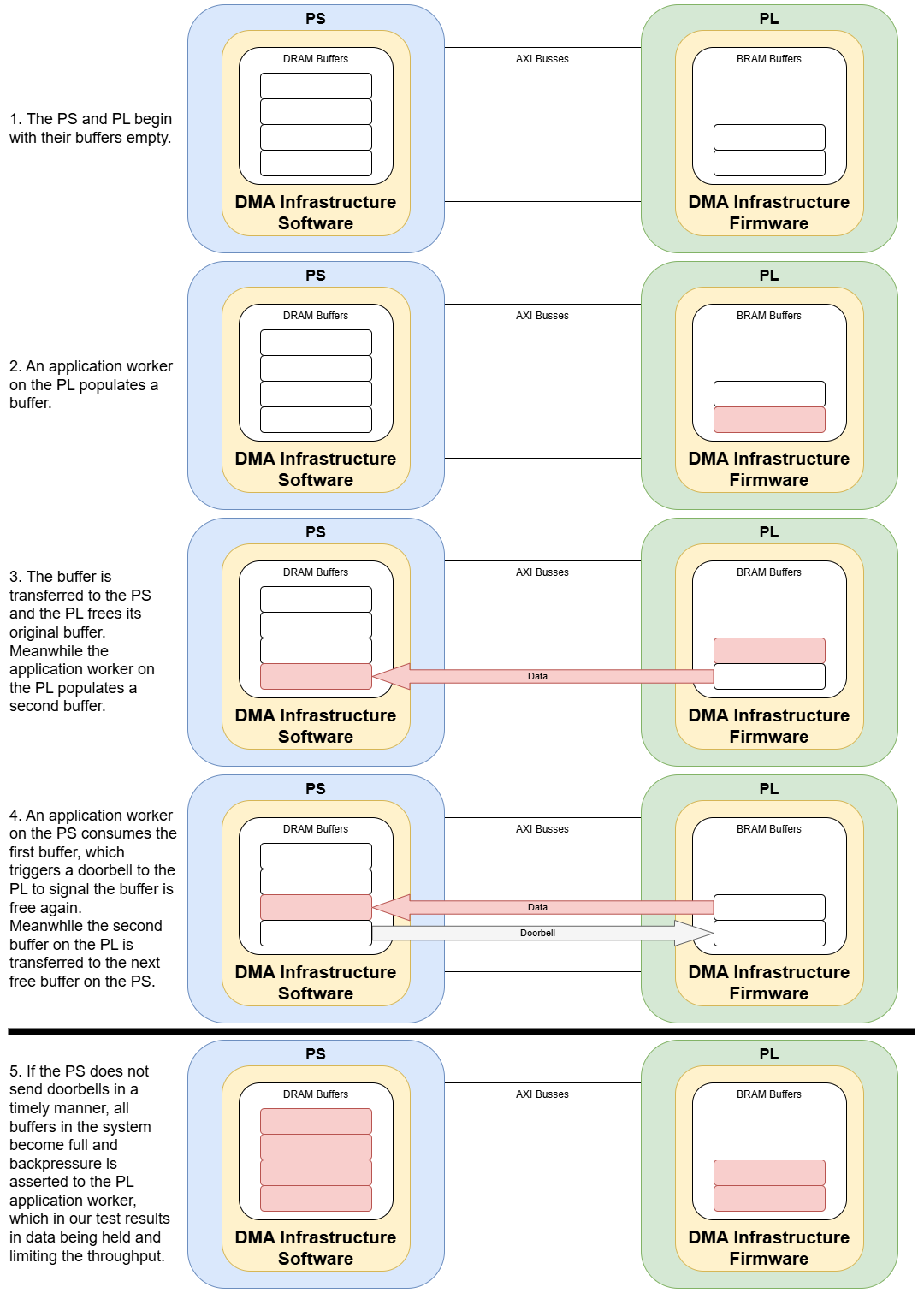
Figure 40: Data Transfer Between PL and PS
Sources of Bottlenecks and Optimizations
Our application comprises a single RCC container, connected to a single HDL container. A simplified block diagram shows the data connections between a single RCC and HDL worker as shown in Simplified view of data connections between a single RCC and HDL Worker.
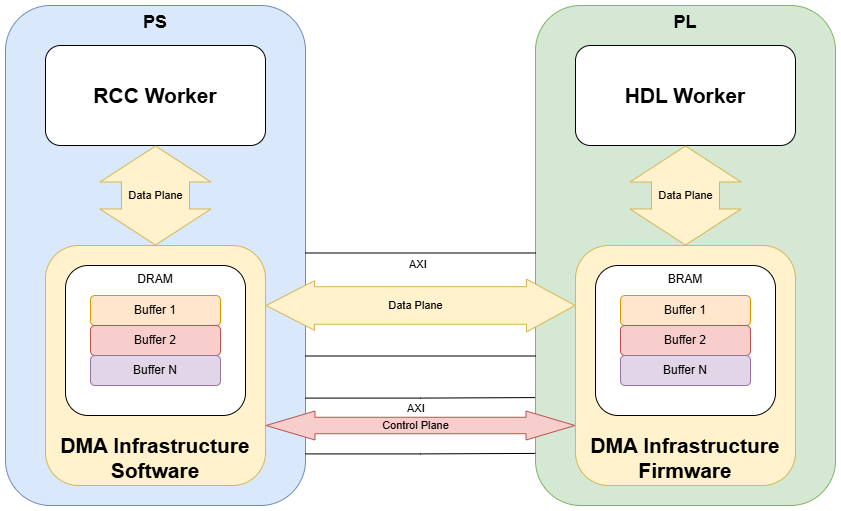
Figure 41: Simplified view of data connections between a single RCC and HDL Worker
The main performance bottleneck is on the PS, specifically how often it services the port buffers. We performed a throughput test both with and without touching the data in the port buffers in the RCC worker and repeated over varying buffer sizes. As discussed, the use of memcpy is to represent a simple, fixed software operation on the port buffers. Methods of improving data throughput were explored and are documented in the following subsections. These methods can achieve an approximate 580% improvement on Zynq 7000 series devices and a 780% improvement on Ultrascale+ devices.
The figures below plot the achieved data throughput for a PL to PS transfer vs buffer size for the two scenarios for Zynq 7000 and Ultrascale+ devices. Throughput from PS to PL was comparable and shown in Data Buffers, however for clarity is not plotted here. All performance methods for improving performance apply equally to data transfer in both directions. Note the results in these figures includes compiler optimizations, which is covered in section Compiler Optimizations.
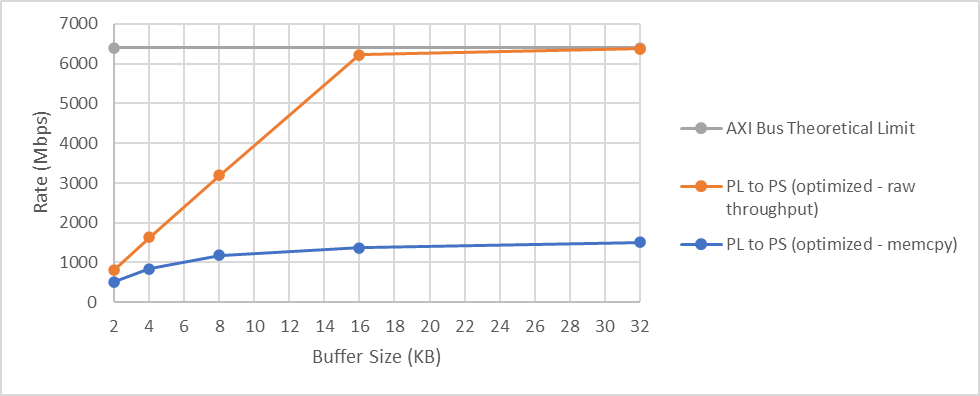
Figure 42: Zynq 7000 Throughput, 64 bit bus, 100MHz clock
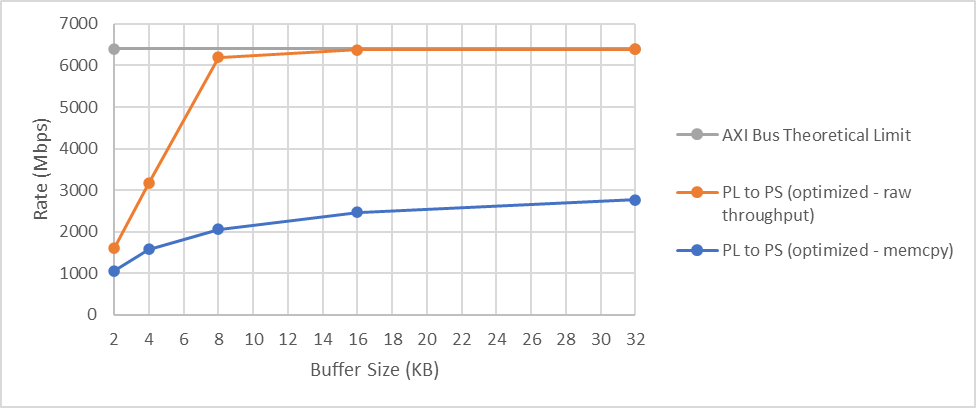
Figure 43: Ultrascale+ Throughput, 64 bit bus, 100MHz clock
As can be seen, the raw throughput increases linearly towards the theoretical bus limit for increasing buffer size, until it reaches this limit. When performing the memcpy this improvement is not linear indicating we are tending towards being limited by how often we can service those buffers, that is, a throughput limit in software.
Software Load
As discussed in the previous section, the doorbell mechanism is used to indicate availability of buffers on the PS and the time between these doorbells must be minimized.
All software execution between the data arriving in the buffer and the doorbell being issued directly contributes to the throughput performance. This is clearly demonstrated by the significant drop in throughput when performing the memcpy operation vs the raw throughput shown in Zynq 7000 Throughput, 64 bit bus, 100MHz clock and Ultrascale+ Throughput, 64 bit bus, 100MHz clock.
In simple terms, the OpenCPI DMA infrastructure is responsible for the transfer of data between worker ports and management of data buffers. User space and kernel space code is running on the PS to provide this functionality therefore a software overhead exists within OpenCPI. The OpenCPI Kernel Driver Functionality Guide provides more detail on the user space and kernel space operations for data transfer. The performance of this infrastructure can be improved and is covered in section Data Buffers and Compiler Optimizations.
The infrastructure will indicate when a data buffer is available on an RCC worker’s port and make that buffer available to the worker. A doorbell is issued once the RCC worker has released the port buffer, that is, it indicates it has finished with the data in that buffer. In most cases, the RCC worker run method will be called when a buffer is available and released when the worker has finished its task, as is the case in our RCC worker, which releases the buffer at the end of every call to the run method. The time taken to execute code between a buffer being available and it being released is therefore a significant factor in overall performance and should be minimized. This is particularly relevant considering the limited PS capabilities of each device, which is highlighted further in section Throughput Limits.
Data Buffers
The data buffers for worker ports are provided by OpenCPI. Unless specified, OpenCPI automatically selects buffer size and count at ports, based on the protocol specification for a port, or default values if no protocol is used. The size of these buffers determines the amount of data available to a worker at any one time and therefore directly contributes to throughput performance.
Buffer Size
There is a processing overhead for every buffer the infrastructure handles, therefore increasing buffer size will generally improve throughput performance, at the expense of latency, as the time taken to fill the buffer will increase. The SDP Buffer Workaround Notes detail a method for increasing the buffer size and count. This guidance was followed to allow for maximum buffer possibilities for testing.
By using the explicit “buffersize” attribute in the application xml, the buffer size was adjusted between 2 KB, the default minimum, and 32 KB, the maximum possible for PL to PS transfers. PS to PL transfers are limited to 16 KB buffers due to limitations in the OpenCPI infrastructure. For every setting of buffer size, the data per message was adjusted to match to ensure buffers are used as efficiently, thereby improving performance. The results are plotted below. Zynq 7000 PL to PS Throughput Comparison vs Buffer Size, 64 bit, 100 MHz and Ultrascale+ PL to PS Throughput Comparison vs Buffer Size, 64 bit, 100 MHz show the throughput with and without performing the memcpy, compared to the AXI bus theoretical limit. Zynq 7000 Throughput vs Buffer Size, 64 bit, 100 MHz and Ultrascale+ Bidirectional Throughput vs Buffer Size, 64 bit, 100 MHz show the rates in both directions when performing the memcpy only to better illustrate the rates.
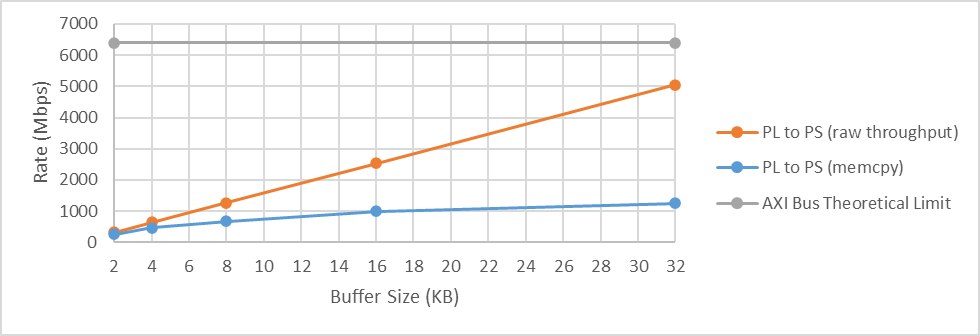
Figure 44: Zynq 7000 PL to PS Throughput Comparison vs Buffer Size, 64 bit, 100 MHz
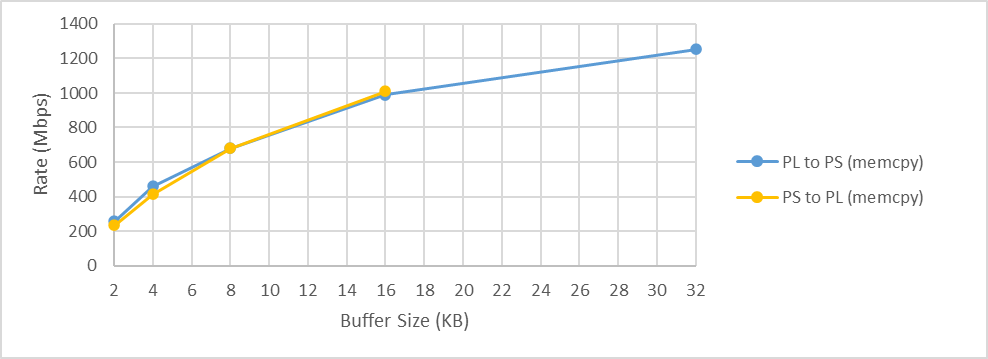
Figure 45: Zynq 7000 Throughput vs Buffer Size, 64 bit, 100 MHz
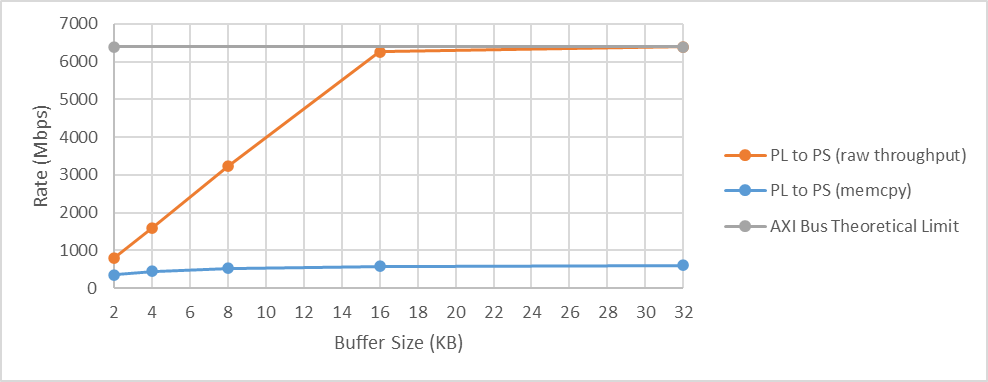
Figure 46: Ultrascale+ PL to PS Throughput Comparison vs Buffer Size, 64 bit, 100 MHz
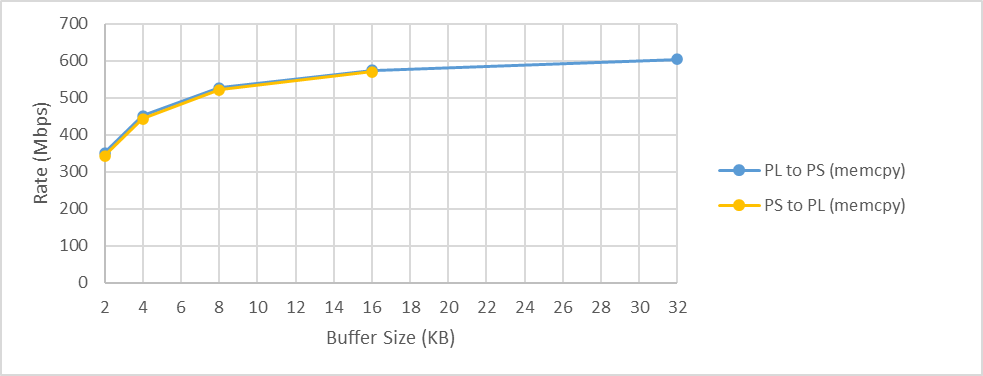
Figure 47: Ultrascale+ Bidirectional Throughput vs Buffer Size, 64 bit, 100 MHz
The raw throughput increases linearly towards the theoretical bus limit for increasing buffer size; these results are a performance ceiling within OpenCPI on these devices. The Ultrascale+ device manages to almost hit the theoretical bus limit for a buffer size of 16 KB, whereas the Zynq 7000 series device does not hit the theoretical bus limit at a buffer size of 32 KB. When performing the memcpy the performance improvement is not linear indicating we are tending towards being limited by how often we can service those buffers, that is, a throughput limit in software.
Buffer Count
The count of buffers for each port can be increased using the “buffercount” attribute in the application xml. During tests, the buffer count was increased for both HDL and RCC workers. Increasing the number of HDL buffers did not improve performance, whereas increasing the number of RCC buffers actually resulted in a slight performance degradation during testing. Increasing buffer count will improve tolerance from jitter in processing time, which may be appropriate in some applications, potentially when data processing in software may change dynamically, for example when dealing with in band messages, such as the discontinuity opcode mentioned in the Vicious Cycle section of the Ethernet Transport Performance Tuning Guide.
Data Widths
The data connections between workers are often defined in a protocol specification, which defines the size of data. Taking the complex_short_timed_sample protocol as an example, data is a pair of 16 bit values, therefore any port which uses this protocol will be 32 bits wide. Within an HDL container, data width determines how much data can be transferred at the data plane clock rate which provides a ceiling for theoretical data transfer at a worker’s port and through the DMA infrastructure. As an example, using a 100 MHz clock and 32 bits of data gives a theoretical throughput limit of 3.2 Gbps. For optimum performance, the data width of workers should be set to match the AXI bus over which it will be connected.
As discussed in 5, the Xilinx SoCs feature a complex interconnection arrangement. The selection of AXI interface and the rate at which they are clocked contributes to performance. The HDL platform developer is responsible for selecting the interfaces and clocks at which they operate and ultimately connecting them to the PS in the platform worker.
OpenCPI contains inbuilt support for specific hardware platforms which use the Xilinx Zynq and Ultrascale+ devices, such as the zedboard and zcu104 development boards respectively. Using the “zed” and “zcu104” HDL platforms as examples, the AXI interfaces used on these platforms are listed in Table 80: and Table 81: and are clocked at 100 MHz. The physical busses are 64 and 128 bits wide respectively, however the OpenCPI support currently limits this to 32 and 64 bits respectively, therefore the maximum raw throughput expected on these platforms is 3.2 Gbps & 6.4 Gbps respectively.
The HDL platform worker specification allows the platform developer to define the quantity and width of the data plane via “count” and “sdp_width”, see the Platform Ports in a Platform XML File section of the OpenCPI Platform Development Guide for a detailed explanation. The zed and zcu104 platform workers are written such that if the data plane count is between 0 and 3, the data planes will be connected automatically to the corresponding index of HP AXI bus listed in Table 81:. Control of the data plane width is achieved via the sdp_width property, which is in the units of 32 bit DWORDS. Adjusting the width to match the width of the AXI bus should allow for maximum throughput however it is not possible to support 128 bit wide AXI interfaces at this time. The OpenCPI SDP to AXI bus adapter HDL IP only supports a 64 bit wide AXI interface and the infrastructure software currently forcibly sets the AXI busses in Table 81: on an Ultrascale+ to 64 bits wide; within file “HdlBusDriver.cc”, the “init()” method reconfigures the S_AXI_HP{3:0}_FPD AXI busses to be 64 bits wide.
As OpenCPI development addresses these limitations, platform developers should look to maximize physical capabilities of these busses. It should be noted that it is possible to set sdp_width to 4 without producing a build time error, therefore avoid setting this until support for 128 bit AXI interfaces has been added.
Our testing configured the AXI busses to 64 bits wide and used 32 bit and 64 bit worker ports. As expected, the raw throughput was doubled when using the 64 bit wide port, however the performance was not significantly improved when performing the memcpy operation, further indicating the main bottleneck of the execution time for the RCC worker run method.
Clocking
The clocks used on the PS and PL contribute to throughput performance. Since the main bottleneck is on the PS, increasing PS frequency will improve throughput performance, however, note that the maximum PS clock frequency is limited by the exact device and speed grade of the part used. In the zed and zcu104 example, these are set to 667 MHz and 1200 MHz respectively, the maximum for those devices.
The clocks used on the PL for the data plane and control plane are connected by the platform worker. In the zed and zcu104 examples, the same 100 MHz clock is used for both the control plane and data plane. Increasing the data plane clock can allow for greater possible throughput. Given we are rate limited by the PS, not by the bus throughput, increasing clock frequency will not improve throughput, however it can be beneficial to make use of faster clocks.
To demonstrate the effect of increasing the data plane clock, tests were performed with a 160 MHz clock on a Zynq 7000 device and 200 MHz clock on an Ultrascale+ device and the results shown in Zynq 7000 performance with 160 MHz clock and Zynq Ultrascale+ performance with 200 MHz clock. Note that during these tests, the PS frequency was also increased to 800 MHz and 1333 MHz respectively; the results in Zynq 7000 performance with 160 MHz clock and Zynq Ultrascale+ performance with 200 MHz clock show a marginal improvement compared to those in section Buffer Size which is entirely due to the increased PS clock.
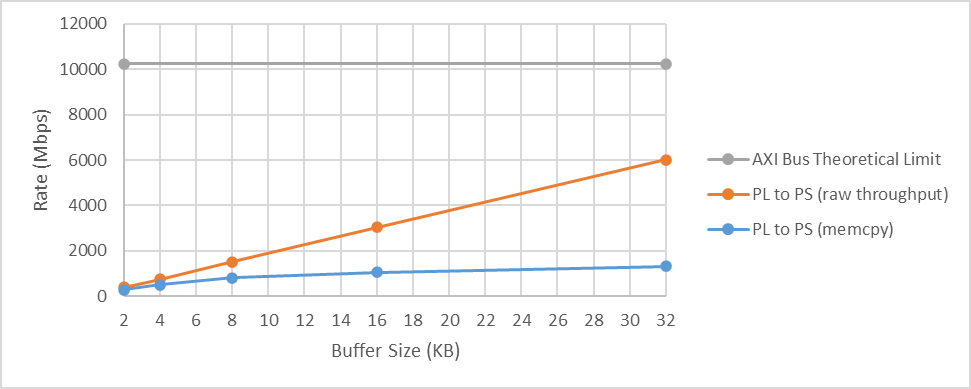
Figure 48: Zynq 7000 performance with 160 MHz clock
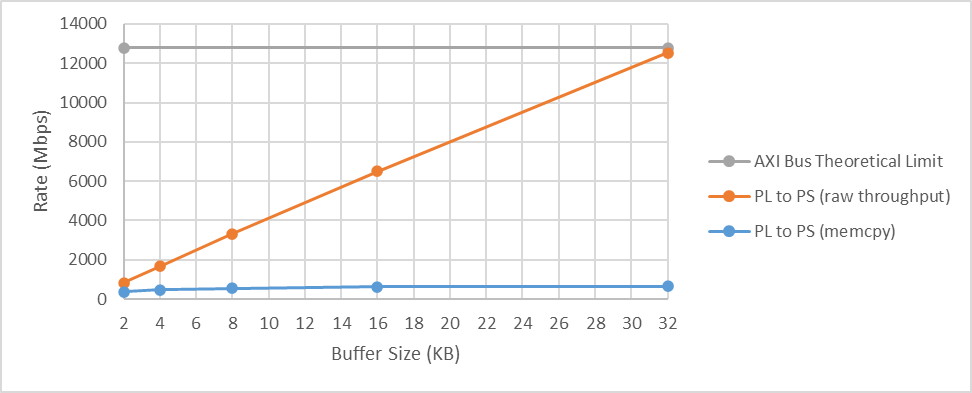
Figure 49: Zynq Ultrascale+ performance with 200 MHz clock
As can be seen, the raw throughput improved and in the case of the Ultrascale+, we were able to hit the increased theoretical throughput with 32 KB buffers. Since these are raw throughput results, that is, when the RCC worker is simply releasing the buffer as soon as it is available, without operating on the data at all, these results demonstrate the impact of the OpenCPI infrastructure. Despite this, platforms should aim to use faster clocks and possibly a separate clock for control and data plane so as not to limit against future performance improvements within OpenCPI.
Whilst using a single clock is a simple arrangement, using a separate clock for the control and data plane is generally good practice and allows the data plane clock to be increased without the control logic being constrained against the timing requirements of that faster clock. In addition, using a data plane clock which is faster than the maximum expected sample data rate allows for the data plane to have overhead which can accommodate for in band messages, for example the discontinuity opcode mentioned in the Vicious Cycle section of the Ethernet Transport Performance Tuning Guide. Such in band messages could be processed differently to sample data, potentially faster, reducing the impact on overall sample data throughput. The actual impact of processing any out of band messages is of course completely dependent on application requirements and implementation.
Compiler Optimizations
OpenCPI installation scripts include the option of building with compiler optimizations. This was found to be the most significant factor in improving performance during testing. To demonstrate the performance benefit, the same test was performed with and without the optimizations. The results are plotted in Zynq 7000 Series Comparison of Optimized OpenCPI Compilation on memcpy test, 64 bit, 100 MHz and Zynq Ultrascale+ Comparison of Optimized OpenCPI Compilation on memcpy test, 64 bit, 100 MHz.
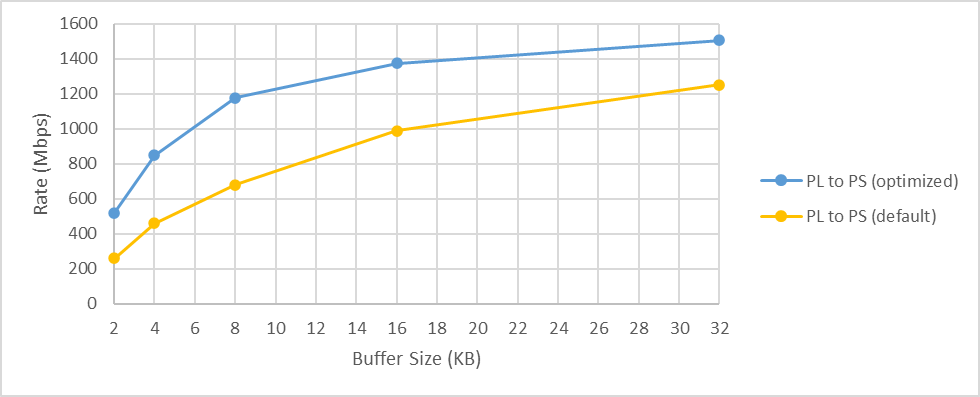
Figure 50: Zynq 7000 Series Comparison of Optimized OpenCPI Compilation on memcpy test, 64 bit, 100 MHz
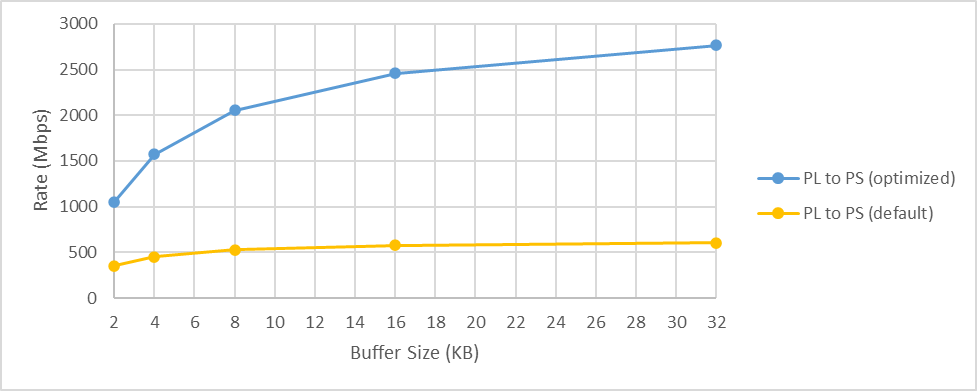
Figure 51: Zynq Ultrascale+ Comparison of Optimized OpenCPI Compilation on memcpy test, 64 bit, 100 MHz
Zynq 7000 Series Comparison of Optimized OpenCPI Compilation on memcpy test, 64 bit, 100 MHz shows an approximate performance increase of 20% on a Zynq 7000 series device at the 32 KB buffer size. Zynq Ultrascale+ Comparison of Optimized OpenCPI Compilation on memcpy test, 64 bit, 100 MHz shows an approximate performance increase of 450% on an Ultrascale+ device at the 32 KB buffer size. Comparing the optimized rate using 32 KB buffers to the default rate using 2 KB buffers, the performance increase is approximately 580% on a Zynq 7000 and 780% on an Ultrascale+.
The performance limitation is still due to the PS, therefore the raw throughput performance as a result of the compiler optimizations is shown in Zynq 7000 Series Comparison of Optimized OpenCPI Compilation on Raw Throughput, 64 bit, 100 MHz and Zynq Ultrascale+ Comparison of Optimized OpenCPI Compilation on Raw Throughput, 64 bit, 100 MHz for reference.
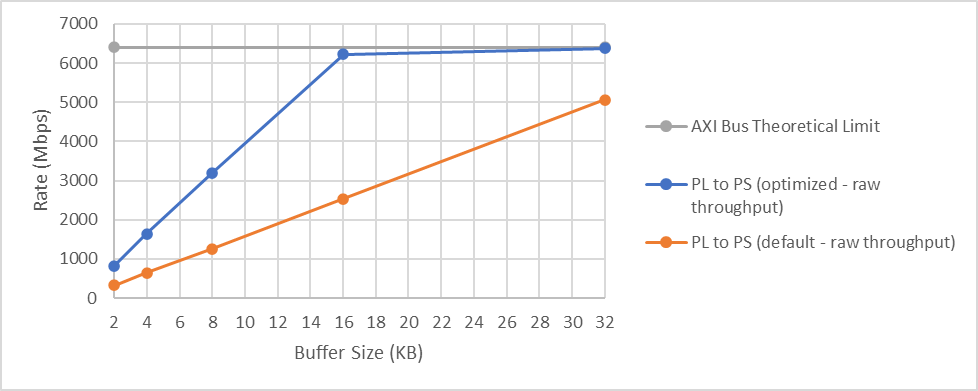
Figure 52: Zynq 7000 Series Comparison of Optimized OpenCPI Compilation on Raw Throughput, 64 bit, 100 MHz
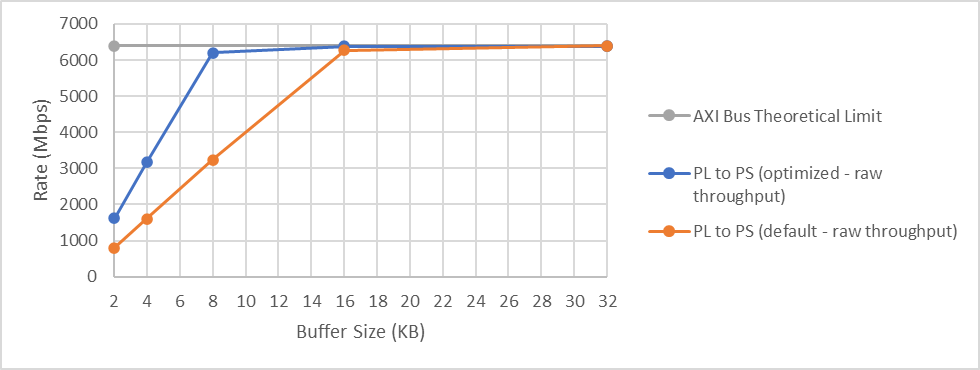
Figure 53: Zynq Ultrascale+ Comparison of Optimized OpenCPI Compilation on Raw Throughput, 64 bit, 100 MHz
To build OpenCPI with compiler optimizations enabled for the xilinx19_2_aarch32 platform, run:
ocpiadmin install platform --optimize xilinx19_2_aarch32 -minimal
This will result in artifact references to xilinx19_2_aarch32-o, where the -o refers to the optimized build.
To deploy OpenCPI for use on a zedboard, run:
ocpiadmin deploy platform xilinx19_2_aarch32-o zed
The build artifacts will be available in the same manner as for non-optimized builds, as described in the Preparing the SD Card Contents section of the OpenCPI Installation Guide.
Multiple AXI Busses
As mentioned in section Buffer Size, the HDL platform worker specification allows the platform developer to define the number of data plane connections via the “count” attribute of the sdp element, see the Platform Ports in a Platform XML File section of the OpenCPI Platform Development Guide for a detailed explanation. Platform developers should use the count attribute to control how many data plane signals are available to them for connection to AXI busses within the platform worker. Application developers should use the count attribute as an indication of how many data plane connections and therefore AXI busses are available on the platform.
OpenCPI uses the count attribute to determine how ports between the PS and PL are connected. Our test application contains a single port connected between PS and PL in both directions. OpenCPI uses a single AXI bus for these connections, as shown in Single HDL & RCC worker port connected to single AXI bus, regardless of the number of AXI busses connected in the platform worker, therefore our application will not benefit from multiple AXI busses being available.
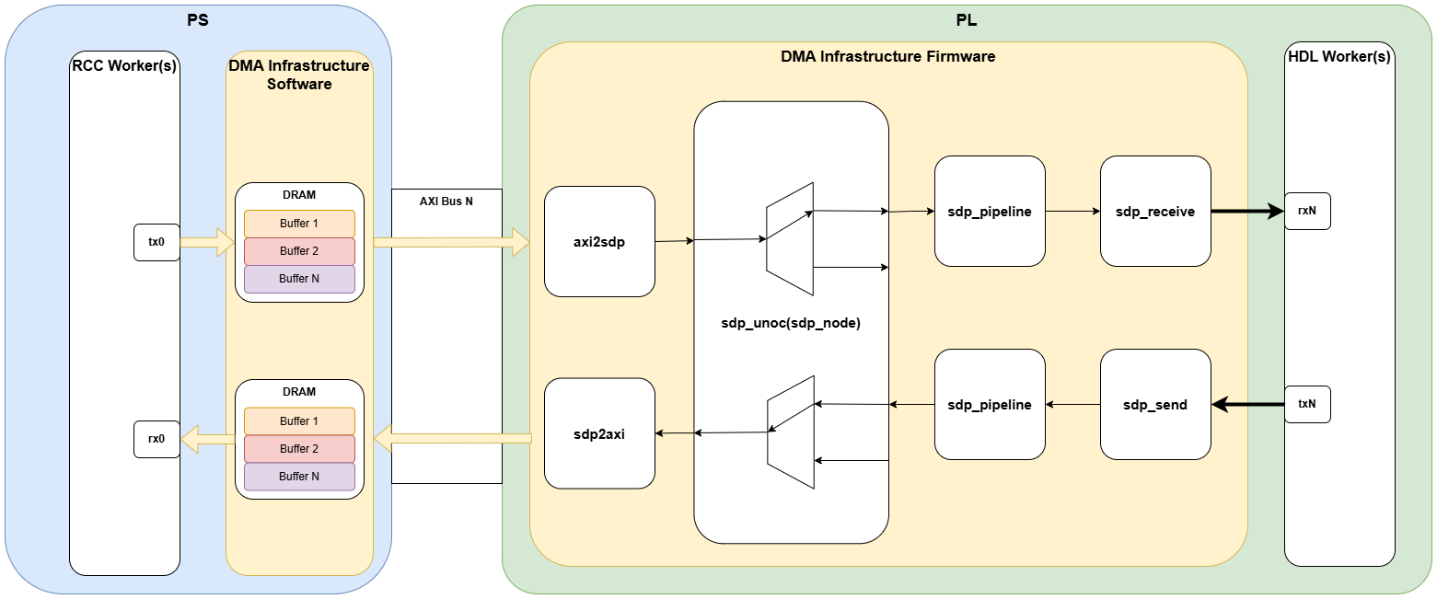
Figure 54: Single HDL & RCC worker port connected to single AXI bus
Applications that contain additional ports between PS and PL workers will be connected to any additional AXI busses that are available on the target platform in a round robin fashion. To illustrate this, consider adding a second instance of the same workers in parallel. OpenCPI will connect them as shown in Multiple HDL & RCC worker ports connected to matching AXI busses.
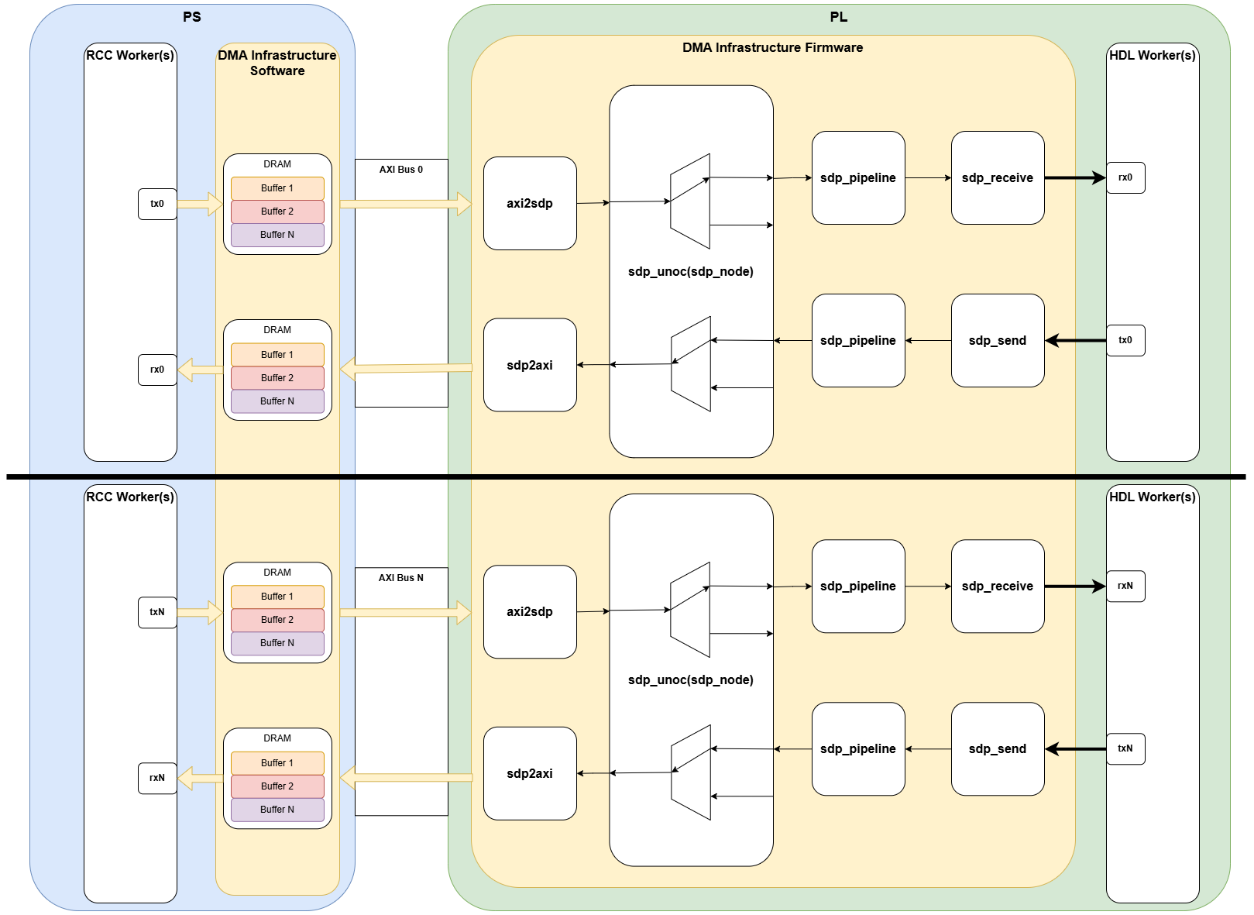
Figure 55: Multiple HDL & RCC worker ports connected to matching AXI busses
As shown in Single HDL & RCC worker port connected to single AXI bus and Multiple HDL & RCC worker ports connected to matching AXI busses, OpenCPI inserts (de)multiplexers between AXI busses and worker ports. Once the number of ports exceeds the number of AXI busses, OpenCPI will make use of these (de)multiplexers to connect the additional ports to the AXI busses. OpenCPI also inserts an additional (de)multiplexer for every connection between RCC and HDL worker port which exceeds the number of AXI busses. To illustrate this, again consider the scenario from Multiple HDL & RCC worker ports connected to matching AXI busses but on a platform with a single AXI bus; OpenCPI will connect the workers as shown in Multiple HDL & RCC worker ports connected to single AXI bus.
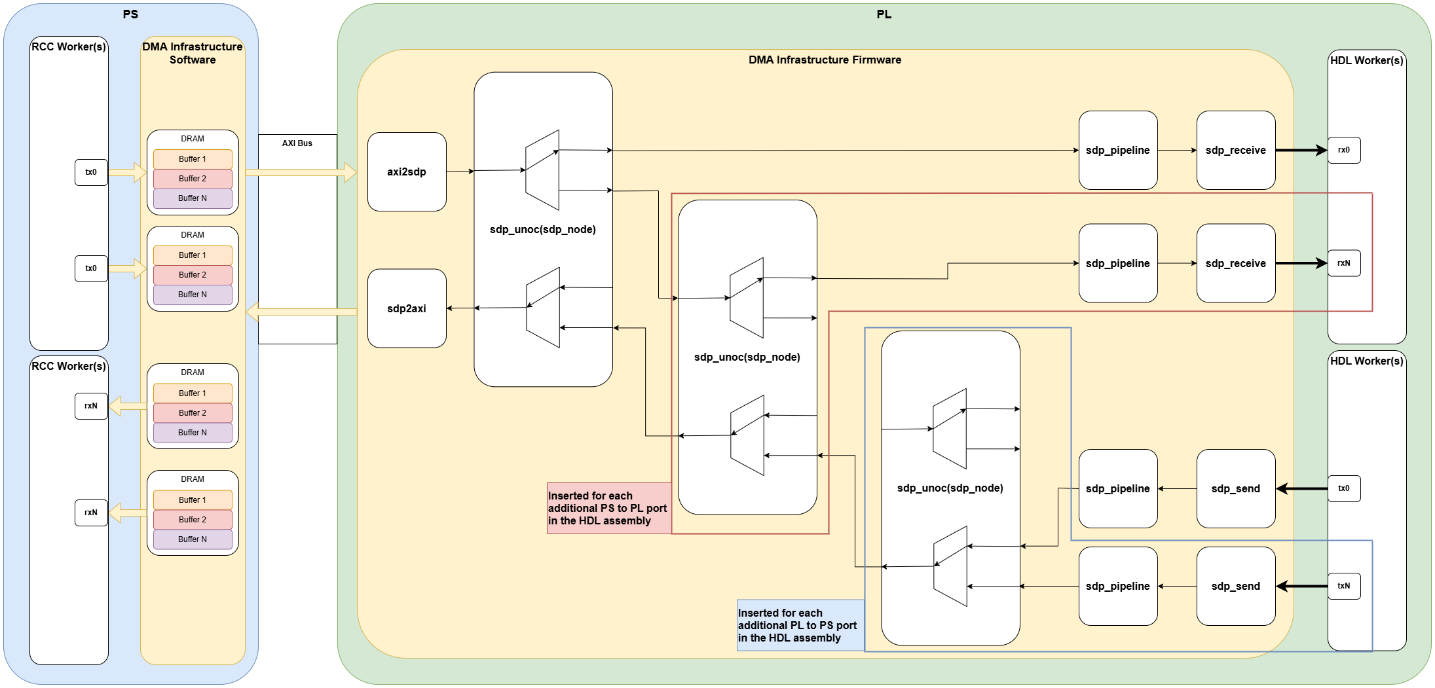
Figure 56: Multiple HDL & RCC worker ports connected to single AXI bus
The multiplexing of data over the available AXI bus(ses) will of course directly affect the overall throughput that can be achieved between worker ports that are sharing an AXI bus. Each (de)multiplexer adds combinatorial logic in the data path, therefore makes it more difficult to meet timing constraints.
Leveraging Multiple AXI Busses
OpenCPI treats the ports between RCC and HDL workers the same, whether they are between multiple workers or the same workers. It is therefore possible to modify the test application to add ports and make use of additional AXI busses available on the platform. This can theoretically allow application designs to work around buffersize limits, effectively widening the data interface between workers and increase the amount of data buffers available. Simplified Block Diagram of 4 Port Performance Test illustrates this concept for 4 ports, to match the available AXI busses on the zed and zcu104 platforms, with (de)multiplexers in the workers themselves.
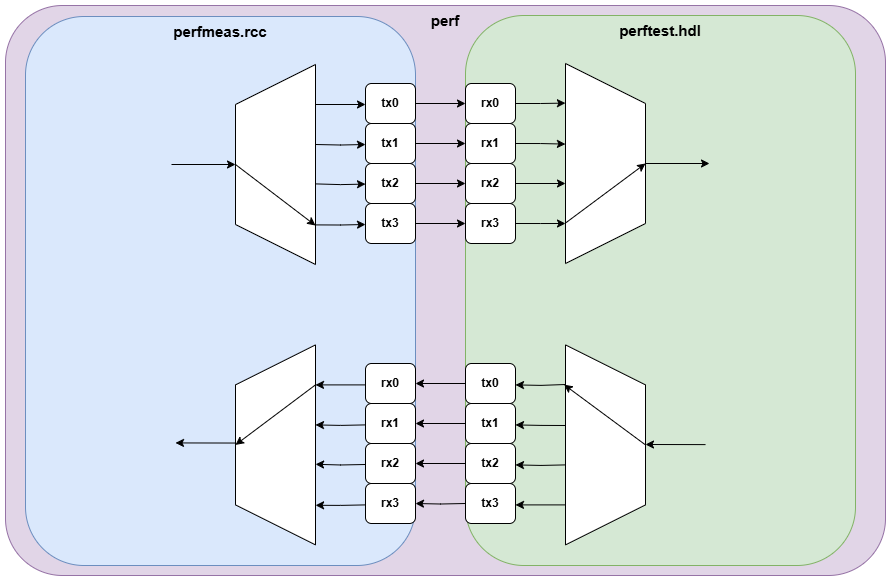
Figure 57: Simplified Block Diagram of 4 Port Performance Test
This workaround is not ideal. The implementations of the (de)multiplexer components are inherently repetitive and verbose because OpenCPI does not support a generic number of ports. Furthermore, each port is assigned a different type which prevents the use of generate statements in VHDL.
Tests were performed in this configuration using OpenCPI built with compiler optimizations. Results are plotted in Zynq 7000 Series Comparison of multiple worker ports on memcpy test, 64 bit, 100 MHz and Zynq Ultrascale+ Comparison of multiple worker ports on memcpy test, 64 bit, 100 MHz.
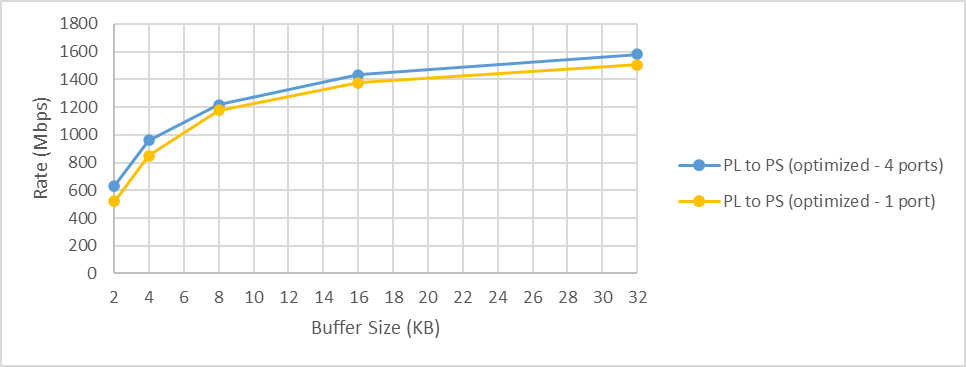
Figure 58: Zynq 7000 Series Comparison of multiple worker ports on memcpy test, 64 bit, 100 MHz
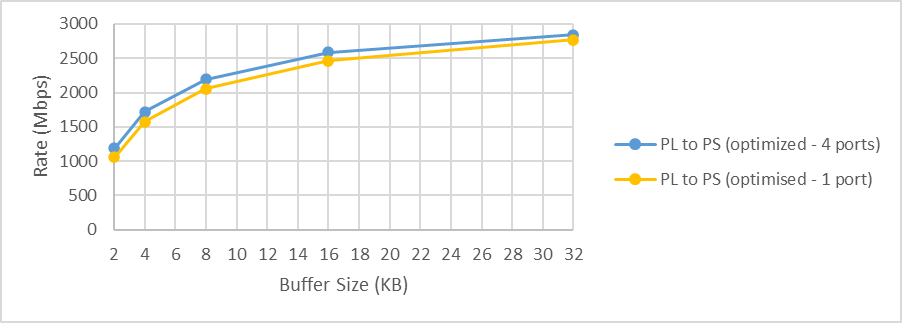
Figure 59: Zynq Ultrascale+ Comparison of multiple worker ports on memcpy test, 64 bit, 100 MHz
As can be seen, there is a marginal performance benefit when performing the memcpy operation, however, not enough to recommend the use of this approach. In this scenario we are effectively performing four times the operations in software; the additional overhead of OpenCPI infrastructure servicing the buffers for the additional ports, and the now larger memcpy operation in the worker run method. The results reiterate the limiting factor is the PS.
It is worth noting that the raw throughput is also slightly improved compared to when using a single port, however it was limited to the theoretical limit of a single AXI bus. This is due to the (de)multiplexers effectively sharing the load as bursts across the 4 busses. The raw throughput performance results are shown in section Buffer Size as they help demonstrate throughput limits of using multiple AXI busses on these devices.
Throughput Limits
By using multiple AXI busses, the theoretical data throughput between PS and PL increases accordingly. As mentioned in Leveraging Multiple AXI Busses, the approach of using multiple ports in the arrangement shown in Simplified Block Diagram of 4 Port Performance Test, hits the theoretical limit of a single bus, due to the (de)multiplexers. By altering the test to have 2 & 4 parallel instances of the original test workers we can explore the raw throughput limits of using multiple AXI busses on each device.
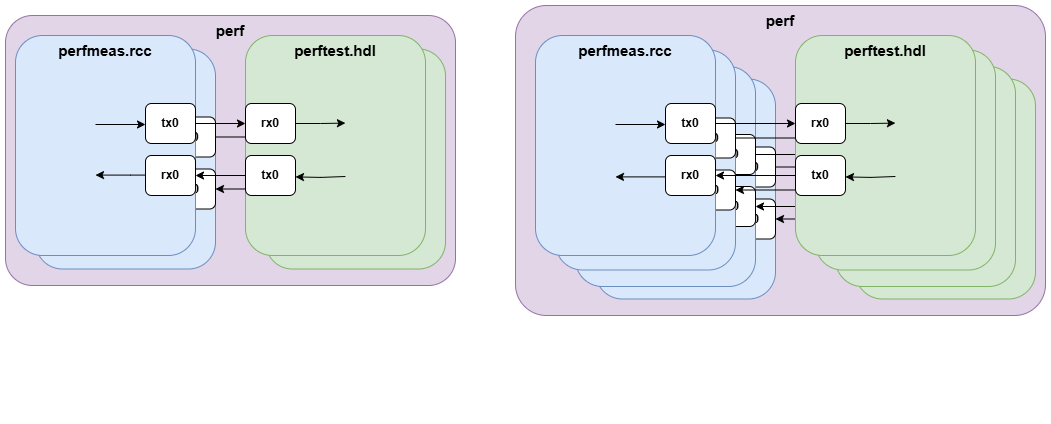
Figure 60: Simplified Diagram of 2 and 4 Parallel Tests
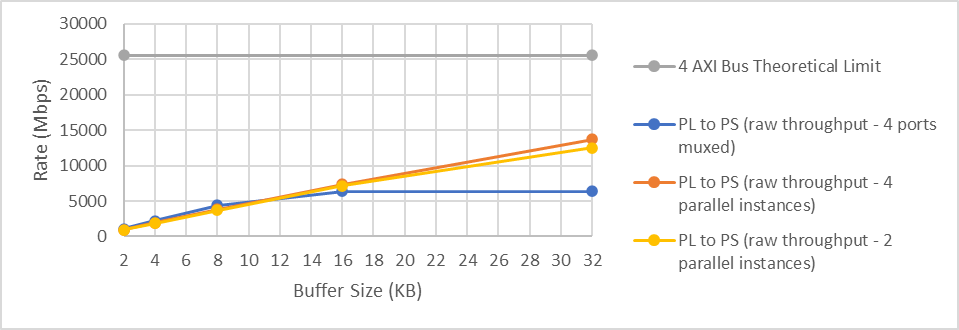
Figure 61: Zynq 7000 Series Raw Throughput - Multiple AXI Busses, 64 bit, 100 MHz
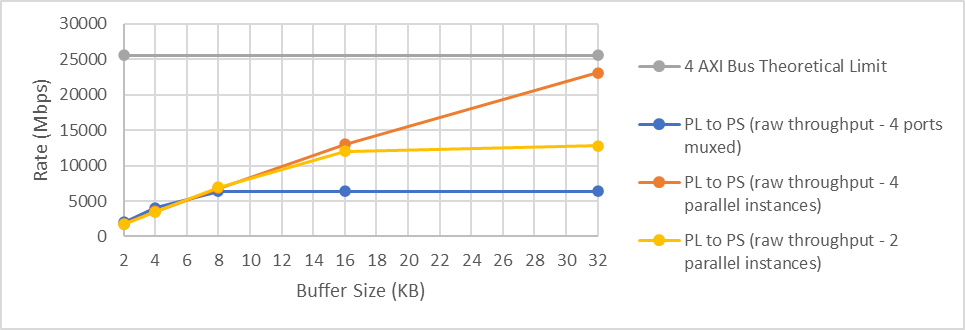
Figure 62: Zynq Ultrascale+ Raw Throughput - Multiple AXI Busses, 64 bit, 100 MHz
The results in Zynq 7000 Series Raw Throughput - Multiple AXI Busses, 64 bit, 100 MHz and Zynq Ultrascale+ Raw Throughput - Multiple AXI Busses, 64 bit, 100 MHz demonstrate neither device was able to hit the theoretical limit for 4 AXI busses. The Ultrascale+ nearly reached it for a buffer size of 32 KB, whereas the Zynq 7000 series barely exceeded the theoretical limit for 2 AXI busses. This is not surprising because the Zynq 7000 PS contains 2 processing cores, whereas the Ultrascale+ PS contains 4; we are now seeing a limit due to the PS capability of running OpenCPI on each device.
Cached Memory Access for DMA
OpenCPI has different default behavior regarding enabling CPU caching and synchronization of DMA buffers between Zynq 7000 and Ultrascale+ devices. The environment variable OCPI_DMA_CACHE_MODE can be used to control whether OpenCPI instructs the driver to explicitly flush and invalidate DMA buffers before and after transfers or instead treat the buffer as uncached at all times. Uncached access is an expensive operation due to the need to flush cache lines on every access, this can result in a very large number of flush operations. Table 79: explains the different settings for OCPI_DMA_CACHE_MODE.
Value |
Meaning |
0 - default for Ultrascale+ |
Uncached access. CPU caching is disabled and DMA buffer access is synchronized. |
1 - default for all other platforms |
Cached access. Caches are explicitly invalidated when new buffers are received by the CPU and explicitly flushed after new buffers are filled by the CPU. This requires interaction with the kernel driver on every transfer. |
2 |
Cached access. Cache-coherent DMA buffers are used to avoid kernel driver interaction to manage flush and invalidate caches. This should only be used on platforms configured to use cache-coherent interfaces. |
Despite the OpenCPI user guide stating the default value is 1, if the environment variable OCPI_DMA_CACHE_MODE is unset, OpenCPI will by default assume a value of 1 on a Zynq 7000 series and a value of 0 on an Ultrascale+ devices. By explicitly setting the OCPI_DMA_CACHE_MODE variable, it is possible to override this default behavior, affecting the rates in both directions. In all tests mentioned outside of this section, OCPI_DMA_CACHE_MODE has been set to 0 for raw throughput measurements and 1 when performing the memcpy operation.
To demonstrate the effect of uncached access, Zynq 7000 Series - Cached vs Uncached Memory Access and Ultrascale+ Series - Cached vs Uncached Memory Access plot results for the test using a single worker and port but adjusting the OCPI_DMA_CACHE_MODE variable. The results are using OpenCPI when compiled with optimizations.
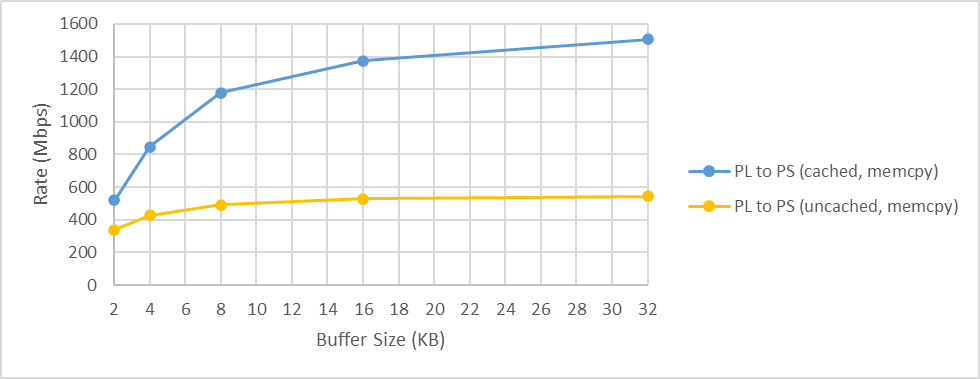
Figure 63: Zynq 7000 Series - Cached vs Uncached Memory Access
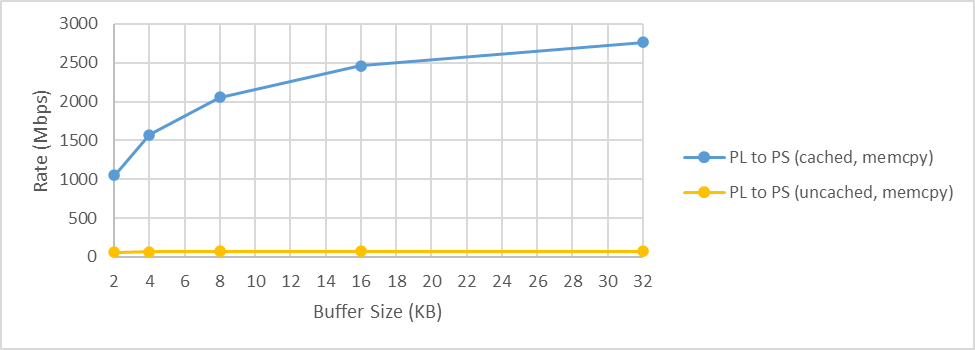
Figure 64: Ultrascale+ Series - Cached vs Uncached Memory Access
The dramatic performance drop is expected as when uncached data is accessed it must be re-retrieved from the DRAM on every access. The Zynq-7000 and Ultrascale+ have 32 B and 64 B cache-lines respectively therefore it is inefficient to discard this cache on every word access. Setting OCPI_DMA_CACHE_MODE=1 allows the entire buffer to be invalidated once and then subsequent accesses may make use of the L1 and L2 caches which significantly speeds up access.
As of OpenCPI 2.4.7 the default cache mode for Ultrascale+ is 0. Although this is a major performance limitation, it is a deliberate decision as support for cached access on these devices is not fully validated in this revision.
Further Optimizations
The Ethernet Transport Performance Tuning Guide refers to the use of a low latency kernel and the isolation of PS cores to improve performance in that scenario. Since applications can have a wide variety of processing needs, it is unlikely that any single configuration of these options will provide a universal performance improvement, however it is possible that improvements can be gained through these mechanisms on Xilinx SoC devices.
As mentioned in section 5, the inbuilt OpenCPI support for the zed and zcu104 platforms uses a PetaLinux environment on the PS, prebuilt by Xilinx for demonstration purposes and is unlikely to be suitable for professional applications. It is more typical for a standard Linux distribution to be used in professional applications, to benefit from the ongoing maintenance and package management they provide, therefore the exact methods and effort required for any such changes will vary based on the exact environment being used.
Throughout the testing performed in this guide, the limiting factor has been the processing capability of the PS. The use of a low latency kernel can allow for execution of a process to start more quickly than when using a generic kernel. It is likely this will require building a custom kernel with the following options enabled:
CONFIG_PREEMPT=y (and ensuring CONFIG_PREEMPT_VOLUNTARY is not set).
This setting increases the level of pre-emption available.
CONFIG_HZ_1000=y (as opposed to the default CONFIG_HZ_250).
This setting increases the frequency of timer interrupts.
Supporting the isolation of CPU cores via the Linux “cpuset” feature can require changes to kernel options. The following kernel options can be used to support the use of cpu control group 1, as discussed in the Ethernet Transport Performance Tuning Guide:
CONFIG_CGROUPS=y
This setting enables the use of control groups.
CONFIG_SMP=y
This setting enables support for multiple processors and cores.
CONFIG_CPUSETS=y
This setting enables support for creating and managing cpusets.
It is possible that in some scenarios, reserving cores for the sole use of OpenCPI may provide a performance increase, however care should be taken when reserving cores on resource constrained targets such as the Xilinx SoCs, particularly on the Zynq 7000 series devices as these only contain 2 cores in the PS. Section Throughput Limits explored the raw throughput limits of using multiple AXI busses and demonstrated a significant difference between the 2 core Zynq 7000 series device and 4 core Ultrascale+ device when trying to reach the theoretical limit of 4 AXI busses. This suggests reserving PS cores is unlikely to produce a performance increase in this scenario.
APPENDIX A - Platform Support on Xilinx SoC devices
Creating OpenCPI support for a platform requires in depth knowledge of Xilinx SoC platforms. This appendix intends to provide information about existing support for Xilinx SoCs and related topics which a platform developer may find helpful.
Existing Support for Xilinx SoC platforms
OpenCPI contains inbuilt support for Zynq 7000 series and Ultrascale+ platforms, the zed and zcu104. Because SoC devices contain a PS and PL, they require an RCC and HDL platform. The HDL platforms are defined in the “platform” project within OpenCPI and are named “zed” and “zcu104” to match the development boards. The RCC platforms commonly used by these devices are defined within the “core” project and are named to match the corresponding version of Xilinx tools and target architecture, for example, using Xilinx Vitis 2019.2 the RCC platforms are “xilinx19_2_aarch32” for the zedboard “xilinx19_2_aarch64” for the zcu104. These RCC platforms correspond to a prebuilt Linux environment, provided by Xilinx, for these development boards, which OpenCPI uses to provide out of the box support for these boards based on PetaLinux.
Supporting Additional Platforms
Platforms used in professionally deployed platforms often run a form of Linux OS on the PS, which likely has some level of customization to support custom interfaces to hardware both external and internal to the SoC. When creating OpenCPI support for these platforms it is therefore typically necessary to create custom RCC and HDL platforms to support their specific needs. Enabling the use of standard Linux distributions on Xilinx SoC devices is not covered here, however in these circumstances the RCC platform should of course match the PS environment.
Creating an HDL platform requires detailed knowledge of the platform and OpenCPI. The OpenCPI OpenCPI Platform Development Guide is aimed at supporting the work of creating support for custom platforms. It is inevitable that developers will refer to example HDL platforms, such as the zed or zcu104, and potentially copy the implementation. It is worth noting that these platforms both use half of the physical width of the AXI connections. Currently OpenCPI DMA infrastructure over AXI only supports 64 bits, setting sdp_width to 2 is the maximum value that should be used. Once this limitation is addressed, sdp_width should be set to 4 on an Ultrascale+ platform, assuming use of 128 bits is possible which may not be the case on custom HDL platforms.
OpenCPI infrastructure is written to use the AXI busses shown in Table 80: and Table 81: by default. It is possible to make use of other ports and this may be necessary in custom platform support, however this is not covered further in this document.
Platform |
Bus |
Comment |
Zynq-7000 |
AXI_GP0 |
Used in preference over GP1 |
Zynq-7000 |
AXI_GP1 |
Used if GP0 already reserved |
Ultrascale+ |
M_AXI_HPM0_FPD |
Note the non-zero offset from the base address of 0xA0000000 for HPM0 |
Device |
Bus |
Comment |
Zynq-7000 |
AXI_HP{3:0} |
It is not possible run all buses at full data rate due to bottlenecks later in the data path. |
Ultrascale+ |
S_AXI_HP{3:0}_FPD |
Refer to Xilinx Ultrascale+ Interconnections, taken from the Zynq UltraScale+ Device Technical Reference Manual (UG1085) for information on possible bus contentions, for example S_AXI_HP0_FPD shares a data path with the DisplayPort data bus. OpenCPI infrastructure currently limits this to 64 bits. |
Xilinx Zynq 7000 & Ultrascale+ AXI Connections
The Xilinx SoCs feature a complex interconnection arrangement for connecting system resources using point to point AXI connections via a series of switches. The interconnections present within the Xilinx Zynq 7000 and Ultrascale+ platforms are similar and are shown in Xilinx Zynq-7000 Interconnections, taken from the Zynq 7000 SoC Technical Reference Manual (UG585) and Xilinx Ultrascale+ Interconnections, taken from the Zynq UltraScale+ Device Technical Reference Manual (UG1085) respectively. The available AXI buses on these devices are listed in Table 82: and Table 83: respectively.
Bus |
Name |
Bus Width (bits) |
Description |
General Purpose PL Interface |
AXI_GP{1:0} |
32 |
|
High Performance PL Interface |
AXI_HP{3:0} |
64 |
Route to DDR Memory Controller via memory interconnect |
Cache-coherent slave port |
AXI_ACP |
64 |
Direct connection to the Snoop Control Unit |
Bus |
Name |
Bus Width (bits) |
Description |
High Performance PL Interface |
S_AXI_HPC{1:0}_FPD S_AXI_HP{3:0}_FPD |
128 |
Direct path to DDR Memory Controller |
Low-latency AXI master ports |
M_AXI_HPM{1:0}_FPD |
128 |
Routed via main switch |
Two way AXI coherency extension slave port |
S_AXI_ACE_FPD |
128 |
|
Cache-coherent accelerator coherency slave port |
S_AXI_ACP_FPD |
128 |
|
Low-power domain AXI slave port |
S_AXI_LPD |
128 |
|
Low-power domain AXI master |
M_AXI_HPM0_LPD |
128 |
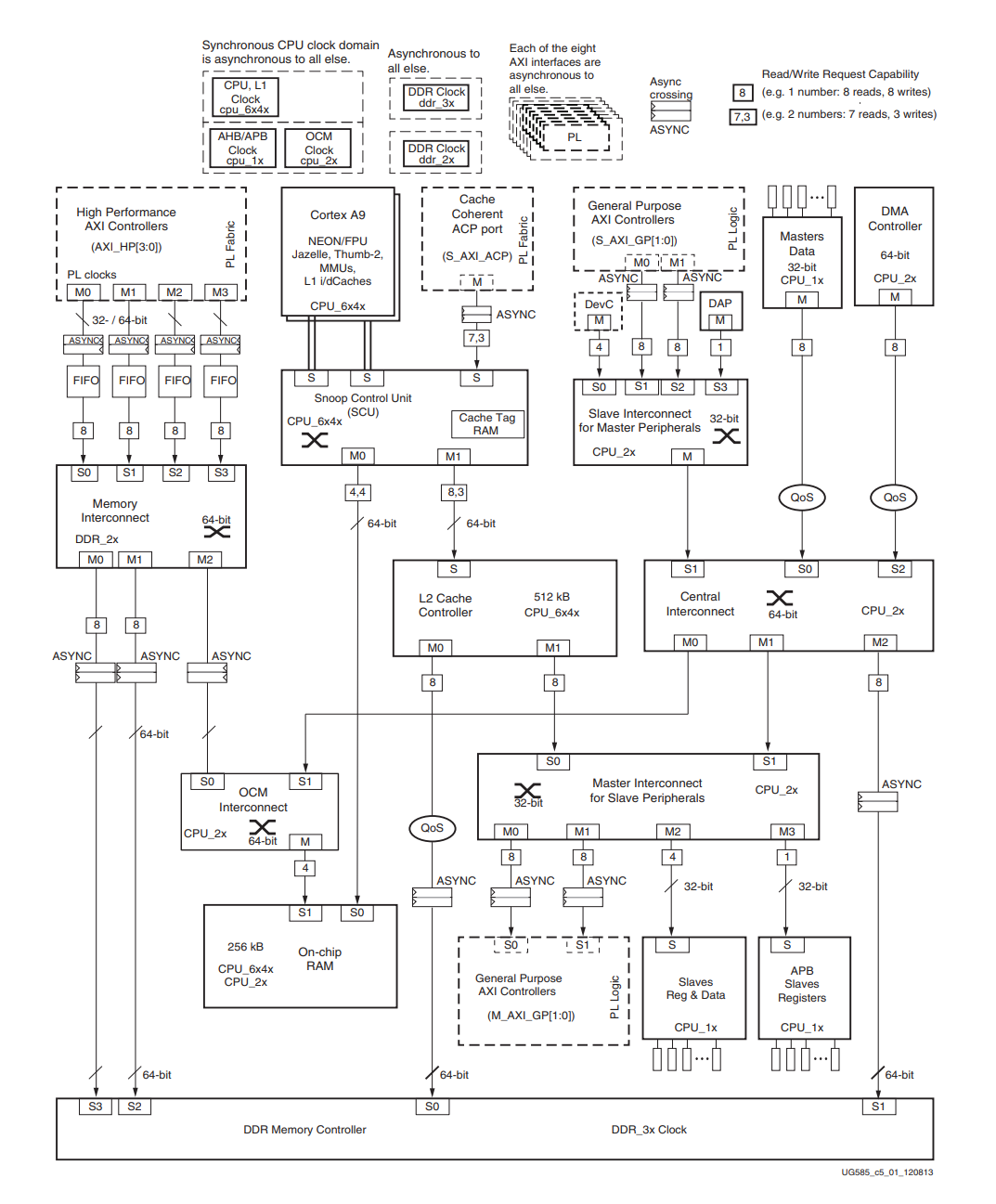
Figure 65: Xilinx Zynq-7000 Interconnections, taken from the Zynq 7000 SoC Technical Reference Manual (UG585)
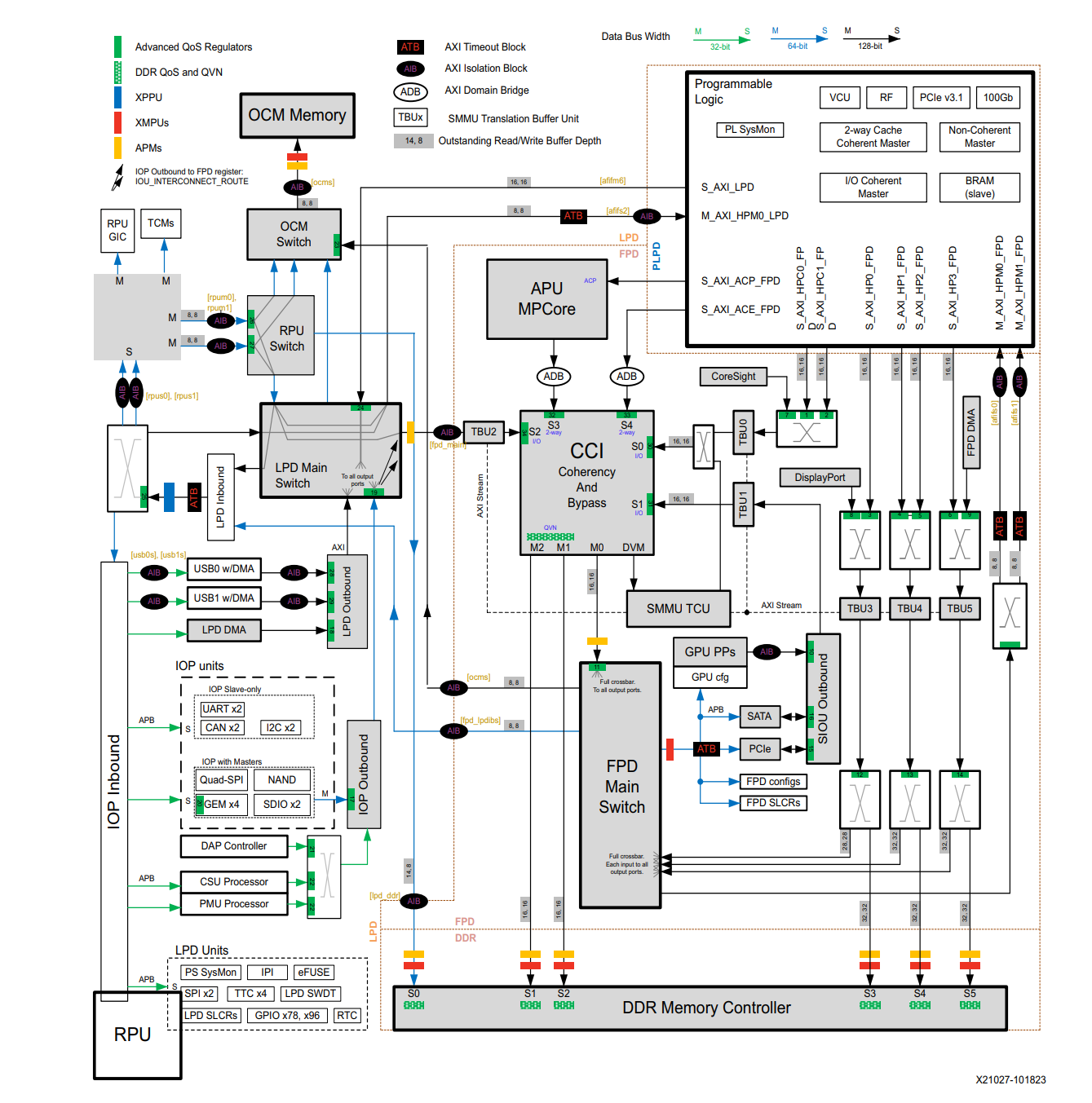
Figure 66: Xilinx Ultrascale+ Interconnections, taken from the Zynq UltraScale+ Device Technical Reference Manual (UG1085)