Enabling FPGA Platforms
Whereas GPP platforms have operating systems and drivers that OpenCPI uses to interface with the hardware surrounding the processor, FPGA platforms do not. OpenCPI provides a runtime infrastructure on FPGAs, which is roughly analogous to an embedded operating system, and which requires FPGA “driver” logic that is specific to the platform and its attached devices. Thus the OpenCPI infrastructure combined with the required platform-specific logic defined below, is analogous to the combination of an embedded OS and a “board support package and drivers” for a typical embedded GPP.
Consistent with the definition of platform given earlier, here we more narrowly define an FPGA platform as a particular, single FPGA on some hardware board. If a board has multiple OpenCPI-usable FPGAs, each is a platform and each may host a container in which components (actually: worker instances) execute. An OpenCPI-usable FPGA is one that can host user-written workers executing in an OpenCPI HDL container.
An FPGA simulator may also be an FPGA platform, which is also a place where OpenCPI HDL workers may execute, with mostly the same infrastructure as physical FPGA platforms.
When an SoC, like the Xilinx Zynq-7000 chip, contains a section of FPGA logic as well as processor cores, the FPGA part is an FPGA platform and the GPP processor core(s) are a GPP software platform. Thus the SoC is indeed a “system on chip”: a system with two platforms and an interconnect between them.
Analogous to preparing the support for a GPP platform, enabling an FPGA platform involves steps to enable the development environment, and steps to enable the run-time/execution environment.
Enabling development targeting a platform involves:
Installing and integrating a development tool chain that can target the FPGA device on the platform (when one is not already installed that also supports the new platform).
Verifying that the integrated tool chain can process and build all the core OpenCPI FPGA code and portable HDL workers when targeting the FPGA platform’s part and part family.
Enabling runtime execution on a non-simulation platform involves:
Writing specific new VHDL code that supports the particulars of the hardware attached to the FPGA on the platform.
Updating software drivers to load/unload configuration bitstreams.
Verifying that the various platform-independent FPGA test applications execute on the platform.
Physical FPGA Platforms
Platforms are specific FPGAs on a board connected locally to:
Local I/O devices: ADC, DAC, DRAM, Flash, GbE, etc.
Interconnects: PCIe, AXI, Ethernet, etc. used to talk to other OpenCPI platforms
Slots: FMC, HSMC, mezzanine card slots.
For example, a PicoEVB board has PCI Express interconnect.
For each device on a platform, specific development may be required (described in the Device Development section below). In many cases existing device support may be reused, since OpenCPI FPGA device support is typically done in a way that is sharable across platforms.
Ideally, new device support is developed such that it can be reused across platforms.
Physical FPGA platforms are based on a particular type of FPGA chip: e.g., a Xilinx ZedBoard development board has a Zynq 7000 series FPGA (xc7020), with a speed grade and a package.
Examples of physical FPGA platforms are:
Board |
Part |
Interconnect(s) |
Description |
|
Zynq-7000/PL |
AXI internal |
Digilent Zynq-7000 Development Board HDL platform is the “PL” side of the Zynq SoC, with the PL-attached devices and one FMC slot |
|
Zynq-7000/PL |
AXI Internal PCIe external |
Xilinx PCIe-based Zynq development board with 2 FMC slots. HDL platform is the “PL” side of the Zynq SoC, with the PL-attached devices, two FMC slots, and an attachment to the PCIe interconnect. |
|
Zynq-MPSoC/PL |
AXI Internal PCIe external |
Xilinx PCIe-based Zynq Ultrascale development board with 2 FMC slots. HDL platform is the “PL” side of the Zynq SoC, with the PL-attached devices, two FMC slots, and an attachment to the PCIe interconnect. |
Simulator FPGA Platforms
OpenCPI provides a software runtime infrastructure to make execution on simulators as similar as possible to execution on physical FPGAs, without simulating any external device-related logic. The simulation execution environment makes execution on different simulators also similar to each other. Multiple simulator instances may execute simultaneously subject to any license restrictions that would allow only a certain number of simulator instances to run at the same time.
Only mixed-language simulators (VHDL and Verilog) may be enabled and used with OpenCPI. These are simulators that support mixing VHDL and Verilog modules in the same design.
Examples of supported FPGA simulators include:
Xilinx Isim from ISE 14.7
Mentor Modelsim DE 10.2
Xilinx Vivado Xsim 2017.1 and 2019.2
Aldec Riviera-PRO
Other simulators that could be supported in the future include:
Cadence
Under OpenCPI, simulators perform co-simulation: the HDL workers inside the simulator (in the HDL container being simulated), can communicate with RCC workers executing outside the simulator. This communication path (from inside to outside of the simulator) is supported on all these HDL simulators.
Enabling Development for FPGA Platforms
Installing the Tool Chain
For tools not currently supported by OpenCPI, document the basic process of obtaining and installing the tools, highlighting any options or configurations that must be specialized, customized, or simply required for using OpenCPI. Licensing is also an issue for many FPGA tools. See the Installing Third-party/Vendor Tools topic for examples.
Note that OpenCPI executes FPGA tools in “wrapper scripts” that perform any necessary initialization or setup, including license setup. Thus, for OpenCPI, there is no need for login-time startup scripts. In fact, such scripts can actually cause problems in many cases since OpenCPI frequently invokes multiple alternative tool sets under a single build command. Polluting your environment with settings from multiple tools and vendors is frequently a source of problems.
For OpenCPI development, it is recommended to remove any such “automatic setup at login” items that the tools installation process inserts into your login script(s) and put them in an a separate script that is used as needed.
Some FPGA tool chain installations include a software tool chain for embedded GPP cores on SoCs. This means that one tool installation supports both the FPGA platform and the GPP platform. E.g. a Xilinx ISE installation may include the EDK (Embedded Development Kit) sub-package that supports cross-compilation for the ARM cores on the Zynq SoC.
Integrating the Tool Chain into the OpenCPI HDL Build Process
For a completely new FPGA tool chain, the integration is somewhat difficult and not well documented. It relies on internal knowledge of the OpenCPI build system.
This process includes enabling the OpenCPI FPGA build process to use the right tools to target the “part family” of the FPGA device on the platform. For example, on the “zed” platform, the family of the FPGA part is “zynq”. On the “picoevb” platform, the family of the FPGA part is “artix7”. The required tools for a platform’s FPGA may already be installed and integrated, and may already support the particular part family of the platform’s FPGA. If not, that support must be added to the integration of those tools.
So the integration process is:
If the required tools are not currently integrated with OpenCPI, they must be integrated (not a small job).
If the required tools are currently integrated with OpenCPI, but do not yet support the part family, that support must be added.
The collection of OpenCPI-supported part families, and their relationships to tools and vendors, is in the file:
tools/include/hdl/hdl-targets.mk
The scripts that wrap and execute FPGA tools are found in the directory:
tools/include/hdl
Building All the Existing Vendor-independent HDL Code
Nearly all HDL code (mostly VHDL) in OpenCPI is portable and can be built (compiled and synthesized) for all part families and vendors and simulators. This first step avoids building platform-specific code. Supplying the targets (part families) is required.
Here is a command (run from the top level of OpenCPI) that builds all the portable code in OpenCPI for currently supported part families (known as “HdlTargets” in the OpenCPI FPGA build process):
make hdlportable \
  HdlTargets='isim modelsim xsim artix7 \
              zynq zynq_ultra zynq_ise'
It of course assumes all the required tools are installed.
This build command builds all primitive libraries and cores as well as all HDL workers in the OpenCPI core tree. It stops short of building anything specific to an HDL platform.
Some of the code built using the above command is explicitly labeled to only build for certain targets or to not build for some targets, but most is truly portable and will build for all targets. Once this build command succeeds for the target (part family) of the new platform, you can proceed with the steps below to write the HDL code necessary to enable execution on the platform.
Scripts for HDL Platforms
For physical platforms (not simulation) which require bitstream loading via JTAG, or power-up flash, there are two scripts that must be written and placed in the platform’s directory, if they apply to the platform:
A JTAG support script to enable JTAG-based bitstream loading, whose name is:
jtagSupport_<platform>(only for platforms with JTAG bitstream loading)A boot-flash loading script to enable scripted loading of bitstreams to the boot flash, whose name is:
loadFlash_<platform>(for platforms with boot-flash loading capabilities)
These scripts typically wrap and call vendor-specific tools for these purposes.
In some cases the appropriate script might already be written for a different platform, in which case one platform’s script can be a symbolic link to the other. In other cases there might be a vendor script (e.g. for all Xilinx or all Intel/Altera) which may live in the runtime/hdl-support/<vendor> directory.
For simulation platforms there must be a script to invoke the simulator from the OpenCPI runtime framework. This script must be called: runSimExec.<platform> and live in the simulation platform’s hdl/platforms/<platform> directory.
Enabling Execution for FPGA Platforms
This section assumes the reader is familiar with component and application development with OpenCPI, including developing HDL application workers and assemblies.
An OpenCPI HDL hardware platform is an FPGA with associated devices and slots attached to its pins. Supporting a platform includes determining whether the types of devices and slots attached to the FPGA are already supported by OpenCPI.
If the devices attached to the FPGA are not yet supported in OpenCPI, that support must also be added. Device support in OpenCPI is generally portable (i.e. the device support code can be used to support the same device on different platforms and cards). This type of device support is done separately from a platform or card so it is easily reused on other platforms or cards. Some device support is very platform-specific and is associated with a particular platform. The device support process is described in the Device Support for FPGA Platforms topic.
If a platform has slot types that are not yet supported, that support must be added. Slot types are defined by specific physical connectors, electrical signaling and direction, and pin and signal name assignments. See the Slots — How Cards Plug into Platforms topic.
The term card is used in OpenCPI to mean a card with additional devices that may be plugged into a compatible slot on various platforms. Thus devices may be directly attached to the pins of the platform FPGA, or they may exist on a plug-in card that, when plugged into a slot, become attached to the platform FPGA. In this latter case, such devices are not considered part of the platform, but part of the card, which might be plugged into a certain type of slot on any platform. See the Defining Cards Containing Devices that Plug into Slots of Platforms topic.
The asset types in a project that supports one or more HDL platforms are:
HDL Device Worker — a specific type of HDL worker that supports external devices attached to FPGAs
HDL Platform Worker — a specific type of HDL device worker providing infrastructure for implementing control/data interfaces to devices and interconnects external to the FPGA or simulator (e.g. PCI Express, Clocks)
HDL Slot Type Definition — a specification of the pins and signals that are present in a type of slot that may be present on platforms, into which compatible cards may be plugged.
HDL Card Definition — a specification that includes the slot type of a card, the devices present, and how they are wired to the slot.
HDL Platform Configuration — a prebuilt (pre-synthesized) assembly of device-level HDL workers that represent a particular configuration (subset) of device support modules for a given HDL platform. The HDL code is automatically generated from a brief description in XML.
All these asset types are created (the required directories and files created), and then compiled/built using the ocpidev tool.
The directories (in any project) where platform support files are placed (by ocpidev) are:
hdl/devicesa component library for portable device workers and proxies
hdl/cardsa component library for card-specific device workers
hdl/cards/specsa directory where cards and slot types are defined
hdl/platformsa directory where platform workers and associated platform configurations are placed
hdl/platforms/<platform>a platform worker’s directory that also contains its platform configurations
hdl/platforms/<platform>/devicesa component library for platform-specific device workers and proxies for
<platform>, which are generally not visible outside the project or from other libraries (including specs)
HDL platform support starts with deciding on a name for the platform (usually a lower-cased version of the name used by the vendor of the platform), and using ocpidev create hdl platform to create a directory and associated files using the ocpidev tool. In that directory there will be an initial platform description XML file and an initial source code skeleton for the platform worker.
In summary, the steps to enabling an HDL platform for execution are, (assuming the development tools are enabled):
Take inventory of the platform by identifying its interconnects, method of reprogramming, devices, and slots
Define the platform worker, with associated hardware-related metadata and files.
Address/configure interconnect issues of the platform worker
Build the platform worker (perhaps a skeleton) and a simple complete bitstream
Implement reprogramming (a.k.a. bitstream loading) of the FPGA
Implement the platform worker and perform basic tests, with no devices enabled.
Define any new slot types and add them to OpenCPI.
Define and establish “skeletons” for all new devices on the platform.
Define the platform with all devices and slots, build and do basic tests.
Implement any new devices for the platform, and test the platform with devices (both pre-existing and new).
Test any slots using supported cards.
The assets created for new platforms are usually done in a separate OpenCPI project, called an OpenCPI System support Project (OSP). But assets that are shareable by multiple platforms should ultimately result in gitlab merge requests for the built-in projects that are part of OpenCPI. There is an OpenCPI built-in project called platform, which contains assets used for supporting different platforms (common devices, cards, etc.). Assets shared by multiple platforms should live there.
The next two sections (signals and slots), define XML elements required by platforms. Following that, the specifics of platform worker XML files are detailed.
Signal Declaration XML Elements for Devices, Platforms, Slots and Cards
Signal declaration XML elements are used in a number of contexts in supporting HDL platforms, cards and devices. They declare name, direction, width and other characteristics. Any specific rules or constraints for each context are specified in the respective sections, but the common aspects of signal declarations are described here.
An example of a signal declaration element is:
<signal name='data' direction='out' width='16'/>
which defines an output signal array 16 wide named data. The attributes to a signal element are: direction, differential, width and pin. Depending on the direction of the signal, there are other attributes that determine the actual signal names.
Name Attribute of Signal Element
The name string attribute provides the signal name and should comply with typical identifier syntax (leading alphabetic, then alphanumeric or underscore). Signal names are case insensitive.
Direction Attribute of Signal Element
The signal direction attribute is an enumerated type with the following choices:
inidentifies a signal as an input
outidentifies a signal as an output
inoutidentifies a signal as a tristate signal
bidirectionalidentifies a signal as usable in either direction
unusedidentifies a signal as unused in the current context
The direction is relative to the asset being defined in the XML file (device, platform or card). When defining slot types, the direction is relative to the platform FPGA. In a platform definition, in means input to the platform worker. For a device, it is input to the device.
The direction attribute for device and platform signals may be an expression based on the worker’s parameter properties. This allows a signal to take on different directions based on other configuration information. In this context, the expression may determine that the signal is unused for some configuration parameter values. For example:
<signal name='data' width='16' direction='mode==2 ? out : unused'/>
This indicates that when the worker’s mode property has the value 2, the data signal is an output, otherwise it is unused.
For a slot signal, declaring bidirectional means that its direction is determined by the direction of the card’s device worker signal which uses it. Consequently, different cards may implement unique directionality for a bidirectional slot signal. Note that slot signal directions in, out, or inout impose a requirement for all possible cards/device workers which use that signal.
For a device signal, declaring the direction to be bidirectional merely defines an HDL inout port on the device worker, and it is expected that the device worker will instance an I/O buffer itself, from which the tools will determine the direction.
For a device or platform signal, the direction unused indicates that it need not be connected since it is nonfunctional in a particular configuration.
Declaring the direction of a device signal to be inout defines the 3 tristate signal ports on the device worker. An inout signal inside an FPGA implies a bundle of three signals (in, out, output-enable) which, when attached to a pin/pad of the FPGA may result in a single tristate signal external to the FPGA. The names of the three associated signals is determined by adding the suffixes: _i, _o, _oe respectively. These default suffixes can be overridden for a signal using the in, out, oe attributes, where %s in these attributes represents the name in the inout attribute. For example, this declaration:
<signal name='mySig' direction='inout' oe='The%sEnable' in='%s_in' out='%sDriven'/>
would imply the three signal names: mySig_in, mySigDriven, and ThemySigEnable, rather than the default: mySig_i, mySig_o, and mySig_oe. These suffixes will be converted to upper case when the signal name is entirely upper case.
Whether this bundle of three signals is implied for inout signals depends on the context of the signal element. When HDL containers are generated by OpenCPI, a tristate I/O pin is generated with the single external (pin) signal and the three internal signals.
These direction and signal type attributes allow OpenCPI to perform error checking for connections and implement the correct tie-offs and I/O primitives for top-level signals in a design.
Width Attribute of Signal Elements
This attribute specifies that the signal is an array of signals with the width specified in the value of the attribute. Each element of the array is an individual signal with a zero-origin index enclosed in parentheses. When VHDL or Verilog code is being generated, the array is defined and used appropriate for the language. Thus if the signal is defined as:
<signal input='data' width='3'/>
The signals are data(0), data(1), data(2). The width attribute may be an expression, which may use other parameter properties. For example:
<signal name='data' direction='in' width='mode==2 ? 4 : 2'/>
This indicates that when the worker’s mode property has the value 2, the data signal has a width of 4, otherwise its width is 2.
Differential Attribute of Signal Elements
This boolean attribute specifies, when true, that the signal is differential and represents a pair of signals with the suffixes p and n representing the positive and negative of the pair respectively. These default suffixes can be overridden using the pos and neg attributes, where %s in the value of those attributes represent the name defined in the direction attribute.
For example, this declaration:
<signal name='mySig' direction='in' differential='1' pos='P_%s' neg='%sN'/>
would imply the two signal names: P_mySig and mySigN rather than the default: mySigp, and mySign.
These suffixes will be converted to upper case when the signal name is entirely upper case. It is invalid to specify an inout signal as differential.
Pin Attribute of Signal Elements
This boolean attribute specifies, when true, that the signal is a pin signal, which implies that it is truly a signal on the pin of an FPGA. This distinction has to do with IO buffers on FPGAs. Most device worker signals are not pin signals since the IO buffers built into the FPGA are only instanced when the final FPGA synthesis is performed, and thus such signals are on the inside of the IO buffers rather than outside. If a device worker specifically instanced IO buffers in the device worker code, then the device worker’s signals would be declared as pin signals since they were on the outside of the IO buffers (and thus directly attached to the pins of the FPGA).
[diagram needed]
The OpenCPI code generator for containers and cards and devices needs to know this distinction to do its job correctly.
Slots — How Cards Plug into Platforms
As mentioned earlier, platforms can have slots, which are an intrinsic part of the platform, and enable cards to be plugged in that add devices to the platform. Such cards may be plugged in to any platform that has compatible slots. Slot types are defined independently and then used when describing platforms and cards. A platform has slots of defined types, and cards which are designed for the same slot type may be plugged into the defined slots on that platform. A common slot type is the FMC (FPGA Mezzanine Card), which is defined by the VITA standards organization as VITA-57.1. In fact this standard defines two slot types: FMC-LPC (Low Pin Count using a connector with 160 pins), and FMC-HPC (High Pin Count using a connector with 400 pins). These slot types are already defined in OpenCPI.
So before platforms or cards are defined, slot types must be defined. Then a platform or card definition refers to slot types of known predefined types. Defining new slot types generally does not involve writing HDL code; just writing descriptive metadata in XML.
A slot type is defined in an XML file placed in the hdl/cards/specs directory of an OpenCPI project by ocpidev. The name of the file is <slot-type>-slot.xml, where the <slot-type> must be a name that can be used is programming languages (i.e. use underscores rather than hyphens), but is otherwise case insensitive. The name should normally be the exact name used in whatever standard document defines the slot type.
The slot type definition file has a top-level XML element SlotType, with an optional name attribute that must match the name of the file without the .xml suffix. This top-level element contains signal child elements as defined in the Signal Declaration XML Elements for Devices, Platforms, Slots and Cards topic. When a pin in a slot type is defined to be used in either direction, it should be declared bidirectional.
A slot type is associated with one or more connectors, and the pins of the connectors are numbered. When a slot type is defined, each pin of each connector is given both a physical pin identifier as well as a signal name. OpenCPI uses only the signal names, although it is useful to put the pin identifiers in a comment next to each signal definition.
The direction of signals in a slot are specified relative to the platform side of the slot (sometimes called the carrier side or the motherboard side). Thus if the signal is sourced on the card (output from the card), it is input to the platform. Thus such a slot signal is defined as an input signal for the slot type.
Signals defined as inout in a slot type do not imply the three separate signals that are implied for such signals when inside an FPGA. The slot type signal is singular and associated with a single pin.
An example small slot type XML file would contain:
<SlotType name='myslottype'>
  <signal name='present' direction='in'/>             <!-- Pin K1 -->
  <signal name='util0' direction='bidirectional'>     <!-- Pin K4 -->
  <signal name='data' direction='**out**' width='4'/> <!-- Pin K5 -->
</SlotType>
The name of a slot type is used in the XML description files of platforms and cards.
Creating the HDL Platform
An HDL platform is created using the ocpidev create hdl platform command, which establishes the platform’s directory as hdl/platforms/<platform> in a project and creates these files:
the
<platform>.xmldescribing the platform, called the OpenCPI HDL Platform Description (OHPD) XML filean initial VHDL source file
<platform>.vhdfor this platform worker.
There are several other types of files that may be manually added in this directory, which include:
the
<platform>.exportsfile, which identifies the files that are needed to use the platform.constraints files (e.g. .xdc files if using the Vivado tool set), to support building final bitstreams for the platform.
platform configuration XML files, which define various device configurations for the platform.
These files are defined in more detail in the following sections.
An HDL platform is implemented by a HDL platform worker. The platform worker is a special type of “device worker”, with extra requirements for the platform. Developing HDL device workers in general is the subject of the Device Support for FPGA Platforms topic, but information specific to platform workers is described here.
The OpenCPI HDL Platform Description (OHPD) XML File
The OHPD file that defines an HDL platform is named the same as the platform name with an “.xml” suffix. It does double duty as both a normal HDL device worker’s OpenCPI Worker Description (OWD) file, but also containing additional information that is unique to its role in describing the actual HDL platform. The HDL device worker aspects are fully described in the XML Metadata for Device Workers/Subdevices/DeviceProxies topic. This section describes the extra XML elements for HDL platform workers.
Thus the OHPD is an OWD for the platform worker, with additional information.
The OHPD has these special aspects, beyond an HDL device worker’s OWD, all described in detail below:
The top level XML element is “
HdlPlatform”The spec being implemented is “
platform-spec”.The slots present on the platform are indicated by
slotelementsThe devices physically present on the platform are indicated by
deviceelements.Special platform port types for platform workers are:
metadata,timebase,cpmaster,sdp, andunoc.
So as a minimum, an example of the OHPD for myplat would be:
<HdlPlatform Language='vhdl' spec='platform-spec'>
  <specproperty name='platform' value='myplat'/>
</HdlPlatform>
Top-level Attributes of Platform Workers
HDL platform workers can have top-level attributes defined for all workers, as described in the Worker Descriptions in OWD XML Files topic, such as spec, language, version, libraries, and controlOperations. They can also have top-level attributes defined for HDL workers as described in the HDL Worker OWD Top Level Attributes topic, such as dataWidth (not applicable here), and cores.
Platform workers have several additional top-level attributes: part, and configurations. The are described in the following table:
Attribute |
Description |
|
Required. The FPGA part used in this platform, using the vendor-neutral format:
|
|
The list of platform configurations that should be built for this platform. Each
mentioned name indicates the presence of a corresponding XML file for the platform
configuration in the platform’s directory. If not specified, the |
Properties of Platform Workers
Several platform properties are parameters (constants) that must be set in the OHPD using the specproperty element with a value attribute:
platformrequired string property must be set to the name of the platform
sdp_widthucharproperty, must be set in platforms using the SDP (see Scalable/Simulatable Data Plane (SDP) Interface below)sdp_lengthushortproperty, must be set in platforms using the SDPnSwitchesattribute is set the number of general purpose switches available, default is zero
nLEDsset to the number of general purpose LEDs available, default is zero
nSlotsset to the number of slots on the platform, default is zero
An example setting these constants is:
<HdlPlatform Language='vhdl' spec='platform-spec'>
  <specproperty name='platform' value='myplat'/>
  <specproperty name='nLEDS' value='4'/>
</HdlPlatform>
Some predefined properties must be supported by the HDL code in the platform worker:
switchesvolatile
ulongproperty returning the state of the switches; switch 0 is the LSB, driven by the platform worker asprops_out.switches.LEDsa writable
ulongproperty to control the LEDs of the platform; LED 0 is the LSB, driven into the platform worker’sprops_in.LEDs.slotCardIsPresenta volatile
boolarray indicating whether a card is present is each slot.
Since the platform worker is like any other worker, it can define any of its own properties using the property element in its OWD.
There are several properties defined in platform-spec.xml that must be connected in the platform worker’s VHDL code, as described in the Writing the Platform Worker Source Code topic.
Platform Ports in a Platform XML File
Platform workers have ports that are different than ports of application and normal device workers. They allow the platform worker to provide required services to the rest of the HDL infrastructure. How they are used or referenced in the platform worker’s source code is described in the Writing the Platform Worker Source Code topic.
A metadata access port must be present in all platform workers. The following line must be present and enables access to bitstream metadata via the platform worker’s properties.
<metadata master='true'/>
A timebase output port must be present in all platform workers. The following line must be present and enables the platform worker to provide timekeeping signals to the rest of the infrastructure.
<timebase master='true'/>
The platform worker must arrange for control plane access which provides off-chip access to the on-chip control plane. This can be accomplished in two ways, direct and indirect.
To directly support a control plane master port, the platform XML declares:
<cpmaster master='true'/>
This indicates that the platform worker will provide an addressable path from the controlling processor’s software into the FPGA, using the cpmaster port signal protocol. This usually involves adapting an address window on a software addressable bus that the FPGA is connected to, to the protocol and signals of the cpmaster port. This normally implies that the external pathways (interconnects) for control and data are separate. See the Control Plane Master Interface topic for more details on this interface.
A platform can indirectly support a control plane by providing an interconnect port that serves both as a control and data plane access path. This is common when there is a single connection between the system bus and this FPGA and the FPGA is both a slave on this bus (for control and possibly data) as well as a master (for DMA data). The absence of a cpmaster element in the platform XML implies that the interconnect port will support both control and data and no XML elements are required in the platform XML and no source code in the platform worker is required for the control plane.
The platform worker must declare a system interconnect port to support data flow between workers in this HDL platform and workers in other platforms connected to this platform via the system’s interconnect, such as PCI Express. As just mentioned, if this interconnect port will also serve as the path for the control plane, then no cpmaster port need be declared.
[diagram showing alternative control plane configurations]
There is a legacy interconnect port type which is found in some existing HDL platforms, called unoc. It is no longer recommended and not described further here. For new platforms, the interconnect port type is sdp (for Scalable Data Plane). When this line is included in the platform XML:
<sdp name="mybus" master='true'/>
it indicates that the platform worker will adapt and connect the system’s bus to the protocol defined for on-chip sdp ports. This sdp element has an optional count attribute which can specify that this port supplies multiple concurrent channels between the system’s bus/memory and the on-chip infrastructure. Data flow connections between the platform’s on-chip HDL application workers and off-chip workers (on other platforms) will be allocated to the channels in round robin fashion.
When the sdp is declared, the sdp_width parameter of the platform worker indicates the width of the sdp port, in DWORDS (32 bit words), and the sdp_length parameter indicates the maximum burst length (in sdp_width*32 bit words) that is tolerated on the system interconnect. See the Scalable/Simulatable Data Plane (SDP) Interface topic for details of this interface.
Device Elements in a Platform XML File
Device elements (<device>) in the OHPD indicate devices that are part of the platform and are directly attached to the platform FPGA’s pins. These device elements declare which devices are physically present and may be used (and thus may be instanced) in platform configurations and containers. These declarations here, by themselves, do not cause the device workers to be instanced in any containers or bitstreams. Devices are used and instanced by being referenced in platform configurations and containers.
Device elements indicate:
The HDL device worker managing this device (like a device driver) (required
workerattribute)The name of the device (optional
nameattribute). If nonameis provided, the worker name is used, and if there are multiple devices using the same worker, a zero-based ordinal is automatically appended to the worker name.Which parameter settings should be used for the device worker for this device (optional
propertychild elements)Any mapping between the device worker’s external signals and the names that the platform uses for those same device signals (e.g. in its constraints file) (optional
signalchild elements)A mapping which can specify which actual other devices in the platform are supported by the indicated device worker, using
<supported>child elements.
In most cases a device element simply indicates that a device exists and which device worker should be used to manage it. E.g.: if a platform had a flash device that was managed by the device worker named flash.hdl, this might be the device element:
<device worker='flash'/>
Like normal application workers, device workers can have parameter or initial property settings. To make device workers reusable on multiple platforms, different parameter values may be needed for different platforms. E.g., if a device worker has several clocking modes depending on how its hardware is configured, these property values indicate to the device worker how it should operate on this particular platform. Such property values are supplied using property elements (with name= and value= and valueFile= attributes), much like the property values for application components in an OpenCPI application.
Specifying a parameter value here means that the specified value will serve as the default value whenever this device is used (instanced) on this platform. Thus when a device is instanced elsewhere in a platform configuration, container, or slave assembly or application, no platform-specific value need be, or should be specified. If such a value is specified where the device is instanced, it much match the value declared for the platform, otherwise it is an error. However, in the device declaration, if the default= or defaultFile= attributes are used rather than the value= or valueFile= attributes, then the value can indeed be overridden where it is instanced.
In the following example, the device element says there is a data_src_qadc device present, and on this platform, its adc_input_is_lsb_of_out_port property should be set to true.
<device worker='data_src_qadc'>
  <property name='adc_input_is_lsb_of_out_port' value='true'/>
</device>
There is one required device on every platform: the time server. It must be specified including the lines:
<device worker='time_server'>
   <property name='frequency' value='100e6'/>
</device>
The frequency of the clock supplied on the required timebase port must be specified as the frequency parameter to this device worker.
Device elements can have signal elements to indicate that the standard signal naming should be overridden to match up with the constraints file of the platform (so that the constraints file can remain untouched). These signal elements use the name attribute to indicate the signal name as declared by the device worker, and the platform attribute to indicate the name used for the platform. If not mapped this way, the platform signal for this device’s signal is the device’s name, followed by underscore, followed by the device worker’s declared external signal name.
If the platform attribute is the empty string, it indicates that this device signal is not connected to the device on this platform. The following example indicates the presence of a qdac device, but that on this platform the tx_clk signal is not connected:
<device worker='qdac'>
  <signal name='tx_clk' platform=''/>
</device>
These signal elements for signal name mapping under the device elements here do not use the same syntax as the signal elements used to declare signals under the top-level elements of platform workers, device workers or slot type definition XML files.
When the specified device worker is a subdevice which has declared that it supports other devices (using the <supports> elements in the subdevice worker’s OWD), the <device> element here in the OHPD can provide a mapping to indicate exactly which devices should be supported by this subdevice on this platform. If no mapping is supplied, then the default mapping is used. The Subdevice Workers topic describes subdevices in more detail.
The default mapping is where the ordinal of this subdevice is used to find the supported device of the same ordinal. E.g., if this subdevice is the 2nd of 3 subdevices of this type present on the platform, then any supported devices are assumed to be the 2nd of 3 of that type of device. If a supported device is a singleton on the platform, then it is assumed to be the supported device.
When the default mapping cannot be used, a mapping is indicated by including one <supported> element here for each <supports> element in the subdevice worker’s OWD. These <supported> elements have one attribute, device, indicating the name of the particular device on this platform that should be supported.
[example of device worker with <supports> and <device> with
<supported> as pointers in the two directions of association]
So the subdevice worker is saying that it supports other devices of certain types, and this mapping is saying: on this particular platform, these are the devices that are actually supported (which must be of the worker type indicated in the underlying <supports> element).
Signal Elements in a Platform XML File
In order to provide the required services at its declared cpmaster, sdp, or timebase platform ports, the platform worker normally requires direct access to some external signals that are not associated with any other device. These are signals such as clocks, interconnects, LEDs, and switches. These ad-hoc signals are declared using the signal elements defined in the Signal Declaration XML Elements for Devices, Platforms, Slots and Cards topic. The signal names should generally match those in the platform’s constraints file, including case. However, the platform worker can define its own (perhaps more convenient) signal names and use the platform attribute to specify an associated platform signal that corresponds to the constraints file.
Signals implied by the presence of devices do not need to be specified.
If a platform worker itself wants direct access to slot signals, it must declare those signals using the signal element, even though the signal’s existence is already implied by the existence of the slot element. An example of this is the “presence” signal in FMC slots. They are not related to any device on a card, but are used by the platform worker to know when a card is plugged in (is present). So, in the zcu102 platform worker these signal elements are present:
<!-- These "card-is-present-in-slot" signals are from each slot-->
<signal name='fmc_hpc0_prsnt_m2c_l' direction='in'/>
<signal name='fmc_hpc1_prsnt_m2c_l' direction='in'/>
The slot names are fmc_hpc0 and fmc_hpc1, and the standard name for this signal is prsnt_m2c_l. When the signal is an output (from the FPGA to the slot), the signal must not be used as an output by any device worker for a device on a plugged-in card.
Slot Elements in a Platform XML File
When a platform has slots, it includes a slot element to declare the existence of a slot. The required type attribute must match the name of a defined slot type. The slot type definition files are normally in the hdl/cards/specs directory in the ocpi.core project, which is automatically searched whenever a platform XML file is processed. Examples of slot types are:
fmc_lpc: “low pin count” variant of the “FPGA Mezzanine Card” (FMC) from VITA57fmc_hpc: “high pin count” variant of the FMC cards from VITA57fmc_plus: “FMC+” variant of the FMC cards from VITA57
The optional name attribute of the slot element may assign a name to the slot. If it is not present, the slot’s type becomes the slot name. If name is unspecified and if more than one slot of the same type is present, a zero-origin ordinal is appended to the slot-type as the name. E.g. if there were two slots of type fmc_hpc and they were not given names, their names would be fmc_hpc0 and fmc_hpc1. Slot names are needed for two purposes:
When a card is plugged into a slot, that slot is identified by its name. Slot names are case insensitive for this purpose (when mentioning slot names in HDL container XML).
The default name for signals between the platform FPGA and a slot is the slot name as a prefix, followed by underscore, followed by the signal name as defined in the slot type definition file (usually based on a standards document).
These fully prefixed slot signal names do not appear in source code or XML, but they do usually correspond to the names found in a platform’s constraints file, which is typically supplied separately by the board vendor and only modified for OpenCPI for other reasons (e.g. not for signal name changes). I.e., the signal names associated with pins of the FPGA attached to slot pins are predetermined by the vendor or board designer and not changed or redefined by the platform worker.
E.g. for a slot signal named PRSNT_M2C_L, the name of the signal from the platform FPGA to the slot, for the second of two fmc_lpc slots that did not have assigned names, would be “fmc_lpc1_PRSNT_M2C_L”. Slot names (and slot type signals) are case sensitive for this purpose (prefixing global net names) since there are some tools and systems where the case of such signals matters in the constraints file. For a given slot, there is also a prefix attribute which can override the default <slot_name>_ prefix. This is useful when there is only one slot of that type, and the platform uses the slot signal names directly without any prefix.
There is one other aspect to slot elements in the platform XML file: slot signal mapping. Most slot signal names are based on the specification of the slot types. E.g., the FMC slot signal names are defined by VITA57. If a platform’s constraints file (and documentation) do not use the standard names from the slot type specification, then extra child elements are added to the platform worker’s slot XML element, to map the standard (e.g. VITA57) signal names to the signal names used by this platform’s constraints file and documentation.
As an example, the ZedBoard platform has a single FMC LPC slot. It uses the VITA57 signal names for almost all these signals. However, it changes signal names when they are differential and use the CC suffix. Whereas VITA57 always puts the CC suffix last, the ZedBoard puts the differential suffix last (i.e. _N and _P). Below is the slot element for the ZedBoard platform XML that forces the slot name to be upper case FMC, and remaps the offending signals so OpenCPI knows how to route signals to the slot’s connector on this platform that does not follow the VITA57 conventions:
<slot name='FMC' type='fmc_lpc'>
  <!-- These signals don't use VITA57 signal names-->→
  <signal slot='LA00_P_CC' platform='LA00_CC_P'/>
  <signal slot='LA00_N_CC' platform='LA00_CC_N'/>
  <signal slot='LA01_P_CC' platform='LA01_CC_P'/>
  <signal slot='LA01_N_CC' platform='LA01_CC_N'/>
  <signal slot='LA17_P_CC' platform='LA17_CC_P'/>
  <signal slot='LA17_N_CC' platform='LA17_CC_N'/>
  <signal slot='LA18_P_CC' platform='LA18_CC_P'/>
  <signal slot='LA18_N_CC' platform='LA18_CC_N'/>
  <signal slot='CLK0_M2C_N' platform='CLK0_N'/>
  <signal slot='CLK0_M2C_P' platform='CLK0_P'/>
  <signal slot='CLK1_M2C_N' platform='CLK1_N'/>
  <signal slot='CLK1_M2C_P' platform='CLK1_P'/>
  <!-- These signals do not have connections to the platform -->
  <signal slot='DP0_C2M_P' platform=''/>
  <signal slot='DP0_C2M_N' platform=''/>
</slot>
Some platforms do not connect all possible slot signals to the FPGA. In this case the slot element maps them to an empty signal name on the platform, indicating that these slot signals cannot be used on this platform. In the above example, the last two slot signals mentioned (DP0_C2M_P/N) are not connected to the (Zynq) FPGA on the ZedBoard platform.
Finally, when a platform does not use the slot name prefix in its signal names, a leading slash can be given in the platform attribute to indicate that no such prefix should be applied. E.g. a signal mapping of:
<signal slot='DP0_C2M_P' platform='/DP0_SLOT2_P'/>
would imply that the signal name in the constraints file would be DP0_SLOT2_P rather than FMC_DP0_C2M_P.
Examples of Platform XML Files
An example of a complete XML file for a Zynq-based HDL platform is below. The platform worker directly supports a control plane (using cpmaster), and sets the time server’s clock frequency to 100e6, and declares an SDP data plane (via sdp) with 2 channels. It has one fmc_lpc slot and 4 LEDs. No switches are declared. One signal (to drive external LEDs) is declared. No clock signals are declared since this platform worker uses on-chip clock-generator resources in the Zynq chip.
<HdlPlatform Language="VHDL" spec='platform-spec'>
  <specproperty name='platform' value='myzynq'/>
  <specproperty name='nLEDs' value='4'/>
  <metadata master='true'/>
  <timebase master='true'/>
  <cpmaster master='true'/>
  <device worker='time_server'>
    <property name='frequency' value='100e6'/>
  </device>
  <sdp name="zynq" master='true' count='2'/>
  <slot name='FMC' type='fmc_lpc'/>
  <signal name='led' width=4' direction='out'/>
</HdlPlatform>
A second example uses an interconnect that indirectly supports a control plane so no cpmaster is necessary, but signals to get clocks and raw interconnect signals are declared. Notice that three different clocks are taken from external inputs, and the PPS inputs and outputs are used to support the time server.:
<HdlPlatform Language="VHDL" spec='platform-spec'>
  <specproperty name='platform' value='mypci'/>
  <metadata master='true'/>
  <timebase master='true'/>
  <device worker='time_server'>
    <property name='frequency' value='200e6'/>
  </device>
  <sdp name="pcie" master='true'/>
  <signal name="sys0_clk" direction='in' differential='true'/>
  <signal name='sys1_clk' direction='in' differential='true'/>
  <signal name='pci0_clk' direction='in' differential='true'/>
  <signal name='pci0_reset_n' direction='in'/>
  <signal name='pcie_rx' direction='in' differential='true'
                         width='4'/>
  <signal name='pcie_tx' direction='out' differential='true'
                         width='4'/>
  <signal name='led' direction='out' width='13'/>
  <signal name='ppsExtIn' direction='in'/>
  <signal name='ppsOut' direction='out'/>
</HdlPlatform>
Writing the Platform Worker Source Code
While a platform worker’s XML (OWD) has extra elements to describe the platform’s hardware (devices, slots), it is still an OWD, and thus it describes any implementation-specific properties and ports of the platform worker. Being a device worker, it can also define external signals that are connected externally to pins.
Thus to complete the OHPD, any such ports and properties must be defined. The OpenCPI Component Specification (OCS) for all platform workers defines certain ports and properties that all platform workers must support and implement, but platform workers can and typically do have other ports and properties that are platform-specific.
Platform Worker Properties
Some required platform worker properties are dealt with entirely in the platform XML file since they just require parameter values which can be specified in the OWD.
Several OCS properties are readable characteristics of the platform that may be defined as parameters with a constant value in the OWD, or be declared as volatile with a runtime-determined value. These include the nSwitches, nLEDs properties. If they are volatile, the worker must drive them by assigning values, e.g.:
props_out.nSwitches <= to_ulong(3);
props_out.nLEDs <= to_ulong(7);
Otherwise, the OWD can simply specify the value, e.g.:
<specproperty name='nSwitches' parameter='true' value='3'/>
Some platform properties are always volatile such as switches and slotCardIsPresent, so the platform worker drives them with:
props_out.switches <= switch_input_pins;
props_out.slotCardIsPresent <= (others => '0');
Some are writable such as LEDs, and are input to the worker:
my_led_pins <= props_in.leds(3 downto 0);
Finally, some properties are associated with platform ports and are described below in the sections about each platform port type.
Here is a typical example of VHDL code in a platform worker for its properties:
props_out.switches          <= (others => '0');
props_out.slotCardIsPresent <= (0 => not fmc_prsnt,
                                others => '0');
props_out.UUID              <= metadata_in.UUID;
props_out.romData           <= metadata_in.romData;
metadata_out.clk            <= ctl_in.clk;
metadata_out.romAddr        <= props_in.romAddr;
metadata_out.romEn          <= props_in.romData_read;
led(0)                      <= props_in.leds(0);
Below is a summary table with the OCS properties and their accessibility.
Name |
Type |
Access |
Description |
|
String |
Parameter |
Platform name Set in OWD <specproperty> |
|
UChar |
Parameter |
Width in DWORDS of SDP.
Set in OWD for |
|
ULong *16 |
Readback |
Unique ID of bitstream file.
Connected in source code for
|
|
UShort |
Writable |
Address for reading bitstream metadata.
Connected in source code for
|
|
ULong |
Volatile |
Data when reading bitstream metadata
Connected in source code for
|
|
Ulong |
Parameter/ Readback |
How many LED indicators are present? Can be parameter or readable. |
|
ULong |
Readable +Writable |
Actual LED settings, up to 32, LSB is LED 0 |
|
Ulong |
Parameter/ Readback |
How many switches are present? Can be parameter or readable. |
|
ULong |
Volatile |
Actual switch settings, up to 32, LSB is switch 0 |
|
Ulong |
Parameter |
How many slots are present?
Set in OWD <specproperty>
Must match the number of |
|
Bool array |
Volatile |
Indicate whether a card is plugged into each slot |
|
String |
Parameter |
Comma-separated list of slot names Set in OWD <specproperty> |
Ports of Platform Workers
Platform workers have ports that are different than ports of application workers. They are not used for moving data to and from other workers. They allow the platform worker to provide required services to the rest of the HDL infrastructure. The platform ports were introduced in the Platform Ports in a Platform XML File topic. Each has implications in the platform worker source code.
The simplest platform port is the metadata port, which simply requires that the platform worker connect the signals at the metadata port to the properties associated with the port using this exact VHDL code:
props_out.UUID          <= metadata_in.UUID;
props_out.romData       <= metadata_in.romData;
metadata_out.clk        <= ctl_in.clk;
metadata_out.romAddr    <= props_in.romAddr;
metadata_out.romEn      <= props_in.romData_read;
For the timebase port, the worker is required to provide three output signals to that port, and take one output signal from that port, e.g.:
timebase_out.clk      <= clk;
timebase_out.pps      <= '0';
timebase_out.usingPPS <= '0';
my_pps_out_pin        <= timebase_in.pps
These signals are the basis for timekeeping on the platform. They are a clock and a PPS input signal and an optionally connected PPS output signal. The platform worker should provide the timebase clock that is best suited for timekeeping, which usually means the one with the least jitter and drift over the short term. On some platforms this is simply the same as the control clock, but on others there may be a clock with better performance for this purpose and the platform worker should use it. The timebase_out.usingPPS signal informs the timekeeping system whether the PPS signal is actually working and valid. The timebase_out.pps signal should be driven by a real PPS (pulse per second) if the platform has that capability. The timebase_in.pps signal is an output from the OpenCPI timekeeping service that is driven whether or not there is a PPS input signal on timebase_out.pps.
If a platform worker is directly supporting a control plane master port (indicated by the cpmaster element in the OWD), the platform worker must provide an addressable path from the controlling processors’s software into the FPGA. This usually involves adapting an address window (64MB in the current release) on an addressable bus that the FPGA is connected to, to the protocol and signals of the cpmaster port. The adaptation is normally put into its own module and then instanced in the platform worker. The platform worker must choose an appropriate clock and (asserted high) reset signal to serve as the platform’s control clock and reset.
Remember that the platform worker may provide for a control plane indirectly by providing an interconnect port that can serve the same purpose. In that case no platform worker support of a cpmaster port is necessary.
A cpmaster example from the ZedBoard platform is where an addressable bus port in the Zynq chip, which connects the processor to the FPGA, is called the M_AXI_GP0. The Zynq CPU is the master, and generates read and write accesses to the FPGA acting as a slave. In this case an adapter module was written (called axi2cp) to convert the protocol used by the M_AXI_GP0 port in the SoC hardware, to the OpenCPI control plane protocol. This module is instanced in the Zed platform worker and connected to the Zynq CPU on one side, and the platform worker’s cpmaster port on the other. In the Zed platform worker this adapter and its connection is shown by this code:
cp : axi2cp port map(clk => clk,
                     reset => reset,
                     axi_in => ps_m_axi_gp_out(0),
                     axi_out => ps_m_axi_gp_in(0),
                     cp_in => cp_in,
                     cp_out => cp_out);
The signaling protocol of a cpmaster port is described in the Platform Ports in a Platform XML File topic.
The last platform port type, system interconnect, is specified using the sdp element in the OWD. The platform worker must provide a path from the platform’s bus/interconnect to the sdp port. When the interconnect used for data flow can also be used to provide control plane access, then the cpmaster port described above is unnecessary. The key attribute needed for the system interconnect to indirectly support control plane access is that the processor on the other side of the interconnect can read and write into the FPGA with the FPGA acting as an addressable slave. This is common when there is only one external bus connected to the FPGA, such as PCI Express.
In the case of the Xilinx Zynq platform, there are multiple hardware interfaces between the on-chip system interconnect and the FPGA (called PL on Zynq). In this case, the platform worker reserves one such interface exclusively for control access (the M_AXI_GP0 connected to a cpmaster port), and uses different interfaces for the data plane.
The sdp ports act as bus masters, generating addressed DMA requests to the platform worker which should adapt and present those requests to the system interconnect. The sdp ports can also act as bus slaves, allowing their use for control plane purposes. The platform worker decides whether to support the sdp port as only a bus master (e.g. as it does on Zynq), or as both master or slave (as it does on PCI Express systems).
The sdp ports can be multichannel, meaning that the platform worker can provide multiple simultaneous paths between the system interconnect and the FPGA data plane infrastructure, to more efficiently support simultaneous data flows between workers in the FPGA and workers outside the FPGA.
The signaling protocol of an sdp port is described in the Platform Ports in a Platform XML File topic.
Platform Worker Clocks
As seen above in the discussion of the control plane adaptation (the cpmaster port), the platform worker sources the clock (and reset) used for the OpenCPI control plane on the platform. It also sources any clocks associated with the “data plane” (sdp) where data/messages are flowing to other workers in other FPGAs or software platforms. In both these cases the clock and reset signals are part of the interface at these ports.
A platform worker usually also sources another clock for timekeeping on the platform (in the timebase port).
In general these clocks already exist on the platform and are simply assigned to these additional purposes. I.e. the control clock may be the clock already associated with the bus between the CPU and FPGA. In some cases the platform worker may synthesize/generate new clocks for these (3) purposes: control, data, and timekeeping.
Building the Platform Worker
The platform worker is built in its directory using ocpidev build, with results in one or more target subdirectories. Platform configurations are also built in the platform worker directory when ocpidev build is invoked. In fact, when nothing else is specified, a “base” platform configuration (with no device workers) is built whenever the platform worker is built. To specify more platform configurations to build, specify them in the Configurations attribute in the XML file, and for each one, write a platform configuration XML file describing which devices (and any parameters for them) that should be included in the platform configuration. See the Specifying Platform Configurations in XML Files topic below for a complete description of platform configurations.
Running ocpidev build in a platform worker directory builds the platform worker, the base configuration, and any other platform configurations as specified in the Configurations XML attribute. No ‑‑hdl-platform option is needed since it is implied by being in the platform worker’s directory.
The HDL Platform Exports File
HDL platforms have exports very similar to RCC platforms. They declare which local files in the platform’s directory (whether static or built/generated) are required by users of the platform. A typical example of an exported file for an HDL platform is the default constraints file. See the Platform Exports File topic for GPP/RCC platforms.
The <platform>.exports file itself is automatically exported.
Specifying Platform Configurations in XML Files
HDL platform configurations are described in the HDL Build Hierarchy section of the OpenCPI HDL Development Guide.
For each platform configuration mentioned in the Configurations attribute in the platform worker’s XML file, there must be a corresponding XML file. This XML file has these aspects:
The top level element is
<HdlConfig>.A
devicechild element is present for each device in the configuration.
For devices previously defined as being part of the platform (and thus mentioned in the platform worker’s OHPD), the device element simply has a “name=” attribute indicating which of the platform’s devices should be included in the platform configuration.
Platform configurations can also specify devices that are on cards plugged into one of the platform’s slots. Specifying the card attribute indicates which card the device is on, and implies that the card is plugged into one of the platform’s slots. If there are multiple slots of the type that the indicated card is defined for, then a slot attribute must be used to unambiguously indicate which slot the card is plugged into.
Thus platform configurations can indicate a mix of devices: those that are part of the platform, and others that should be made available assuming a certain type of card is plugged into one of the platform’s slots. The following example, (for the ZedBoard platform), indicates that a configuration should be built that assumes a fmcomms_2_3_csts card is plugged into the slot on the platform, the data_sink_qdac_csts device should be instanced, and any device worker that supports the data_sink_qdac_csts device on that card should also be included. There is no slot attribute included or required since the platform has only one slot.
<HdlConfig>
  <device name='data_sink_qdac_csts' card='fmcomms_2_3_csts'/>
</HdlConfig>
Device elements in this file can also set values for parameter properties of the device worker for the device, but only those that are not already specified with the value attribute in the board definition (either the platform worker XML file (the OHPD) or the card definition XML). I.e. the board definition file specifies fixed aspects of the device as it exists on that board, but any other parameter properties not mentioned for the board can be configured as required in the platform configuration (or in the container). If the value in the OHPD file uses the default attribute (attribute whose name is default), then it may be overridden in the platform configuration. E.g.:
<HdlConfig>
  <device name='data_sub' card='fmcomms_2_3_csts'>
    <property name='lvds_p' value='true'/>
  </device>
</HdlConfig>
The same capability exists for the platform worker itself. Parameter property values for the platform worker can be specified by top level property elements in this file, e.g.:
<HdlConfig>
  <property name='ocpi_debug' value='true'/>
  <device name='data_sub' slot='fmcomms_2_3_csts'/>
</HdlConfig>
The HdlConfig element has an optional attribute, constraints, which can specify the name of a constraints file to be used with this platform configuration (rather than the default one for the platform). The appropriate suffix is applied automatically.
The constraints attribute can be a file name optionally followed by parameters supplied to the constraints file using the “URL query” syntax where a ? character separates the file name from <name>=<value> parameters. The & or ; characters can be used between <name>=<value> parameters, although the & is less convenient since it must be escaped as & in XML. An example is:
<HdlConfig constraints='my-constraints?rx=1;mode=5'>
The parameters are set as global variables that can be accessed in the constraints file itself. So the above example sets the rx and mode variables for use when the constraints file is processed by the underlying tools. When a constraints file is parameterized this way, it must take care to accept the situation where the variable is not set at all, presumably setting it to a default value. E.g., in the tcl language one could have:
if { ! [ info exists rx ] } { set rx 0 }
Control Plane Master Interface
This interface is defined in the HDL primitive library whose name is platform, found in the ocpi.core built-in project. The input and output signal records for the interface are thus: platform.platform_pkg.occp_in_t for signals going from the master (i.e. the platform worker), into the control plane, and platform.platform_pkg.occp_out_t for signals going from (out of) the control plane to the platform worker. I.e. in this case the “in” and “out” are relative to the control plane slave, which is part of the generic OpenCPI HDL infrastructure.
This control plane interface is a simple 32 bit data bus with these features:
There are byte enable bits allowing the master to read or write individual bytes (or aligned shorts) within a 32 bit location.
When the master system bus or interconnect is driving this interface, and that bus supports 64 bit accesses, those access must be correctly converted into 2 sequential 32 bit accesses on this interface.
The master drives clock and (asserted high) reset.
The address is a DWORD address.
A request is asserted using the
in.validsignal, and acknowledged (accepted) using theout.takesignal, and thus a request is consumed when both are asserted (like AXI).A read response (and data) is asserted using the
out.validsignal, and must be accepted by asserting thein.takesignal. The response must be accepted even if the request is not. I.e. a read request is only accepted by the slave when the associated read response data is accepted by the master.
One example master module is the axi2cp module that converts an AXI 4 slave to a cpmaster. It is found in the hdl/primitives/axi library in the ocpi.core built-in project.
[timing diagrams needed here].
Scalable/Simulatable Data Plane (SDP) Interface
When FPGA platforms have off-chip interconnects to connect with other FPGAs or GPPs, they need to be adapted to the on-chip infrastructure that is common to all OpenCPI FPGA platforms. Examples of off-chip interconnects are PCI Express, Ethernet, and the Zynq AXI interconnect between the FPGA side of the SoC (called PL) and the multi-core GPP side (called PS).
The main interface in the OpenCPI data-plane infrastructure is the SDP.
The S in SDP is used both for the Scalable aspect (where the width of the data path is parameterized) as well as the Simulatable aspect (where the entire on-chip data plane infrastructure runs in simulation).
The SDP interface is an on-chip (inside of FPGA) interface which is used for transferring packets to/from OpenCPI infrastructure modules. The purpose of this chapter is to provide the information required to adapt other interfaces/interconnects to the SDP. Each interconnect is adapted to the SDP so that the rest of the on-chip data-plane infrastructure remains common across all HDL platforms supported by OpenCPI.
Within the OpenCPI data plane stack, the data plane is organized in two layers, the “message transport” and the “data transfer” layers. [diagram from briefings]
The transport layer is interconnect agnostic and provides buffer and message management. The data transfer layer is defined by OpenCPI with a protocol specification for Remote DMA (RDMA) which provides data transfer interoperability between heterogeneous components executing within FPGAs, DSPs, and GPPs that all have access to each other’s addressable space. The RDMA software module allows new software drivers to be plugged into OpenCPI, enabling data exchange over a variety of interconnects. OpenCPI provides several intrinsic drivers with the standard distribution including Host Memory, network sockets and DMA bus/fabric.
SDP was designed to process the OpenCPI RDMA protocol inside of FPGA containers. Other requirements and/or design goals of SDP were:
Minimize differences between SDP and common FPGA interconnects (AXI, PCIe)
Minimize complexity of FPGA infrastructure which must interface to SDP
Provide portability and commonality of DMA infrastructure.
The SDP interface has the following attributes:
Bidirectional: either side of a connection can be master
Multi-master: multiple FPGAs can be masters on an interconnect
Packet-based: header and (optional) data
Split transaction: Read request packets elicit read response packets (with data), Write request packets (with data) are posted, with no response
Full-duplex
The side of the interface closer to the off-chip interconnect is called the SDP interface master, and thus must interact with a slave SDP interface. At the VHDL port level, there are two record structures (one per direction) with VHDL types m2s_t, and s2m_t. Data is bidirectional and of type dword_array_t with parameterized width using the generic parameter sdp_width to define the width in DWORDS (32 bit words), hence the “Scalable” in SDP.
The VHDL ports (e.g. for an SDP master) are:
sdp_out      : out m2s_t
sdp_out_data : out dword_array_t(0 to sdp_width-1)
sdp_in       : in  s2m_t
sdp_in_data  : in  dword_array_t(0 to sdp_width-1)
Within both m2s_t and s2m_t records is a common messaging record of VHDL type sdp_t. The figure below illustrates the port structure using VHDL types, and the tables following it describe the signals.
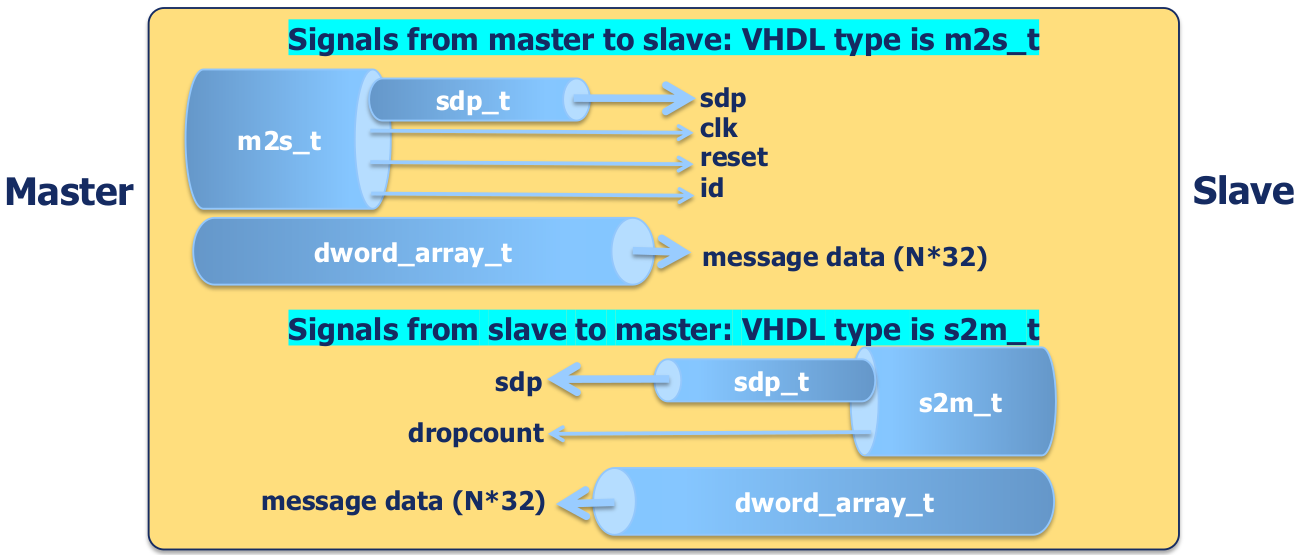
Figure 24: SDP VHDL Record Structure
Signal |
Type |
Description |
|
|
SDP header and handshake signaling common to masters and slaves |
|
|
The clock for the SDP instance, usually from the HDL platform worker. |
|
|
Associated synchronous reset (asserted high for minimum of 16 cycles) |
|
|
The SDP node/position/ordinal assigned to the attached slave |
Signal |
Type |
Description |
|
|
SDP header and handshake signaling common to both SDP masters and slaves |
|
|
Count of non-decoded/dropped packets from slave (only when slave is terminator) |
The sdp_t VHDL record contains header and handshake signals. The figure below shows the record structure and following tables describe the record signals.
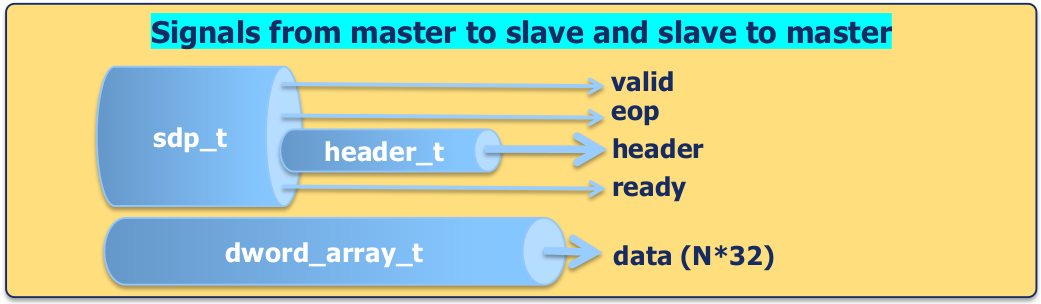
Figure 25: sdp_t Record Structure
Signal |
Type |
Description |
|
|
Data/header is valid (like AXI). Analogous to “FIFO not empty”. |
|
|
End of packet. Qualified by valid. |
|
|
Header defines contents of packet. Will be stable from sop to eop |
|
|
Can accept/is accepting data from other side - like AXI; analogous to “FIFO dequeue”. |
Signal |
Type |
Description |
|
|
Number of dwords of data minus 1 (like AXI). For read requests, requested count. For writes and read-responses, count of data in packet. |
|
|
Operation: read or write or read response. |
|
|
Transaction ID for matching read responses to read requests |
|
|
Number of invalid bytes at start of first dword of packet. |
|
|
Number of invalid bytes at end of last dword of packet |
|
|
For packets to slaves: The on-chip node that should receive this packet. For packets to masters: The on-chip node that should receive the read response (if any). |
|
|
LSBs of dword address. For requests to slave, address within SDP node. For requests to master, simply word address LSBs. |
|
|
For requests to master, address MSBs to achieve 36 bit addressing. |
Packets are transferred using a sequence of transfers controlled by valid and ready. In FIFO-speak, valid is analogous to “FIFO not empty”, and ready is analogous to “dequeue”. The valid signal in one direction is acknowledged by the ready signal in the other direction. When they are both asserted (from opposite directions) at a rising edge, the transfer is complete. The valid signal can lead ready or vice versa. This terminology is similar to AXI.
The following diagram shows three SDP transfers:
ready trailing valid
ready leading valid
ready simultaneous with valid
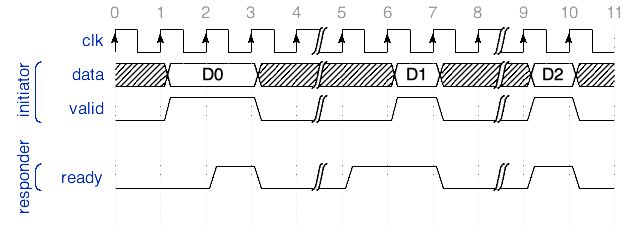
Figure 26: Three SDP Transfers with Different Ready and Valid Assertions
The eop signal indicates the last transfer in a packet, and is qualified by the valid signal. When valid is not asserted, eop is meaningless/undefined. The last transfer in a packet is indicated when both valid and eop are asserted. The start of a packet is inferred (after previous eop or reset). The following diagram shows an example of a packet transfer completion.
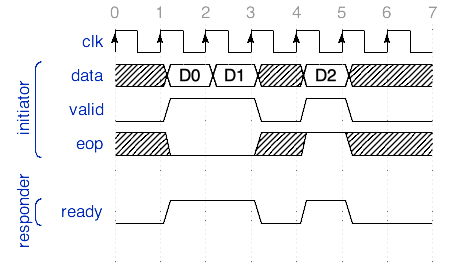
Figure 27: SDP Packet Transfer Showing EOP
The initiator must hold the header constant for the duration of a packet. The header signal structure is continuously valid at the first transfer in the packet through the last one; i.e. it does not need to be captured on the first transaction in the packet. It becomes valid when the valid signal is asserted at the beginning of a packet. The data signal may provide new data on each transaction in the packet. For some packets (e.g. read requests), only the header is used, and the data is unused. The following diagram shows a packet transfer including the header.
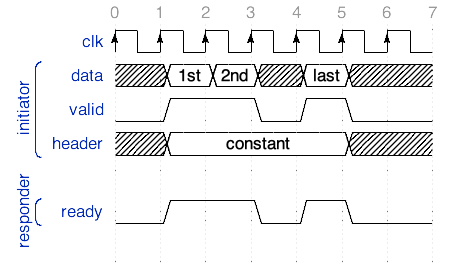
Figure 28: SDP Packet Transfer Showing Header
SDP is split transaction, like PCIe and AXI. Read request packets elicit read response packets (with data). Write request packets (with data) are posted, with no response. The first transfer of a packet transfers data (unless it is a read request). The header defines what the packet is for (its operation or op):
A read request (with address and no data)
A read response (data responding to a read request)
A write request (with address and data)
The following diagram shows an example of a write request with basic header information and data.
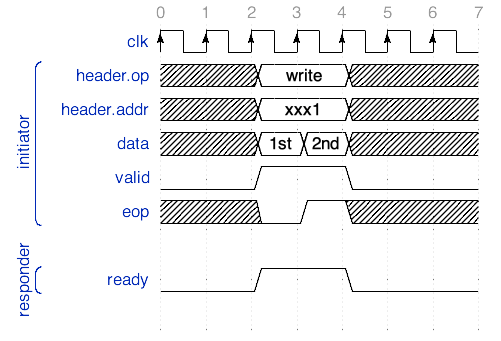
Figure 29: Basic Write Request with Address and Data
The header defines xid (transaction ID) for matching responses to read requests. The following diagram shows an example of a read request with corresponding response.
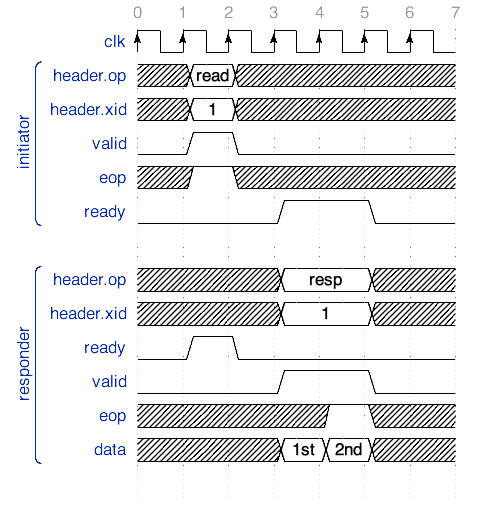
Figure 30: Read Request and Corresponding Response
The amount of data in a packet may be any number of 8-bit bytes. The header specifies count (number of dwords of data minus 1). For read requests, count is the requested number of dwords. For write and read responses, count is the number of dwords in the packet. The maximum count allows for 16KB (e.g. enough for jumbo Ethernet frames).
In addition to count, the header specifies leading invalid bytes in first dword and trailing invalid bytes in last dword. The following diagram shows how 16 bit writes are conveyed on a 32 bit interface using lead and trail.
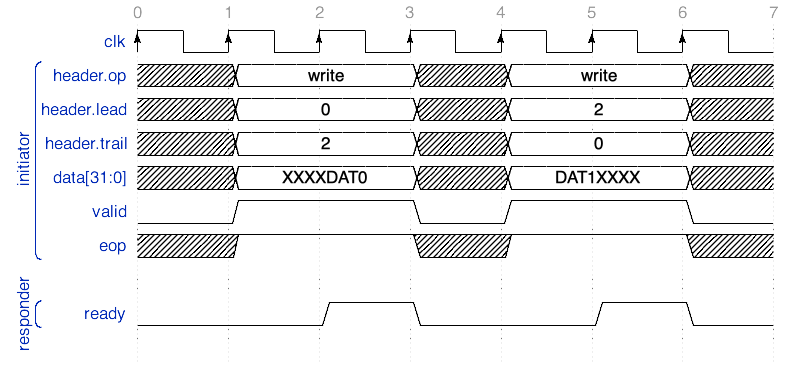
Figure 31: Two 16-bit Writes on a 32-bit Interface with Leading/Trailing Invalid Bytes
The data in a packet (if not a read request) is aligned, little endian. This is relevant if the SDP interface is configured with a dword-width of > 1. For example, if width is 2 dwords, and a single dword transfer has dword address of 1, the LSB dword will be padding, and MSB dword is the single dword of valid data. The following diagram illustrates this scenario.
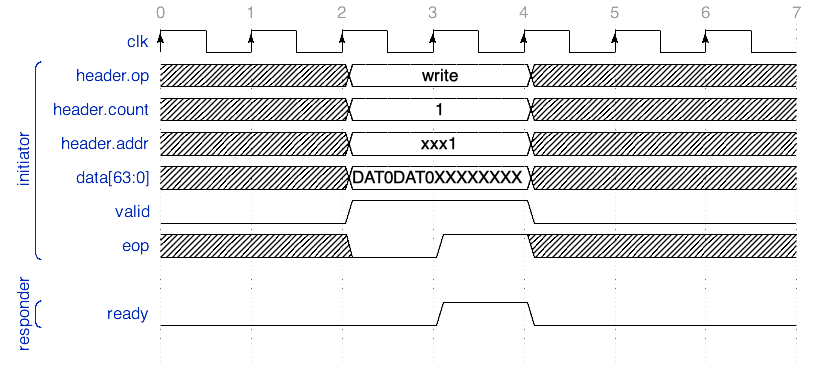
Figure 32: 32-bit Write on 64-bit Interface Showing Little-endian Alignment
The UNOC Data Plane Interface
The precursor/legacy interface for the on-chip data plane for OpenCPI was called UNOC (micro-network-on-chip). This interface is used in some PCI Express interconnect designs and is deprecated. Those designs are being converted to use the SDP.
Testing the Basic Platform without Devices
You can build and run various tests without supporting any of the devices on the platform. This can be the first chance to test the full bitstream build flow. This mode is sometimes called the “accelerator” mode, where the FPGA is simply being used to perform data processing functions, with data input from and output to software workers.
In particular, to test the control plane support, you can test the platform with no interconnect/dataplane support by using applications like “tb_bias_v2” which do not require interconnect support for the data plane.
Data plane support can then be tested one direction at a time, using simple applications like “patternbias_v2” or “biascapture_v2” that only flow data in one direction between the FPGA platform and the processor.
The biascapture_v2 assembly (in assets/hdl/assemblies/biascapture_v2/biascapture_v2.xml) contains the following XML, which takes external input and captures it:
<HdlAssembly>
  <Instance Worker="bias_vhdl" connect='capture_v2' external='in'/>
  <Instance Worker='capture_v2'/>
</HdlAssembly>
The file-bias-capture_v2 application (in assets/applications/file-bias-capture_v2/file-bias-capture_v2.xml) reads from a file and then uses the above assembly. The XML is:
<application package='ocpi.core' done='capture_v2'>
  <instance component="file_read" connect="bias">
    <property name='filename' value='test.input' />
    <property name='messagesInFile' value='false' />
    <property name='opcode' value='0' />
    <property name='messageSize' value='2048' />
    <property name='granularity' value='4' />
  </instance>
  <instance component='bias' connect="capture_v2">
    <property name='biasValue' value='0x01020304'/>
  </instance>
  <instance component="ocpi.assets.util_comps.capture_v2">
  <property name='stopOnFull' value='true'/>
  <property name='numRecords' value='256'/>
  <property name='numDataWords' value='1024'/>
  </instance>
</application>
Testing in one direction greatly simplifies initial debugging of platform workers that are using new interconnect adapters for SDP.
Device Support for FPGA Platforms
Device support involves the creation of workers that enable OpenCPI to use the devices attached to an HDL platform or card. Device workers are like “device drivers” for specific FPGA-attached hardware devices — workers that interface with devices using device-specific signals and I/O pins.
In addition to a control interface and data interface(s) that an application worker would have, device workers also have signal connections with hardware attached to pins of the FPGA. For example, a device worker for an output device (like a DAC or a parallel output port) would have some signals attached to FPGA pins that are connected to the output device or connector, and would also have a normal worker input data port that would be connected to some application worker producing the data.
[Diagram showing app worker → device worker → device.]
When the device is attached to the FPGA via dedicated pins, the device is considered part of the platform. When the device is on an optional card plugged into a slot (which has pins connected to the FPGA), the device is considered part of the card, not the platform. In both cases, the same device worker is used to access and control the device. An OpenCPI HDL device worker can be reused across platforms and cards.
A simple DAC device worker might have an XML descriptor (OWD) like this:
<HdlDevice Language='vhdl' spec='dac-spec'>
  <streaminterface name='in' datawidth='8'/>
  <signal name='valid' direction='out'/>
  <signal name='data' direction='out' width='8'/>
  <signal name='dataclk' direction='out'/>
  <signal name='ready' direction='in'/>
</HdlDevice>
The HdlDevice element is similar to the HdlWorker element except that it allows some extra features like the signal child elements.
The spec='dac-spec' attribute indicates that this device worker implements the component spec common to all DAC devices (with properties and ports). It can add its own properties as required in its OWD. The streaminterface element simply sets the physical data width of the input port to 8. The signal elements specify the names of device signals (HDL language “ports”) connected to the FPGA pins that are connected to a device managed by this device worker.
All the details of an HdlDevice XML are mentioned below. An example of the device worker source code (using version='2') for this (simplistic, single clock domain) device worker might be:
dataclk     <= ctl_in.clk;  -- use the control clock as output clk
data        <= in_in.data;  -- drive data output from input
valid       <= in_in.valid; -- drive output valid from input valid
in_out.take <= ready;       -- accept input when output is ready
A Device Worker Implements the Data Sheet
It is recommended to use the device manufacturer’s data sheet’s signal and register names in the device worker code (and its OWD) so they are easily correlated to the names in the data sheet. This provides easier code maintenance and system-level debugging. E.g., a system engineer may find it valuable to probe and examine device-level settings when referring to the data sheet, even though they might not be HDL coders. When the naming conventions in the data sheet are at odds with “better” naming conventions, it may still be preferable to use them for the above reasons.
Implementing all the functionality in a device may not be desirable when the device worker initially written for a platform, since that platform may not use all the device’s capabilities. When a device worker is insufficient in this way for a new platform or project, it should be enhanced in such a way that any existing uses of it will still work (backward compatibility) so that the community in fact gets the benefit of a newer more complete device worker implementation.
As mentioned above, multi-function chips should generally be supported by multiple device workers. But within any device worker for a function, if there are features or modes that carry significant overhead, they should be controlled by parameter properties (thus generics in VHDL) so that the resources are not wasted when the feature/mode is not being used. This promotes re-use of the device worker.
When devices have internal registers, the most common approach is to define each internal register as a property in the OWD (not in the OCS), and use the “raw property” feature of HDL workers to access those registers. This enables direct control and display of the internal configuration of the device with no software programming since the ocpirun and ocpihdl commands can easily access this information. It also allows a clean “hardware-to-software” handoff when the device worker implements what the datasheet describes.
Device Component Specs and Device Worker Modularity
In order to ensure that similar devices have common application-visible behavior, OpenCPI has device class specs that represent commonly used classes of devices. This is a special case of the component specification (OCS) being the basis of multiple implementations (workers) of the same functionality. In this device case, the “multiple implementations” are for different devices of the same class. Device workers for devices in the same class implement the same OCS; a device class is represented by this device class OCS. Current classes include clock_gen, qdac, and qadc.
As the integration of functionality on single chips increases, it is common for a “device chip” to implement multiple functions of different classes of device (e.g. an ADC and a DAC). Generally, this should not result in a single device worker for the multi-function chip. Creating such a single device worker would result in the functions not being represented to the system or to users the same as a similar function from a non-integrated single-purpose chip. Thus, a device worker should be developed for each class that is present on the multifunction chip.
This avoids exposing the multi-function integration of a single chip to applications and thus enhances the re-use of applications. Furthermore, when only one function is needed, a multi-function device worker would not use FPGA resources for functions that are not being used. While it is possible to develop “swiss-army-knife” device workers for multifunction chips that intend to avoid using resources for parts that are unused, OpenCPI recommends designs that are more modular, namely:
Chips that contain multiple functions should generally be treated as multiple devices using multiple device workers of the appropriate classes.
When a multi-function device has pins or hardware that must be shared among the functional device workers (e.g. a common reset or SPI or clocks), a “subdevice” module can be used for such shared logic. This is discussed in the Subdevice Workers topic.
The first step in developing support for a new device is to identify the device class specs that are relevant, and determine the list of device workers that must be created. Each device class spec defines common properties, data ports, and implied functionality that all device workers of the class should try to implement.
Some examples of classes of devices currently defined are:
ADC and DACs which convert between isochronous data and flow-controlled data and may have scheduling and time-stamping functionality.
Upconverters and downconverters between IF/Baseband and RF.
Clock generators
DRAM
Device Proxies — Software Workers that Control HDL Device Workers
A device proxy is a software worker (RCC/C++) that is specifically paired with one or more device workers in order to translate a higher level control interface for a class of devices into the lower level actions required on a specific device. While it is possible that the HDL device worker itself could support the required generic interface, for many device classes, it is more productive to split the supporting code for the device into a (software) proxy and a HDL device worker. When a device worker has a proxy, it is termed the “slave” of that proxy. Using a proxy is not always required since the underlying (slave) device worker is always controllable directly, using the “data sheet” level of interface.
The requirements for a class of devices may in fact be split into a low level part that HDL device workers typically implement, and a high level part that would usually be implemented in a proxy. An example might be where an ADC device worker had a low-latency gain adjustment input port that could probably not be implemented in software, as well as a high level sample rate setting that would be better implemented in a proxy.
Device proxies are simple C++ (not C) RCC workers where the XML (OWD) specifies a slave attribute, indicating which worker is the slave for that proxy. That attribute enables convenient access to all the slave worker’s properties from the proxy’s code. A more powerful mode is where the proxy specifies a slave assembly – a group of slaves with interconnections, all controlled by the proxy. [ more explanation of slave assemblies, typically used by DRCs, should be included here].
Thus there are two patterns for implementing HDL device support in OpenCPI:
Device-worker-only, where the device worker implements both the device class component spec as well as any required higher level properties.
Device-worker-and-proxy, where the device worker implements only the device component spec, and the device proxy implements the higher level properties for the class.
A common example of higher level properties for a device class is the center/tuning frequency of an RF/IF up/down converter. The high level property is a convenient floating point number, which typically requires setting a variety of device registers to accomplish. The proxy code would make the necessary translations and computations before setting the correct register values in the HDL device worker.
Subdevice Workers
[Diagrams here, based on existing briefings etc.]
Writing a device worker to be reusable across many embedded systems is made more difficult by two facts:
Multifunction devices have aspects that are shared between functions (e.g. common reset)
Controlling different devices sometimes involves sharing control/configuration buses (e.g. SPI and I2C) or other hardware among unrelated devices.
In order to preserve the modularity of distinct classes of devices, as well as the reusability of device workers, OpenCPI supports a further specialization of device workers called subdevice workers.
A subdevice worker implements the required sharing of low level hardware between device workers. It is defined to support some number of device workers, and is thus instantiated automatically whenever any of its supported device workers are instantiated in a platform configuration or container. Subdevices are commonly platform-specific or card-specific.
New subdevice workers may be required when a device with an existing device worker is used on a new platform or card, since the sharing of hardware (e.g. an I2C bus) may require different logic. That may result in the existing device worker being refactored to share functions that it did not share before, by defining an interface to a subdevice.
There are cases where a subdevice is required to support a single reusable device worker when some low level logic must be different for different platforms. This allows the device worker itself to remain portable, letting alternative subdevices do platform/card-specific dirty work.
A subdevice is specified as existing on a platform or card, and is instantiated automatically whenever any of its supported devices are needed. Thus the right subdevice is chosen when the card or platform is already known, in the container. It can also be explicitly instantiated in a platform configuration or container.
So a given device worker may have a number of different subdevices that support it, but the choice of which subdevice to use is always unambiguous since for a given platform or card, only one subdevice is appropriate.
Subdevice workers typically have no control interface. Like device workers, they have signals that are attached to FPGA pins. These pins are usually what is “shared” between the device workers that the subdevice supports. It is possible that subdevices have no external signals and only exist to coordinate between several optionally present device workers.
Subdevice workers usually have connections to the device workers they support. The XML (a minimal OWD) for a subdevice defines:
The hardware FPGA pins it is attached to (via the “signals” element like all device workers)
The device workers it supports (using
<supports>elements).How it is connected to each of the device workers it supports (using
<connect>elements under<supports>elements).
Since platforms and cards declare which devices they have, including subdevices, they specify which subdevices are present. This allows different subdevices to be used for different platforms while leaving the device workers untouched and reusable.
Finally, when platforms have multiple devices of the same type, declared in the HDL platform’s OWD, the platform (not the subdevice) can specify the unambiguous association between subdevices and devices, using <supported> elements in the platform’s OHPD/OWD. See the Device Elements in a Platform XML File topic for how these elements work.
[a repeated diagram with the two associations]
For help in understanding these aspects of OpenCPI, look closely at the fmcomms_2_3_csts card (hdl/cards/specs/fmcomms_2_3_csts.xml), and the devices that it includes. This card is used in the zed platform for certain configurations based on the hdl/platforms/zed/cfg_* files. To learn more about raw properties, take a look at the si5351 device at hdl/devices/si5351.hdl. The many raw properties declared in the xml file correspond to hardware registers on the si5351 chip. See chapter 7/page 23 (“Register Map Summary”) at https://cdn‑shop.adafruit.com/datasheets/Si5351.pdf. Each raw property in the OpenCPI si5351.xml corresponds to a line in the datasheet table there.
Finally, for a further understanding of subdevices, take a look at platform_ad9361_spi_csts.hdl (in hdl/devices/platform_ad9361_spi_csts.hdl), which is a subdevice that handles raw property accesses and low level SPI functionality. It supports the ad9361 devices, which means that the ad9361 devices can delegate their raw property accesses to the platform_ad9361_spi_csts subdevice.
Using RawProp Ports with SubDevices
The example below defines a subdevice with no control interface (no properties or control operations), driving two signals that are an I2C interface, and supporting a si5351 clock generator device worker via a rawprop worker port (defined in RawProp XML Elements for Device Workers and Subdevice Workers topic). It is declaring that if that supported device is present, it should also be present and be connected to that device worker via the rawprop port. By including this subdevice in a board description file (in the platform’s OHPD/OWD or a card’s spec file), it will be associated on this board with the si5351 device worker.
<HdlDevice language="vhdl">
  <componentspec nocontrol='true'>
  <rawprop/>
  <supports worker='si5351'>
    <connect port="rawprops" to="rawprops"/>
  </supports>
  <Signal name='sda' direction='inout'/>
  <Signal name='scl' direction='inout'/>
</HdlDevice>
The most common connection between a device worker and a subdevice that supports it is the rawprop connection that enables a device worker to delegate some or all of its raw property accesses to the subdevice. The device worker declares a rawprop master port for this delegation, and the subdevice declares an array of one or more a rawprop slave ports to support device workers this way. This type of connection is common when there is a shared control path like SPI or I2C to access the registers of several devices.
The rawprop port has a bundle (VHDL record) of signals that is identical to the raw signals defined in the Raw Access to Properties topic. This record is called raw in both the control interface signals (props_in.raw, props_out.raw) as well as the rawprop port signals (rawprops_in.raw and raw_props_out.raw).
A rawprop worker port consists of a VHDL record of signals that allow a device worker to easily delegate all of its raw property accesses to the subdevice, using this VHDL:
rawprops_out.present  <= '1';
rawprops_out.reset    <= ctl_in.reset;
rawprops_out.raw      <= props_in.raw;
props_out.raw         <= rawprops_in.raw;
The present signal tells the subdevice that there is a connection to a device worker it supports. The reset signal tells the subdevice that this device worker is being reset, and the raw subrecord conveys the raw property signals between the device worker and the subdevice. In the subdevice, the rawprop port may be an array port (with count attribute > 0) when the subdevice worker is supporting multiple device workers.
Using DevSignal Ports with SubDevices
When the rawprop connection is not sufficient for all of the shared functionality in the subdevice (raw properties, presence and shared control reset), another type of connection is used, which is a customized set of signals. This is called a devsignal port. The port is declared for both the device worker (or platform worker in some cases) and the subdevice worker using devsignal element.
The devsignal element declares the port and has four attributes: name, master, signals and count. The optional name attribute provides a port name, with the default being dev. The boolean master attribute defines a master/slave role for the port, which is used relative to signal directions. The signals attribute is the name of a file containing a top-level signals element, containing signal definitions for this port. The direction of the signals declared in the file are relative to the master port. Here is an example signals file (named mydevsignals.xml):
<signals>
  <signal name='DATA_CLK_P' direction='in'/>
  <signal name='DATA_CLK_N' direction='in'/>
  <signal name='SYNC_IN' direction='out'/>
  <signal name='ENABLE' direction='out'/>
 </signals>
The master port (usually the device worker) would drive the SYNC_IN and ENABLE signals as outputs, and the slave port (usually the subdevice) would receive them as inputs. The port declaration in the OWD of the device workers would be:
<devsignal master='true' signals='mydevsignals'/>
Since the signals are common to the ports of both workers, they are in their own file, usually in the specs directory of the component library containing both device and subdevice workers (usually hdl/devices/specs). Since the purpose of the subdevice is normally to share/multiplex output signals among more than one device worker, the subdevice’s port declaration normally includes a count to indicate that the port is actually an array of identical ports. So the subdevice port declaration would be something like:
<devsignal signals='mydevsignals' count='2'/>
As with the rawprops examples above, the connection of these ports is indicated by the supports element and its connect child element. See the DevSignal XML Elements for Device Workers and Subdevice Workers topic.
Testing Device Workers with Emulators
The OpenCPI unit test framework described in the Unit Testing of Workers topic can be used to test device workers, using a special type of device worker called an emulator.
An emulator device worker is actually a device emulator that emulates a device for test purposes. Thus while a normal device worker manages and controls a device by driving and receiving signals from the device (via FPGA pins), the emulator acts like the device. So if the device has a reset input pin, the normal device worker will drive that reset signal as an output of the device worker, into the actual device. The emulator for the device will have that reset signal as an input signal.
We discuss this relationship such that:
We use “emulator” to mean “emulator worker”, which is a special type of device worker (much like a platform worker is a special type of device worker).
The device worker manages a device, and may have an associated emulator, which is its emulator.
The emulator emulates a device which has a device worker, which is its device worker.
There is nothing about emulators that restricts them to running only in simulators, so when it is useful, they can be written to be synthesizable and executed in hardware.
When used in the unit test framework, the emulator is automatically instanced to test its device worker.
Emulator Signals, Ports and Properties
An emulator establishes the relationship with its device worker using the top level emulate attribute whose value is the name of the device worker for the device it emulates. An emulator automatically inherits the signals from its device worker, with the directions reversed. Thus no signal elements need be defined in an emulator’s OWD.
Similarly, for non-data, non-control ports (usually rawprop or devsignal ports), the emulator has the same ports defined, with the same name, with the opposite master attribute value. I.e. when the device worker is a master of such a port, the emulator is a slave. The emulator has its own control port, and may have its own data ports (e.g. for recording test data into a file).
Finally, the emulator also inherits all the parameter and writable/initial properties of its device worker so that when used, it sees the same parameter and property values that its device worker sees. It can then emulate accordingly. It can have its own additional properties of course, but it cannot have its own parameters with multiple values or mentioned in test cases. Its build configurations are the same as its device worker’s build configurations.
When testing a device worker with its emulator, both the emulator and the device worker are instantiated, their signals are connected, and the non-control, non-data ports are connected between them. Thus they form a test unit (UUT) where each has its own control port, and each may have its own data ports.
An example is where a device worker for an ADC, might have an emulator that takes test data from a file, and feeds the data into the ADC device worker as if it was the ADC hardware device.
Emulator Worker OWD XML Files
An emulator’s OWD references the OCS for all emulators, emulator-spec, using its spec attribute. It identifies its device worker using the emulate attribute, whose value must include the .hdl model suffix. An emulator must have a control interface so it cannot set the nocontrol attribute to true.
An example emulator OWD is:
<HdlDevice emulate='mydevice.hdl' spec='emulator-spec'>
  <property name='errorcount' volatile='true'/>
  <streaminterface name='tracedata' producer='1'/>
</HdlDevice>
This OWD says that the emulator will have a volatile property errorcount to report the number of errors encountered while observing its device worker’s behavior. This property is in addition to all its device worker’s parameters and writable properties that are automatically inherited.
The streaminterface element is directly introducing a data output port even though there is no such port in the OCS, since emulators are not required to have such ports.
The “results” of running the emulator would be the errorcount property’s value and the data produced at its tracedata output port.
An emulator OWD has these restrictions when compared to a normal device worker:
It must implement/reference the
emulator-spec(viaspecattribute)It must reference its device worker via the
emulateattributeIt cannot have any property whose name conflicts with any parameter or writable property of its device worker.
It cannot have any data port whose name conflicts with any of its device worker’s ports.
It cannot have any signals (it will inherit its device worker’s signals)
Using an Emulator for Device Worker Unit Testing
When a .test directory is defined for a device worker (using the ocpidev create test command), OpenCPI expects to find an emulator worker in the same component library and will instantiate and connect it next to the device worker in all test assemblies.
All the testing then proceeds the same as testing application workers with these additions:
The final values for the emulator’s own properties is also available to verification scripts.
Data input ports of the emulator must be supplied with data with input files or generator scripts.
Data output ports on the emulator will captured and available to verification scripts.
Essentially the UUT becomes the combination of a device worker and its emulator.
If the emulator is written to be synthesizable, test execution can include hardware platforms as well as simulator platforms.
Note that emulator workers are always started before the device worker they are associated with.
Using an Emulator in Containers without the Unit Test Framework
When a more complex testing configuration is needed beyond the “one device worker with its emulator” scenario describe above, it can be done by instantiating device workers and emulators directly in a container using the “floating device” feature.
Floating devices are simply those that are not really part of the platform being targeted (usually simulators in this case), but are devices instantiated and connected directly to their emulators. This allows for test configurations that combine device workers, subdevice workers, and emulators in various ways.
An example container XML file that uses emulators is:
<HdlContainer platform='isim'>
  <device worker='i2c_em' floating='1'/>
  <device worker='i2c_sim_master' floating='1'/>
  <device worker='i2c_sim_master_16b_props' floating='1'/>
  <device worker='i2c_sim_master_mix_props' floating='1'/>
  <device worker='i2c_sim_master_16b_ext_wr_props' floating='1'/>
  <device worker='i2c_sim_subdevice' floating='1'/>
</HdlContainer>
This example instantiates various device workers as well as the emulator. The emulators are automatically wired up with the device workers they are emulating. They all use the floating attribute since they are not defined as existing on the isim platform.
[Preliminary feature with limited support]
Higher-level Proxies Suitable for Applications
As discussed above, we use device proxies to normalize (or make more user-friendly) the behavior of a class of devices. The granularity of such classes is sometimes below the level appropriate for applications, but is optimal for sharing, reuse, and rapid enablement of new platforms.
An example of fine granularity is a clock generator chip. There are many such chips, and device workers are written for them. They should all act the same, in terms of how they are set up and programmed, usually using a device proxy. When users or applications want access to a clock generator device, they should be able to use it the same way as any other clock generator device.
However, clock generator chips are also frequently used to drive other devices to a specific clock (e.g. sampling) frequency, and there may be some specific relationship on a given platform or card between specific clock generator chips and the devices they provide clocking too.
So, as an alternative to (or in addition to) device proxies that are defined for the granularity of individual devices, that have device workers, OpenCPI provides for higher level proxies which have multiple slaves, for presenting a collection of devices and proxies to applications as something higher level to connect and configure within the application. A good example is the Digital Radio Controller (DRC) proxies as described in the Supporting the Digital Radio Control (DRC) Component Specification topic.
The purpose of these multi-slave proxies is to remove all device specifics from applications, rather than simply normalize the behavior of a device to its class. Applications and users want to see standard, portable interfaces for endpoints (e.g. sources and sinks of radio data). Multi-slave proxies make that possible.
As with subdevices at the bottom of the OpenCPI “device support” stack, these multi-slave proxies are at the top of the “device support” stack, appropriate for use by applications. But both may internally be platform specific. Both exist to “leave the device workers alone” so that they are reusable across platforms and cards.
[Insert diagram for “stack”]
Applications use these higher-level proxies by instantiating a component of a higher level proxy spec. These proxies can represent any application-level subsystem or source or sink of data, and they can delegate connections to their IO ports to connect to the ports of their slaves.
XML Metadata for Device Workers/Subdevices/DeviceProxies
The four types of workers that relate to device support in OpenCPI are:
Device Workers
Device Proxies
Subdevices
Device Emulators
All these are workers and share the XML structure of workers via the OWD for ports and properties.
Device workers use the normal top-level spec attribute to identify the class of the device. Device workers and subdevice workers use the HdlDevice top level XML tag, have signal elements for hardware signals, and may have rawprop and devsignal ports to connect device workers to subdevice workers. If a device worker uses a subdevice worker, it may in fact have no signal elements.
Subdevice workers have supports child elements describing which device workers (i.e. device types) they support and how they should be connected to them.
Device proxies have a top-level slave attribute identifying which worker they are a proxy for. The name should include the authoring model suffix, such as:
slave='adc-chip123.hdl'
Multi-slave proxies for controlling a group of devices specify multiple slaves, as described in the Controlling-Slave-Worker-from-Proxies topic.
The signal elements in the OWD for devices and subdevices are as described for platform workers in the Signal Declaration XML Elements for Devices, Platforms, Slots and Cards topic.
RawProp XML Elements for Device Workers and Subdevice Workers
The rawprop child element identifies a port of the worker that forwards/delegates the raw property signals from a device worker’s control interface to a subdevice worker. It may be an array port (typically at the subdevice). Its attributes (all optional) are:
Name — The name of the port (default is
rawprops)Optional — Indicates if a connection to this port is not required (default
false). Normally true on subdevices supporting multiple optional devices.Count — Indicates if specified > 0 that this is an array of raw property ports (default is
0, meaning not an array port). Normally only specified on a subdevice supporting multiple devices.Master — Boolean Indicating who generates addresses for raw accesses (usually the device worker sets it
trueand the subdevice leaves itfalse).
The port is an array port if count is specified and greater than 0 or if the count attribute value is an expression based on parameter values.
DevSignal XML Elements for Device Workers and Subdevice Workers
This XML element represents a custom signal bundle that is connected between device workers and subdevices. It has these attributes:
Name — the name of the port (the default is
dev).Optional — whether this port must be connected or not.
Count — indicates an array of similar ports with the same signals (when > 0 or an expression)
Signals — indicates a file containing a top level
signalselement consisting ofsignalchild elements. The.xmlsuffix is not required in the attribute.Master — Boolean Indicating who is the master, which simply is the side where the direction of the underlying signals is referenced to.
The file indicated by the signals attribute enumerates the signals in the bundle, similar to the signal elements in a device worker’s OWD. The direction of the signals is relative to the master. If the signal is declared as “input”, that means it is an input signal to the master, and an output from the slave.
The <Supports> XML Element for Subdevices
Subdevices indicate which device workers (i.e. device types) they support by using <supports> XML elements: the subdevice is declaring that it supports the specified device worker when that worker is present (in platform configuration XML or in container XML). To indicate how the subdevice is connected to a device worker it supports, it specifies <connect> child elements within the <supports> elements, e.g.:
<supports worker='ad9361_config'>
  <connect port='rawprops' to='rprops'/>
  <connect port='dev_force_spi_reset' to='dev_force_reset'/>
</supports>
The attributes of the <supports> element in the subdevice’s OWD are:
worker — the name of the device worker this subdevice supports
The attributes of the <connect> child element of the <supports> element are:
port — the port on the supported device that should be connected to this subdevice
to — the port on this supporting subdevice to be connected
index — index into this subdevice’s port array (when its count attribute is > 0).
It is possible that different instances of the same device on a platform or card are supported by entirely different subdevices or by a single subdevice.
Associating Device Workers and Subdevice Workers with Platforms and Cards
Both device workers and subdevice workers are enumerated in the XML description of a platform or card using the device child element and the worker attribute. This declares the existence of the device on the platform or card as well as the device worker that is used. The order of these elements defines the ordinals of the devices when multiple instances of the same device type (device worker) are present.
The presence of subdevice workers in this declared list makes them available to support any devices that are used in a platform configuration or container. When a device is used (instantiated based on the platform configuration XML or the container XML), any subdevices that exist on the platform that support the device will also be instanced and connected.
Design Pattern for ADC and DAC Device Workers
When supporting ADC and DAC devices with device workers in OpenCPI (for use on platforms or cards that have them), OpenCPI specifies interfaces to be used for the digital data input and output. These interfaces are then connected to OpenCPI-provided “helper” workers that perform a number of related functions generically. This simplifies the device-specific ADC and DAC device workers.
For Quadrature ADC devices:
the generic helper worker is called
data_src_qadcthe
devsignalinterface is based on the fileqadc-16-signals
For Quadrature DAC devices
the generic helper worker is called
data_sink_qdacthe
devsignalinterface is based on the fileqdac-16-signals
This section describes the ADC/DAC interfaces and the provided helper workers.
ADC Device Workers
The following are requirements for an ADC device worker:
Supply the sample clock of the ADC device as an output.
Produce data in the ADC’s sample clock domain (no clock domain crossing), one clock per sample.
Indicate if possible, when the sample data for the clock period is not valid (i.e. if/when the ADC knows it is non producing usable samples).
The following diagram shows how the device-specific ADC device worker fits into the platform, with the ADC helper worker (data_src_qadc) and optional timestamper worker providing the appropriate messages to the rest of the system.
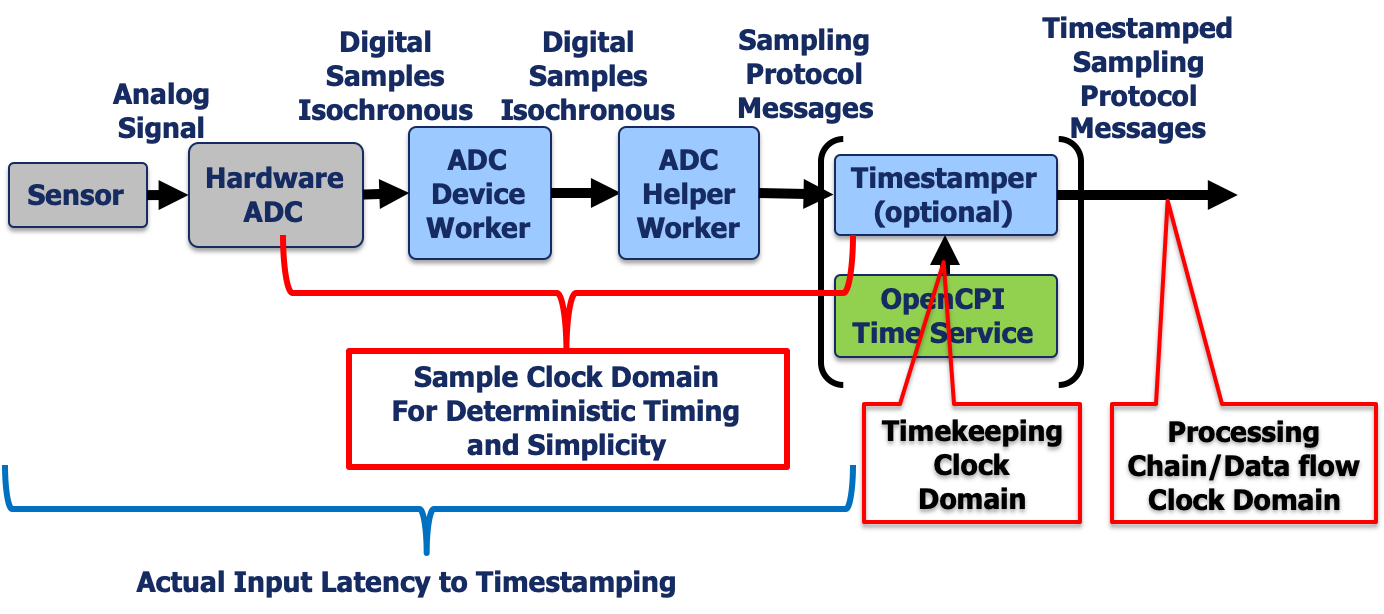
Figure 33: ADC Device Support Model
The data_src_qadc helper performs the following functions, so the hardware device worker should not:
Detect overrun and record it in a volatile property
Produce protocol messages indicating sample discontinuity (for overruns or invalid data).
Normalize bit width of output data, possibly sign-extending if requested.
This helper worker has a producer streaming data port which implements the complex_short_time_sample (csts) protocol. This worker accepts input data using the qadc interface. The following table describes the signals in that interface. The data_src_qadc worker serves as the master of that interface, and the direction described is with respect to data_src_qadc.
The data_src_qadc worker represents a single channel of I/Q sample data. If the actual ADC device is multichannel, it will have separate interfaces connected to separate data_src_qadc workers for each channel.
Signal |
Direction |
Description |
|
|
Sample clock associated with |
|
|
Sample data corresponding to complex_short_time_sample protocol’s samples argument’s I member |
|
|
Sample data corresponding to complex_short_time_sample protocol’s samples argument’s Q member |
|
|
The |
|
|
Indicator to the connected ADC device worker that there is a connection |
When support is added for a new type of ADC, a device worker must be created with a slave qadc devsignal interface to feed the data_src_qadc. Its function is to adapt between this interface and the hardware interface of ADC device. For example, some ADC devices, such as RF digitizers, may interleave I and Q or interleave data from multiple ADCs when streaming data over the device’s bus. It is the job of an ADC device worker to de-interleave the data from this bus and present each ADC’s samples on a distinct parallel signal bus as defined by the qadc interface.
To use this ADC, both the data_src_qadc and the device-specific worker must be declared in any platform OWDs or card specifications where the device exists. The device-specific worker must have a supports element in its OWD, declaring that it supports the data_src_qadc, and is connected to its qadc interface. The inclusion of the data_src_qadc worker in the platform or card XML should set any of its parameter properties appropriately, especially the ADC_WIDTH_BITS, and ADC_INPUT_IS_LSB_OF_OUTPUT_PORT parameter properties.
When a single ADC device has multiple channels, the ADC device worker may have multiple ports that are supported by different helper workers, where the ports are declared as optional. This allows a subset of the ports/channels to be used in a given platform configuration or container. In this case, the present signal indicates to the device worker which ports/channels are actually being used.
Platform configurations or containers can specify a data_src_qadc, causing the ADC worker to be included automatically (due to the supports relationship). Such assemblies can be used by applications by simply instantiating the data_src_qadc component in the application.
DAC Device Workers
The following are requirements for DAC device workers:
Supply the sample clock of the DAC device as an output
Process data in the DAC device clock domain (no clock domain crossing)
Utilize, as appropriate for the hardware, an indication that the data for the current sampling interval is valid or not
The data_sink_qdac helper performs the following functions, so the hardware device worker should not:
Interpret protocol messages indicating EOF or lack of valid data.
Normalize bit width of output data
Provide underrun indicator when rate of input data is less than DAC sample rate
Indicate to the DAC whether the current output sample has valid data.
This worker has a consumer WSI data port which accepts the complex_short_time_sample protocol. This worker produces data using the qdac interface. The following table describes the signals in that interface. The data_sink_qdac worker serves as the master of that interface, and the direction described is with respect to data_sink_qdac.
Signal |
Direction |
Description |
|
|
Sample clock associated with |
|
|
Sample data corresponding to complex_short_time_sample protocol’s samples argument’s I member |
|
|
Sample data corresponding to complex_short_time_sample protocol’s samples argument’s Q member |
|
|
data_i and data_q signals hold valid sample data for this period |
|
|
Indicator to the connected device worker that there is a connection |
When support is added for a new type of DAC, a device worker must be created with a slave qdac interface to interface with data_sink_qdac. Its function is to adapt between this interface and the interface of a DAC device. For example, some DAC devices will require interleaved I and Q data to multiple DACs when streaming data over the device’s bus. In this case, it is the job of a DAC device worker to interleave the data to this bus and accept each DAC’s datastream as a distinct parallel signal bus as defined by the qdac interface.
Both the data_sink_qdac and the device-specific worker must be declared in any platform OWDs or card specifications where the device exists. The device-specific worker must have in its OWD, a supports element declaring that it supports the data_sink_qdac, and is connected to its qdac interface.
Any platform configuration or container can specify a data_sink_qdac worker, and that will cause the device-specific worker to be included automatically (due to the supports relationship). Such assemblies can be used by applications that simply ask for the data_sink_qdac component.
Summary of Worker Types for Supporting HDL Devices
Device Workers directly control and attach to physical devices, as “device drivers”, and generally implement the data sheet for the device, providing access and visibility to the device’s native registers and capabilities.
Subdevice Workers enable multiple device workers to share some underlying hardware, like shared resets, shared SPI or I2C busses. They also allow device workers to stay portable when low level modules differ by platform or card.
Proxy Workers (for device workers) provide a higher level and more generic interface to make the device look more like others in its class, providing more user and software-friendly access and visibility to the device’s capabilities.
Emulator workers are used to test device workers by providing the mirror image of the device worker’s external signals so they can emulate the device in simulation.
Defining Cards Containing Devices that Plug into Slots of Platforms
A card is specified in a card definition XML file initially created using the ocpidev create hdl card <cardname> command, which creates the file <cardname>-card.xml file in the hdl/cards/specs directory. This file has a top-level card XML element with a required type attribute, and contains device elements.
The type attribute is the slot type and must match the name of a defined slot type.
The device elements declare device instances on the card, and act the same as device elements in an HDL platform XML file with two additional aspects:
First, when property values are specified in the device declaration, a platform attribute may be used to indicate the platform that the value should be applied to. I.e. if the platform attribute is specified, the value will only be applied when the card is used with (plugged into) the platform. If no platform attribute is present for a property value, it will apply to all platforms. This allows values to be platform-specific. This is useful when the value of a device’s parameter depends on the combination of card and platform. The example below indicates that for this device on this card, the Data_CLK_Delay parameter should be set to 5, unless the card is being used on the zcu104 platform, in which case the value should be 7.
<device worker='data_sub'>
  <property name='Data_CLK_Delay' value='5'/>
  <property name='Data_CLK_Delay' value='7' platform='zcu104'/>
</device>
In both platform XML and card XML files the signal child elements of device elements indicate a non-default mapping between device worker signals and platform or card-level signals. Whereas the signal mapping on platforms use the platform attribute for the platform/card-level signal name, in card definition files, the card attribute is used. This makes it clear that in the case of cards, you are mapping a device worker’s signal to a card signal.
Card signal names in this case indicate the slot type’s signals. Thus each device instance’s signals are essentially wired to slot pins.
Here is example of a simple card definition file with one device. It has one required parameter property setting (use_ctl_clk), one device signal that is not available on the card (tx_clk) and some other signals mapped to card signals that are derived from the slot type:
<card type='fmc_lpc'/>
  <device worker='qdac'>
    <property name='use_ctl_clk' value='true'/>
    <Signal name="tx_clk" slot=''/>
    <Signal name="tx_clk_in" slot='LA04_N'/>
    <Signal name="tx_iq_sel" slot='LA29_N'/>
    <Signal name="txd(0)" slot='LA25_N'/>
    <Signal name="txd(1)" slot='LA25_P'/>
    <Signal name="txd(2)" slot='LA22_N'/>
    <Signal name="txd(3)" slot='LA22_P'/>
    <Signal name="txd(4)" slot='LA20_N'/>
    <Signal name="txd(5)" slot='LA20_P'/>
    <Signal name="txd(6)" slot='LA16_N'/>
    <Signal name="txd(7)" slot='LA16_P'/>
    <Signal name="txd(8)" slot='LA12_N'/>
    <Signal name="txd(9)" slot='LA12_P'/>
    <Signal name="txd(10)" slot='LA08_N'/>
    <Signal name="txd(11)" slot='LA08_P'/>
  </device>
</card>
Reporting FPGA Platform Timekeeping Characteristics
[Preliminary feature documentation]
When enabling an FPGA platform, characteristics of the timekeeping clock of the system should be reported as part of platform documentation.
The following characteristics of the timekeeping clock must be reported:
Frequency Error (Hz)
Phase accuracy (s)
Jitter (s)
Short term stability (Allan Variance)
In addition to these characteristics, the ability to accurately provide time to HDL workers must be measured and reported.
The following characteristics regarding timestamping accuracy must be reported:
Timestamp resolution (s)
Timestamp accuracy (s)
OpenCPI provides applications for collecting these measurements given a particular hardware setup. The following section describe the required hardware test setups for collecting these measurements.
Timekeeping Clock Characteristics
The test setup for measuring timekeeping clock characteristics can be seen in Figure 11: Timekeeping Clock Measurement Setup. The setup requires one dedicated input to the FPGA and one dedicated output from the FPGA. The dedicated input is a PPS signal sourced from a high precision frequency standard and connected to the PPS input of the Hardware Time Server (HTS) inside the FPGA design. The dedicated output is connected to the PPS output signal generated by the HTS, which is derived from the HTS clock and PPS inputs. The output signal is then connected to a high precision frequency counter which measures the required performance characteristics.
Given this test setup, running the timekeeping_clock_characterization application in the platform project will report the required characterization values for the platform under test. The following sections describe how the application collects those characteristics from the test setup.
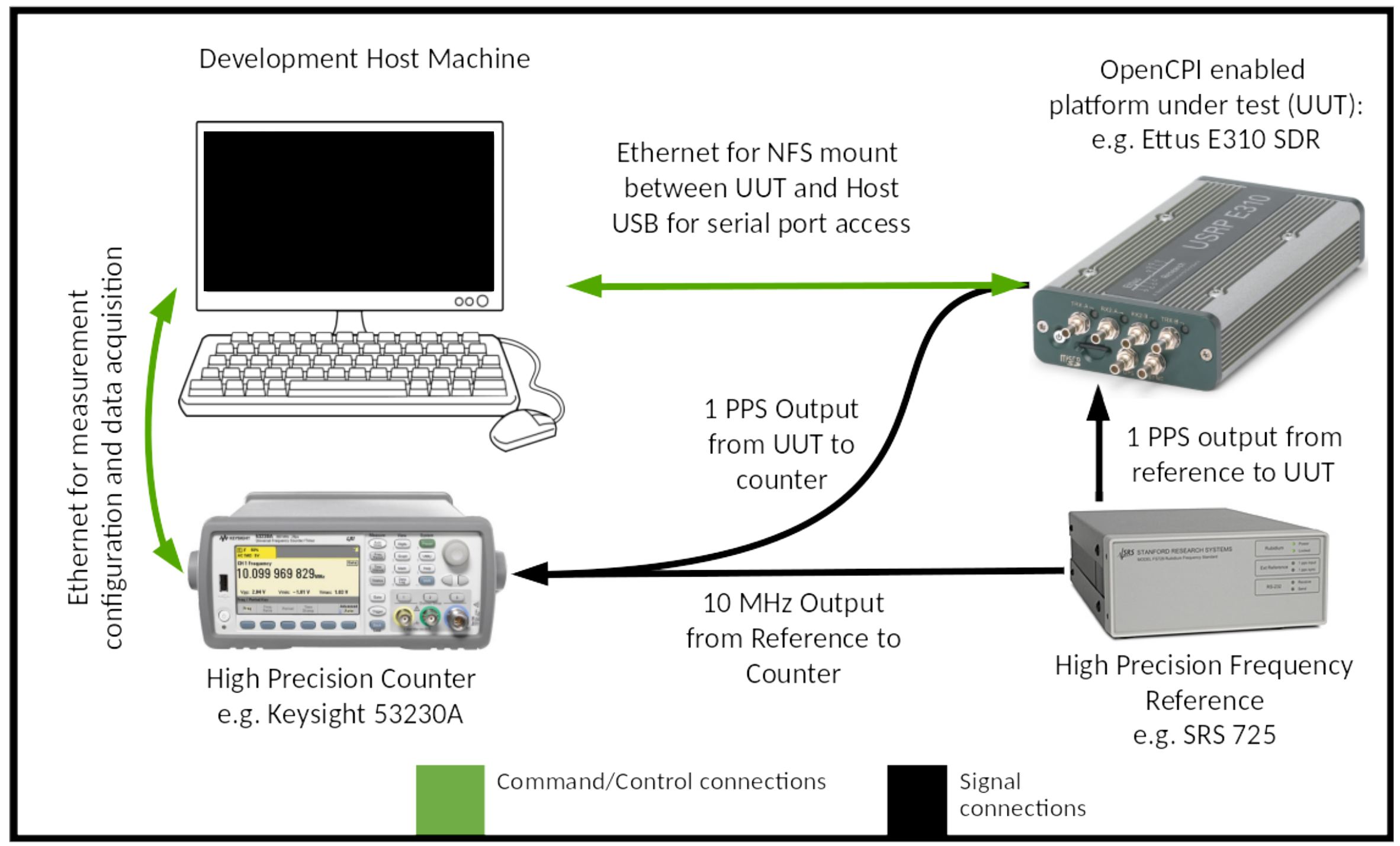
Figure 34: Timekeeping Clock Measurement Setup
Frequency Error (Hz)
The Frequency Error is measured with the high precision frequency counter. 100 frequency measurements are made and the Frequency Error is reported as the maximum and minimum frequency of the PPS generated by the HTS.
Phase Accuracy (s)
The Phase Accuracy is measured with the high precision frequency counter. 100 time interval measurements are made between the rising edge of the PPS from the precision frequency standard and the rising edge of the PPS generated by the HTS, and the Phase Accuracy is reported as the average time interval.
Jitter (s)
The Jitter is measured with the high precision frequency counter. 100 period measurements are made on the PPS generated by the HTS, and the Jitter is reported as the standard deviation of the the period measurements.
Short Term Stability (Allan Variance)
The Allan Variance is measured with the high precision frequency counter. 100 frequency measurements are made of the PPS generated by the HTS and the Allan Variance is reported for both 10 and 100 frequency measurements.
Timestamping Accuracy
The test setup for measuring accuracy can be seen in Figure 12: Timestamping Accuracy Measurement. A GPS signal is sourced to both the on-platform GPS device and a GPS frequency reference. This requires a dedicated FPGA input connected to the GPS time phase-aligned PPS output from the GPS frequency reference.
This dedicated FPGA input must be connected to the signal input of the signal_time_tagger.hdl device worker in the platform project’s hdl/devices library. This worker collects timestamps at the rising edge of an FPGA input signal.
In this test setup, running the timestamping_accuracy application in the platform project reports the characterization values for the platform under test. The following sections describe how the application collects those characteristics from the test setup.
Timestamp Resolution (s)
The Timestamp Resolution is the period of the clock provided to the HTS.
Timestamp Accuracy (s) 1
The Timestamp Accuracy is measured by collecting timestamps from 100 consecutive PPS inputs sourced from the GPS frequency reference and computing the difference from the nearest integer second. The accuracy is reported as the minimum, maximum, and standard deviation of these differences.
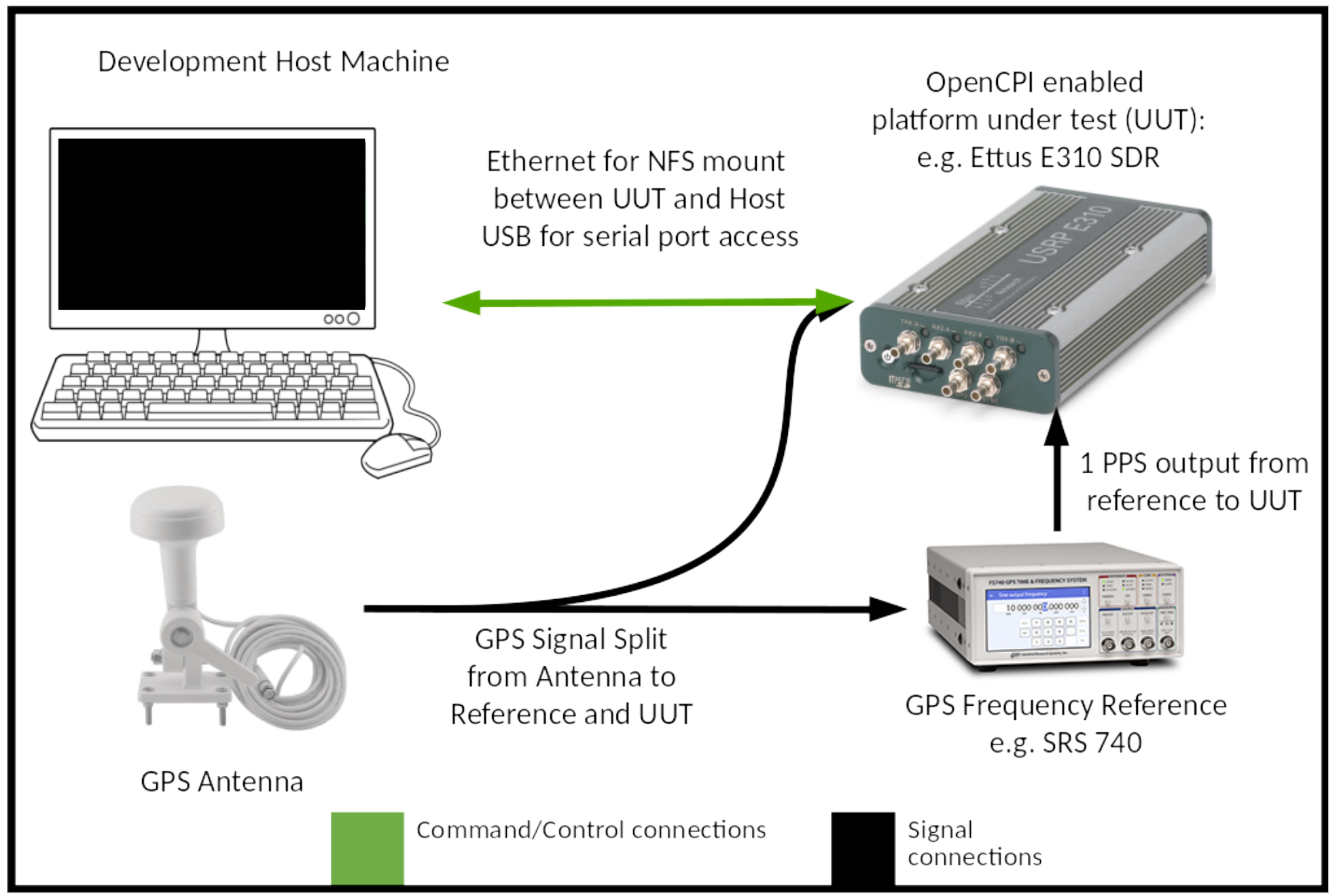
Figure 35: Timestamping Accuracy Measurement
Supporting the Digital Radio Control (DRC) Component Specification
The DRC component is used when an application needs to use radio hardware in the system, for the purpose of controlling it and streaming sample data to and from it. The “digital radio” function in a system usually has antennas for transmitting and receiving RF signals, and channels which convert the RF signals to and from base-band digital samples that are produced and consumed by the application.
Usage of the DRC component by application developers is described in the OpenCPI Application Development Guide. The DRC section of that document should be read as a prerequisite for this section. This section describes how a platform developer can implement support for the DRC component specification on a given system, in order to support SDR applications (applications that need to use radio hardware) on the system.
This support involves writing a system-specific RCC proxy worker that implements the DRC specification, as defined in the file drc-spec.xml. This proxy worker in turn controls the various radio-related devices in the system which are usually supported by FPGA/HDL device workers for that hardware. Radio-related hardware (and thus device workers) can include ADCs, DACs, integrated RF transceivers, clock generators, GPIOs, antenna switching, RF filter banks, power amplifier controls — any hardware that is needed to manage hardware resources that deliver the radio input/output functions as defined by the DRC.
As with all workers, the DRC proxy worker implements its spec (OCS), has an OWD XML file describing it, and has one or more source code files. If the system being supported lives in its own supporting project (OSP), then this worker would normally be in the hdl/devices or hdl/cards subdirectory in that project.
DRC proxy workers usually have the name:
drc_<hdl_platform>.rcc
when the DRC worker is specific to an HDL platform that is attached to radio hardware. If the DRC is specific to a plug-in card with radio hardware, then the DRC worker is specific to that card, but not specific to an HDL platform, and thus would be named:
drc_<hdl_card>.rcc
Preparing the Worker Descriptor XML (OWD) for a DRC Proxy Worker
There are several aspects to preparing a DRC worker’s OWD XML file:
Specifying which properties for controlling DRC configurations notify the worker code when they are written
Specifying the constant property values of the implementation and the associated radio hardware,
Specifying the required slave workers and their properties and interconnections, which will be used and controlled by the DRC proxy worker.
After the OWD XML file is prepared, the worker source code skeleton is re-generated based on the prepared XML when the ocpigen build command is issued.
Specifying Notifications for Properties that Control DRC Configurations
As described in the Properties for Controlling DRC Configurations topic, there are several properties which, when written, change the state of a specified DRC configuration. These are the prepare, start, stop, and release properties. The value of each property is an ordinal indicating which configuration is being controlled, and thus the following lines must be placed in the DRC proxy’s OWD:
<specProperty name='prepare' writesync='1'/>
<specProperty name='start' writesync='1'/>
<specProperty name='stop' writesync='1'/>
<specProperty name='release' writesync='1'/>
<specProperty name='status' readsync='1'/>
These writesync attributes indicate that the worker will be notified when these properties are written. In the case of the last one, the status property, the readsync attribute indicates that the proxy should be notified just prior to the status being queried. This allows the proxy to refresh the status, perhaps based on querying the hardware (i.e. the underlying slave device workers).
Constant Values in the OWD for a DRC Proxy Worker
The DRC spec defines a number of properties that are considered constant values for a given DRC proxy worker. These properties are defined in the OCS in one of two ways:
As an explicitly constant parameter property, defined in the OCS with
parameter='true'and providing a default value that can be overridden in the DRC proxy’s OWD using, e.g.:<specproperty name='MAX_CHANNELS' value='2'/>
As a readable property set in the OCS without
parameter='true', which may be resolved in the worker OWD either by:
Having no mention in the OWD, which implies that the DRC proxy will provide a value at runtime during initialization before or during start.
Specifying in the OWD that the property is in fact a compile time constant by using:
<specproperty name='<prop>' parameter='true' value='12'/>
The following table describes these constant properties and whether they must be constants (upper case) or can be either constants or determined at initialization time.
Name |
Default in OCS |
Description |
|
|
Maximum number of configurations supported. This is not platform-specific. |
|
|
Maximum number of RX or TX channels in any configuration. |
|
|
Maximum number of RX channels in any configuration. This sizes the proxy’s RX port. |
|
|
Maximum number of TX channels in any configuration. This sizes the proxy’s TX port. |
|
|
Number of RX RF ports, as
specified in the |
|
|
Number of TX RF Ports, as
specified in |
|
Names of RF ports capable of RX, first being default. Type is sequence of strings |
|
|
Names of RF ports capable of TX, first being default. Type is sequence of strings |
|
|
Type is |
|
|
Type is |
|
|
Type is |
|
|
Type is |
|
|
Type is |
|
|
Type is |
|
|
Type is |
|
|
Type is |
|
|
Type is |
|
|
Type is |
|
|
Type is |
|
|
Type is |
|
|
Type is |
|
|
Type is |
|
|
Type is |
|
|
Type is |
|
|
Type is |
|
|
Type is |
The slaves element in the DRC Proxy Worker OWD
The second key aspect of a DRC proxy’s OWD is to specify which workers should act as slaves for the DRC proxy along with their property values and interconnections. This is done by defining a slave assembly under the <slaves> element in the OWD. This assembly is quite similar to an HDL assembly and will be described mostly as how it is different from a normal HDL assembly. All the instances in this slave assembly are considered slaves of the proxy and thus are accessible to the proxy worker code as described in the Controlling Slave Workers from Proxies — C++ Language Only topic.
During the execution of an application, when a DRC proxy worker is chosen as an implementation for a DRC component instance in the application, all the slave instances mentioned in the proxy worker’s slave assembly will automatically become part of the application. Any connections among the slave instances also become part of the application.
External ports of the slave assembly are associated with the ports of the DRC proxy itself. This means that all external ports of the slave assembly must have names that correspond to the names of ports of the DRC proxy worker. Thus when the application makes connections to the DRC proxy worker’s ports, those connections are actually connected to the external ports of the slave assembly (and thus to ports of slave instances). We say that the proxy’s ports are delegated to the underlying slave ports.
The slave workers implement “channels”, using some combination of device workers specific to the radio platform and DSP workers doing work that the hardware devices cannot do. Some hardware is more capable than others, so these DSP workers are essentially implementing functionality that might be available in some radio hardware, but is not available in the particular radio hardware present in the DRC’s platform. Instances of device workers must have the same property settings as are specified in the HDL platform or card XML.
To support radios that have multiple channels, the DRC proxy worker’s rx and tx ports are array ports, meaning they act as an indexable set of ports under a single name and direction. Thus when an RX channel is enabled in a DRC configuration, the data will be produced on a slave port that corresponds to (is delegated from) the proxy’s rx port, which has a connection in the application for receiving baseband sample data. On a two-channel radio, the DRC proxy’s port would have an array count of two, and the underlying slave assembly would have different slave workers connected to those two elements of the array port. An application would have different connections to the proxy’s rx port with index='0' for the first channel and index='1' for the second channel. Here is an example of a two-rx-channel slave assembly where two device workers are used to receive two channels of received data.
<slaves>
  .... slave instances ....
  <external name='rx' count='2'/>
  <connection>
    <port name='out' instance='adc0'/>
    <external name='rx' index='0'/>
  </connection>
  <connection>
    <port name='out' instance='adc1'/>
    <external name='rx' index='1'/>
  </connection>
</slaves>
The DRC spec (OCS) already defines the rx port as:
<port name='rx' count='MAX_RX_CHANNELS' producer='1' optional='1'/>
An example of a two-channel DRC proxy is the one for the FMCOMMS2/3 card, found in projects/assets/hdl/cards/drc_fmcomms_2_3.rcc.
Wiring the DRC Proxy Source Code
DRC proxies are RCC workers written in C++, and like all RCC workers, the code skeleton is initially generated based on the OWD for the proxy. There is a helper class for DRC proxies, OCPI::DRC::ProxyBase, that should be used when writing a DRC proxy. The DRC worker class should inherit this helper class. This class is available by including the file OcpiDrcProxyApi.hh, after the line in the file that “uses” the worker’s namespace containing its generated data types. In the example below, for a proxy worker whose name is drc_example.rcc, the extra lines to use this helper class are underlined and colored in blue:
#include "drc_example-worker.hh"

using namespace OCPI::RCC; // for access to RCC types and constants
using namespace Drc_exampleWorkerTypes;

#include "OcpiDrcProxyApi.hh" // must be after "using namespace"
namespace OD = OCPI::DRC;

class Drc_fmcomms_2_3Worker : public OD::DrcProxyBase {
This base class knows about the requirements of the DRC spec, and simplifies the coding for handling the management of the state machine for DRC configurations. It implements all the property notification methods associated with the properties that control DRC configurations, and maintains the state of the configurations according to the defined lifecycle state machine. It defines 5 virtual methods, 3 of which the proxy must implement (start_config, stop_config and release_config) and 2 that the proxy may implement:
virtual RCCResult prepare_config(unsigned config);
virtual RCCResult start_config(unsigned config) = 0;
virtual RCCResult stop_config(unsigned config) = 0;
virtual RCCResult release_config(unsigned config) = 0;
virtual RCCResult status_config(unsigned config);
All these methods take the configuration ordinal as an argument, return an RCCResult type, and can access the configurations using code like this:
RCCResult start_config(unsigned config) {
  auto &conf = m_properties.configurations.data[config];
  ...
and thus, according to how all C++ RCC workers are written, the parts of the configuration structure can be accessed using code like:
auto nChannels = conf.channels.length;
  for (unsigned n = 0; n < nChannels; ++n) {
        auto &channel = conf.channels.data[n];
        ..... channel.tuning_freq_MHz...
The most important method is start_config, which takes the configuration information and sets up the hardware and slave workers to implement the requested configuration and make it operational. The prepare_config method may be used to do any preprocessing on the configuration information to minimize the overhead of subsequent starting and restarting a configuration repeatedly in a multi-configuration (mode switching) application. The prepare_config method must not change any hardware settings that could impair another configuration that was already running, but it could be called to do preprocessing and error checking on the “next” configuration, while a previous configuration was operational, to reduce switching time.
The stop_config is intended to allow currently used channel resources to now be used for a different configuration, while possibly preserving the validation and preparation work previously done. The release_config method indicates that there is no more need for the configuration and that any validation and preparation resources may be relinquished.
This model allows for there to be “preparation resources” used during preparation that do not affect running configurations, and then there are other additional (hardware, channel, etc.) resources that are necessary to make the configuration operational.
Finally, the status_config method is responsible for filling in status for channels in the requested configuration that are not simply copies of what is in the configuration. I.e., the actual hardware value that is within the requested tolerance, but not the exact value requested. Eg.:
RCCResult status_config(unsigned config) {
  auto &conf = m_properties.configurations.data[config];
  auto &status = m_properties.status.data[config];
  for (unsigned n = 0; n < conf.channels.size(); ++n) {
    auto &conf_channel = conf.channels.data[n];
    auto &status_channel = status.channels.data[n];
    status_channel.tuning_freq_MHz = ...
Note that the requested values of each channel are copied into the status for each channel prior to this method being called so only when the actual value varies from the requested value is this method necessary.
- 1
Note that the fractional second PLL in the HTS settles over time, so the highest amount of inaccuracy will occur out of reset. Because of this settling, accuracy measurements must be reported out of reset or immediately following the load of a new FPGA bitstream.