Utility Components for Applications
There are several built-in components that application developers use frequently. These are listed in this section. Their availability on a given platform depends on whether they have been built for that platform and whether artifacts are available in the path specified by the OCPI_LIBRARY_PATH environment variable. That variable is set automatically when the ocpidev tool is used to run applications, but in a runtime-only environment without ocpidev, OCPI_LIBRARY_PATH must be set.
All of these utility components are in the ocpi.core package, so using them usually involves specifying the instance’s component attribute as ocpi.core.<component>. If most of the components in the application are in this package it may be more convenient to simply set the package attribute for the whole application to provide a default prefix.
file_read Component that Reads Data or Messages from a File
The file_read component (ocpi.core.file_read) injects file-based data into an application. It is normally used by specifying an instance of the file_read component, and connecting its output port to an input port of the component which will process the data first. The name of the file to be read is specified in the fileName property.
This component has one output port whose name is out, which carries the messages conveying data read from the file. There is no protocol associated with the port: it is agnostic as to the protocol of the file data and the connected input port.
For details about how to use the file_read component, refer to the data sheet in the ocpi.core project.
file_write Component that Writes Data or Messages to a File
The file_write component (ocpi.core.file_write) writes application data to a file. It is normally used by specifying an instance of the file_write component, and connecting its input port to an output port of the component producing the data. The name of the file to be written is specified in the fileName property.
This component has one input port whose name is in, which carries the messages to be written to the file. There is no protocol associated with the file, enabling it to be agnostic as to the protocol of the file data and the connected output port.
For details about how to use the file_write component, refer to the data sheet in the ocpi.core project.
The Digital Radio Controller (DRC) Component to Use Radio Hardware
The DRC component is used when an application needs to use radio hardware in the system, for the purpose of controlling it and streaming sample data to and from it. The “digital radio” functionality in a system usually has antennas for transmitting and receiving RF signals, and channels which convert the RF signals to and from base-band digital samples that are produced and consumed by the application.
Applications that use the DRC component are usually called SDR (software-defined radio) applications.
SDR application developers use the DRC component by instantiating it in their applications, and setting properties to control and configure radio channel hardware (and possibly some extra hidden components behind the scenes). Applications also make connections to the DRC’s RX (receive) and TX (transmit) data ports to produce or consume baseband digital samples, usually using the complex_short_timed_sample protocol.
The following diagram shows how a typical implementation (worker) of a DRC works. The DRC usually has “slave workers” behind the scenes, controlling radio hardware. These slaves are configured by the DRC to implement channel processing between RF ports and application ports. Channel processing is accomplished by some hardware-specific combination of actual hardware (e.g. RF filters, digital sampling) and some signal processing (e.g. digital down conversion).
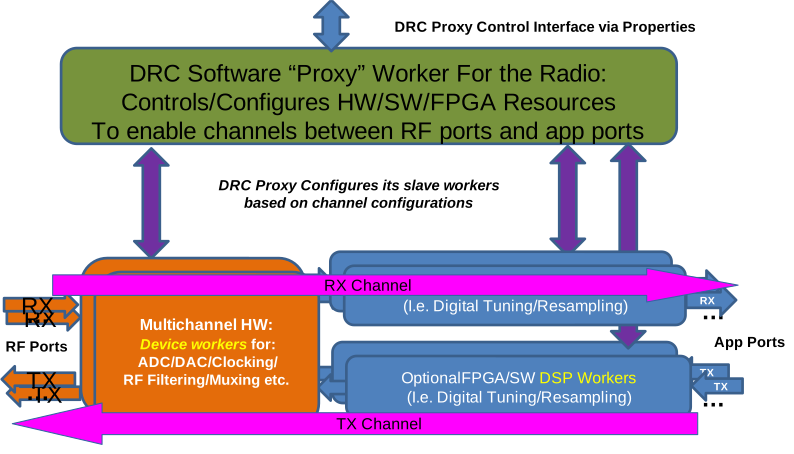
Figure 6: Digital Radio Controller Concept
DRC Properties
Applications may use DRC components statically, where the configuration properties are set only in the application’s XML, or dynamically where an ACI program changes and accesses them during execution. In either case, the primary usage of properties is to configure channels that perform processing between RF antennas or connectors on one side (RF ports) and baseband digital samples data ports (application ports) on the other. In the description below we use the term sequence consistent with how OpenCPI property data types are defined: it is a variable length set of typed values.
Three concepts are used when configuring channels:
An RF port is a source or destination of RF signals, usually with a physical connector or antenna with a label, on the outside of the radio hardware.
An Application port is a source or destination for digital samples of a baseband signal, which communicates to or from the rest of the application.
A Channel is a virtual processing resource that conveys and transforms information between RF ports and application ports. Channels are configured as to their endpoints (RF ports and application ports) as well as the typical radio-related parameters such as sampling rate, bandwidth, and tuning frequency. Channels are virtual in that a DRC may use a combination of various hardware and firmware resources to perform the necessary processing and thus implement the channel.
A Channel Configuration is a set of parameters and identified endpoints (RF and app ports) specifying an operating mode of a channel.
A DRC Configuration is a sequence of channel configurations that are specified, enabled (started) or disabled as a group.
The properties of a DRC component are:
configurations— a sequence of DRC configurations that may be activated.prepare/start/stop/release— used to control individual configurationsstatus— provides for reading back the current status of configurationsconstraints— provides the channel and tuning constraints of the radio.
There are additional properties that allow an application to query for radio attributes like the labels on connectors, or the OpenCPI platform it is running on. These can be used to select a particular radio in environments where there are more than one available.
The Configurations Property Specifies a Set of DRC Configurations
This property is writable both when an application starts and also during runtime. Its value is a sequence of DRC configurations, each of which configures some channels. Writing this property has no side effect: activation is accomplished separately. Each configuration in the sequence is a structure with these members:
Description— an optional string description of the configuration (perhaps describing the mode of the radio when operating under this configuration).Recoverable— a boolean indicating whether errors encountered when enabling the configuration should result in a recoverable error (i.e. not creating application exceptions). Useful in some ACI applications, but default isfalse. When recoverable, a configuration’s status can be queried using thestatusproperty.Channels— a sequence of channel configurations that will be enabled and disabled together when this DRC configuration is enabled/disabled.
A typical static DRC application would have one configuration defined directly in its XML (in the OAS); it would not need a description or be recoverable. It would simply be enabled when the application is started, and the sample data would flow to and from the application ports. An example of such a static configuration is as follows:
<Application>
  <Instance component='drc'>
    <property name='configurations'
              value='{channels {
                       {rx true,
                        tuning_freq_mhz 2450,
                        bandwidth_3db_mhz 0.24,
                        sampling_rate_Msps 0.25,
                        samples_are_complex true,
                        gain_db -25,
                        tolerance_tuning_freq_mhz 0.01,
                        tolerance_sampling_rate_msps 0.01,
                        tolerance_gain_db 1},
                       {rx false,
                        tuning_freq_mhz 2450,
                        bandwidth_3db_mhz 0.24,
                        sampling_rate_Msps 0.25,
                        samples_are_complex true,
                        gain_db -25,
                        tolerance_tuning_freq_mhz 0.01,
                        tolerance_sampling_rate_msps 0.01,
                        tolerance_gain_db 1}}}'/>
    <property name='start' value='0'/>
  </Instance>
  . . . other component instances in the app. . .
</Application>
With the ACI, all configurations can be written at once, individual configurations can be written, individual channels within a configuration may be written, or even individual attributes of the channel may be written. Two examples of writing the gain_db to -23 of channel 1 in configuration 2, would be:
OA::Application app(xml);
app.setProperty("drc", "configurations", "-23",
                {2, "channels", 1, "gain_db"});
OA::Property configs(app, "drc.configurations");
configs.setValue(-23, {2, "channels", 1, "gain_db"});
An example of setting one channel configuration (say #1) within DRC configuration 0, using a text value, would be:
configs.setProperty("rx false,"
                    "tuning_freq_mhz 2450,"
                    "bandwidth_3db_mhz 0.24,"
                    "sampling_rate_Msps 0.25,"
                    "samples_are_complex true,"
                    "gain_db -25,"
                    "tolerance_tuning_freq_mhz 0.01,"
                    "tolerance_sampling_rate_msps 0.01,"
                    "tolerance_gain_db 1",
                    { 0, "channels", 1});
In the above example, commas between members are inside the quotes (in red).
Configurations are not volatile. Their value remains whatever the application last set them to. The status property described below can be read to determine the current state of a configuration (and its channels). The application can change a configuration during execution, since it is only looked at (as a snapshot) when the application requests that a configuration should be prepared or started.
The Channels Structure Member of DRC Configurations
A DRC configuration contains a sequence of channel configurations to be controlled as a group. Each channel in the group is specified and configured via structure members defined in the following table. When specifying a structure in text form, any member not mentioned takes on its default value. All members have a default value or zero, false, or the empty string, depending on their type. Any channel structure member can be accessed as a scalar binary value, using the setValue method (example above).
Name |
Type |
Description |
|
String |
String describing the channel, optional |
|
Bool |
Whether channel is RX (RF port => App port) or TX (App port => RF port) |
|
Double |
|
|
Double |
|
|
Double |
|
|
Bool |
Samples are complex (I/Q) or real. |
|
Double |
|
|
String |
|
|
Double |
|
|
Double |
|
|
Double |
|
|
Double |
|
|
UChar |
Ordinal of RF port among RX
or TX RF ports (depending
on setting of |
|
String |
Radio-specific name of the RF port. Using this is not portable across radios. |
|
UChar |
Ordinal of app port among
the possible RX or TX App
ports ( |
As a default, when rf_port_num and app_port_num are left at their default zero values, the first defined RF and app ports are used. For an RX channel (rx == true), this would be the first RF port that is defined to be capable of reception, and the app port whose name is rx, with an index of zero. For an TX channel (rx == false), this would be the first RF port that is defined to be capable of transmission, and the app port whose name is tx, with an index of zero. See the section on application ports below.
Properties for Controlling DRC Configurations
Each DRC configuration has a lifecycle similar (but not identical) to components in an OpenCPI application. The lifecycle state machine for each DRC configuration is shown in the following diagram:
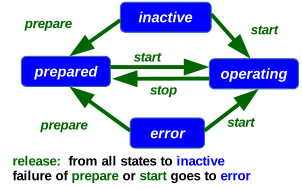
Figure 7: DRC Configuration Lifecycle
DRC configurations begin in the inactive state, where they can be modified by the application without any action being taken by the DRC. The prepare operation performs validation and setup of the channels, without making them operational, and without interfering with any currently operational configuration/channels. A successful prepare operation achieves the prepared state of the DRC configuration. From there, the start operation makes the configuration operational, in the operating state. Using the start operation in the inactive state automatically prepares the configuration.
As shown in the state machine diagram above, the state of a configuration is changed using the following four operations, which are performed by setting these 4 properties, whose name is the name of the operation.
prepare — validate all the channel configurations, and do any additional work to be able to start them quickly as a group. Enter the prepared state.
start — transition to the operating state, with all channels in the configuration configured and operating. If issued in the inactive state, this operation also implies the prepare operation.
stop — revert to the prepared state, where the channel configurations are valid and ready to be (re)started.
release — revert to the inactive state where no assumptions are made about the validity of the configuration, and any preparation resources are released.
All four properties are written with the value being the index of the DRC configuration to be acted upon. Thus starting the first DRC configuration involves writing a zero to the start property. In the XML example above, there is the setting:
<property name='start' value='0'/>
The above starts configuration 0, when the overall application is started. This operation, when defined in the XML, is deferred until the application is started. With an ACI program, dynamic controls are possible. For example, to disable configuration 1 and enable configuration 0, would be (assuming the OA namespace is OCPI::API):
OA::Application app(xml_filename_or_string_with_drc_instance);
app.initialize();
app.start();
OA::Property start(app, "drc", "start"), stop(app, "drc", "stop");
...
stop.setValue(1);
start.setValue(0);
The Status Property for Reading the Actual State of DRC Configurations
This volatile property is used to find out the exact state of the DRC configurations. Its value is similar to the configurations property in that it is a sequence of structures, one per DRC configuration, and within each each of those, is a sequence of structures for the status of each channel in the configuration.
While the configurations property is what is being requested, the status property is what has been achieved. For each DRC configuration (structure) in the configurations property (sequence), there is a structure in the status property (sequence), with
a
statestructure member (an enumeration value for the state:inactive,prepared,operating,error)an
errorstructure member (a string value describing why the error state was entered), anda
channelsstructure member which is itself a sequence of structures with members describing the actual values of each channel when the DRC configuration is in thepreparedoroperatingstates.
Upon a successful prepare or start operation, these values should be within the requested tolerance specified in the configurations property for that channel.
Name |
Type |
|
Double |
|
Double |
|
Double |
|
Bool |
|
Double |
|
String |
Properties for Describing a DRC’s Static Attributes
The constraints property is a readable set of radio capabilities that the application may use to know what the radio is capable of, and based on that, the application can either produce useful error messages, or possibly adjust the configurations being requested based on those constraints. Also, in an environment with multiple radios, these attributes may be used to assign different tasks to different radios based on what they are capable of.
The value of this property is a sequence of constraint structures describing the radio’s capabilities when using each of its RF ports for a particular direction. The members of each constraint structure are:
Name |
Type |
|
String |
|
Boolean mode of using the RF port |
|
Sequence of min/max double values |
|
Sequence of min/max double values |
|
Sequence of min/max double values |
|
Boolean “real” and “complex” members |
The members that are sequences of min/max values are sequences of ranges representing the feasible ranges of values supported by the radio when using the given RF port in the given direction. The ranges can specify multiple, different, non-overlapping feasible ranges for the attribute in question.
The RX_RF_PORTS and TX_RF_PORTS Properties for RF Port Names
These two properties are both sequences of strings that are the names of the RF ports on the radio which are capable of RX or TX respectively. An RF port name can be in both lists if the radio can be configured to receive and/or transmit from that one RF port. The rf_port_num members of the channel configuration structure are used to index into these sequences. The first in each list is the default (index 0).
The MAX_RX_CHANNELS and MAX_TX_CHANNELS Properties
These allow the application to know the maximum number of simultaneously enabled (operating) channels that are possible in each direction.