HDL Assemblies for Creating Bitstreams/Executables
An HDL assembly is a fixed composition of HDL application workers that can act as a whole or part of a heterogeneous OpenCPI application. It is built to create different FPGA bitstreams for different FPGA platforms. It will execute as part of some OpenCPI application with its workers being a subset of the workers in the application.
This section describes how to define and build (synthesize) these assemblies and to ultimately turn them into bitstreams. When the target HDL platform is a simulator, we use the term executable while when the target is an actual physical FPGA, we use the term bitstream. In both cases there is a single resulting standalone OpenCPI artifact file that is ready for loading and execution.
Creating an artifact from an assemblies is basically: implementing the assembly for a specific platform with a specific configuration of devices.. More specifically, it is combining the defined assembly of HDL workers with a platform configuration to create an HDL container that is then transformed into a bitstream/ executable. This was shown above in the build hierarchy in the The HDL Build Hierarchy topic.
The container is the outer module that contains the HDL assembly as well as the platform support modules in the platform configuration.
Assuming that the platform configurations already exist, the steps taken to go from the assembly (described in XML) to a bitstream are:
Describe the assembly in XML, specifying application workers and connections between them.
Select the platform configuration that the assembly will be implemented on.
Specify how the assembly’s external ports connect to the platform (i.e. to an interconnect like PCIe for off-platform connections, or to local devices). This is “defining the container”.
Run ocpidev build to generate the bitstream.
In most cases, steps #2 and #3 above are automatic and use defaults. A quick example, typically used for unit testing would be an assembly file containing a single worker:
<HdlAssembly>
  <Instance Worker="bias_vhdl" externals='true'/>
</HdlAssembly>
This above example specifies that the assembly consists of a single worker whose ports become the external ports of the assembly. HDL assemblies are created using the ocpidev tool.
Creating an OpenCPI HDL Assembly
ocpidev create hdl assembly
Create an OpenCPI HDL Assembly.
Usage:
$ ocpidev create hdl assembly [OPTIONS] NAME
Arguments:
NAME: [required]
Options:
-p, --project Project: Specify the Project that the asset resides in.--exclude-platform Platform: Do not allow building asset for specified platform. May be used more than once.--only-platform Platform: Only allow building asset for specified platform. May be used more than once.--exclude-target HDL Target: Do not allow building asset for specified HDL target. May be used more than once.--only-target HDL Target: Only allow building asset for specified HDL target. May be used more than once.--help: Show this message and exit.
Example:
$ ocpidev create hdl assembly myassy
The above example creates a directory in the project’s hdl/assemblies directory, with the name of the assembly (myassy), containing an initial HDL assembly XML file myassy.xml. The name of the XML file is simply the name of the assembly, with the “.xml” file extension. This command can be issued in the project directory or the hdl/assemblies directory of a project. When the command is issued for the first time in a project, the hdl/assemblies directory itself will be created, with its own XML file: assemblies.xml. Thus after creating the first HDL assembly (called first) in a project, and building it for the zed platform, the directory structure would be:
hdl/assemblies/                   # Directory for all assemblies
  assemblies.xml                  # XML for all assemblies
  first/                          # Directory for first assembly
    first.xml                     # XML file for the first assembly
    -- from here down is results from building for zed --
    gen/xyz—assy.v                # generated assy structural hdl
      -- other generated files --
    target-zynq/                  # synthesized assembly build dir
    container-first_zed_base/     # container dir for first on zed
      gen/first_zed_base-assy.vhd # generated top level vhdl
        -- other generated files --
    target-zynq/                  # final bitstream build directory
      first_zed_base.bitz         # final bitstream/executable file
The actual steps taken by the OpenCPI scripts and tools, to create a bitstream or executable from an assembly, are:
Generate the Verilog/VHDL code that structurally implements the assembly.
Build/synthesize the assembly module, that has some “external ports”.
Generate the Verilog/VHDL container code that structurally combines the assembly and platform configuration, as well as any necessary additional device workers (that are not already in the platform configuration).
Build/synthesize the container code, incorporating the assembly and platform configuration. This is the top level module.
Run the final tool steps to build the bitstream (map, place, route, etc.).
The assembly, platform configuration and container are all in the same namespace and thus must have distinct names. This constraint will be removed in a future release.
HDL adapters will automatically inserted as needed in both steps 1 and 3.
This process is run for all platforms specified with the --hdl-platform option to ocpidev build.
This results in an artifact file, with the suffix .bitz, which can be used at runtime when executing OpenCPI applications. This file is based on the vendor-tool-specific output files like .bit for Xilinx and .sof for Altera, which are also in the container/bitstream build directory. Those files are not used by OpenCPI after the .bitz file is created.
The HDL Assembly XML file
The assembly is described in an XML file containing an HdlAssembly top-level XML element, which contains worker instances, property/parameter settings, connections and external ports . It is similar to the Application XML file that describes the whole OpenCPI heterogeneous application (as documented in the OpenCPI Application Development Guide).
The XML file is generated initially when the ocpidev create hdl assembly command is issued.
The worker instances (instance subelements of the HdlAssembly) reference HDL workers in some component library, and optionally assign names to each instance. The worker attribute is the worker’s OWD name (without directory or model suffix), and the optional name attribute is the instance name. Worker names can include package prefixes to select workers in different libraries or projects. When not specified, instance names are either the same as the worker name, without any package prefix (when there is only one instance of that worker in the assembly), or the worker name followed directly by a zero-based decimal ordinal (when there is more than one instance of the same worker).
Connections among workers in the assembly can use connection XML elements or a more compact shorthand described next. The connection elements define connections among worker data ports. A trivial example would be:
<HdlAssembly>
  <Instance Worker="generate"/>
  <Instance Worker="capture"/>
  <Connection>
    <port name='out' instance='generate'/>
    <port name='in' instance='capture'/>
  </Connection>
</HdlAssembly>
For convenience, internal connections between the output of one instance to the input of another can simply be expressed using the connect attribute of the instance, indicating that the instance’s only output should be connected to the only input of other instance whose name is the value of the connect attribute. The example above can be written as:
<HdlAssembly>
  <Instance Worker="generate" connect='capture'/>
  <Instance Worker="capture"/>
</HdlAssembly>
Furthermore, when this shortcut is used, you can specify the “from” port using the from attribute, and the “to” port using the to attribute. If these instances had multiple other input and output ports, you can also specify it this way:
<HdlAssembly>
  <Instance Worker="generate" connect='capture' from='out' to='in'/>
  <Instance Worker="capture"/>
</HdlAssembly>
To specify external ports, where the data is flowing into or out of the assembly itself, the external element is used, which allows the name of the external port to be different from the worker port it is connected to:
<HdlAssembly>
  <Instance Worker="generate" connect='process' from='out' to='in'/>
  <Instance Worker="process"/>
  <external name='procout' instance='process' port='out'/>
</HdlAssembly>
But there is also a shortcut when the external port name is the same as the worker’s port name, by simply using the external attribute of the instance:
<HdlAssembly>
  <Instance Worker="generate" connect='process' from='out' to='in'/>
  <Instance Worker="process" external='out'/>
</HdlAssembly>
To specify that all unconnected ports of a worker should be made external ports of the assembly, you can use the externals boolean attribute. E.g., if the assembly is in fact a single worker where both in and out ports should be external, you would only need:
<HdlAssembly>
  <Instance Worker="process" externals='true'/>
</HdlAssembly>
This is a common use case for unit test assemblies used to test single HDL workers.
Below is a diagram of a simple assembly, and the corresponding HdlAssembly XML file. The application has a switch worker that accepts data either from its in0 or in1 interface, and sends the data to its out interface. The delay worker sends data from in to out implementing a delay-line function that requires memory. The split worker takes data from its in interface and replicates it to both its out0 interface as well as its out1 interface. The HDL assembly has 4 external ports (ADC, SWIN, SWOUT, DAC).
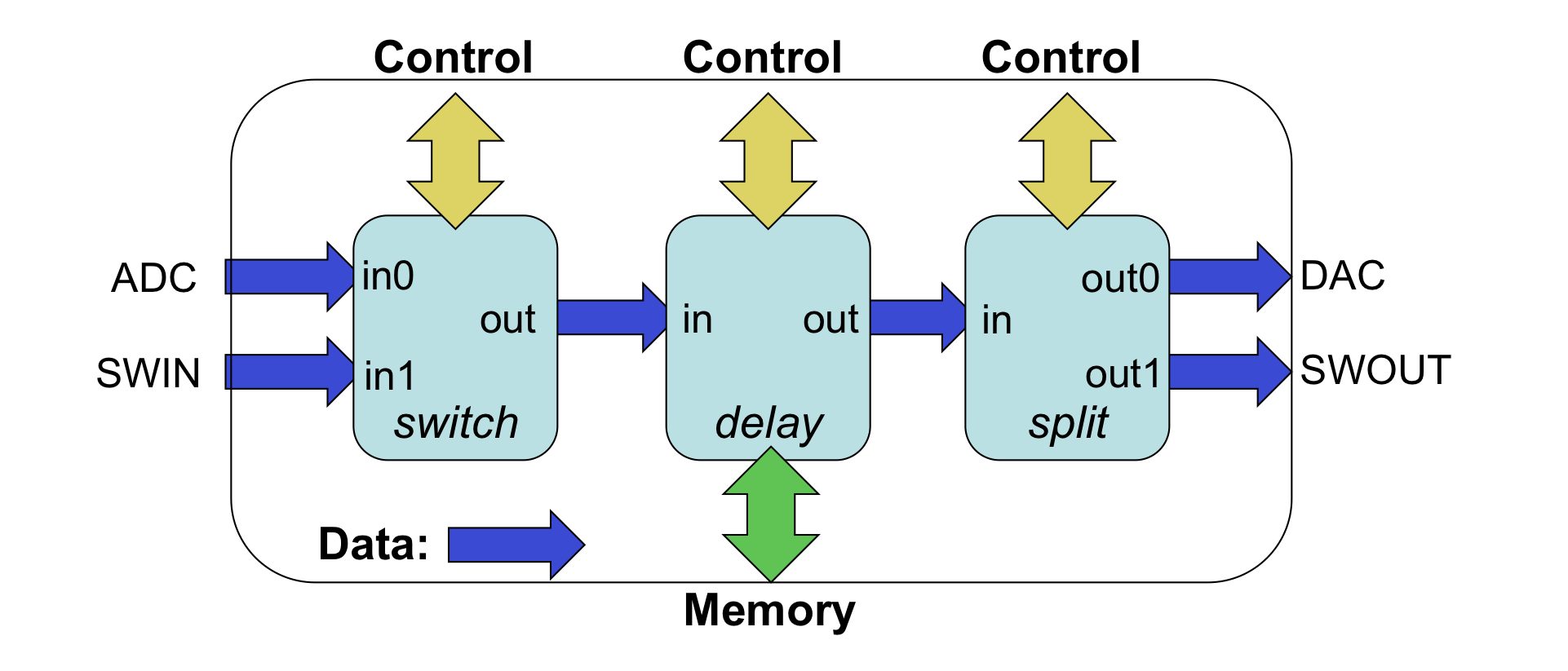
Figure 21: Example HDL Assembly
Given that these three workers are already in a component library, the XML description of the example is below. It uses the external elements rather than simply adding the externals='true' to the switch and split workers because the external ports of the assembly have different names than the corresponding worker ports.
<HdlAssembly>
  <Instance Worker="switch" connect="delay"/>
  <Instance Worker="delay" connect="split"/>
  <Instance Worker="split"/>
  <External name='adc' instance="switch" port="in0"/>
  <External name='swin' instance="switch" port="in1"/>
  <External name='dac' instance="split" port="out0"/>
  <External name='swout' instance="split" port="out1"/>
</HdlAssembly>
The OpenCPI Framework has a limit of 127 indexed workers within an assembly. This limit includes any infrastructure workers that are assigned index values. For example, the platform and timeserver worker will be assigned index values and do not appear in the Assembly XML file. Therefore, the HDL Assembly XML file can have a maximum of 127 workers minus the number of infrastructure workers the design will use.
Assembly XML Attributes for Building the Assembly
The assembly’s XML file can specify in top-level attributes various options when the assembly is built. A common attribute, ComponentLibraries, is used to specify where the workers should be found to make the assembly. An assembly XML file for the above application might be:
<HdlAssembly ComponentLibraries='testcomps'>
  --- instances, connections, externals ---
</HdlAssembly>
In this case the assembly’s workers will be found in the indicated component library, or other libraries in the search path, described earlier in the HDL Search Paths when Building topic. This attribute can also be set in the hdl/assemblies directory XML file assemblies.xml to apply to all the assemblies in that directory (see just below), or in the project’s Project.xml file.
While HDL primitives and workers are built for FPGA part families, indicated using ‑‑hdl-target options to ocpidev build, HDL assemblies are built for specific HDL platforms, using --hdl-platform options. The platform includes specific devices attached to the FPGA as well as other specific FPGA attributes. In general, anywhere that --hdl-target is used, --hdl-platform can be used, since a platform implies a target. The attributes suitable for HDL assembly XML files are:
Attribute Name
in HDL Assembly
|
Usable as default in
assemblies.xml file? |
Description |
|
Y |
A list of component libraries to search for the workers in the HDL assembly (in order) |
|
Y |
An exclusive list of platforms for which this assembly (and default containers) should be built. |
|
Y |
A list of platforms for this the HDL assembly should not be built. |
|
N |
A list of containers to build for this assembly (name of local XML files for containers, without suffix) |
The hdl/assemblies directory of a project acts as a sort of library of assemblies. This XML file assemblies.xml in the hdl/assemblies directory is automatically created when the first HDL assembly is created, as:
<assemblies/>
If the assemblies in this directory should not all be built, or should be built in a particular order, the Assemblies attribute can be set to a list of assemblies to be built in the specified order.
Specifying the Containers that Implement the Assembly on Platforms
The container is the top-level module and implements the assembly on the platform. Separating the assembly from the container in this way keeps the assembly portable and hardware-independent (assuming the workers are). The assembly’s external input and output connections are unspecified until it is implemented in a container on the platform. By itself, the HDL assembly is usable in a simulation testbench, when it is built for a simulation platform.
In an assembly’s XML file, containers are specified in two ways. The first is default containers. Default containers are generated by looking at the assembly, and connecting all the external ports to the platform’s interconnect (e.g. PCI Express or SoC AXI buses). Thus the implicit default container specification is to connect every external port of the assembly such that it connects external to the HDL platform, to connect to workers running on containers on other platforms. Using the previous assembly example, the default container would implement the assembly with all 4 ports (ADC, SWIN, DAC, SWOUT) connected to the platform’s interconnect.
The optional DefaultContainers attribute is used to list platform configurations for which default containers (and thus bitstreams) should be automatically generated for this assembly. The format of the items in this list is <platform> or <platform>/<configuration>. If this attribute is defined as empty:
DefaultContainers=''
no default containers are built for this assembly. If the DefaultContainers attribute is not set at all (not mentioned in the assembly’s XML file, the default situation), then default containers (and bitstreams) will be generated for whatever platform the assembly is built for. In this case the platform configuration is assumed to be the base platform configuration for the platform (the one with no device workers at all).
Based on these defaults, if nothing is said at all about containers in the XML file, default container bitstreams will be built for whatever platforms are mentioned in the ‑‑hdl‑platform options to ocpidev build. In many cases this default case is all that is required (no container attributes at all).
Default containers are used to connect the external ports of the assembly to the single system interconnect of the platform. I.e. if there are multiple interconnects (say PCIe and Ethernet), or if connections to local devices are required, then a container must be specified in its own XML file. The Containers attribute specifies a list of containers (with container XML files) that should be built in addition to those indicated by the DefaultContainers attribute (or absence thereof). The Containers attribute does not suppress the building of the default containers.
This example assembly XML file relies only on the component libraries specified in search paths, or in the ComponentLibraries attribute setting in the hdl/assemblies/assemblies.xml file, and builds default containers for whatever platform is specified using the --hdl-platform option. It is essentially what is generated automatically by the ocpidev command.
<HdlAssembly>
  -- instances, connections, externals --
</HdlAssembly>
An XML file that builds a default container on the zed base platform configuration and the cfg_1rx_0tx configuration of the zed platform, and further generates a specific container called in_2_adc for connecting some external port to the ADC device on that latter platform configuration, might look like:
<HdlAssembly DefaultContainers='zcu104 zed/cfg_1rx_0tx'
             Containers='in_2_adc'>
  -- instances, connections, externals --
</HdlAssembly>
HDL Container XML files
A container XML file is required to connect to multiple interconnects (or not the first one) or to make connections to local devices. The top-level element of the container XML file is the HdlContainer element. It may have these attributes: platform, config, constraints, onlyPlatforms, excludePlatforms, pipeline.
The first three provide specific information as to which platform, platform configuration, and FPGA tools constraints file should be used for this container. These are common when a container is indeed specifically designed for a particular platform and configuration.
The onlyPlatforms and excludePlatforms, allow a container to be (re)used for multiple platforms by specifying which platforms are suitable for the container. Wildcards can be used in these platforms, which normally specify all simulator platforms using the value: *sim.
pipeline configures pipeline elements inserted in auto-generated busses to control the trade-off between timing closure and utilization.
HDL Container XML Top Level Attributes
The top level of the HDL Container XML can have the XML attributes in the table below. All are optional, and all are of string type.
HdlContainer Attribute Name |
Description |
|
The platform to use for this container. Used when the container is specific to one platform. |
|
The platform configuration to use, possibly for
more than one platform if multiple platforms have
the same platform configuration name (e.g. the
default, or |
|
The constraints file to use, possibly for more than one platform if multiple platforms have the same constraints file name (even with different suffixes). Suffixes are optional. Typically placed in the assembly’s directory. |
|
A comma-separated list of platforms or wildcard
strings to specify all the platforms this
container could be built for. E.g. |
|
A comma-separated list of platforms or wildcard
strings to specify all the platforms this
container should not be built for. E.g. |
|
A space-separated list which describes where in auto-generated busses pipeline elements are inserted. |
HDL Container XML config attribute
The config attribute specifies which platform configuration should be used when building this container. The platform configuration usually specifies which devices should be present and which constraints files (and parameters for them) to use. A platform configuration is needed when the default one (called base, which has no devices) is not appropriate. Containers should use (and share) platform configurations whenever possible (and not indicate constraints files directly) since this reduces duplications and maintenance when the devices and constraints are replicated unnecessarily in different container XML files.
HDL Container XML constraints attribute
The constraints attribute indicates a constraints file to be used when building the container (bitstream). Constraints files are typically associated with platform configurations and not containers, but this attribute allows overriding whatever constraints file is already associated with the indicated platform configuration (via the config attribute). When no constraints file is indicated here or in the platform configuration, the default one is used, whose name is the platform name (followed by the appropriate suffix. e.g. .xdc).
The constraints attribute can apply to multiple platforms, and since it does not need a suffix (the suffix is implied by the tool needed for the platform), it can apply to different platforms that use different tools. An example, showing that the same constraints file being used for different platforms with different tools and different suffixes is:
<HdlContainer onlyPlatforms='zed,zed_ise' constraints='myconstraints'/>
For zed (using the Vivado tool set) the file would be myconstraints.xdc, while for zed_ise (using the ISE tool set) the file would be myconstraints.ucf.
As with the constraints attribute of platform configurations, the file name can be followed by parameters supplied to the constraints file using the “URL query” syntax where a ? character separates the file name from <name>=<value> parameters. The & or ; characters can be used between <name>=<value> parameters, although the & is less convenient since it must be escaped as & in XML. An example is:
<HdlContainer constraints='my-constraints?rx=1;mode=5'>
The parameters are set as global variables that can be accessed in the constraints file itself.
HDL Container XML pipeline attribute
This attribute is used to add or remove pipeline elements in busses which are generated by OpenCPI. It is useful for closing timing on fast clock designs.
Use of this attribute requires knowledge of the infrastructure that OpenCPI generates to transfer data between workers and the boundary of the FPGA. This is different between the data plane (ports) and control plane (properties). Both are illustrated in the following figure.

Figure 22: Infrastructure generated by OpenCPI
Data plane data is transferred from other containers to the application using the ‘Scalable Data Plane’ (SDP) bus. The SDP bus is responsible for transferring data from the platform worker and routing it to the appropriate port on the appropriate worker. It has a daisy chain topology. Namely, each SDP channel exported by the platform worker is connected to a chain of sdp_node workers. Each sdp_node splits off one SDP channel and connects it to either an sdp_send or sdp_receive worker, which implements the SDP protocol and presents a WSI slave or master port respectively to the application. The daisy chain topology means that in a large design the SDP chain may traverse a long distance across the FPGA, and the combinatorial paths within and between nodes can become critical. Additional pipeline stages can be inserted at several points in this chain to break up these paths, as described in the table below.
If the platform worker does not provide a dedicated control plane port, the control plane is instead implemented on top of the data plane using additional workers in the container. Control plane pipelining is only applicable on platforms where the control plane is implemented over the data plane. In the example above the platform worker does provide a dedicated control plane port so the pipelining is not applicable.
Additional pipeline stages can be configured in two ways:
by setting the
pipelineattribute on theHdlContainerXML elementby setting the
OCPI_HDL_CONTAINER_PIPELINEenvironment variable
The pipeline attribute takes precedence over the environment variable. If neither is set then the default value, DATA, applies.
Both accept the same space-separated list of option tokens. Any combination of the following options is valid. Values are case-insensitive.
Option |
Effect |
|
Inserts an |
|
Inserts an |
|
Inserts an |
|
Enables |
|
Disables all pipeline insertion, including the |
For most Zynq-based designs, starting with ALL is a reasonable first step when facing timing closure issues caused by the data plane. The DATA option (the default) addresses the path between the split/join node and the DMA workers. Adding NODE addresses the path along the daisy chain itself and is particularly critical on large designs or when there are many nodes in the chain. CONTROL is not applicable on Zynq platforms.
HDL Container XML connection Child Element
These connection elements specify connections among external ports of the assembly, devices on the platform, and interconnects of the platform. Connection elements have these attributes:
external: specify an external port of the assemblydevice: specify a device on the platform or on a cardinterconnect: specify an interconnect on the platform, or*for the only oneport: specify the device’s port (required when device has more than one data port)otherdevice: specify a second device for device-to-device connectionsotherport: specify the otherdevice’s port for device-to-device connectionscard: specify a type of card that a device is on (required if device is not part of the platform, i.e. not defined in the platform’s XML)slot: specify the slot that a card is plugged into for a device (required when the card is supported in more than one of the platform’s slots)
Using these attributes you can specify connections between:
external and interconnect
external and device
interconnect and device
device and otherdevice
Device-to-device connections are currently only supported when neither is on a card, or both are on the same card.
In a case where the in of the assembly connects to a locally attached adc device, but the out of the assembly is attached to the interconnect for communicating to other FPGAs or software containers, you would have:
<HdlContainer platform=' zed' config='zed_conf1'>
  <connection external='in' device='adc'/>
  <connection external='out' interconnect='pcie'/>
</HdlContainer>
The connection to the adc device will be resolved in one of two ways:
if the
adcdevice was already included in thezed_conf1configuration of thezedplatform, then thatadcdevice instance will be usedIf not, then the
adcdevice logic would be instantiated in the container itself, and used there
Service Connections in a Container
OpenCPI HDL workers have three types of ports: control, data, and service. Service ports are connected locally in the container to provide the required services to workers. Service ports are implementation-specific for a given worker and thus not found in OCS files. I.e., the worker declares what services it needs for its particular implementation. The services currently defined are memory and time (time of day).
If workers in the assembly have service ports, they automatically become external ports of the assembly, but not for data. When generating a container, all services required by the assembly, as well as any services required by device workers instanced in the container, must be satisfied by instancing the appropriate service modules in the generated container code.
Time service requirements (based on timeinterface elements in the worker’s OWD) are satisfied by:
instancing a time client module for each worker that needs “time of day”, and
connecting that time client to the timekeeping infrastructure on the platform
Each time client is instanced based on requirements of the associated worker’s time port, as specified by the timeinterface element in the worker’s OWD.
Memory service requirements [which are currently not supported as of this writing] are satisfied by instancing either private BRAM modules (private to the worker) or instancing external memory access interfaces connected to device workers for external memory. Memory access may also be multiplexed to support multiple workers sharing the same memory. Note that such memory services are unrelated to data message buffering used to connect workers together or connect them to devices and interconnects.
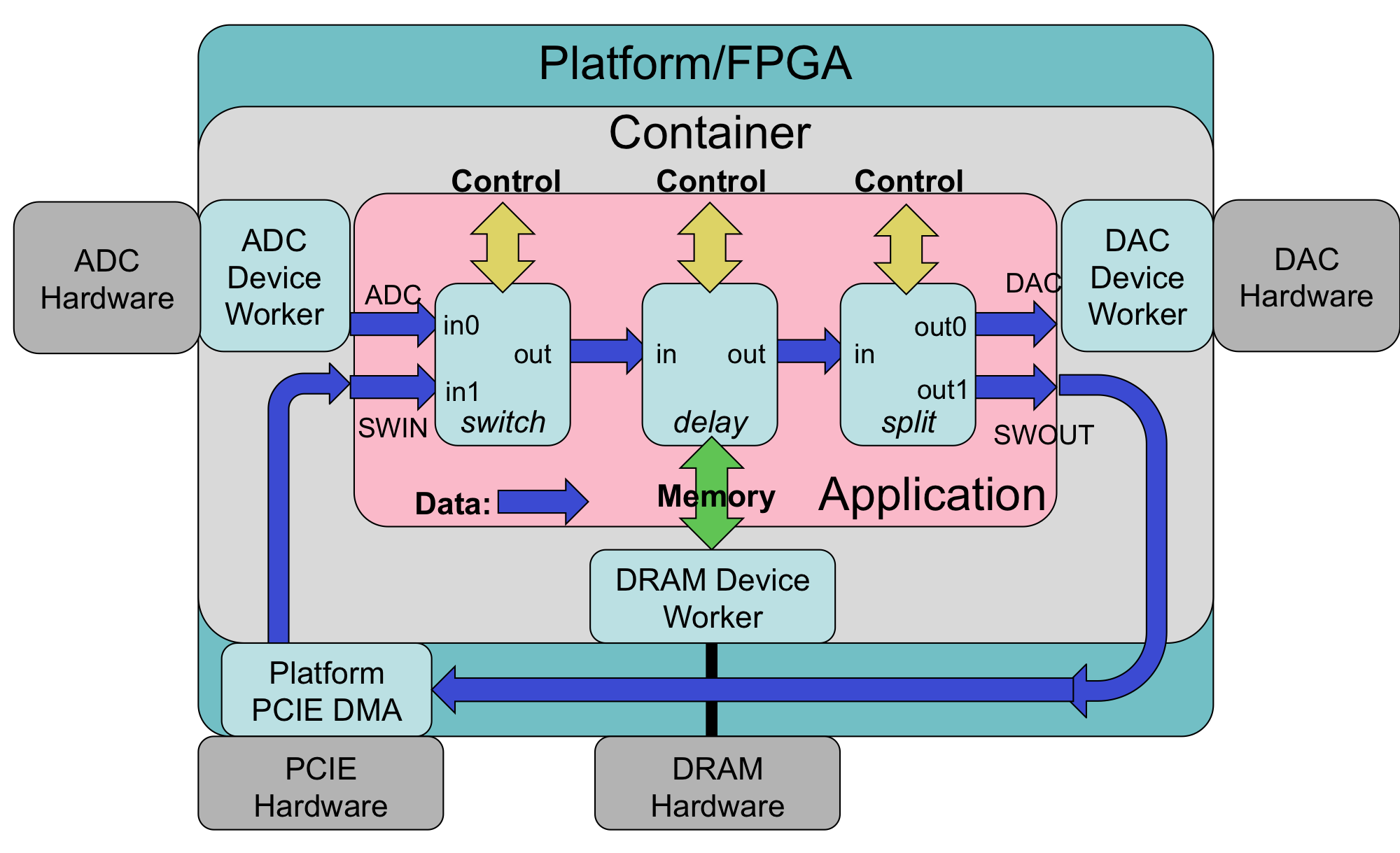
Figure 23: OpenCPI HDL Assembly on Container and Platform
Preparing the Bitstream/Executable Artifact File
This section describes how the container build process injects metadata into the resulting artifact file. There is no user control over this process, but it is useful to understand for troubleshooting purposes. Containers are built into bitstream/executable files by the FPGA back-end place-and-route or simulation tools. These tool-specific files are then post-processed into a generic .bitz file that acts as an OpenCPI artifact for application execution. This post-processing always compresses the tool-specific output files using gzip.
This post processing also uses an artifact XML file that is generated and describes what is in the bitstream/executable. This information includes the contents of the platform configuration, the assembly, and the container. The post-processing attaches artifact XML to the file in two ways.
The first is that the XML is compressed and embedded into the logic of the bitstream in a block memory. This allows OpenCPI software to extract it when the bitstream is loaded in an FPGA. It enables software to know what is in the bitstream without knowing or having access to the file it was originally loaded from. E.g., if the FPGA was booted from a flash memory attached directly to the FPGA and not accessible to software, software can still retrieve this information and know how to use the bitstream. The ocpihdl tool, described in The ocpihdl Command Line Utility for HDL Development topic, is used to manually query this embedded information for troubleshooting purposes.
The second way the XML is attached to the file is outside the FPGA configuration logic, but attached to the bitstream (.bitz) file so that it can be retrieved from the file generically, regardless of the FPGA or simulation tools used to create the file. This allows software to know what is in the file, without it being loaded into a device, and without knowing any other files or locations that the artifact file came from. It makes the file self-describing. This attached XML is the same for all artifact files for all authoring models. The ocpixml command-line tool is used to extract this XML data into a separate file for examination.
In summary:
target-specific FPGA or simulation tools create the raw container output file
this file has embedded artifact XML in an initialized block memory
this file is compressed
the artifact XML is then attached to the compressed file like all other artifact files
Artifact files are installed in an OpenCPI runtime directory as referenced by the OCPI_LIBRARY_PATH environment variable. They are in the format expected by the internal OpenCPI mechanisms to load bitstreams onto platforms at runtime.
All artifacts built in a project are available in the artifacts/ subdirectory of the project, and when exported from the project (if requested in the project’s Project.exports file), in the exports/artifacts/ directory.
These directories can be placed in the OCPI_LIBRARY_PATH environment variable that is used to find artifacts when executing OpenCPI applications. The ocpidev run command and the unit testing framework do this automatically when running applications or unit tests. When not using these, setting OCPI_LIBRARY_PATH is required.
How Clocks are Connected in an HDL Assembly or Container
Every connection in an assembly or container is in some clock domain. When workers are written using the control clock for data interfaces, the connections are in that clock domain. If one worker (A) specifies that there is a clock input signal on a data interface, implying that it can accept any clock, then the clock domain of the connection is determined by the clock at the other end of the connection (B), and the appropriate clock signal is fed into (A). Note clock handling is independent of data flow direction.
There are three cases to determine the clock domain of the connection when one end takes a clock as input (interface A):
If the interface (B) at the other end of the connection has no declared clock, then the control clock is used for that connection and fed to (A).
If the other end (B) has a clock output signal (i.e.
clockDirection='out'), that clock signal will be fed into worker A’s interface and will thus be the clock for the connection.If that other interface (B) uses a clock from another one of its worker’s ports (i.e. it has a
clockattribute set to that other interface’s name), then the clock for the connection is in fact the clock used at the interface at (B)’s worker, indicated by thatclockattribute.
Clock associations are transitive: when the clock is set for (A), and another interface on the same worker specifies that it uses (A)’s clock (using the clock attribute), then that automatically determines the clock domain for any connection on that other port.
For worker ports in an assembly that are promoted to be external ports of the assembly, the clocking of the external port is inherited from the clocking of the worker port. Finally, if the clocks at both ends of a connection are determined to be different clocks, a clock-domain adapter is inserted into the connection.
These capabilities allow parts or all of assemblies to have a “data clock” independent of the control clock. Using the example where all ports are in a data clock domain with the clock supplied on one of its ports, all connected workers in the assembly that have independent data clocks will all be running their data ports and processing in that separate clock domain. By using the convention that input ports accept input clocks, all connected workers will simply propagate their clock domains.
The OpenCPI infrastructure for streaming data into and out of the the platform/FPGA (the SDP) is in a platform-defined clock domain separate from the control clock. Thus if all workers in the assembly are split-clock workers, then the entire data flow is in that SDP clock domain. An example in the core project (in projects/core/components/bias.test, when built for unit testing), is the unit test assembly for the bias_clock.hdl worker found in:
gen/assemblies/bias_clock_0
The assembly uses the bias_clock.hdl worker as well as two other unit test infrastructure workers, metadata_stressor.hdl and backpressure.hdl. Since all three workers are split-clock, the input to the assembly carries the clock for the whole assembly, as shown in:
gen/assemblies/bias_clock_0/gen/bias_clock_0-assy.v
When this assembly is deployed in the default container, the data clock for the assembly is connected to the SDP’s clock, separate from the control clock.
[ Use a better example, and use a diagram]