HDL Workers
This section describes how to write an HDL worker, and defines what distinguishes HDL worker development from developing workers using other authoring models. It builds on the worker development section in the Component Development Guide (CDG) that describes what is common to building workers for all authoring models.
HDL workers can consist of a single standalone source code module or reference and instantiate lower level models: HDL primitive libraries and HDL primitive cores. In either case a worker is compiled and (when appropriate) synthesized for a given HDL Target, as described in detail in the HDL Build Targets topic. HDL worker source code cannot reference other workers.
Execution Model for HDL Workers
An HDL worker executes when enabled from its control interface. When not in the operating control state a worker should only execute in response to control operations. When in the operating state, it is expected to operate continuously until a control operation changes its state (via stop or release control operation). As a convenience, the code generated worker “shell” has its own implementation of the start control operation and sets the is_operating signal accordingly. See the figure in the The Authored Worker: the VHDL Architecture or Verilog Module Body topic. It is strongly recommended that every worker use that signal to enable its operation. Execution of workers normally processes data arriving at input ports and produces data at output ports, possibly changing the values of volatile properties.
All workers are provided a reset signal, which is guaranteed to be asserted for at least 16 control clock cycles. If a worker needs more time or clock cycles to perform its initialization, then it must implement the initialize control operation as described in the Life Cycle/Control Operation Signals in the Control Interface topic.
Clocking and Clock Domains in HDL Workers
All HDL workers are provided the control clock which is used to control the operating state of the worker, access property values/registers, and may be used for data processing. However, this default single clock may restrict performance in some cases since the control clock may not be the fastest clock rate that the logic can support.
Workers may be written with different clocks used at different ports, allowing some to operate at clock rates different from the control clock. It is common for all data interfaces to use the same data clock that is different from the control clock. In some cases different data interfaces could use different clocks, all different from the control clock. Workers can also internally generate clocks that are used with one or more of its data interfaces.
It is up the worker author to perform appropriate clock domain synchronization inside the worker between control signals using the control clock and signals operating using other clocks. In many cases the only signals that might need to “cross a clock domain boundary” inside such a worker are:
the control
resetandis_operatingsignals, when used by logic operating in a data port clock domain.volatile property values, where the values are created in the data interface clock domain, and are read by the control interface using the control clock.
writable property values, where new values are written to the worker from the control clock domain and the values are used in the data clock domain.
Note that initial properties have values that are stable before the worker enters the operating state and thus do not require clock-domain-crossing synchronization. Similarly, volatile properties that are only useful when viewed at the end of an application run may not need synchronization.
A worker author indicates which interfaces operate with which clocks in the OWD XML file, which is described below.
Creating an HDL Worker
The process of writing a new HDL worker (after the OCS exists), starts with using the ocpidev create hdl worker command, as described in the CDG, to create the worker’s directory and its initial content, usually as a subdirectory of a component library. This command can be executed in a project’s directory or a component library’s directory. The name of an HDL worker always has the .hdl suffix, and the language must be specified as VHDL or Verilog. Languages are case insensitive. The default is vhdl.
Creating OpenCPI HDL Workers
ocpidev create hdl worker
Create an OpenCPI HDL Worker.
Usage:
$ ocpidev create hdl worker [OPTIONS] NAME
Arguments:
NAME: [required]
Options:
-p, --project Project: Specify the Project that the asset resides in.-l, --library Library: Specify the Library that the asset resides in.--xml-include TEXT: Directory to search for XML include files. May be used more than once.--include-dir TEXT: Directory to search for include files. May be used more than once.--primitive-library TEXT: Primitive library asset depends on. May be used more than once.--component-library TEXT: Component library asset depends on. May be used more than once.-S, --spec Component: Component spec to use.-L, --language TEXT: Specify the source language for the worker being created.--exclude-platform Platform: Do not allow building asset for specified platform. May be used more than once.--only-platform Platform: Only allow building asset for specified platform. May be used more than once.--exclude-target HDL Target: Do not allow building asset for specified HDL target. May be used more than once.--only-target HDL Target: Only allow building asset for specified HDL target. May be used more than once.-O, --other TEXT: Specify a source code file that is not included by default.--core TEXT: Specify an HDL primitive core on which the worker being created depends.--help: Show this message and exit.
Examples:
$ ocpidev create hdl worker xyz.hdl -L vhdl
$ ocpidev create hdl worker -p assets -l dsp_comps xyz.hdl
$ ocpidev create hdl worker fft.hdl -S fft2d-spec
As described in the CDG, this will create an initial worker description XML file (OWD), <worker>.xml, in the worker directory, which is subsequently edited for worker-specific attributes. Creating an HDL worker also generates various files in the worker’s gen/ subdirectory, including the code skeleton file which is initially copied to the <worker>.<language-suffix> in the worker’s directory. The first ocpidev command in the examples above would result in the following directory tree for the worker:
xyz.hdl/
        xyz.xml           # OWD for this worker
        xyz.vhd           # editable source code for this worker
        gen/xyz-skel.vhd  # initial skeleton for this worker
          xyz-defs.vhd    # definitions enabling instantiation
          xyz-impl.vhd    # the generated shell of the worker
          xyz.build       # the generated build configuration file
None of the files in the gen subdirectory should be edited. Since this directory and its contents are all generated by tools, all are deleted when the ocpidev clean command is issued here or at the project or library level. For HDL workers using VHDL, the initial worker code file (xyz.vhd), that you must subsequently edit, contains only the architecture of the worker. The entity declaration of the worker was automatically generated for you, and is found in the generated file gen/xyz‑impl.vhd.
Building the Worker
The above command establishes the worker’s directory (xyz.hdl), its OWD file (xyz.xml), and its initial source code file (xyz.vhd).
Building an OpenCPI HHDL Worker
ocpidev build hdl worker
Build an OpenCPI HDL Worker.
Usage:
$ ocpidev build hdl worker [OPTIONS] [HDL Worker]
Arguments:
[HDL Worker]
Options:
-l, --library Library: Specify the Library that the asset resides in.-p, --project Project: Specify the Project that the asset resides in.--hdl-platform HDL Platform: HDL Platform(s) to apply the command for.--hdl-target HDL Target: HDL Targets(s) to apply the command for.--doc-only: Only build docs.--no-doc: Do not build docs.--artifacts-only: Clean up intermediate build files.--report-format [junit]: Format of report(s). [default: junit]--report-path FILE: Path of file to write report(s) to.--builder [make]: Specify the Builder to use to run the asset(s). [default: make]--help: Show this message and exit.
Examples:
From within a worker’s directory:
$ ocpidev build --hdl-target zynq
$ ocpidev build --hdl-platform zed
From within a worker’s project or library:
$ ocpidev build hdl worker xyz.hdl --hdl-target zynq
$ ocpidev build hdl worker xyz.hdl --hdl-platform zed
From outside of a worker’s project or library:
$ ocpidev build hdl worker -p assets -l dsp_comps xyz.hdl --hdl-target zynq
$ ocpidev build hdl worker -p assets -l dsp_comps xyz.hdl --hdl-platform zed
In both the above examples, --hdl-target would specify which HDL part families to build for, and --hdl-platform would specify the platform that implies the target to build for. If a default build target was already specified in the project’s Project.xml file, nothing would be necessary here. Multiple targets or platforms may be specified to build for multiple targets with one command.
These commands will compile (or synthesize) the worker for the active set of HDL Targets, such as zynq, zynq_ultra, kintex7, xsim or modelsim. HDL targets are described in detail in the Building HDL Assets topic.
The worker may be built as it was originally created by ocpidev, for any targets, before adding any code to implement the actual function of the worker.
As with any type of worker, compilation output is placed in the target-TTT subdirectory of the worker, for each target in the currently active set. An example explicitly specifying multiple targets (by specifying platforms) is:
$ ocpidev build --hdl-platform=modelsim --hdl-platform=zed
This would compile (and for non-simulation targets, synthesize) the worker for two targets for the indicated platforms. At this point, after building the initial generated worker code file, the directory representing the new worker looks like this:
xyz.hdl/
        xyz.xml             # OWD for this worker
        xyz.vhd             # editable source code for this worker
        gen/xyz-skel.vhd    # initial skeleton for this worker
          xyz-defs.vhd      # definitions enabling instantiation
          xyz-impl.vhd      # the generated shell of the worker
          xyz.build         # the generated build config file
        target-zynq/        # directory for results of zed build
          xyz.edf           # zynq synthesized netlist file
          xyz-xst.out       # log of tool output
        target-modelsim/    # dir for results of modelsim build
          xyz/*             # modelsim compilation result files
          xyz-modelsim.out  # log of tool output
The gen directory and all the target-* subdirectories are generated, and should not be edited. More details about these files are described below. As they are generated files, they are removed when the ocpidev clean command is issued.
HDL Worker Description File: the OWD XML File
This file specifies characteristics for an HDL worker which expand on those found in the spec file (OCS). In many cases it can be empty or left as it is. A default file is generated when the worker is created. Aspects of the OWD that are common to all authoring models are described in the CDG. Aspects specific to the HDL authoring model are described here.
Some reasons to customize the OWD XML file for an HDL worker are to specify:
- Additional implementation-specific propertiesYou can add additional worker properties for the implementation, beyond what is in the OCS/spec file. The
propertyelement accomplishes this, with the same XML syntax as in the OCS file.
- Additional accessibility to OCS propertiesYou can add more access capabilities for existing properties, via the
specpropertyelement. E.g. make a property that is write-only in the OCS to be also volatile in the implementation for debug purposes. The allowed attributes are described in the CDG.
- That an OCS property is in fact a parameter (compile-time) propertyYou can indicate that in this worker, the OCS property is actually a compile-time value. This only applies to
initialproperties in the OCS.
- Which control operations this worker will implementYou can specify which control operations are in the implementation: none are required. This uses the top-level
ControlOperationsattribute of the OWD.
- Interface style, and implementation and clocking attributes for data portsYou can specify whether the port uses a stream or message interface, and provide details for those interfaces (e.g. clock domain, data path width, or whether the port supports aborting messages). See the Attributes of Worker Interfaces topic.
- Specify that the control interface should support raw propertiesThis is an alternative method of accessing properties described in the Raw Access to Properties topic. The XML attributes used are described there.
- Specify build instructions, based on the needs of worker source codeThese are described in the CDG, with a few HDL-specific ones here.
Only the last 3 items above may be in fact specific to HDL workers. All the rest apply to workers of all authoring models and are fully described in the CDG.
HDL Worker OWD Top Level Attributes
The top level of the HDL OWD is the XML HdlWorker element, which can have the XML attributes in the table below (beyond those defined for all OWDs in the CDG, such as Libraries and IncludeDirs). All are optional, and are only specified when the default behavior must be overridden.
HdlWorker Attribute Name |
Data Type |
Description |
|
unsigned |
The default physical width of data ports for this worker. Any individual port can override this. The default value when this attribute is not specified is based on the protocol (messages) defined for the port in the OCS. |
|
list |
A list of HDL primitive cores required by this worker. |
|
boolean |
A boolean value indicating whether the worker will use the raw property interface for all properties. The default is false. The raw interface is described in the Raw Access to Properties topic and is typically only used for device workers. |
|
string |
A string value indicating the name of the first property that requires the raw property interface. Properties before this use the normal property interface. |
The attributes below are for HDL infrastructure workers coded to the “outer” or OCP interfaces and not supported for general users. |
||
|
boolean |
Whether the worker implements the outer interface, used in internal OpenCPI modules or for legacy code. |
|
string |
An external signal naming pattern (described below this table) for all signals of the worker. The default is “%s_”, which indicates a prefix of the port name followed by underscore. External signals are those defined using the OCP interface standard, not the inner worker signals. |
|
string |
A port naming pattern used when port names and signal
(not data) direction are used in the generated code.
I.e. for each worker port, a naming pattern is defined
both for input signals and output signals of the port.
The default is “%s_%n”, which indicates a prefix of
the port name followed by underscore, and then |
|
unsigned 64-bit |
Overrides the size of the configuration space in bytes. The default is based on the actual properties. |
|
boolean |
Whether this worker needs to support property values smaller than 32 bits (and thus requires byte enables in its interface). The default is based on the actual properties. |
When using the Cores attribute, if a name in the list has no slashes, it is found by searching the path for HDL primitives as described in the HDL Search Paths when Building topic. If the name does contain slashes, it is the specific path name of the library or core, usually a relative path name within the same project. The IncludeDirs attribute, described in the CDG, can apply to Verilog includes. For HDL workers, the Libraries attributes described in the CDG refers to HDL primitive libraries, described in the HDL Primitive Libraries topic.
The Pattern and PortPattern attributes are like sprintf format strings in C, with %s being the port name (%S capitalized), %n being in or out for signal, not data, direction (in to or out of the worker), %m being m or s for master/slave (and %M for M / S), %0 or %1 for port ordinal within OCP profile (0 origin or 1 origin), %i / I for using i / I for input, o / O for output, %N for In or Out, and %w/W for profile name (lower case or capitalized). These patterns are used when exporting or importing OCP-based workers.
Attributes of Worker Interfaces
Other aspects of the OWD for HDL workers are described in the topics describing each interface: The Control Interface to the HDL Worker., HDL Worker Data Interfaces for OCS Data Ports (stream and message 1), and Time Service Interface (time and memory 1). They are summarized here, and described in detail later.
Attribute Name |
Which Interfaces? |
Description |
|
Only control |
Control clock cycles allowed for control ops |
|
Any data |
The minimum unit of data, in bytes. |
|
Any data |
The minimum multiple of data values |
|
Any data |
Maximum number of opcodes to support |
|
Any data |
Maximum message length in “data values” |
|
Any data |
Declare support for zero length messages |
|
Stream data |
Declare that messages can be aborted. |
|
Stream data |
Declare that messages will have known length at the start of the message. |
|
Time |
Bits in the |
|
Time |
Bits in the |
|
Time |
Declare tolerance for time to be unavailable |
|
Any data |
The (other) interface to use the clock from |
|
Any data |
The direction of the clock on this interface |
The Authored Worker: the VHDL Architecture or Verilog Module Body
This section describes how and where to write the actual VHDL or Verilog source code for a worker.
The functional code or “business logic” of the worker is in the architecture section (VHDL), in the xyz.vhd file (and possibly subsidiary source files). In Verilog, it is in the body of the module, and the file is xyz.v. This architecture/module is initially generated as a skeleton of the inner worker. It is surrounded by an automatically generated logic shell which provides robust and composable interfaces compliant with the Open Core Protocol (OCP) defined for the entire outer worker.
This shell and the entity declaration for the inner worker are found in the generated file: gen/xyz-impl.vhd for VHDL and gen/xyz-impl.vh for Verilog. The skeleton file, consisting of an empty inner worker, becomes the authored worker when the functional logic is written/inserted into that file.
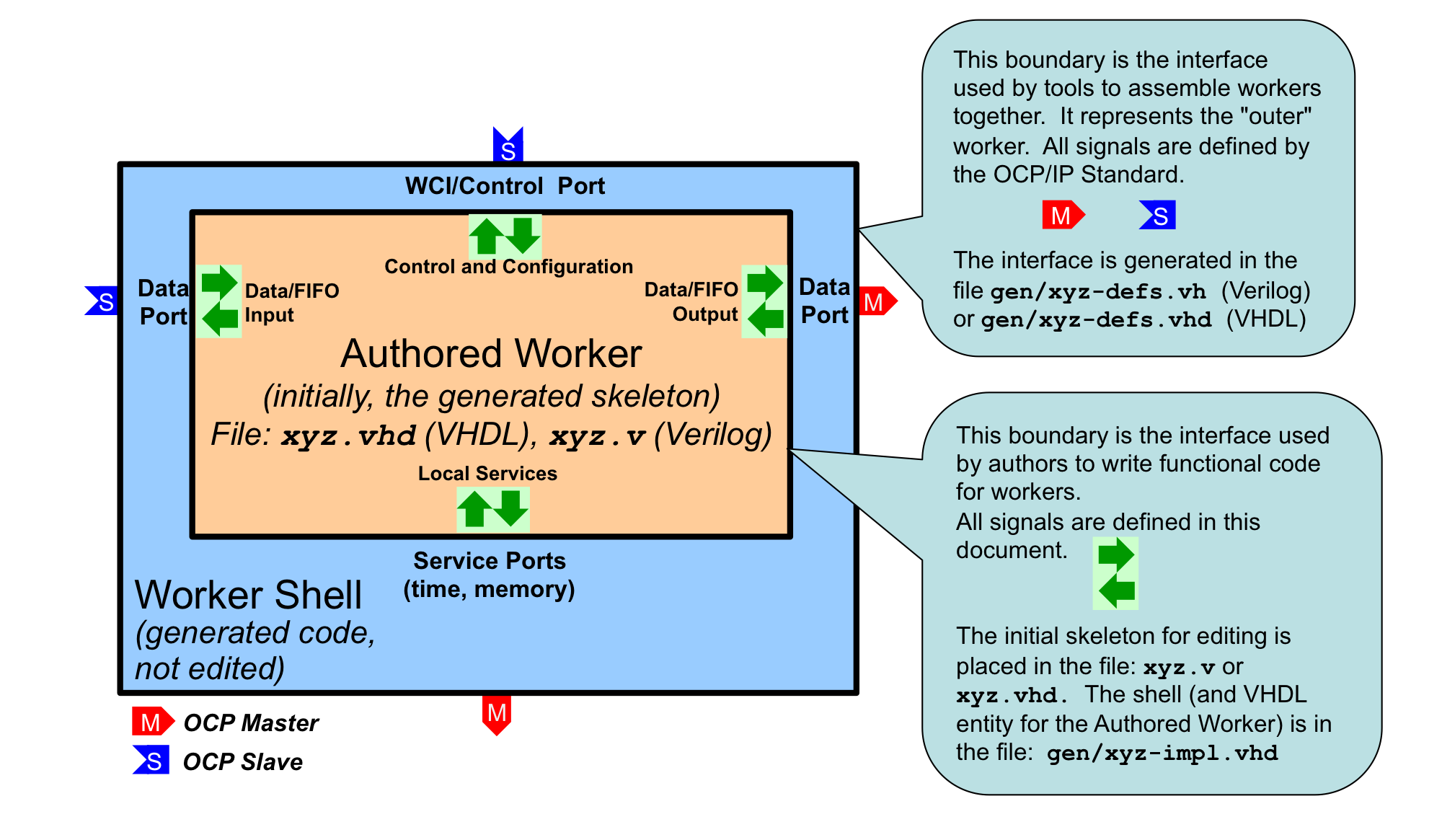
Figure 11: Worker Code and Files
All OpenCPI HDL workers are characterized by their properties, their data and service ports and their clocks, and usually the clocks are simply associated with ports, or even more simply, a single clock is commonly used with all ports. The job of implementing the inner worker is the job of:
processing the various data ports’ inputs to the worker to
produce the various data ports’ outputs of the worker,
using the services provided at the service ports.
For each port of the worker (including the control port) there are input signals (into the worker) and output signals (out of the worker).
In VHDL, these groups of inputs and outputs are in a record type. Thus for each port (whether control, data producing, data consuming or other service) there is an input signal record and an output signal record named <port>_in and <port>_out, respectively. In Verilog, there are no record types so individual signals simply have the <port>_in_ and <port>_out_ prefixes.
E.g., with a “filter” worker that has a “sensor” input port, and a “result” output port, the VHDL entity declaration (in the gen/filter-impl.vhd file) would be:
entity filter_worker is
  port(
    ctl_in : in worker_ctl_in_t;
    ctl_out : out worker_ctl_out_t;
    sensor_in : in worker_sensor_in_t;
    sensor_out : out worker_sensor_out_t;
    result_in : in worker_result_in_t;
    result_out : out worker_result_out_t);
end entity filter_worker;
The actual individual signals in each record depend on the contents of the OCS and OWD files. These signals will be described below. Note that the name of the “control port” defaults to ctl. An example skeleton file for this worker, in the file filter.vhd, would be:
library ieee; use ieee.std_logic_1164.all, ieee.numeric_std.all;
library ocpi; use ocpi.types.all;
architecture rtl of worker is
begin
  -- put the logic for this worker here
end rtl;
Note that while the overall worker has the name “filter”, the entity being implemented in the architecture here is worker, the inner worker.
The clause use ocpi.types.all introduces all the data types in that package to the namespace for the architecture code of the worker. This is most convenient for using the built-in types provided by OpenCPI. However, if the author wants to avoid any collisions with their own types or functions, they can remove this use clause and fully qualify references to types provided by OpenCPI.
Signal Naming Conventions and Data Types
Other than the property access signals described below, the signals in these worker interfaces are mostly a combination of IEEE std_logic_vector and a boolean type, bool_t, that is used for various boolean indicator signals. All these VHDL types and related constants are defined in the ocpi.types package from the ocpi HDL primitive library.
The VHDL type bool_t acts as much like the VHDL type BOOLEAN as possible (with various operator overloading functions), while still being based on std_logic. The to_boolean and to_bool functions explicitly convert to and from the VHDL BOOLEAN type, respectively. The its function is a convenient synonym for the to_boolean function, enabling code like:
if its(ready) then
  ...
end if;
There are also two constants for this type, btrue and bfalse. These types and constants may also be used in user-written primitives, and are used in code automatically generated by OpenCPI.
In VHDL, all signals into and out of the authored worker are in the in and out records of each port.
All data types created by OpenCPI use the _t suffix. All enumeration values defined by OpenCPI use the _e suffix.
OpenCPI uses the term port to mean a high level data flow interface in and out of all types of workers. This conflicts with the use of the term in VHDL and Verilog, which means the individual signals (of any type) that are the inputs and outputs of an entity (VHDL) or module (Verilog).
In this section on HDL workers, this document uses the term interface to be the HDL worker’s set of input and output port signals that correspond to the high level OpenCPI ports as defined in the OCS and OWD for the HDL worker. We also use the term interface for the implicit control port of all workers. An HDL worker has a control interface (for the implicit control port), data interfaces (for the explicit data ports defined in the OCS), and service interfaces (for service ports as defined in the HDL worker’s OWD).
The Control Interface to the HDL Worker.
Every HDL worker has a control interface that at a minimum provides a control clock and associated reset into the worker. Normally, the control interface also is used to:
Convey life cycle control operations like
initialize,startandstopAccess the worker’s configuration properties as specified in the OCS and OWD
In VHDL, when the default name of the control interface is used (ctl), the input signals are prefixed with ctl_in. and the output signals are prefixed with ctl_out. I.e. the input signals are in the ctl_in record port, and the output signals are in the ctl_out record port.
When the spec for the HDL worker (in its OCS) has the (rarely used) NoControl attribute set to true, only the clock and reset signals are present. In this case no signals associated with control operations or properties are present and there are no ctl_in or ctl_out signals. Only wci_clk for the clock signal and wci_reset for the reset signal are present.
XML attributes for the HDL Worker’s Control Interface
Most aspects of the control interface are generically specified either in the OCS (e.g. the NoControl attribute), or at the top level of the OWD XML (e.g. the ControlOperations attribute). Several additional control interface attributes for HDL workers may be specified in a ControlInterface child element of the OWD. One example is the Timeout attribute described below. An example of an HDL OWD with this attribute would be:
<HdlWorker>
  <ControlInterface Timeout='100'/>
  ...
</HdlWorker>
The following table contains attributes that may be specified for the ControlInterface element:
Attribute Name |
Value Type |
Description |
|
ULong |
The minimum number of control clock cycles that
should be allowed for the worker to complete
control operations or property access
operations. When this number is exceeded the
worker is considered inoperative and a timeout
error is reported. The worker completes these
operations using the The default value is 16. |
Reset Behavior and Initializations in HDL Workers and Infrastructure
Per (at least) Xilinx recommended practice, OpenCPI uses and generates resets synchronously. Thus resets are implemented active high and are asserted and deasserted synchronously. There are several reasons for this policy, but one is that less logic is typically needed to implement the resetting of register state.
At power up or reconfiguration, resets are asserted, so they will be asserted on the first clock edge. Per the OCP specification, resets will always be asserted for at least 16 clock cycles.
If registers (state) truly need an initial value (e.g. for simulation cleanliness or glitch-free initialization or sim-vs-synth consistency), it is preferred to set an initial default expression value in VHDL or Verilog, rather than using asynchronous reset. This is done by providing an initial value expression in the signal declaration. Note that current Xilinx (Vivado, ISE, and ISIM), Intel/Altera (Quartus), and Mentor (Modelsim) support such initialization without using any resources.
In the OpenCPI HDL infrastructure, applying resets to register state is only used to serve a functional purpose, and not the default practice.
Clock and Reset Input Signals in the Control Interface
The signal ctl_in.clk is the clock for all other control port signals as well as the default clock for all other data or service ports of the worker. The ctl_in.reset signal (asserted high) is asserted and deasserted synchronously with this clock. This reset is guaranteed to be asserted for 16 clock cycles. When 16 clocks are not enough to perform initialization, the worker should implement the initialize control operation (see below). The control reset, like all other resets generated by the OpenCPI infrastructure, is initially asserted.
If the worker (in its OWD) declares that other data or service ports have clocks that are different than this control clock (i.e. those interfaces operate in different clock domains), the worker implementation code has responsibility for the appropriate synchronizations between this control clock (and its associated signals) and any other signals related to the data or service interfaces. In particular, it is the worker’s responsibility to propagate this control reset to the reset outputs associated with other interfaces, in their clock domain.
Life Cycle/Control Operation Signals in the Control Interface
Other than the control reset signal, the life cycle of all workers is managed by life cycle control operations, according to the diagram below. When a worker’s control reset is deasserted, it enters the exists state. Control operations cause state changes as shown. When control operations fail, the unusable state is entered. The worker autonomously enters the finished state, without any control operation.
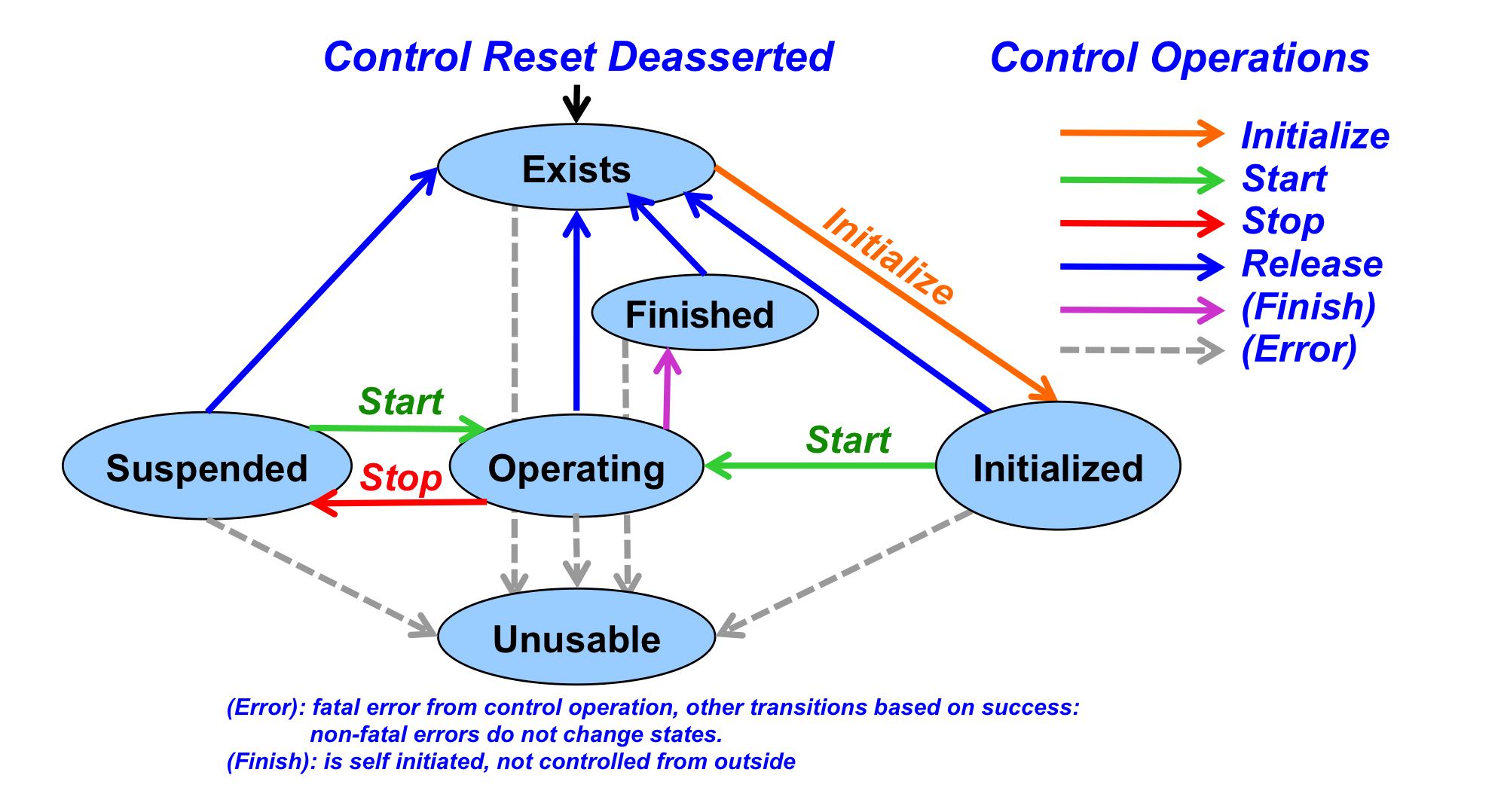
Figure 12: Control Operations and States
In simple and common cases, when the worker has no need to implement any of these operations, there is a single input signal indicating when the worker should operate, called is_operating. I.e., after reset is deasserted, the worker should operate only when this is_operating signal is asserted. Many HDL workers use this signal (as well as clk and reset) and no others in the control interface.
The is_operating signal indicates that the worker has been started and should now perform its function. A worker must not perform any data transactions at its data ports unless is_operating is true. This is necessary for robust system-level application control to suspend and resume all or parts of an application.
An example of a simple HDL worker would be:
architecture rtl of filter_worker is
  signal mystate_r : std_logic_vector(7 downto 0); -- some state
begin
  process (ctl_in.clk) is
  begin
    if rising_edge(ctl_in.clk) then
      if its(ctl_in.reset) then
        mystate <= "01010101";
      elsif its(ctl_in.is_operating) then
        -- do the clocked functions of this worker
      end if;
    end if;
  end process;
end rtl;
This allows the worker to be suspended and resumed since nothing happens during suspension, when is_operating is false.
If the initialize control operation is not implemented, then when the reset signal is deasserted, the worker is considered to be initialized. If initialize is implemented, the worker is considered in the exists state after reset is deasserted. The worker’s OWD specifies whether initialize is implemented by this worker.
When a worker needs to explicitly support other control operations, there are two input and two output signals it may use. The control_op signal is a VHDL enumeration value that conveys which control operation is in progress. When there is no operation in progress, it has a value of NO_OP_e. Otherwise the choices are: INITIALIZE_e, START_e, STOP_e, RELEASE_e, BEFORE_QUERY_e, and AFTER_CONFIG_e. The operation is terminated by the worker asserting the done or error output signals, after which the control operation is considered accomplished successfully (if done) or not (if error). Note that the done signal is driven to a default value of btrue in the entity declaration and the error signal defaults to bfalse. The worker does not need to drive these at all if it will always perform the control operations in a single cycle and will never need to assert error. The operation will be forced to complete with a timeout error if neither done nor error is asserted within the number of control clock cycles indicated in the Timeout attribute of the ControlInterface element.
All VHDL types specifically associated with the control interface are in the wci package of the ocpi library, including the enumeration values just mentioned. E.g.:
library ocpi;
...
if ctl_in.control_op = ocpi.wci.START_e ...
A common example of a control operation might be when the worker needs multiple clock cycles to accomplish something like initialize or start. In that case, it notices when the control_op signal changes from no_op_e, and then performs the operation, asserting done (or error) when the operation has completed. An example where initialization takes 10 clock cycles, would be:
architecture rtl of example_worker is
  signal init_count_r : unsigned(4 downto 0);
begin
  process (ctl_in.clk) is
  begin
    if rising_edge(ctl_in.clk) then
      if its(ctl_in.reset) then
        init_count <= (others => '0');
      elsif ctl_in.control_op = INITIALIZE_e then
        init_count <= init_count + 1;
      elsif its(ctl_in.is_operating) then
        -- do normal functions
      end if;
    end if;
  end process;
  -- initialize takes 10 clocks, all others take 1
  ctl_out.done <=
    '0' when ctl_in.control_op = INITIALIZE_e and init_count < 20
    else '1';
end rtl;
Another convenience input signal, state, indicates which life cycle state the worker is in. It changes when control operations succeed. It is a VHDL enumeration value: EXISTS_e, INITIALIZED_e, OPERATING_e, SUSPENDED_e, FINISHED_e, and UNUSABLE_e. These types are also in the ocpi.wci package.
Finally, there are two control output signals that the worker can use to indicate two other conditions. The first control output signal is finished. The worker uses this to indicate it has entered the finished state, and will perform no further work. This enables the worker to tell control software that its work is finished and perhaps that the application the worker is part of can be considered finished. This signal should be deasserted upon reset. Asserting finished will cause is_operating to become false, and state to become FINISHED_e.
The second, attention, allows the worker to indicate an interrupt or other condition to control software. This signal is for legacy compatibility and should not be used in new workers. It should be deasserted on reset.
Here is a summary of the control interface signals in the ctl_in record. The bool_t type is in the ocpi.types package, and the control_op_t and state_t are in ocpi.wci
Signal |
Type |
Description |
|
|
The clock for the control interface and the default clock for all other interfaces and ports. |
|
|
Asserted high and synchronously, for the control interface, for at least 16 clocks. Initially asserted. |
|
|
An enumeration type specifying the
currently active control operation,
with the value |
|
|
An enumeration type indicating the
worker’s current control state.
Changes when control operation ends
(via |
|
|
Indicates the worker is started and is
in an operating state. Persists until
stop or release operation
completes or |
|
|
A command indicating that a long-duration control operation is being forcibly aborted. A pulse. |
|
|
For dynamic endian workers, set at reset. |
Here is a summary of the control interface signals in the ctl_out record:
Signal |
Type |
Description |
|
|
Indicates successful end of a control operation. The default driven value is true indicating that all control operations complete in the same cycle they start. |
|
|
The signal indicating the unsuccessful end of a control operation. Default driven value is false. |
|
|
A persistent indication, not deasserted after being asserted, until reset, that the worker has entered the finished state. Default is false. |
These signals are assigned the default value in the entity port declaration.
Property Access
A worker’s configuration properties are accessed via two additional record port signals called props_in and props_out (separate from the ctl_in and ctl_out records for the control interface). The individual signals within these records depend on what types of properties have been declared in the OCS and OWD.
When the worker shell is generated based on the OCS and OWD, the accessibility of properties determines which registers and signals are generated and made available to the worker code for each property. If any property is specified as being a raw property in the OWD, then the raw interface is also generated, and used for all such properties, as described in the Raw Access to Properties topic. Otherwise the following rules apply:
Property is writable or initial |
Property is Readback |
Property is Volatile |
Logic Description |
Yes |
No |
No |
Value is registered in the shell
and register outputs are available
in |
Yes |
Yes |
No |
Value is registered in the shell
and register outputs are available
in |
Yes |
No |
Yes |
Value is registered in the shell
and register outputs are available
in |
No |
Yes |
No |
Readback value from the worker in
|
No |
No |
Yes |
The readback value is from the
worker in |
In the tables below, for a property called foo, the signals will be present as described. The types of the signals are all in the ocpi.types package.
The signals possibly present in the props_in record are in the following table.
Signal in props_in |
Included when: |
Type |
Signal Description |
|
Writable or Initial |
|
The registered value last written by control software. The type is dependent on the property type. |
|
Writable or Initial, type is sequence |
|
Registered 32 bit unsigned number of elements when property is a sequence. |
|
Writable |
|
Indicates the entire value
is being written. Persists
until |
|
Writable and (array or sequence or string) |
|
Indication that any part of
the value is being written.
Persists until
|
|
Volatile or (readback and not writable) |
|
Indication that the property
is being read. Persists
until |
The indication signals are valid during the access operation (until ctl_out.done or ctl_out.error is asserted). The operation will be forced to complete with a timeout error if neither done nor error is asserted within the number of control clock cycles indicated in the Timeout attribute of the ControlInterface element. Unless the OWD declares that the readError or writeError attributes are true, control software will not expect and not check that errors have occurred. The readSync and writeSync OWD property attributes currently have no function for HDL workers.
Any writable property is registered in the worker’s shell when written, even when the property is volatile and the worker is supplying a volatile value for reading in the props_out record. The signals possibly present in the props_out record are:
Signals in props_out |
Included when: |
Type |
Description |
|
Volatile or (readback and not writable) |
|
The worker-supplied value of the property, with the type dependent on the property declaration. |
|
Volatile or (readback and not writable) and sequence type |
|
The worker-supplied 32 bit unsigned length (number of elements) when a sequence type. |
Property Data Types
The props_in and props_out port signal records contain fields for property values with types that correspond to the property types defined in the OCS or OWD. All these types and associated conversion functions are defined in the ocpi.types package (in the ocpi HDL primitive library). This package is available in all workers. The worker author can decide to use the fully specified types (e.g. ocpi.types.ulong_t), or introduce the types into the worker architecture’s namespace using:
library ocpi; use ocpi.types.all;
architecture rtl of worker is
For all property data types there is a:
VHDL type name specified in the OCS with a
_tsuffixfrom_<type>conversion function from the type tostd_logic_vectorto_<type>conversion function fromstd_logic_vectorto the typeto_<type>conversion function from the related VHDL type (below) to the type<type>_min(for signed types) and a<type>_maxconstant for minimum and maximum values of the type<type>_array_ttype for array or sequence property values, with a range of(0 to length - 1)to_slvconversion function from each<type>_array_ttostd_logic_vector.to_<type>_arrayconversion function fromstd_logic_vectorto<type>_array_t.
For example, for the ushort type, the ocpi.types package contains:
subtype ulong_t is unsigned (31 downto 0);
type ulong_array_t is array (natural range <>) of ulong_t;
constant ulong_max : ulong_t := x"ffff_ffff";
function to_ulong(c: natural) return ulong_t;
function to_ulong(c: std_logic_vector(31 downto 0)) return ulong_t;
function from_ulong(c: ulong_t) return std_logic_vector;
function to_slv(a: ulong_array_t) return std_logic_vector;
function to_ulong_array(a: std_logic_vector) return ulong_array_t;
The string_t type is a null-terminated array of char_t types. The to_string conversion function can convert from a VHDL STRING type to a string_t.
The types are summarized in the following table, with extra conversion functions specific to each type.
VHDL type |
Based on |
Width |
Extra Conversion Functions |
|
IEEE unsigned |
8 |
|
|
IEEE signed |
8 |
|
|
IEEE unsigned |
16 |
|
|
IEEE signed |
16 |
|
|
IEEE unsigned |
32 |
|
|
IEEE signed |
32 |
|
|
IEEE unsigned |
64 |
|
|
IEEE signed |
64 |
|
|
std_logic_vector |
32 |
|
|
std_logic_vector |
64 |
|
|
char_t |
8 |
|
|
std_logic |
1 |
|
Raw Access to Properties
There is an alternative property access method where a worker must manage the storage and addressing of individual property values itself. This is called the raw property interface. There are two primary use cases for this method:
Device workers using properties to access hardware registers outside the FPGA, e.g. via I2C, SPI.
Application workers that need to arrange the storage of property values for more efficient storage of large values, e.g. in a block memory managed by the worker.
In both cases, this avoids register duplication for property values, either off or on chip. The raw property interface does not apply to parameter properties.
The use of the raw property access interface is indicated in one of three ways:
Set the boolean
rawattribute of the property (inPropertyorSpecPropertyelements) totrueto indicate those properties that should be accessed using therawinterface.Set the boolean
rawPropertiestop-level worker attribute totrueto indicate that all properties defined for the worker (in OCS or OWD, except parameters), will use the raw interface.Set the
firstRawPropertystring attribute to the name of the first property that should use the raw interface, as well as all subsequent properties.
All properties designated as raw will be accessed in an address space with each property aligned based on its type, with the first raw property having raw address 0. The padding property attribute can be specified in OWDs to explicitly align the addresses of raw properties.
The input signals (in the props_in record) for the raw interface are:
Signal in |
Signal included when: |
Signal Description |
|
Always |
The byte offset from the first raw property, of the property being accessed. |
|
Some raw property is less than 32 bits. |
The (4) byte enables for reading/writing bytes in the 32-bit data path of the control interface. |
|
Some raw property is readable/volatile |
Access operation is reading a raw
property, valid until |
|
Some raw property is writable/initial |
Access operation is writing a raw
property, valid until |
|
Some raw property is writable/initial |
The data being written to the raw property, on the appropriate byte lanes for the offset. |
The output signals (in the props_out record) for the raw property access interface are:
Signal in props_out |
Signal included when: |
Signal Description |
|
Some raw property is readable/ volatile |
The data value for the raw
property being read, with values
smaller than 32 bits (e.g. 8 or
16 bit values) aligned in the
appropriate byte lanes. Valid and
accepted when |
|
Any raw properties |
Indicates when the access cycle has completed successfully. Asserted for one cycle per access. |
|
Any raw properties |
Indicates when the access cycle has completed unsuccessfully. Asserted for one cycle per access. |
When raw properties are being accessed, the props_out.raw.done and props_out.raw.error signals indicate when the access is complete (and for reading, when the props_out.raw.data signal is valid). These are analogous to the done and error signals in ctl_out, although they do not have default values and must be explicitly driven by the worker.
If the raw interface is accessing registers or block memories in the worker, the raw.done signal may be tied asserted if all access happens in a single cycle. When the raw interface is used to access external registers (e.g. accessing an I2C or SPI bus), it would be asserted by the worker for one cycle when the access is complete.
The following timing diagrams show examples of raw property accesses. Consider a worker with the following properties:
<Property Name="prop0" Initial="true" Raw="true"/>
<Property Name="prop1" Volatile="true" Raw="true"/>
<Property Name="prop2" Padding="true" Raw="true" Type="ushort"/>
<Property Name="prop3" Initial="true" Raw="true" Type="ushort"/>
The raw address map for these properties would be:
prop0: 0x00000000
prop1: 0x00000004
prop2: 0x00000008
prop3: 0x0000000A
The following timing diagram shows an example of a writing the value 0x3333 to prop3. In this case, the worker asserts done one cycle after the write data appears on the interface.
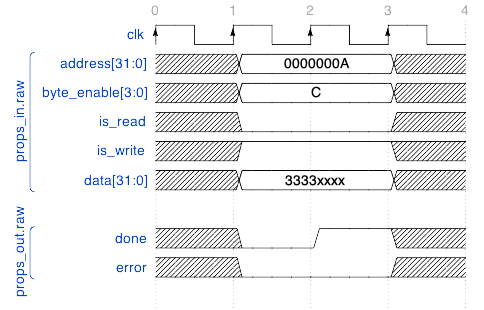
Figure 13: Raw Property Write to 16-bit Property
The following diagram shows an example of reading the value from prop1, which is assumed to be driven to 0x1111 by the worker. In this case, the worker asserts data and done one cycle after the read request appears on the interface.
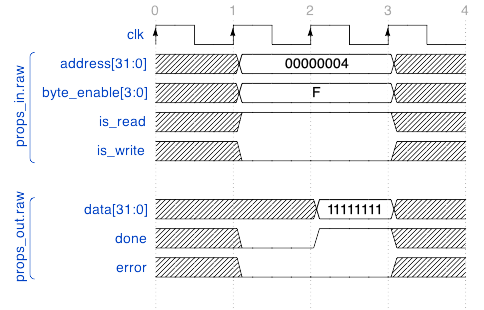
Figure 14: Raw Property Read of 32-bit Property
Summary of HDL Worker Control Interface
Interface inputs are in the
ctl_insignal port record.Interface outputs are in the
ctl_outsignal port record.Clock is
ctl_in.clk.Reset is
ctl_in.reset, asserted high, synchronously, for at least 16 cycles.Do no work unless
ctl_in.is_operatingis asserted, or a control operation is in progress.Optionally use
ctl_out.doneandctl_out.errorwhen control operations or property accesses take more than one cycle.Optionally set
ctl_out.finished, if the worker has some semantic of being finished.Property inputs (written values, and access indicators) are in
props_in.Property outputs (volatile values) are in
props_out.If raw properties are used, the interface is in the
rawmember ofprops_inandprops_out.If using
ctl_out.doneorctl_out.error(or their raw equivalents), and more than 16 control clock cycles are required to complete the operation, set theTimeoutattribute in theControlInterfaceelement.
HDL Worker Data Interfaces for OCS Data Ports
The OpenCPI data-plane is the collection of hardware and software infrastructure that conveys variable-length messages between workers of all types. Each message has an associated opcode, which is an ordinal indicating the message type, among those defined in the protocol indicated for the port defined in the worker’s OCS. The data-plane also conveys the EOF condition (see the End-of-File (EOF) Indications on Data Ports topic). In summary, the data-plane conveys four things: data, message boundaries, opcodes, and EOF.
HDL worker data interfaces correspond to the ports defined in the worker’s OCS and convey these four things in to and out of HDL workers. The signals in these interfaces carry data, opcodes, message boundaries and EOF. These interfaces have a physical data width, specified by the HDL-specific dataWidth attribute. It indicates the number of wires over which the message data will be conveyed. The data is conveyed as a sequence of fixed-width words of dataWidth bits. How message data is packed into these words is described in the Message Payloads vs. Physical Data Width on Data Interfaces topic.
When there is only one message type in the protocol, no opcode is conveyed and no interface signals are present for opcodes. Data interfaces may have zero width when all messages in their protocol have no arguments and thus are all zero length: message opcodes are all that is conveyed. If there is only one message in the protocol, and it has no arguments, then there is no data, no opcode, but still an indication of a message being conveyed. This is essentially an “event pipe” or “pulse” interface.
Data interfaces implement flow control: an output cannot be produced unless permission is granted. HDL workers explicitly accept data at input interfaces when offered, and only produce data at output interfaces when permitted.
Data interfaces convey the EOF condition. Most workers ignore the EOF condition and it is automatically propagated from its input(s) to its output(s). Prior to worker interface version 2, EOF was not supported but was overloaded with zero-length messages with opcode zero.
Worker data ports can be implemented in two different styles: stream or message. Stream interfaces are FIFO-like with extra qualifying bits along with the data indicating message boundaries, byte enables and EOF. Message interfaces are based on addressable message buffers. Each style has its own section below. The style of a port used in the HDL worker is indicated by the XML element that describes it in the OWD. The stream interface is the default style. If all attributes of the interface have default values, no indication of this port or style is required in the OWD.
The stream interface style is indicated by the <StreamInterface> element in the OWD. This element specifies interface characteristics and may also override any of the protocol summary attributes explained in the CDG (protocol and OCS port section).
An example of the per-data-port XML element is:
<StreamInterface name="sensor" dataWidth="64"/>
The example shows the sensor data interface port declared in the OCS is being further configured for a non-default dataWidth.
Message Payloads vs. Physical Data Width on Data Interfaces
As described above, message data is conveyed by the HDL worker data interfaces as a sequence of fixed-width words of datawidth bits. Message data is packed into these words according to the format described in the Message Payloads on Data Ports topic. As shown in the example there, if the operation element in a protocol contains:
<argument name='a1' type='uchar'/>
<argument name='a2' type='ushort' arraylength='2'/>
<argument name='a3' type='ulonglong'/>
And the values of this payload are:
a1: 1, a2: {0x2345,0x6789}, a3: 0xfedcba9876543210
Then the byte sequence (with proper alignment, and encoded little-endian), would be:
Sequence # ► |
0 |
1 |
2 |
3 |
4 |
5 |
6 |
7 |
8 |
9 |
10 |
11 |
12 |
13 |
14 |
15 |
|---|---|---|---|---|---|---|---|---|---|---|---|---|---|---|---|---|
Contents (hex) |
01 |
x |
45 |
23 |
89 |
67 |
x |
x |
10 |
32 |
54 |
76 |
98 |
ba |
dc |
fe |
Argument |
a1 |
a2[0] |
a2[1] |
a3 |
||||||||||||
Contents |
1 |
0x2345 |
0x6789 |
0xfedcba9876543210 |
||||||||||||
As mentioned earlier, HDL worker data interfaces have a physical width, specified by the HDL-specific dataWidth attribute. The width must be a multiple of the smallest data value in the protocol. In the example above, this would be 8 bits. If dataWidth was 8, the sequence of content bytes shown above would be how the payload appears on that byte-wide data interface. If the dataWidth was 16, the message would appear as:
Sequence # ► |
0 |
1 |
2 |
3 |
4 |
5 |
6 |
7 |
|---|---|---|---|---|---|---|---|---|
15 downto 8 |
x |
23 |
67 |
x |
32 |
76 |
ba |
fe |
7 downto 0 |
01 |
45 |
89 |
x |
10 |
54 |
98 |
dc |
If the dataWidth was 32, the message would appear as:
Sequence # ► |
0 |
1 |
2 |
3 |
|---|---|---|---|---|
31 downto 24 |
23 |
x |
76 |
fe |
23 downto 16 |
45 |
x |
54 |
dc |
15 downto 8 |
x |
67 |
32 |
ba |
7 downto 0 |
01 |
89 |
10 |
98 |
And if the dataWidth was 64, the message would appear as:
Sequence # ► |
0 |
1 |
|---|---|---|
63 downto 56 |
x |
fe |
55 downto 48 |
x |
dc |
47 downto 40 |
67 |
ba |
39 downto 32 |
89 |
98 |
31 downto 24 |
23 |
76 |
23 downto 16 |
45 |
54 |
15 downto 8 |
x |
32 |
7 downto 0 |
01 |
10 |
The byte sequence remains the same regardless of dataWidth.
Byte Enables on Data Interfaces
Byte enables on data interfaces are only present when needed, and their presence is determined by a combination of the protocol summary attributes and the dataWidth of the interface.
Two relevant values are inferred from the protocol:
DataValueWidth: the smallest data value in the protocol.
DataValueGranularity: the least common multiple of data values among all messages in the protocol; all message lengths are a multiple of this number of data values.
The physical data width of the interface, dataWidth, must be a multiple of DataValueWidth. When dataWidth is greater than DataValueWidth * DataValueGranularity, byte enables are in the interface, since data words (of DataWidth) at the end of a message may be partially valid. E.g. if the DataWidth is 32, and DataValueWidth is 8 and DataValueGranularity is 1, the messages may have any number of bytes and thus the last 32 bit word of a message may have 1, 2, 3 or 4 valid bytes. In this context, a byte is a data value, and bytes might not be 8 bits. Here are some examples:
- Message is a sequence of short (16 bit) values,
dataWidthis 16:DataValueWidth = 16DataValueGranularity = 1No byte enables required.
- Message is a sequence of short (16 bit) values,
dataWidthis 32:DataValueWidth = 16DataValueGranularity = 1Byte enables (2) are required since sequences might be an odd number of shorts.
- Message is a sequence of pairs of short (16 bit) values,
dataWidthis 32:DataValueWidth = 16DataValueGranularity = 2Byte enables not required since sequences are always a multiple of 2 shorts.
The exact naming and use of byte enable signals in data interfaces is described below.
Clocks for Data Interfaces
Data interface signals operate using the control clock provided on the control interface unless specified otherwise. There are two ways to override this behavior and specify that a data interface should not use the control clock:
Specify that the interface should have its own clock signal as part of the interface (and whether that signal is an input or output signal to/from the worker). This is indicated by the
clockDirectionattribute.Specify that the interface should use the clock signal from another data interface on the same worker. This is indicated by the
clockattribute.
The clockDirection attribute can have values of in or out. The presence of this attribute means there will be a signal in the interface named clk, which will be in the input record as an input signal if the value of the attribute is in, or in the output record if the value of this attribute is out. E.g. if the interface name is data, the signal in the worker will be data_in.clk or data_out.clk. Setting this attribute is saying that this interface operates in its own clock domain and will either accept as input, or drive as output, its clock.
The clock attribute is a string-valued attribute whose value is the name of another interface (port) on the worker. It indicates that the interface operates in the same clock domain as that other named interface, and thus the worker internally will use the clock signal associated with that other interface.
A common configuration of these attributes is when one interface (e.g. called data1) declares clockDirection='in', and all other data interfaces declare clock='data1'. This means that all data interfaces of the worker are in one clock domain that is different from the control clock, and the data clock signal is fed into the data1 interface. Note that the direction of the clock signal at data1 is independent of the data direction at that interface.
Such workers are typically called “split clock” workers: the control clock is separate from the clock used for data flow and processing. See the How Clocks are Connected in an HDL Assembly or Container topic for how split-clock workers are used in HDL assemblies. Split clock workers are generally considered best practice, but they must be written to ensure that any interactions between the control interface (e.g. volatile properties) and logic associated with the data interfaces, are handled with appropriate CDC (Clock Domain Crossing) logic.
Streaming Data Interfaces to/from the HDL Worker
The stream data interface is layered, with a simple default model usable by many workers, and a more advanced model that covers all possibilities.
The simple model:
focuses exclusively on processing words of data and supporting flow control
is designed to be similar to the AXI4-Stream interfaces found in other systems
ignores signals used by the advanced model
allows the worker to ignore message boundaries
uses a small number of control signals to consume or produce data.
The advanced model gives the worker total control over message boundaries, byte enables and opcodes.
This data streaming interface is versioned according to the OWD version attribute described in the CDG. This attribute indicates the specific interface semantics. This distinction between simple and advanced interfaces was established with version 2 of this interface (introduced in release 1.5 of OpenCPI). Prior to that there was a single more complex interface model. The interface description here is the version 2 interface, with notes where a signal had a different semantic prior to version 2.
Attributes of Streaming Data Interfaces
Recall that the dataWidth attribute at the top level of the HDL OWD specifies the default physical width of all data interfaces. If most interfaces have the same width, it may be most convenient to specify this width at the top level HdlWorker element. Specifying dataWidth in the StreamInterface element applies only to that port. These dataWidth attributes may also be expressions based on the values of parameter properties.
The XML attributes of the StreamInterface element are in the following table:
Attribute in StreamInterface |
Attribute data type |
Attribute Description (optional unless specified as required) |
|
string |
The name of the corresponding port in the OCS. Required. |
|
unsigned |
The width of the data path for this
interface. The default is the width of the
smallest element in the message protocol
indicated in the OCS, unless overridden by a
default |
|
boolean |
The worker will take responsibility for asserting EOF at this output port. If not set, this will be done automatically based on the first input port (see CDG). Only valid for output ports. Not valid for versions < 2. |
|
boolean |
End of message will be automatically asserted appropriately. The worker need not deal with or assert EOM. The worker may still assert EOM if it needs to. Only valid for output ports. Not valid for versions < 2. |
|
string |
The name of the other interface that this interface will use for its clock. If not specified, the control clock is used. |
|
string |
The value must be |
Signal Summary for Streaming Interface
The signals are described in the following tables and explained in sections after the table. The term “qualified by xxx” means “is only usable when xxx is asserted”.
Signal |
When Included |
Signal Description |
|
If clockDirection == in |
Clock for the signals of the interface if
|
|
Always |
Port is being reset either by the worker connected to it or by the control port (ctl_in.reset, but in this port’s clock domain). |
|
If dataWidth > 0 |
The input data, qualified by |
|
If dataWidth > 0 |
The |
|
If dataWidth > 0 ** |
Which data bytes are valid; qualified by |
|
Always |
Can consume, and metadata bits are valid/usable.
Implies |
|
Always |
The start-of-message indication. Qualified by
|
|
Always |
The end-of-message indication. Qualified by |
|
If Abortable |
The message is being aborted. Qualified by |
|
numberOf OpCodes > 1 |
Opcode for the current message. Valid from start of
message to end of message on input. Initially
qualified by |
|
Version > 1 |
Indicates EOF condition. Not qualified. Persists until
reset when asserted. Only asserted after an |
All the above input signals are in the <port>_in VHDL record entity port.
Signal |
When Included |
Signal Description |
|
If clockDirection == out |
Clock for the signals of this interface,
driven by worker, when |
|
Always |
Indicates that the worker consumes the word
if |
All the above input signals are in the <port>_in VHDL record entity port.
When using the port in the simple mode that ignores message boundaries, only the data and valid and take signals are used (and byte_enable when present).
When the dataWidth is zero, only the ready and take signals are used.
For interface versions prior to 2, eof signal did not exist and the valid signal was qualified by ready and could not be used unless ready was asserted.
Signal |
When Included |
Signal Description |
|
If clockDirection == in |
The clock for all the signals of this
interface, if |
|
Always |
Port is being reset either by the worker
connected to it or by the control port
( |
|
Always |
Indicates that the shell will consume the
word (metadata and maybe data) if |
All the above input signals are in the <port>_in VHDL record entity port.
Signal |
When Included |
Signal Description |
|
If clockDirection == out |
Clock for the signals of this interface,
driven by the worker if |
|
If dataWidth > 0 |
The output data, qualified by |
|
If dataWidth > 0 |
The |
|
If dataWidth > 0 ** |
Which data bytes are valid; qualified by
|
|
Always |
Indicates metadata and maybe data is valid/usable. When asserted, one of som/eom/valid/abort must be asserted. |
|
Always |
The start-of-message indication. If
previous |
|
Always |
The end-of-message indication. Qualified by
|
|
If Abortable |
The message is being aborted. Qualified by
|
|
numberOf OpCodes > 1 |
Opcode for the this message. Must be valid with som on output. |
|
Always |
Indicates EOF condition (not present prior to v2) Not qualified. Persistent (until reset) |
All the above output signals are in the <port>_out VHDL record entity port.
When using the port in the simple mode that ignores message boundaries, only the data and valid and ready signals are used (and byte_enable when present).
When the dataWidth is zero, only the ready and give signals are used.
For interface versions prior to 2, eof signal did not exist and the valid signal was qualified by give and could not be used unless give was asserted.
The data and byte_enable signals are std_logic_vector. The opcode signal is also std_logic_vector when there is no protocol in the OCS, otherwise it is an enumeration of type <protocol>_OpCode_t, with each operation having an enumeration constant <protocol>_<op>_op_e. These opcode types are in the work.<worker>_worker_defs package. The other signals are all bool_t, from the ocpi.types package.
Metadata and Message Boundaries Used for Stream Interfaces
The information flowing out of or into stream interfaces are variable length messages conveyed using fixed width words of data, along with metadata. The metadata associated with every word presented at the interface includes:
Valid: indicates whether the data is present and valid
SOM: start of message: indicates that this word is the first in a messageversion >= 2: on input will always be coincident with first valid data wordversion <2: may be present whether or not there is valid data present.
EOM: end of message: indicates that this word is the last in a messageversion >= 2: will always be coincident with the last valid data wordversion <2: may be present whether or not there is data present.Abort: (optional) whether this word is indicating the end of an aborted messageByte_enable: (optional) indicates, ifvalidis true, which bytes in the data word are valid. This signal is all ones on all but the last valid word of a message.
These metadata signals, as well as data, are all registered on input ports, outside the worker’s code, enabling simple workers to be written in a combinatorial style. Only the valid signal (and data) is used in the simple usage model.
On input, the optional abort indicator, when present and asserted, forces the EOM indicator on, and the valid indicator off. When abort is asserted on output, EOM and valid are ignored and assumed true and false, respectively. When there is no abort, the three metadata bits, SOM, EOM, and valid, can be in various combinations, with the following valid combinations:
SOM |
Valid |
EOM |
Signal Description |
1 |
0 |
0 |
The start of a message, with no data (yet). Only on output. |
1 |
1 |
0 |
The start of a message, coincident with the first word of data. |
1 |
0 |
1 |
A zero length message, with no data, in a single word. |
1 |
1 |
1 |
A single word message. |
0 |
1 |
0 |
A data value in the middle of a message |
0 |
1 |
1 |
A data value, coincident with the end of the message |
0 |
0 |
1 |
An end of message with no data. Only on output |
On input, the worker can assume that the sequence of metadata values will be correct, meaning all messages will have a SOM and an EOM. The valid sequences are:
The first word of a message must have
110,101, or111(i.e. theSOMbit set).After a message is started but not simultaneously ended by
101or111, any of010, or011may occur (i.e. be data-without-EOM, or data-with-EOM).After a word with
EOMset, the next word must haveSOMset.
On output, the worker may also produce a SOM with no data (and no EOM) and an EOM with no data (without SOM), but a worker will never see these combinations on input.
Validity/Qualification of Interface Signals
On both input and output ports the ready signal is an input that allows data to move and is prequalified by the ctl_in.is_operating signal from the control interface. On input, the som, eom, data, and byte_enable signals are only meaningful if ready is asserted. However, the input port valid signal, when asserted, implies ready, and can thus be used as the sole control signal of the input interface when message boundaries are being ignored and all messages contain data.
The take signal on the input interface is the handshake to accept a word of data and metadata. It is not qualified. Similar to AXI interfaces, the take signal (like the AXI “ready” signal) may be asserted before input ready if the worker is prepared to accept data/metadata.
On output, none of the output signals are used unless the ready input signal (of the output interface) is asserted. Similar to input, the valid signal by itself indicates that valid metadata and data is being offered for output (and thus implies give).
In summary, when message boundaries are ignored (and insertEOM is set for the output port), the entire interface is controlled by valid and take at an input port, and valid and ready at an output port. The semantics are the same as AXI-Stream signaling (with the OpenCPI take signal acting like the AXI ready signal).
When a more advanced worker needs to manage message boundaries in a more complex way, the som and eom signals can be used on either or both sides, along with the input ready and output give signals.
Prior to version 2, the valid input signal was also qualified by the ready signal and the ready signal was not qualified by ctl_in.is_operating. On output the valid was qualified by give. The changes introduced by version 2 can be summarized as:
validcan be used on input and output without usingready(on input) orgive(on output)readycan be used on input and output without usingctl_in.is_operatingtakecan be asserted beforereadyon input, andgivecan be asserted beforereadyon output.
Output Message Sizes
The maximum permitted size of a message produced at an output port, in bytes, is always asserted by the system in the built-in initial property named ocpi_buffer_size_<port>. of type ushort_t. For bounded protocols, this value will always accommodate any message defined by the protocol. The worker can take one of the following approaches to managing the output message size:
Let the system do it automatically by setting the
insertEOMattribute and never driving the EOM signal at all.Let the system do it automatically (using
insertEOM), but in some cases forcible terminate a message early by asserting EOM.Drive the EOM signal on output based on an EOM signal from an input port, when message sizes on input and output can and should be the same number of words.
Intelligently drive the EOM per protocol, ensuring this maximum is respected.
Sometimes a worker must specifically determine and implement output message sizes based on some other criteria. An example would be a worker that produced a fixed size message regardless of the size of input messages, essentially accumulating data from input messages into fixed size output messages that should not necessarily be as large as allowed by the ocpi_buffer_size_<port> attribute.
Using insertEOM is best practice since it allows the application developer to adjust the message sizes to tune application performance for latency or throughput.
Flow Control (a.k.a. Back Pressure) On Streaming Interfaces.
Both input and output stream interfaces have a ready signal, that is always input to the worker, indicating that data can be consumed or produced.
The rules for input interfaces are:
readyindicates that the metadata and perhaps the data signals are validvalidindicates that metadata and data signals are valid. Prior to version 2, this signal is qualified byready.if
readyis not asserted, none of the metadata signals are valid or meaningfulthe worker takes input data when
readyorvalidis asserted by asserting thetakesignalthe
takesignal may be asserted early withoutready(orvalid) asserted
The rules for output interfaces are:
readyindicates that metadata and perhaps data can be producedif the
readysignal is not asserted, none of the metadata or data output signals are used.the worker gives data when
readyis asserted by asserting thegivesignal; thegive(orvalid) signal may be asserted prior toreadybeing asserted.the worker may also use
validto implygive
Data flows according to FIFO semantics. Input data is presented as ready as if there is an input FIFO outside the worker that is not empty. The worker consumes this data by taking it, which is as if it is dequeueing data from this not-empty FIFO. Similarly, output data can be produced when output is indicated to be ready as if there is an output FIFO outside the worker that is not full. The worker produces this data by giving it, which is as if it is enqueueing data to this not-full FIFO.
These signals (ready/valid, take, give/valid) control the flow of data and metadata words through the interface. Here is a table of how this signal terminology compares to some other common interfaces with FIFO semantics: the classic FIFO interface, the AXI streaming interface, and the “native” Xilinx FIFO interface.
Meaning |
OpenCPI |
Classic FIFO |
AXI |
Xilinx FIFO |
Data is available to consume |
|
|
|
|
Consume data |
|
|
|
|
Data can be produced |
|
|
|
|
Produce data |
|
|
|
|
In AXI interfaces, either signal (valid or ready) may be asserted early. The handshake (ready) can in fact be asserted early even when valid is not yet asserted.
With OpenCPI prior to version 2, it was invalid to assert take or give without ready. Version 2 brought alignment with AXI signaling. In Xilinx FIFO, rd_en and wr_en are ignored if the fifo is empty (input) or full (output).
In all cases (all these interfaces) data moves from producer to consumer when both sides assert their signals in the same cycle (at the same clock rising edge).
Since worker ports all have FIFO semantics, workers must be written to accommodate “back pressure”. I.e. the ready signal on output interfaces may not always be asserted, so the output data is not accepted until then.
Example timing diagrams for this interface follow the signal descriptions below.
Timing Diagrams
The following diagram shows an input port where both the infrastructure (worker shell) and the worker respond one cycle after they see new input, resulting in a throughput of 3 clock cycles per data word. Both SOM and EOM are coincident with data.
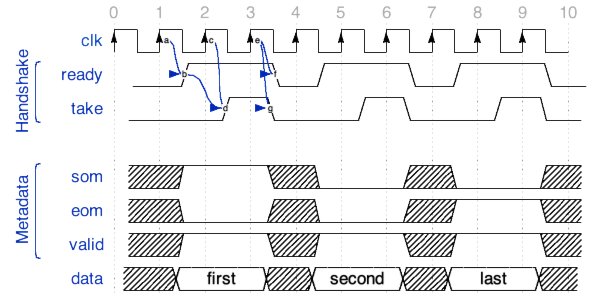
Figure 15: 3 word input message with delays on both sides
The following diagram shows an input port where only the worker responds one cycle after it sees new input, resulting in a throughput of 2 clock cycles per data word.
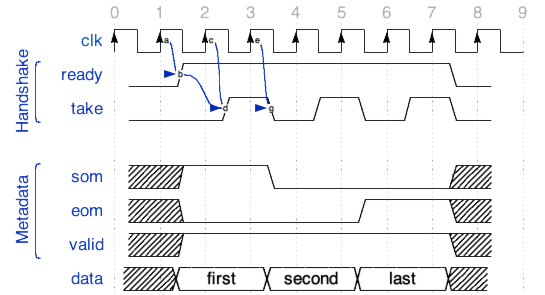
Figure 16: 3 word input message width worker adding delay
The following diagram shows an input port where both sides respond in the same cycle, with no delays, resulting in a throughput of 1 clock cycles per data word.
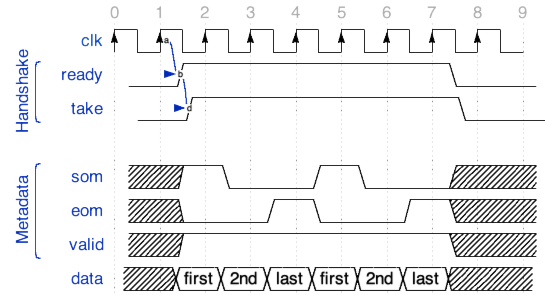
Figure 17: Two 3 word messages, with no delays on either side.
Source Code Examples
Here is a set of examples, showing the use of these signals. The first is a complete worker that is purely combinatorial, and simply adds a constant (3) to every data value from input to output. It is simply processing data and ignoring message boundaries. It sets insertEOM in its OWD since it is not interested in message boundaries.
No VHDL process or clocking or even reset is used since the computation takes place in a single clock cycle. No opcode or byte_enable is used since the protocol has a single operation and the data in that message is all the same size.
architecture rtl of worker is
begin
  out_out.data <= std_logic_vector(unsigned(in_in.data) + 3);
  in_out.take <= out_in.ready;
  out_out.valid <= in_in.valid;
end rtl;
If the same worker wanted to be sure that the output messages were the same size as the input messages, it would not set insertEOM in its OWD.
architecture rtl of worker is
begin
  out_out.data <= std_logic_vector(unsigned(in_in.data) + 3);
  in_out.take <= out_in.ready;
  out_out.give <= in_in.ready;
  out_out.som <= in_in.som;
  out_out.eom <= in_in.eom;
  out_out.valid <= in_in.valid;
end rtl;
The next example shows a worker that inserts a special single-word all-ones message, with operation xy, every 8 messages it passes.
architecture rtl of worker is
  signal count     : unsigned(3 downto 0);
  signal inserting : bool_t := count = 8;
begin
  process (ctl_in.clk) is begin
    if rising_edge(ctl_in.clk) then
      if its(ctl_in.reset) then
        count <= (others => '0');
      elsif its(out_in.ready) then
        if its(inserting) then
          count <= (others => '0');
        elsif in_in.ready and in_in.eom then
          count <= count + 1;
        end if;
      end if;
    end if;
  end process;
  in_out.take   <= out_in.ready and in_in.ready and not inserting;
  out_out.give  <= out_in.ready and (count = 7 or in_in.ready);
  out_out.data  <= (others => '1') when inserting else in_in.data;
  out_out.som   <= inserting or in_in.som;
  out_out.eom   <= inserting or in_in.eom;
  out_out.valid <= inserting or in_in.valid;
end rtl;
HDL Worker Data Interface Summary
Only move data when the port is ready. The
validinput signal implies the input port isready(v2+).Input data is valid only when explicitly indicated at the input interface.
Output data can only be moved when flow control allows it at the output interface.
Output message boundaries must be supplied and respect maximum message sizes, unless
insertEOMis set in OWD.Output message boundaries can be derived from input message boundaries.
Remember to (in most cases) convey zero length messages from input to output. (In V1 workers only. Otherwise simply respect the protocol).
Time Service Interface
This interface provides “time of day” information to the worker, to the precision requested in the OWD via attributes to the TimeInterface element. Time of day values are supplied to the worker in the clock domain of this interface, which defaults, like all interfaces, to the control clock. The clock and clockDirection attributes are valid and have the same meaning as in the Clocks for Data Interfaces topic.
The signals for the time service interface are in the time_in signal port record and are described below. If the default port name is overridden, the signal port record could be <port-name>_in.
Signal in |
Width |
Signal Description |
|
attribute of
element |
The entire seconds part of the time-of-day, in GPS time (no leap seconds). If the width is 32 it is absolute time. If width less than 32, it is just a relative time truncated preserving the LSB, to that value, and wraps. The LSB is always 1 second; VHDL type is IEEE numeric unsigned. Width may be zero, in which case this signal is not present. |
|
attribute of
element |
The binary fraction of a second, with the radix point to the left of the MSB. If width is 32 bits, the LSB represents 2^-32 seconds, or ~233 ps. If width is less than 32, the MSB are preserved, such that the MSB is always ½ second. Width may be zero, in which case this signal is not present. |
|
1 ( |
Indicates when the time of day is
valid. Present only when the
|
Memory Service Interfaces
This interface provides access to memory. [Not supported in 2021Q2]