Capture v2 (capture_v2)
capture_v2 is an asset in the ocpi.assets.util_comps component library. Implementations include capture_v2 HDL Worker (capture_v2.hdl) and capture_v2 RCC Worker (capture_v2.rcc). Tested platforms include xsim, zed, Rocky9.
Design
The capture_v2 component provides the ability to store an input port’s data. Two modes are supported: * ‘leading’ - capture all messages from input port until the buffer is full. This has the affect of capturing messages from the start of an application. * ‘trailing’ - capture all messages from input port and allow the buffer’s content to be overwritten while application is in operation. This has the affect of capturing all messages (a buffers worth) near the end of an application.
This component provides an optional output port, so that, it may be placed between two components. For the capture_v2.hdl worker, the input messages are directly passed to the output port with a latency of the input port clock cycles.
The capture_v2 component takes input port messages and stores their data in a buffer via the data property as 4 byte words. Metadata associated with each message is stored as a record in a metadata buffer via the metadata property. It captures four 4 byte words of metadata. The first metadata word is the opcode of the message and message size (bytes); opcode 8 MSB and message size 24 LSB. The second word is the fraction time stamp for the EOM. The third word is the fraction time stamp for the SOM. And the fourth word is the seconds timestamp for the SOM. For capture_v2.rcc, the second and third words have the same value since there is no concept of start and end of message for RCC workers. So that the metadata can be read on a little-endian processor, the ordering of the metadata is as follows:
opcode (8-bit) & message size (24-bit),
eom fraction (32-bit),
som fraction (32-bit),
som seconds (32-bit)
Some example python code for reading in the metadata property values written to a file packed little-endian:
data = struct.unpack('<I', ifile.read(4))[0] # 32/8 = 4 bytes
For capture_v2.hdl, when the number of bytes sent for a message is not a multiple of 4, only the last (number of bytes modulus 4) least significant bytes of the last word in the data buffer represent received data. The (number of bytes modulus 4) most significant bytes will always be zero in the last word in the data buffer.
For example, given that last captured data buffer word is 0x0000005a:
if number of bytes is 5, the last data received was 0x5a.
if number of bytes is 6, the last data received was 0x005a.
The capture_v2 component counts the number of metadata records (metadataCount) have been captured, how many data words have been captured (dataCount), and the total number of bytes that were passed through the worker during an app run (totalBytes). It allows for the option to wrap around and continue to capture data and metadata once the buffers are full or to stop capturing data and metadata when the data and metadata buffers are full via the stopOnFull property.
When stopOnFull is true (leading), data and metadata will be captured as long as the metadata buffer is not full. The data buffer will loop if it is not full and the metadata buffer is not full. The metadata buffer will loop independently until it is not full. When stopOnFull is false (trailing), the data and metadata buffers loop independently. There will be a wrap around when the data and metadata buffers are full and data and metadata will continue to be captured.
The component also has properties that keep track of whether or not the metadata and data buffers are full; metaFull and dataFull.
When using capture_v2.hdl, the totalBytes, metadataCount, dataCount, metaFull, and dataFull properties should be checked at the end of an app run because they won’t be stable until then. The worker doesn’t use cdc crossing circuits for them because it takes advantage that they will have a stable value by the time the control plane reads those values at the end of an app run.
A block diagram representation of the implementation is given in Figure 162:
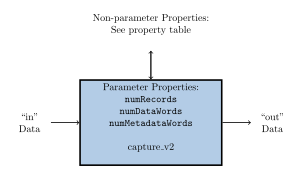
Figure 162: capture_v2 block diagram.
Interface
<ComponentSpec>

  <Port Name="in"/>

  <Port Name="out" Producer="true" Optional="true"  buffersize="in"/>

  <Property Name="stopOnFull" Default="false" Type="bool" Initial="true" Description="
  True - Stop capturing data and metadata when the data and metadata buffers are full. The data buffer will loop if it
  is not full and the metadata buffer is not full. The metadata buffer will loop independently until it is not full.
  False - Wrap around and continue to capture data and metadata once the buffers are full.
  This stop functionality is independent of both the control plane 'stop' operation and 'finished' worker state."/>

  <Property Name="metadataCount" Type="uLong" Volatile="true" Description="Counter of metadata records written."/>

  <Property Name="dataCount" Type="uLong" Volatile="true" Description="Counter of words captured."/>

  <Property Name="numRecords" Parameter="true" Type="uLong" Default="256" Description="This is the maximum number of metadata records
  that may be captured for messages received (not necessarily the content)."/>

  <Property Name="numDataWords" Parameter="true" Type="uLong"  Default="1024"  Description="Maximum number of 32 bit data words that may be
    stored in the data buffer. If stopOnFull is true, meaning no wrap around, no more data will be captured once the data buffer is full."/>

  <Property Name="numMetadataWords" Parameter="true" Type="uLong" Default="4" Description="Due to a limitation (AV-4292), cannot use constrained elements
  in unconstrained array declarations, so cannot directly set the second dimension for the metadata property to 4. The number of metadata words must
  always be 4, since there are four 4 byte words that are captured. The first metadata word is the opcode for the message and message size in bytes;
  opcode 8 MSB and message size 24 LSB. The second word is the fraction timestamp for the EOM. The third word is the fraction timestamp for the SOM.
  And the fourth word is the seconds timestamp for the SOM. So the default value must not be changed."/>

  <Property Name="metaFull" Type="bool" Default="false" Volatile="true" Initial="true" Description="Metadata buffer full flag."/>

  <Property Name="dataFull" Type="bool" Default="false" Volatile="true" Initial="true" Description="Data buffer is full flag."/>

  <Property Name="stopZLMOpcode" Type="uChar" Default="0" Initial="true" Description="Opcode associated with the ZLM which causes the worker to become finished."/>

  <Property Name="stopOnZLM" Type="bool"  Default="false" Initial="true" Description="Indicates causing the worker to become finished on ZLM of stopZLMOpcode."/>

  <Property Name="stopOnEOF" Type="bool"  Default="true" Initial="true" Description="Indicates causing the worker to become finished on EOF. stopOnEOF is always
  regarded as true now since the only reason to be false was the opcode-0-ZLM aliasing that no longer exists."/>

  <property name="totalBytes" type="uLongLong" Volatile="true" Description="Total number of bytes that passed through the worker during an app run."/>

  <Property Name="metadata" Type="uLong" ArrayDimensions="numRecords, numMetadataWords" Volatile="true" Description="Multidimensional array containing metadata records."/>

  <Property Name="data" Type="uLong" ArrayLength="numDataWords" Volatile="true" Description="Data buffer containing data words."></Property>

</ComponentSpec>
Properties
stopOnFull: True - Stop capturing data and metadata when the data and metadata buffers are full. The data buffer will loop if it is not full and the metadata buffer is not full. The metadata buffer will loop independently until it is not full. False - Wrap around and continue to capture data and metadata once the buffers are full. This stop functionality is independent of both the control plane ‘stop’ operation and ‘finished’ worker state.Type:
boolAccess:
Parameter:
FalseWritable:
FalseInitial:
TrueVolatile:
False
Default value:
false
metadataCount: Counter of metadata records written.Type:
ulongAccess:
Parameter:
FalseWritable:
FalseInitial:
FalseVolatile:
True
Default value:
None
dataCount: Counter of words captured.Type:
ulongAccess:
Parameter:
FalseWritable:
FalseInitial:
FalseVolatile:
True
Default value:
None
numRecords: This is the maximum number of metadata records that may be captured for messages received (not necessarily the content).Type:
ulongAccess:
Parameter:
TrueWritable:
FalseInitial:
FalseVolatile:
False
Default value:
256
numDataWords: Maximum number of 32 bit data words that may be stored in the data buffer. If stopOnFull is true, meaning no wrap around, no more data will be captured once the data buffer is full.Type:
ulongAccess:
Parameter:
TrueWritable:
FalseInitial:
FalseVolatile:
False
Default value:
1024
numMetadataWords: Due to a limitation (AV-4292), cannot use constrained elements in unconstrained array declarations, so cannot directly set the second dimension for the metadata property to 4. The number of metadata words must always be 4, since there are four 4 byte words that are captured. The first metadata word is the opcode for the message and message size in bytes; opcode 8 MSB and message size 24 LSB. The second word is the fraction timestamp for the EOM. The third word is the fraction timestamp for the SOM. And the fourth word is the seconds timestamp for the SOM. So the default value must not be changed.Type:
ulongAccess:
Parameter:
TrueWritable:
FalseInitial:
FalseVolatile:
False
Default value:
4
metaFull: Metadata buffer full flag.Type:
boolAccess:
Parameter:
FalseWritable:
FalseInitial:
TrueVolatile:
True
Default value:
false
dataFull: Data buffer is full flag.Type:
boolAccess:
Parameter:
FalseWritable:
FalseInitial:
TrueVolatile:
True
Default value:
false
stopZLMOpcode: Opcode associated with the ZLM which causes the worker to become finished.Type:
ucharAccess:
Parameter:
FalseWritable:
FalseInitial:
TrueVolatile:
False
Default value:
0
stopOnZLM: Indicates causing the worker to become finished on ZLM of stopZLMOpcode.Type:
boolAccess:
Parameter:
FalseWritable:
FalseInitial:
TrueVolatile:
False
Default value:
false
stopOnEOF: Indicates causing the worker to become finished on EOF. stopOnEOF is always regarded as true now since the only reason to be false was the opcode-0-ZLM aliasing that no longer exists.Type:
boolAccess:
Parameter:
FalseWritable:
FalseInitial:
TrueVolatile:
False
Default value:
true
totalBytes: Total number of bytes that passed through the worker during an app run.Type:
ulonglongAccess:
Parameter:
FalseWritable:
FalseInitial:
FalseVolatile:
True
Default value:
None
metadata: Multidimensional array containing metadata records.Type:
ulongArray dimensions:
['numRecords', 'numMetadataWords']
Access:
Parameter:
FalseWritable:
FalseInitial:
FalseVolatile:
True
Default value:
None
data: Data buffer containing data words.Type:
ulongArray dimensions:
['numDataWords']
Access:
Parameter:
FalseWritable:
FalseInitial:
FalseVolatile:
True
Default value:
None
Ports
Inputs:
inProtocol:
NoneOptional:
False
Outputs:
outProtocol:
NoneOptional:
True
Implementations
Dependencies
The dependencies to other elements in OpenCPI are:
assets/components/util_comps/comp.hdl/comp.vhd
assets/components/util_comps/comp.hdl/capture_implementation.vhd
core/hdl/primitives/util/util_pkg.vhd
core/hdl/primitives/util/BRAM2.v
assets/components/util_comps/capture_v2.rcc/capture_v2.cc
Limitations
Limitations of capture_v2 are:
None.
Testing
The capture_v2-test.xml has a test property called testScenario that allows for five different test cases: testing sending no data; testing making only metadata full; testing making data full; testing sending multiple zlms (with different opcodes), a single word message, filling data and filling up metadata (for configurations where there are at least six metadata records); and test sending stopZLMOpcode opcode and no output port connected.
An input file is generated via generate.py. The generate.py script will output different input data based on the testScenario chosen.
The tests are verified by verify.py script. It checks that the totalBytes, metadataCount, dataCount, status(metaFull and dataFull), metadata and data match the expected results.