File write demux (file_write_demux)
file_write_demux is an asset in the ocpi.assets.util_comps component library. Implementations include file_write_demux RCC Worker (file_write_demux.rcc). Tested platforms include Rocky9, xilinx24_1_aarch32.
Design
The File Writer Demux component acts as a demultiplexer/router by parsing any protocol and routing different opcodes to various output files.
The names of the files being written, along with various ways to determine the Worker’s “done” status, are extremely configurable using Properties.
Note
This Component provides minimal error checking and is not recommended for production use, but is only intended for prototyping and testing of other Components.
A block diagram representation of the implementation is given in Figure 164:
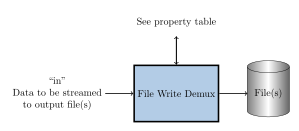
Figure 164: file_write_demux block diagram.
Interface
<ComponentSpec>
  <Port Name="in" numberofopcodes='256'/>
  <Port Name="out" numberofopcodes='256' optional='true' producer='true'/>

  <!-- File name to write to -->
  <Property name="outFile" type="Struct" writable="true">
    <Member name='prefix' type='string' stringLength='1024'/>
    <Member name='digits' type='uChar' default='1'/>
    <Member name='suffix' type='string' stringLength='1024' default='.bin'/>
    <Member name='messagesInFile' type='bool' arrayLength="256" default='false'/>
  </Property>

  <!-- Statistics for each opcode -->
  <Property name="current" type="Struct" volatile="true">
    <Member name="Total" type="Struct">
      <Member name="bytes" type="ULongLong"/>
      <Member name="messages" type="ULongLong"/>
    </Member>
    <Member name="Opcode" type="Struct" arrayLength="256">
      <Member name="bytes" type="ULongLong"/>
      <Member name="messages" type="ULongLong"/>
    </Member>
  </Property>

  <Property name="stopOn" type="Struct" writable="true">
    <!-- Stop on TOTAL bytes/messages  -->
    <Member name="Total" type="Struct">
      <Member name="bytes" type="ULongLong"/>
      <Member name="messages" type="ULongLong"/>
    </Member>
    <!-- Stop on bytes/messages with a certain opcode -->
    <Member name="Opcode" type="Struct" arrayLength="256">
      <Member name="bytes" type="ULongLong"/>
      <Member name="messages" type="ULongLong"/>
    </Member>
    <!-- Stop on bytes/messages with any single unspecified opcode -->
    <Member name="Any" type="Struct">
      <Member name="bytes" type="ULongLong"/>
      <Member name="messages" type="ULongLong"/>
    </Member>
    <!-- Stop on ZLM for given opcode. To disable, not within 0..255 -->
    <Member name='ZLM' type='UShort'/>
  </Property>
</ComponentSpec>
Properties
outFileType:
structMembers:
prefix:
data_type:
stringstringlength:
1024
digits:
data_type:
uchar
suffix:
data_type:
stringstringlength:
1024
messagesInFile:
data_type:
boolarraydimensions:
['256']
Access:
Parameter:
FalseWritable:
TrueInitial:
FalseVolatile:
False
Default value:
None
currentType:
structMembers:
Total:
bytes:
data_type:
ulonglong
messages:
data_type:
ulonglong
Opcode:
bytes:
data_type:
ulonglong
messages:
data_type:
ulonglong
Access:
Parameter:
FalseWritable:
FalseInitial:
FalseVolatile:
True
Default value:
None
stopOnType:
structMembers:
Total:
bytes:
data_type:
ulonglong
messages:
data_type:
ulonglong
Opcode:
bytes:
data_type:
ulonglong
messages:
data_type:
ulonglong
Any:
bytes:
data_type:
ulonglong
messages:
data_type:
ulonglong
ZLM:
data_type:
ushort
Access:
Parameter:
FalseWritable:
TrueInitial:
FalseVolatile:
False
Default value:
None
Ports
Inputs:
inProtocol:
NoneOptional:
False
Outputs:
outProtocol:
NoneOptional:
True
Implementations
file_write_demux(RCC)
Dependencies
The dependencies to other elements in OpenCPI are:
:math:`<`\ assets\ :math:`>`/components/util_comps/file_write_demux.rcc/file_write_demux.cc
Limitations
Limitations of file_write_demux are:
None.
Testing
Usage (local/x86)
After building the component, the user needs to type make tests RCC_CONTAINERS=1 in the file_write_demux.test directory. Various properties and data flows will be tested to try to cover as many use cases as possible.
If the user would like to execute only one test, TESTS=test_XX can be added to the end of the command.
Experimental: Usage (remote/ARM)
Full test environment configuration (e.g. NFS mounting, OCPI_CDK_DIR, etc.) on the remote GPP is beyond the scope of this document. The test procedures assume that both shells’ current working directory is the file_write_demux.test directory (NFS-mounted on remote) and ocpirun is in the remote’s current PATH. NFS must be used for the scripts to properly verify the outputs.
In the host shell, the user types make tests IP=xx.xx.xx.xx. A command that can be copied and then pasted into the remote shell will be displayed. Once the remote shell returns to the bash prompt, pressing “Enter” on the host will begin the verification process.
Single tests can be performed in the same manner as documented above.
Detailed Theory of Operation
Each test_XX subdirectory has the following files:
description - a one-line description of the test
application.xml - the OAS XML for the test setup
golden.md5 - (optional) MD5 checksums of golden/expected output
generate.[sh|pl|py] - (optional) script to generate test data
verify.sh - (optional) script to verify output(s)
Data is sourced with the pattern component or file_read within the OAS. If the former, the source data is encapsulated in the OAS. When the latter, a generate.py script generates the required data. Most OASs dump the “current” property to a file UUT.current.dump, which is also confirmed to match expected output.
If generate.sh does not exist, a default one is created that will run generate.pl and/or generate.py if they exist and are executable. This default script is removed with make clean.
If verify.sh does not exist, a default one is created that will run md5sum and verify all the checksums listed in golden.md5. This default script is also removed upon make clean.