Building HDL Assets
Building workers is similar across different authoring models and languages: typing the ocpidev build command in a worker, library, or project directory builds workers for a specified set of targets. If the worker depends on lower level “primitive” libraries, those libraries are specified in the worker’s OWD XML file, using the Libraries attribute. To make a declaration of such primitive libraries common to all workers in a library, or in a project, the HdlLibraries attribute can be set in the library’s <libname>.xml file or in the project’s Project.xml file. This attribute applies only to HDL workers. Lower level libraries must be built before building a worker which references them.
Similar to other authoring models (e.g. the RCC model), the build targets are specified by setting options to ocpidev build specifying targets for that model. For HDL, these target options are: --hdl-target or --hdl-platform. These options can be supplied multiple times for multiple targets/platforms. HDL build targets are discussed in detail in the next section.
The default platform for RCC workers is the development system itself (e.g. rocky9). Unlike RCC workers, HDL assets have no inherent default target. However, a default value for HDL targets/platforms can be set in the HdlPlatforms and/or HdlTargets attributes in the library’s <libname>.xml file, or in the project’s Project.xml file.
For software workers, this is usually the end of the build process: deployable artifacts for these workers are created and ready for export and/or use in applications.
For HDL workers, it is different. FPGAs are generally not subject to dynamic, partial loading: the whole FPGA must be reloaded with a full “configuration bitstream”. [OpenCPI does not support partial reconfiguration of FPGAs as of this document version]. As with any authoring model, primitives are built first. Then HDL workers are built and, for targets that are real FPGAs rather than simulators, synthesized. Finally, there are two additional steps in the build process in order to create the final, dynamically loadable configuration bitstream:
Composing workers into an HDL assembly.
Finalizing the bitstream as an HDL container.
This final step creates the deployable artifact usable for export and/or use in applications. These steps are defined in the sections below.
HDL Build Targets
Build targets specify the target device, family of devices, or platform for which the asset should be built (compiled, synthesized, place-and-routed, etc.) When building any level of modules for FPGAs, the build targets are specified via the --hdl-target or --hdl-platform options to the ocpidev build command, or sometimes using the HdlTargets or HdlPlatforms attributes in the library or project-level XML files. The targets are chips or chip families, whereas the platforms are actual FPGAs on specific boards. HDL primitives, workers, and assemblies, are built for HDL targets, and HDL platforms and containers (final bitstreams) are built for HDL platforms. These build targets are defined in a hierarchy with these levels:
Top level, vendor level: this level specifies vendors (Xilinx, Altera), as well as vendor-independent simulators (Modelsim). This enables HDL assets to be built for all Xilinx and Altera targets or built for Modelsim. This implies building for all lower level targets under these top-level labels. The value
allspecifies all top level supported targets.Family level: this level specifies the family of parts under the vendor level. Different part families typically have different on-chip architectures, and may drive tools differently. Building for a family target means generating libraries or cores that are suitable to any member (part) in the family. Examples would be “virtex6” or “zynq” or “stratix4”. Simulation targets at the top level don’t have families (yet) so these top two levels are the same for simulation.
Part level: specifies the exact part the design is targeted at, e.g. xcv5lx50t. This does not include package information but may include speed grades.
The following two XML attributes can further filter the targets that are built anywhere that HDL building takes place.
ExcludeTargets/ExcludePlatforms: these attributes specify targets to be excluded, usually because they are known not to be buildable for one reason or the other (a tool error, or other incompatibility).
OnlyTargets/OnlyPlatforms: this attribute specifies targets to be exclusively included, because it is known that only a limited set of targets should be built (e.g. a Xilinx coregen core specific to a particular family or part).
The --hdl-platform option for ocpidev build (or the HdlPlatforms attribute in library or project XML) specifies HDL platforms to build (like Xilinx zed and zcu104), which imply the appropriate family and part. I.e., if you specify to build for a platform, it will build primitives and workers for the appropriate part family. Except for the final bitstream build, the HDL target(s) are implied by the specified HDL platform(s).
If no HDL target or HDL platform options for ocpidev build are set, and no HDL target or HDL attributes are set in library or project XML files, the OCPI_HDL_PLATFORM environment variable can be set to an HDL platform. That will be used for all HDL builds.
In some synthesis cases, tools that target a part family actually target the smallest part in the family and try to limit use of some on-chip resources (e.g. DSP blocks) to the amount that exists on the smallest part. While this usually correctly generates a resulting file that can be used on any part in the family, it is not always desirable when the target platform in fact has a larger part.
Similarly, some tools that target a part family do not target the smallest part, so that the resulting design will not work on the smallest part.
To force a worker to be built for a specific part for an HDL target, you can set the ExactParts attribute in the worker’s XML file. The value of this attribute is a list of colon-separated pairs of <family>:<part>, indicating the exact part to use when building for the mentioned part family. For example, this worker XML:
<HdlWorker ExactParts='zynq:xc7z020-1-clg484x
                       zynq_ultra:xczu48dr-2-ffvg1517e'/>
would choose the indicate parts when the HDL target of the build was zynq or zynq_ultra.
Note the parts are all of the form <part>-<speed>-<package> even though various vendor tools have different part name formats for different lower level tools.
The HDL Build Hierarchy
OpenCPI FPGA bitstreams (the files that configure entire FPGAs) are built in several layers. The same layers apply to building executables for FPGA simulation. The following diagram shows the build flow (bottom to top) and hierarchy.
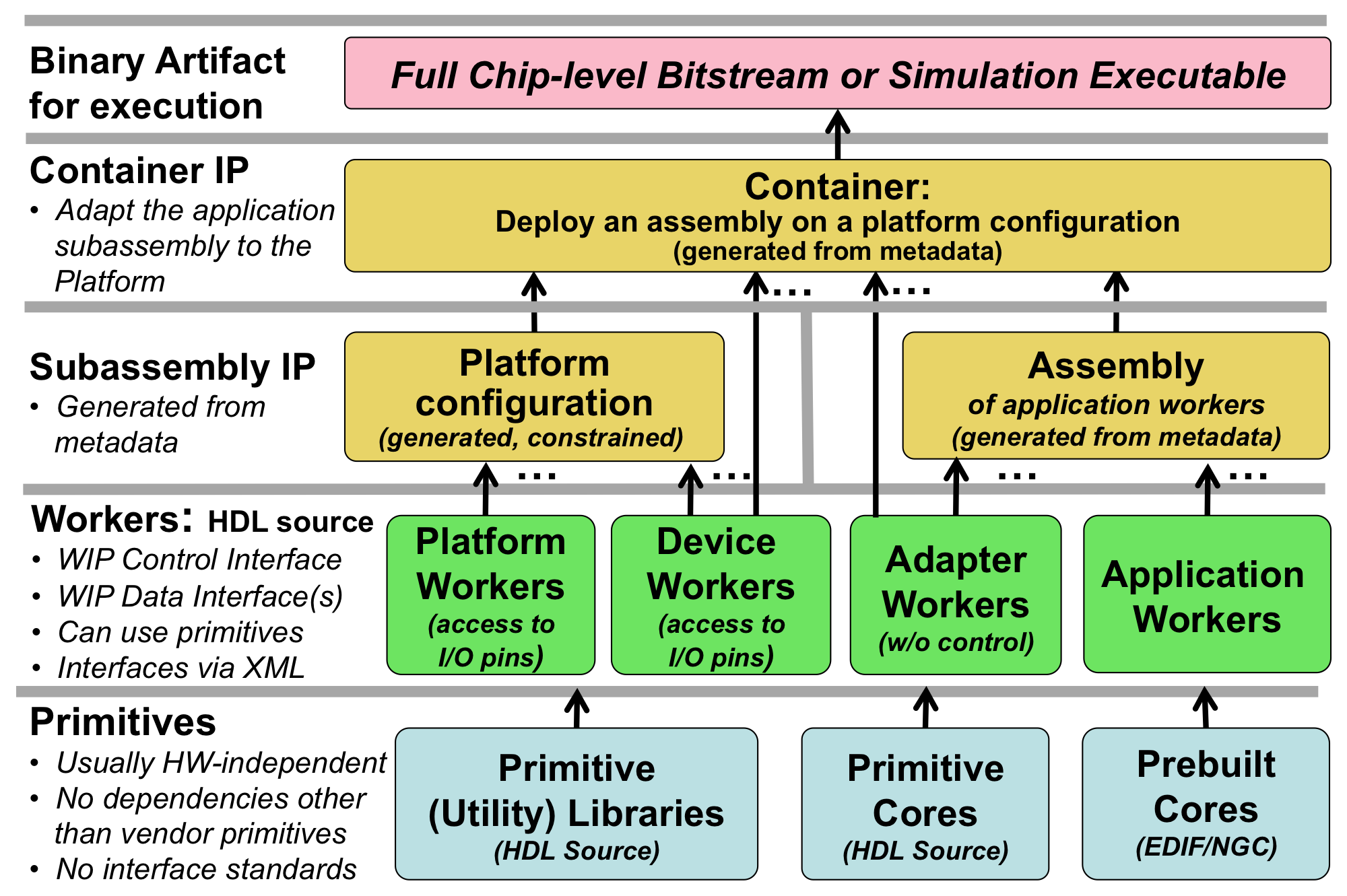
Figure 18: OpenCPI HDL Build Flow Layers
At the bottom layer (built first, used by all other layers), are primitives. These are low level, “leaf” libraries and cores used by higher levels. Primitive libraries are libraries of modules built from HDL source code that are available to be used higher up the hierarchy; using a primitive library in a higher level module does not imply all the modules in the library are brought into the design, but only pulled in as needed by references in the higher levels of the design.
Primitive cores on the other hand are single modules built from source or generated from tools such as Xilinx Coregen, which are also used in higher levels of design. They are explicitly instantiated in workers. Primitives may in fact depend on each other: a core may depend on primitive libraries, and primitive libraries may depend on other primitive libraries. Circular dependencies are not supported.
There are primitive libraries specific to vendors and families that can be used for implementing primitives using vendor-specific elements. More detail on creating such primitive libraries are in the OpenCPI HDL Platform Development document.
Above the primitives layer is the HDL worker layer, with workers of several types. All types of workers can use primitive libraries or cores as required. Application workers are generally portable and hardware independent. Device workers are workers that connect to the I/O pins of external hardware, and in some cases can attach to vendor-specific on-chip structures (e.g. ICAP on Xilinx). Adapter workers are used when two connected workers are not connectable in some way due to different interface choices in the OWD (e.g. width, stream-vs-message, clock domains). Adapter workers are normally inserted automatically as needed.
A platform worker is the special type of device worker that performs necessary platform-wide functions for the platform.
At the next layer, the HDL assembly is automatically generated HDL source code that uses application workers and adapter workers. The HDL assembly itself is described in metadata (XML) as an assembly of connected application workers. It typically represents a subset of an overall heterogeneous OpenCPI application: a subset that will be executed on a single FPGA.
The platform configuration is automatically generated HDL source code that uses platform workers along with some device workers. It represents a platform configured with built-in support for some attached devices, and may include various constraints and physical design. For those familiar with Linux kernels, a platform configuration is analogous to a built/configured kernel with some device drivers built-in.
At the top layer, the container adapts the application assembly to a platform configuration and provisions any additional required device workers. It connects and adapts the “external I/O ports” of the HDL assembly to the available I/O paths and devices in the platform. When the deployment of the HDL assembly requires device workers that are not in the platform configuration, they are instanced in the container itself. The Linux kernel analogy is that these extra device workers are analogous to the dynamically loaded device drivers used to run the application.
Device workers can either be built into the platform configuration or instanced in the container. Platform configurations provide the way to share configurations of devices and device workers to avoid redundancy and duplications of such things in container XML.
The final design for the entire FPGA is the container logic. This hierarchy (except primitives) is shown in the following diagram.
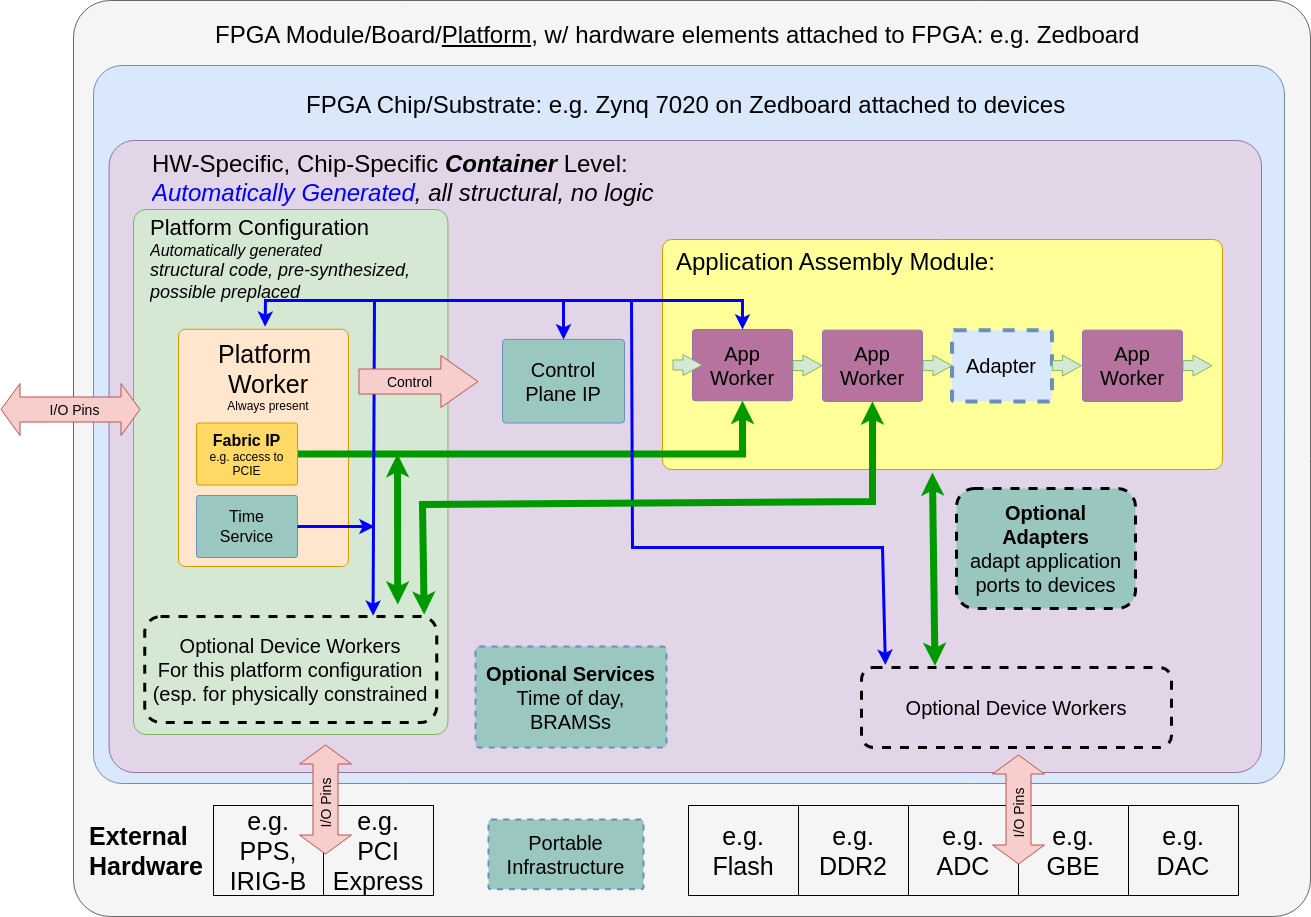
Figure 19: HDL Full FPGA Hierarchy
When tools support it, each layer in the build is actually synthesized or precompiled or elaborated as the tools allow (i.e. “prebuilt”).
Each worker in a component library is prebuilt (possibly using primitive libraries and cores)
Assemblies are prebuilt from generated VHDL or Verilog code using the required worker cores
Platform configurations are prebuilt from platform workers and device worker cores
Container top levels are built from platform configurations and HDL assemblies, with any additional device workers, service modules and adapters as required
Full bitstreams (or simulation executables) are built from the container modules
This layered prebuilding allows the results to be reused at the next level without recompiling or resynthesizing, all in a vendor independent fashion. E.g. an HDL assembly prebuilt for a Xilinx zynq part can be reused to target different zynq-based platforms. The exact definition of prebuilding varies with different tool chains, and the level of synthesis optimization that happens at each step also varies by tool, and some of this level of hardening at each level is controllable for some tools.
At one extreme, prebuilding simply means remembering which source files must be provided to the next level (for tools that have no precompilation of any kind). At the other extreme are tools that can incrementally synthesize to relocatable physically mapped blocks on a family of FPGA parts.
Simulators are considered HDL platforms that act as test benches for assemblies. This is described in more detail below in the simulation section.
HDL Directory Structure
In OpenCPI projects, HDL workers are in component libraries with other non-HDL workers. Component libraries are thus heterogeneous, where different workers, possibly using different authoring models, may implement a common spec. A project may have a single component library called ‘components’, where worker directories are located. Alternatively, a project may have multiple uniquely named libraries under the components directory, each of which contains workers with some common theme. When projects have a single component library, it is in the components directory of the project. There can also be multiple separately named component libraries under the components directory. Additionally, the top-level hdl directory in a project contains the following directories as needed:
primitives: This directory contains subdirectories for each primitive library or core.
assemblies: This directory contains subdirectories for each HDL assembly of application workers, and is where containers deploying these assemblies on platforms are built into bitstreams and simulation executables
devices: This directory is a component library containing HDL device workers for devices that are potentially usable on different platforms. HDL device emulators and software proxies for some of the devices may also be in this component library.
platforms: This directory contains subdirectories for each platform implemented in the project. Platforms are a specific FPGA chip/part on a circuit board with attached devices, or simulators. This is where platform-specific worker code exists, and where platform configurations are specified and built. There may also be a subdirectory under the platform’s directory, called
devices, containing a library of HDL device workers, proxies and emulators specific to that platform.cards: This directory contains HDL device workers (and their proxies and emulators) that are specific to cards, rather than those generally useful on different platforms and cards. It also contains specification files for cards.
Development for HDL devices, platforms, and cards is described in the OpenCPI Platform Development Guide.
Application workers for all authoring models are found in component libraries in projects, some of which are part of OpenCPI.
The project directory hierarchy is shown in the following diagram. All directories are optional and are created as needed by the ocpidev tool described in the CDG.
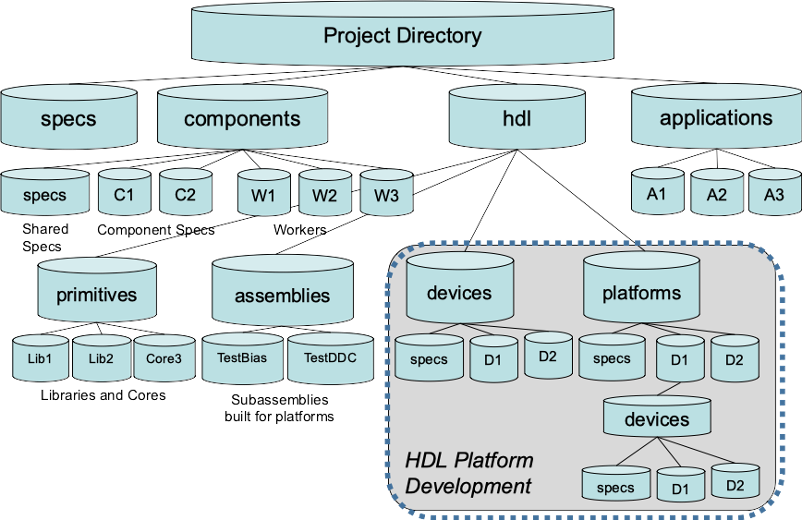
Figure 20: OpenCPI HDL Directory Structure
HDL Search Paths when Building
When building at any level of the HDL build hierarchy, the asset being built can depend on other assets, usually at lower levels of the hierarchy. HDL primitive libraries and cores can depend on other HDL primitive libraries. Workers can depend on primitives, specs, protocols and other workers. HDL assemblies always depend on application workers in libraries. The assets being depended on may be in the same library or same project, or in a different project.
In each case of a dependency, the underlying asset is found using search rules. The built-in search rules automatically find assets that are in the component library, when building workers in that library. They also automatically find assets that are in the current project, when building HDL primitives, workers, and assemblies in projects. Special action by the developer is only required when there are dependencies on assets outside the current library or project.
If assets in one project (A) depends on assets in another (B), that should be stated in the ProjectDependencies attribute in the project A’s Project.xml file. If a special version of that second project (B) was needed temporarily, an environment setting would cause the special version to be searched first, shadowing the assets in the project (B) explicitly stated in ProjectDependencies of A. By “shadowing” we mean that the environment setting causes the search to look elsewhere before looking at the projects specified in the ProjectDependencies attribute.
Environment variables are normally used only to temporarily replace/shadow assets in the default search path. Dependencies are normally stated at the point of dependency and stored in the appropriate file that is part of that asset (e.g. Project.xml for project-level dependencies). Environment variables essentially override these stated dependencies.
For each of the search rules defined below, the following principles are applied:
Search “closer” first, then “farther away” (e.g. in library, then in project, then other projects).
Search within the project before searching outside the project.
Search using the project path in the environment (
OCPI_PROJECT_PATH) before using the explicit dependencies in the project’sProject.xmlfile.Search the built-in
ocpi.coreproject last.Search the directories specified in any path environment variables in the order they appear in the colon separated list.
Searching for HDL Primitives
When a worker depends on primitive libraries, it specifies this by declaring the library name in a list in the Libraries attribute in its OWD XML file. Similarly, when an HDL worker depends on primitive cores, it specifies this by putting the core name in a list in the Cores attribute. When the worker is being built, these lists are used in the following way.
If the library or core name has slashes in it, it is treated as a pathname (absolute or relative) to the specific directory of the primitive library or core. Examples are:
Libraries=../../myprims /home/colleague/hisprims/funprims
Cores=../../../ourcores/fft
Or for tools that require Cores to be explicitly mapped to HDL instances:
Cores=../../../ourcores/fft:fft_i
If a name in the primitive library or core list does not have a slash (the common case), it is found by searching in the following places, in the following order:
The HDL primitive libraries or cores in the same project as the worker.
The HDL primitive libraries/cores in the projects listed in the environment variable
OCPI_PROJECT_PATH, which are colon separated and searched in order.The HDL primitive libraries or cores in the projects listed in the
ProjectDependenciesattribute in the project’sProject.xmlfile.The HDL primitive libraries or cores in the
ocpi.coreproject.
When it is convenient to put a list of primitive libraries in the library or project’s XML file, (making them available to all workers in the library or project), the name of the attribute is specific to the authoring model. Thus to make a list of libraries available to all the HDL workers in a component library, you would put the following line in the library’s XML file.
<library HdlLibraries='gprims'/>
Rarely, HDL Compilation tools may require that cores be explicitly mapped to HDL instances in a design. For such tools (e.g. Quartus Prime Pro Edition), the format Cores=<core-name-or-path>:<hdl-instance> can be used.
Searching for XML files (OCS, OPS) when Building Workers
As described in the CDG, all workers have an OWD, and all OWDs depend on a component spec, normally found in a separate OCS XML file. Furthermore, OCS files frequently depend on a separate OPS (protocol spec) file. It is also possible that an OWD could include an XML file to incorporate a list of properties defined elsewhere.
When looking for these XML files, when their name has no slashes, it is found by looking in the following places, in order:
The worker’s directory
The
gensubdirectory of the worker’s directory (for files generated by tools)Directories specified in the space-separated list in the XML attribute
XmlIncludeDirsThe component library’s export directory (
lib/hdl) for referencing other HDL workers (e.g. forslaveandemulateattributes)The component library’s
specssubdirectoryThe export directories (
lib/hdl) of all component libraries in theComponentLibrariesattribute (see below) for referenced HDL workers (e.g. forslaveandemulateattributes)The directories listed in the environment variable
OCPI_XML_INCLUDE_PATH, which are colon separated and searched in orderThe
specssubdirectories of all projects in the environment variableOCPI_PROJECT_PATH, which are colon-separated and searched in orderThe
specssubdirectories of the projects listed in theProjectDependenciesattribute in the project’sProject.xmlThe
specsdirectory of the built-inocpi.coreproject.
Searching for Workers in Component Libraries
The XML ComponentLibraries attribute specifies a list of places to look when searching for workers. The most common use case for ComponentLibraries is for creating HDL assemblies, where the workers specified in the assembly must be found by searching for them in component libraries. Other uses include device workers, platform workers and platform configurations, as described in the HDL Platform and Device Development topic.
While it might seem counter-intuitive for a worker inside a component library to depend on other component libraries, there are three cases where this occurs:
A worker’s OWD depends on specs (OCS and/or OPS) in another library.
A worker is a proxy for a worker defined in another library (HDL workers cannot act as proxies).
A worker is a device emulator for a device worker defined in another library.
A worker is a subdevice which supports a device worker defined in another library.
In all these cases, a worker or a component library might define the ComponentLibraries XML attribute to specify this dependence.
To find workers, the search first looks in the library that the worker is already a part of. After this, the ComponentLibraries attribute is used, which holds a list of component libraries to search.
If the component library name in ComponentLibraries has slashes in it, it is treated as a path name (absolute or relative), to the specific directory of the component library. If a name in the list does not have a slash, the component library is found by looking in the following places, in order:
The other component libraries in the same project.
The component libraries exported by the projects listed in the environment variable
OCPI_PROJECT_PATH, which are colon separated and searched in order.The component libraries of the projects listed in the
ProjectDependenciesattribute in the project’sProject.xmlfile.The component library in the
ocpi.coreproject.
In all cases, for a worker to be found, it must have been built, or for HDL workers, their project must have been built for RCC workers (using the --rcc option to the ocpidev build command in the project). Building a project’s RCC workers has a side effect of making all of its worker (RCC, HDL etc.) visible to other workers and projects even though they are not actually built. This happens automatically when a platform is installed using the ocpiadmin install platform command.
Advanced Build Configuration for Primitives and Assemblies
HDL primitive libraries and assemblies support advanced attributes for special build configurations or dynamic code generation. These attributes are optional and typically only used when a primitive library or assembly needs non-default build configuration that can’t be expressed in the asset’s XML file alone.
configfiles Attribute
The configfiles attribute lets you specify additional XML files that provide build variables during the build process. You’d use this when an HDL primitive library or assembly needs build configuration beyond what the asset’s XML file provides. The files listed are paths relative to the asset’s directory.
Unlike workers, the files specified in configfiles are all processed at the same time. This reflects the relative simplicity of building HDL assets—there’s no need to generate a large number of build variables to expose to pre-build scripts.
Each configuration file contains <buildoption> elements that define variable names and their values. Here’s the basic format:
<config>
    <buildoption name="foo"  value="bar"/>
    <buildoption name="foo2" value="bar2" append="true"/>
    ...
</config>
The configuration files are processed in the order they appear in the configfiles list. If the same variable appears multiple times, the last value wins—unless a later occurrence uses the append="true" attribute, in which case the new value is appended to the previous one.
NOTE: Setting a build variable via configfiles will typically overwrite the previous value. The exception is SourceFiles when specified in a generated configuration file—the new value is appended instead. This allows using SourceFiles="_" at the top level for all files needed across any target, while a generated configuration file can add target-specific files as needed.
NOTE: Not all variables can be set by configuration files. Some variables are processed before configuration files are read, or should be set directly in the asset’s XML file. The limitations section lists which variables fall into this category.
prebuildscript Attribute
The prebuildscript attribute specifies one or more executable files that run before the HDL asset is built. Each script should be executable with the appropriate shebang line at the start. You’d use pre-build scripts to dynamically generate code, integrate third-party IP, or set build variables based on external conditions.
When you specify a prebuildscript, the build system generates gen/build-variables.xml before running your scripts. This file exposes a limited set of build variable values to your scripts so they can make informed decisions about what to generate. For HDL primitive libraries and assemblies, this file contains only HdlTargets and HdlPlatforms (or just HdlPlatforms for assemblies). The format matches the configuration file format shown above (but without the append attribute):
<config>
    <buildoption name="foo" value="bar"/>
    <buildoption name="foo2" value="bar2"/>
    ...
</config>
The typical workflow combines prebuildscript with configfiles:
Set
configfiles="gen/{name}.xml"in the asset’s XML fileYour pre-build script writes new
<buildoption>elements togen/{name}.xmlThe build system processes the newly generated options via
ocpigen
This pattern is useful when, for example, a script needs to discover available hardware resources or version information from an external tool and then pass that information into the build.
Limitations
Some build variables are processed before configuration files are read, which means a generated configuration file can’t modify them. If you try to set these in a pre-build script output, the change won’t take effect. This list includes:
ExcludePlatformsExcludeTargetsOnlyPlatformsOnlyTargetsLibrariesIncludeDirsConfigurationsContainersDefaultContainersParamConfigurationsHdlTargetHdlTargetsHdlPlatformRccTargetRccPlatformRccPlatforms
This list may not be exhaustive—if a variable controls early-stage build configuration, it’s safest to assume it can’t be changed by a generated configuration file.