Authoring Models
This section introduces the concept of an OpenCPI Authoring Model, and defines aspects common to all authoring models. It specifies the concepts, lifecycle states and related operations, and OWD XML information used and manipulated by OpenCPI tools and edited by OpenCPI component developers.
The use of the term component is to define the functionality and an abstract interface. The term worker is used for particular implementation of a component written, (authored), using a programming language source code.
The definition of an authoring model can be referred to as a way to write a worker. A key goal is to support different processing technologies available such as General Purpose Processors (GPPs), Field-Programmable Gate Arrays (FPGAs), Digital Signal Processors (DSPs), or Graphical Processing Units (GPUs).
Since there is no one language, or API, that allows all these processing technologies to be utilized with efficiency and utilization comparable to their native languages and tool environments, we define a set of authoring models that achieve native efficiency with sufficient commonality with other authoring models to be able to:
Implement an OpenCPI worker for a class of processors in a language that is efficient and natural to users of such processors
Be able to switch or replace the authoring model and processing technology used for a particular component in a component-based OpenCPI application without affecting the other components of the application.
Combine workers into an application using a variety of authoring models and processing technologies.
An OpenCPI authoring model consists of these aspects:
An XML structure/schema/definition for OWDs, which describes aspects of the worker needed by tools and runtime infrastructure.
Three programming language interfaces used for interactions between the worker itself and its environment:
Control and configuration interfaces for run-time lifecycle control and configuration, referred to as the control plane.
Data passing interfaces for workers to consume/produce data from/to other workers in the application (of whatever model on whatever processor), referred to as the data plane.
Local service interfaces/APIs used by the worker to obtain various services locally available on the processor on which the worker is running.
Mechanisms to build workers and package them for execution.
Control Plane Introduction
The material in this introduction is common to all authoring models. We use the term control software to describe software that launches and controls OpenCPI applications. This is either the standard utility program, ocpirun, or custom C++ programs that perform the same function embedded inside them. Such custom programs use the Application Control Interface (ACI), an application launch and control API described in the OpenCPI Application Development Guide.
We use the term Control Plane as the infrastructure to support how control software, usually running in a centralized host processing environment, can control worker instances at runtime. The entity that is doing the controlling (or managing) is the control application, or simply control software. The control software accesses all controllable worker instances the same, regardless of where they are running, on what type of processing technology, and with what authoring model they were written.
While control software sees a uniform view of how to control workers, each authoring model defines how this is accomplished from the point of view of the worker itself. In particular, each authoring model defines how the two key aspects of control are made visible to the worker’s source code: LifeCycle control and Configuration Property access. The documents describing each authoring model give additional interface details of these interactions, but they all follow a common pattern which is defined here.
LifeCycle State Model
Most component-based systems have an explicit lifecycle state model, where workers are instantiated and then managed, according to a lifecycle state machine. Normally all components in the application are managed together and they all progress through the lifecycle together. However, there are cases where control software must control (start/stop etc.) some components in the application different than others.
The LifeCycle model is defined by the control states each worker may be in, and control operations which generally change the state a worker is in, effecting a state transition. The possible states and transitions are shown in the following diagram.
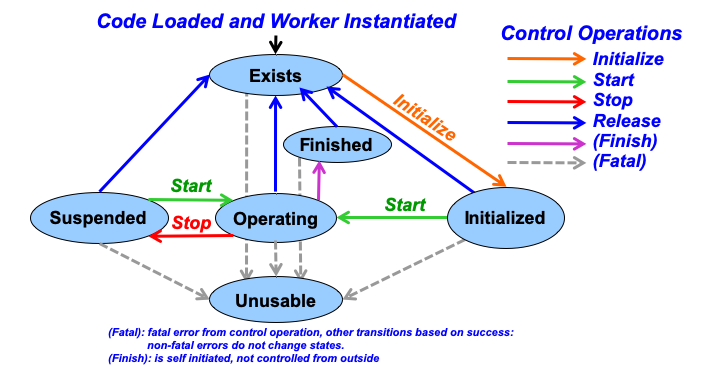
Figure 8: Control States and Operations
LifeCycle Control Operations
Workers have default implementations for control operations that only perform the state transitions: workers code only needs to implement the operations that have custom behavior. A good example is the initialize control operation. If the worker has no runtime initialization to perform, it can have no implementation of this operation and not even have an empty “stub”. Each authoring model describes which control operations must have implementations, if any.
Control operations can have two error types: transient or fatal. Transient errors imply that no state change occurred and the operation can be retried. Fatal errors imply that the worker instance has become unusable and needs to be reloaded.
Control software is required to issue control operations correctly, in sequence, so workers can avoid checking for valid states and transitions. State descriptions are listed in the table below:
Control State |
Previous State(s) |
Allowable Operations |
Description |
|---|---|---|---|
Exists |
Initial state or all others after release, except unusable |
Initialize |
Follows instantiation or a successful release. Worker is loaded (if necessary), not fully initialized, with no properties valid, and property access not allowed. |
Initialized |
Exists |
Start, Release |
Initialization complete due to initialize. In a stable state “ready to start doing work”, not “operational”. Properties can be read and/or written. |
Operating |
Initialized, Suspended |
Stop, (finish), Release |
Member doing normal work using properties and data at ports. Properties can be read or written. Follows start. |
Suspended |
Operating |
(Re)start, release |
Member not operating, will not produce or consume at data ports. Properties can be read or written. Can be resumed via start. |
Finished |
Operating |
Release |
Member is finished and will not produce or consume at data ports. Properties can be read or written. Entered autonomously. |
Unusable |
All (fatal errors) |
none |
Fatal error state, may not be ever reusable without reloading (model-dependent). |
Configuration Properties
Configuration properties are specified in the OCS or OWD, and are writeable and/or readable values that enable control and monitoring of workers by control software. They are logically the knobs and meters of the worker’s “control panel”. All authoring models provide an interface enabling control software to access (read and write) these values.
Some authoring models define a flat/linear configuration address space where the configuration properties are accessed by accessing this memory space, roughly as a data structure or register file.
The component specification for the worker contains the description of the configuration properties that are part of the component’s external behavior. These will exist in all implementations (workers) that reference the component specification. However, each worker may also add to this set of configuration properties and define implementation-specific configuration properties. These can be useful for implementation debugging and testing, or in some cases to allow applications to configure properties specific to a particular implementation.
Each configuration property is defined with a name and data type from the data types listed in the table below. Each configuration property may vary in length (i.e. be strings or sequences) but must specify a maximum length. This enables components and workers to be compliant with a variety of component system standards, and enables authoring models for resource-limited embedded technologies.
Data types for configuration properties are based on the scalar types listed in the following table. A property data type can be one of the scalar types or a structure with typed members that are property data types. A property data type may have array dimensions, and also (after any array dimensions are applied) be defined as a variable length, single dimension sequence. This recursive definition allows for complex types such as: a sequence of a two-dimensional arrays of structures containing members that are themselves arrays or sequences or structures.
Scalar Data Type |
Support for Unsigned Version |
Data Size |
Notes |
|
N/A |
8 bits |
|
|
Yes |
8 bits |
Unsigned version is |
|
N/A |
64 bits |
Consistent with IEEE floating-point types |
|
N/A |
32 bits |
Types are represented by ulong values, but are associated with string names. |
|
N/A |
32 bits |
Consistent with IEEE floating-point types |
|
Yes |
32 bits |
Unsigned version is |
|
Yes |
64 bits |
Unsigned version is |
|
Yes |
16 bits |
Unsigned version is |
|
N/A |
fixed |
Null terminated with a defined max length |
When a property’s type is a multidimensional array of the above types, the number of dimensions is fixed, and the length in each dimension is fixed.
When a property’s type is a variable length sequence of the above types (or arrays of above types), it has a current length (number of valid values present), but is still required to have a defined maximum possible length (capacity). Sequences may have a current length of zero or any amount up to the specified maximum possible length. E.g. if a sequence is defined with a maximum length of 4, it means that it may hold zero, 1, 2, 3 or 4 values. Space is always reserved for the maximum number of values, but the current length is also recorded in the sequence and is set whenever a new value for the sequence is set.
Beyond data type, the configuration properties also have accessibility attributes indicating whether the value can only be:
set at initialization time
set any time during execution
never set (read-only)
Similarly, a configuration property value can be described as volatile where the value may be changed by the worker during execution, or statically readable and will not change unless written by control software. These accessibility types are described in detail in the Accessibility Attributes; How and When Properties Get Their Values topic.
An OWD file allows additional properties to be defined unique to the worker, beyond those specified in the OCS. Additionally, the OWD may add to the accessibility of an OCS property. E.g., for debug purposes, the OWD may make a property readable that was not readable in the OCS. The accessibility added by the OWD results in the implementation having a superset of what was described in (and required by) the OCS.
Properties That Are Build-time Parameters
While the OCS specifies properties and their initialization-time and run-time accessibility, an OWD can further declare that a property is a compile time parameter in this worker. This is not allowed for properties declared as writable at runtime, either in the OCS or OWD. When an OWD declares properties to be parameters, this means that the worker will be built, compiled, synthesized, elaborated for specific values of such properties. This has three implications:
An application can only use the worker if it is built for a property value that matches the value requested for an “initial” property in the application.
Binary component libraries may have multiple binary artifacts for the same worker, but with different combinations of parameter values.
The component developer must decide which combinations of parameter values to build, in order to make alternative settings of such parameters available.
This parameter feature allows implementations to have compile time optimization for certain values. It also allows a single worker’s source code module to be optimized for specific compile-time values.
Parameter property values are applied to the build process as per the language of the authoring model: e.g. by preprocessor symbol definitions for C, static const values for C++, generics for VHDL, and parameters for Verilog. A framework-generated (built-in) parameter property is the ocpi_debug Boolean property that specifies the typical debug build vs. production build. Parameter properties are described in more detail in the Built-in Parameters of All Workers OWD topic.
Each authoring model specifies how properties, at runtime and compile time, appear to the worker code. In addition it specifies how the worker may access property values written by control software, and set values that will be read by control software. Finally, different authoring models define how workers know when control software actively reads or writes these values.
Data Plane Introduction
Components (and thus workers) communicate with each other by sending and receiving messages via ports. Ports are specified as sending or receiving messages whose content is defined by a protocol. A protocol is simply a defined set of message types (see the Protocol Specifications (in OPS XML Files) topic). Thus a port will send or receive messages of the types defined in its protocol.
When a message is sent or received, it is accompanied by two items of metadata, usually out-of-band (not embedded in the message payload):
an opcode, which is an ordinal indicating which message type it is (if there is only one message type in the protocol, the opcode will always be zero).
a length, in bytes, indicating how long the message payload is.
Messages are sent or received this way whether the other connected worker is in the same container (colocated) or on a different processor entirely. Messages are placed in buffers by the sending worker and retrieved from buffers in the receiving worker. When an application is run, the workers are instantiated in containers, and every connection between worker ports is established. Some connections are implemented with one or more fixed size buffers, so in general the sending worker must assume that the (output) buffer it is using for sending a message has a size limit.
Workers must assume fixed size output buffers since that is the case some of the time. Every worker can get the runtime size limits of its output buffers, using a method defined by its authoring model. If the protocol specifies fixed size messages, this worker can assume output buffers will always be large enough to contain any message type in the protocol. If the protocol specifies some variable size messages, usually using sequence data types, it must ensure that the output buffer size is respected, by limiting the (variable) size of output messages produced.
There is a built-in (always present) property for each output port, whose name is ocpi_buffer_size_<port>, that all workers can examine for this purpose. Some authoring models have separate convenience methods for getting this value. This output port buffer size property value is set externally, at application start time, which is why it is a runtime value, not a compile time constant value.
How the actual contents of messages are read from input ports and written to output ports is defined for each authoring model. Message payloads (when seen as a sequence of bytes), follow a conventional structure-like format, with all scalar values aligned per their size in bytes, and any array or structure is aligned for the maximum alignment of any of its members. Sequences (variable length) are preceded by an aligned 32 bit number-of-elements value, followed by aligned sequence element data. Strings are aligned on 4-byte boundaries, and are null terminated. More details about message payload formats is in the Message Payloads on Data Ports topic.
A message type in a protocol may be specified as having no data, i.e. be zero length.
End-of-File (EOF) Indications on Data Ports
Regardless of protocol, the OpenCPI messaging system (its data plane) supports an EOF indicator in the data paths between workers of all types that indicates that no more messages/data will arrive at input ports or that no more messages/data will be produced on output ports. This indication is a persistent condition that will only be removed when the application and workers are restarted. It is not a message or a protocol operation.
Such an indication only happens when some worker asserts it on an output port, which then propagates it (down-stream) to the input port of the worker that the output is connected to. The most common usage of this EOF indication is when data is being read from a file (e.g. by a file_read component), and when that component encounters the end of the file it is reading. Such a worker typically has three options:
Assert an EOF on its output port after the last message/data is sent, and enter the finished control state.
Do nothing on the port, and enter the finished control state.
Start reading the file from the beginning again.
Thus in a typical execution of an application where end-of-data is a meaningful condition, the EOF will propagate through all workers to the final “sink” components (e.g. file_write or capture) that do not have output ports. In this way all workers know that the application is finished, and all can cleanly complete their work (perhaps flushing pipelines, closing output files etc.). In this way the EOF indication on the data plane is related to the action that a worker would take to enter the finished control state. I.e. the reception of EOF would commonly result in the worker entering that state.
For continuous applications where the concept of EOF is not meaningful, it will never be encountered by any worker since no worker will assert it on an output port.
The unit test framework described in the Unit Testing of Workers topic makes use of EOFs to execute repeatable tests of components. Applications that process data sets of bounded size will also find the use of EOF to be convenient and useful, since it makes it clear to all components as well as the application as a whole, that the application is “finished”.
For most workers, the propagation of the EOF indication from its input port(s) to its output port(s) is automatically done without their involvement. Input data will simply stop arriving. However, some workers have more complex interactions with data ports, and perhaps more complex internal pipelining or state that requires special treatment when the last data arrives. They will recognize the EOF indications and perform final processing tasks accordingly. This latter type of worker declares “I will deal with EOFs”, (using the WorkerEOF attribute) and the OpenCPI infrastructure will not perform the automatic EOF propagation from input to output. The default propagation of EOFs (when no WorkerEOF attributes are set), is to propagate an EOF arriving on the first input port to all output ports.
Each authoring model has an interface for the worker to sense the EOF indication on input and assert it on output. These interfaces are described in the respective documents specific to the authoring models (e.g. RCC and HDL development guides).
The next section describes important issues of backward compatibility relating to EOF indications for workers implemented prior to release 1.5, which are still supported.
EOF Processing Prior to Release 1.5
Prior to release 1.5, the notion of EOF was overloaded with, and frequently confused with, the notion of a zero-length-message (a.k.a. ZLM). The pre-1.5 file_read component, upon encountering the end of the file it was reading, would (as a default), send a zero length message with the opcode of zero as an EOF indication.
This would directly conflict with protocols whose first operation happened to have no arguments. In general, users avoided the conflict by not defining protocols with the first operation having no arguments. And it was impossible to use the EOF concept with a “pure single event” protocol that only had one message with no arguments, which is useful for sending events (pulses) between components. These difficulties disappear with the introduction in release 1.5 of a cleanly separate EOF indication that has nothing to do with messages and protocols.
Workers written prior to release 1.5 that supported EOF for unit test or other reasons, did so by explicitly adding code to interpret zero-length messages with opcode zero (ZLM0s) as EOF, and passing them from input to output. A small number actually acted on the reception of ZLM0 to perform certain flushing operations. This ZLM0 recognition was required in order to make best use of the unit test framework and the extra worker code to process ZLM0s was considered “worth the extra code” in order to facilitate repeatable testing.
Software Execution Model
The material in this section applies to most software-based authoring models (e.g. RCC and OCL). It does not apply to the HDL (FPGA) authoring model.
Execution of software workers is based on a construct called Containers. Containers supply threads and execute the workers. This eliminates the need for workers to create or manage threads. This reduces the complexity of the worker code, eliminates any requirement to support a threaded API capability, and allows the container to determine the level of multithreading that is needed. The authoring model defines how the threading is provided.
Execution of a worker occurs when the worker is transitioned into the operating control state. Workers are only executed when either a combination of its ports are ready (port readiness), or an amount of time has elapsed. The combination of port readiness and the passage of time is referred to as the worker’s run condition: the condition under which it should be run.
Every worker has an entry point called its run method. When a worker’s run condition is satisfied, determined by its container, its run method is called. Worker execution is a series of “runs” initiated by the container. The worker’s run method cannot block, but returns after doing some work, allowing the container itself to determine when the worker should be entered again: when its run condition is once again satisfied.
The container calls the worker’s run method when the worker’s run condition is satisfied. Run conditions are satisfied based on 1) the availability of input buffers, with data, or output buffers, with space, at a worker’s ports or 2) the passage of time. The worker’s run method performs some processing and may:
process some available messages at some of its input ports
produce messages at some of its output ports
indicate when messages are consumed as input or produced as output
make any changes to its run condition
It then returns control to its container. Workers never block. The container conveys the messages in buffers between collocated workers as well as into and out of the container as required by the application assembly’s connections between components.
The container determines when the worker should run, supplies it with buffers full of input messages, and buffers into which output messages may be placed.
Run Conditions
Workers declare a run condition which tells the container under what conditions the worker should run. The container evaluates the run conditions of all workers and runs them as resources and priorities allow.
The run condition object contains two aspects: port readiness and time. The worker is run when its port readiness requirements are satisfied, or a specified amount of time has passed. Either or both aspects can be specified.
While the worker is in the operating state, port readiness means that buffers are available at that port to be used by the worker. Input ports have available buffers when there is message data present that has not yet been consumed by the worker. Output ports are ready when buffers are available into which the worker may place new data. I.e. input ports are ready when the worker has data to consume, and output ports are ready when the worker has room to produce new data into a buffer. Workers may partially consume or partially produce messages in any given run.
This port readiness model implements simple data driven execution: code is run when data can flow. The default run condition specifies that the worker should run if data is available at all input ports and space is available at all output ports (or conversely, there are no ports that are not ready). Note that this default, for workers with no ports, means they are always ready to run.
The time aspect of run conditions, indicated by the worker, specifies the desired maximum time between invocations of the worker’s run method. If no port readiness is also specified, this simply indicates periodic execution. If the time aspect is specified with port readiness, it indicates that execution should take place when either the indicated port readiness conditions are satisfied –or– the indicated amount of time has passed since the worker’s run method was last entered.
The default time aspect of run conditions is: no such maximum time at all. In this case time passing does not affect worker execution, only port readiness.
A worker may change its run condition at any time during the execution of its run method by passing a new run condition to the container, to be considered after the run method returns to the container.
In summary, run conditions specify a combination of data-driven and time-driven execution. Most workers use one or the other, but both can be used together. The defaults allow most workers to never have to indicate any run condition at all.
Sending or Receiving Messages via Ports
The worker indicates data flow to the container under two conditions. The first occurs when the worker has consumed the message in an input buffer at a port. Notification of that consumption allows that buffer to be released and reused. The second happens when the worker has finished placing a message in an output buffer at a port. This allows the message in the buffer to be sent on to the other worker connected to that port.
Buffer Management
The container provides and manages all buffers and provides references to buffers to the worker. Input ports operate by the container providing buffers to the worker, filled with incoming messages. Output ports operate by the container providing buffers for the worker to fill with messages before being sent. Output buffers are either:
obtained for a specific output port (since they may be in a special memory or pool specific to a particular output hardware path), or
originally obtained from an input port and passed to output ports, with no copying by worker code.
Workers may modify data in input buffers, allowing input buffers to be used for temporary storage, to reduce overall memory requirements. When reuse occurs, the buffers must be annotated in the worker description XML. This ensures the container does not share the buffer with another consumer of the same data.
Several more advanced buffer management requirements are supported for certain situations:
To support sliding window algorithms, workers are allowed to retain ownership of previous buffers by not releasing them while new ones are requested; i.e. allow explicit in order input buffer release, not just the most recent buffer obtained. The worker must still release the buffers in the order received.
To support zero copy from input ports to output ports, workers are allowed to send a buffer obtained from an input port to an output port. This method does not require an empty current buffer to fill on the output port. Such buffers must be sent, or released, in the order received. This avoids copying data from input buffers to output buffers.
The advanced features listed above are only needed in certain cases, and can be ignored for most simple workers. To support these more advanced modes, non-blocking interfaces for explicitly releasing, sending, and requesting buffers are available.
There are four operations performed with message buffers. These provide the basis for specific non-blocking functions in the APIs defined for each authoring model.
Request that a new buffer be made available. For an input port, it will be filled by the container with a new input message. For an output port, it is to be filled by the worker with a new output message. In both cases the ownership of the buffer passes from container to worker when it becomes available. The new buffer may or may not be immediately available based on this request.
Release a buffer to be reused, with its contents discarded. The ownership passes from worker to container. Input buffers must be released (or sent) in the order received, i.e. ownership of input buffers must be passed from worker to container in the order that ownership was given from container to worker.
Send (enqueue) a buffer on an output port, to be automatically released after the data is sent. The ownership passes from worker to container. If the buffer was originally obtained from an input port, it must be sent or released in the order received.
Take the current buffer from an input port such that is it no longer the current buffer of the port, but ownership is retained by the worker. This allows new input buffers to be made available while the worker holds on to previous buffers. A take implies a request for new buffers. This function allows workers to use previous buffers to hold history data for algorithms such as sliding window or moving average, without allocating any additional storage.
The concept of the current buffer of a port supports a model for workers that have no need to be aware of buffer management. A port is ready if it has a current buffer. A current buffer on an input port is available to read data from. A current buffer on an output port is available to write data into. The concept of advancing a port, is simply a combination of releasing (input) or sending (output) the current buffer of the port, and requesting a new buffer to be made available on that port, to become the current buffer when it becomes available in the future:
advance = release_or_send + request
Simple workers, using the default run condition, wait for all ports to be ready, process input buffers into output buffers, advance input and output ports, and return.
Worker APIs defined by the authoring model are designed to make this common pattern as simple as possible. Workers are run when ports are ready, and they advance ports after processing messages in current buffers.