Overview of OpenCPI
Open-Source Component Portability Infrastructure (OpenCPI) is a development and runtime framework that embraces:
Open source software and gateware
Component-based development (CBD)
Heterogeneous embedded computing
The following diagram shows what OpenCPI considers to be a heterogeneous embedded system, with multiple different processor types (yellow) are connected by multiple different interconnect technologies (green).
In the following figure, two applications (blue and brown) are deployed with their constituent components distributed to the available processors.
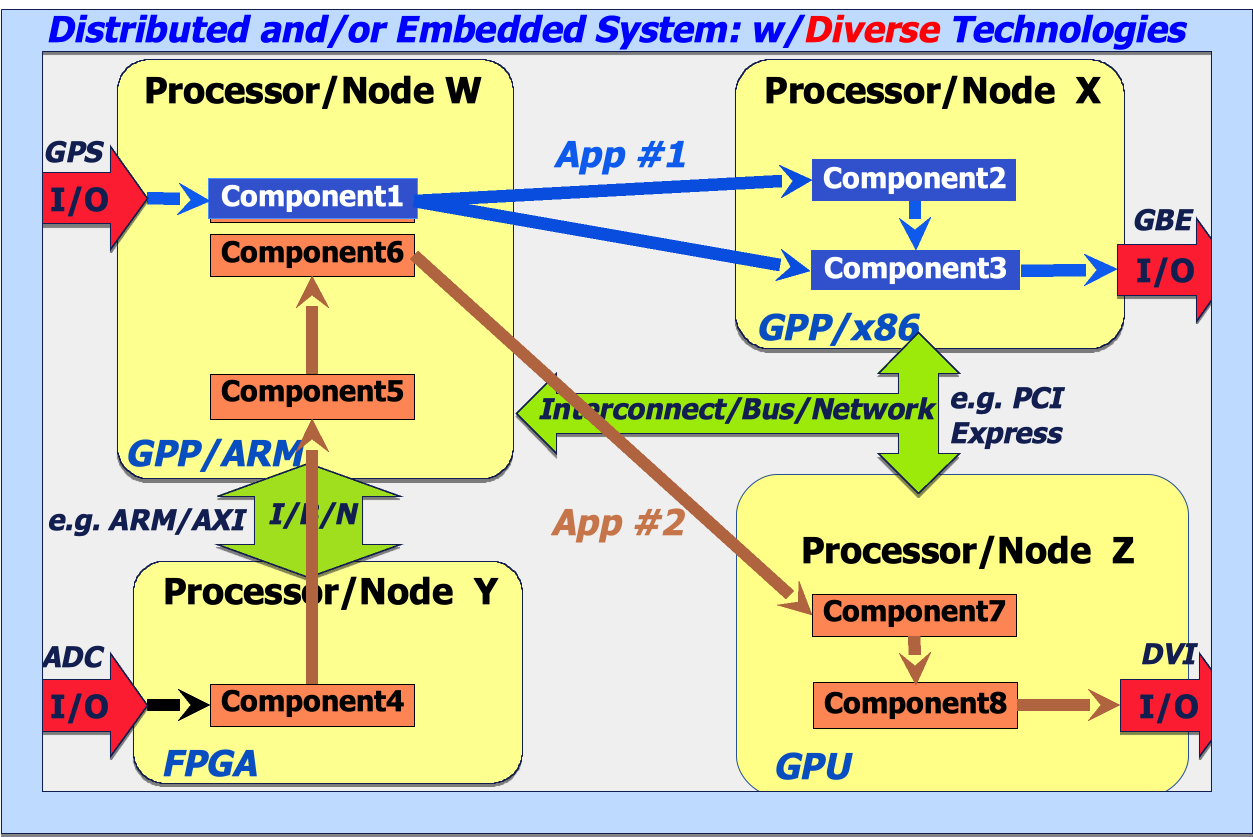
Figure 2: Embedded System with Diverse Processing and Interconnect Technologies
The most common type of embedded system that OpenCPI is used with is Software Defined Radio (SDR), but any system with diverse technologies is appropriate. SDRs commonly contain a mix of general purpose processors (GPPs) and FPGAs, both of which perform computing tasks for SDR applications.
OpenCPI has also been used with small clusters of processors in a rack packaged for an embedded environment.
The OpenCPI framework includes:
A runtime environment for executing components and moving data, including a set of runtime libraries (software and FPGA IP code), command line utilities and “drivers” for different platforms, devices and interconnects
A set of tools, specifications, documentation, examples and tests for developing components and applications that use them
A framework and methodology for component-based development mixing processor types and diverse interconnect technologies and targeting embedded applications
Framework Architecture
At the highest level, the architecture of the framework combines three key concepts:
Application management model: How component-based applications are managed and controlled, including loading, launching, starting, stopping, configuring, querying, etc. This is sometimes described as how component-based applications are deployed. The OpenCPI framework provides a command line tool and a native C++ API for application deployment.
Authoring model: How components are written in order to be effective on various processing technologies and execution environments. The OpenCPI framework defines authoring model APIs that allow development in languages that target a particular processing technology.
Data transport model: How messages are moved between one component and another. The OpenCPI framework provides a flexible and transparent methodology for moving data of differing types, enabling a simplified and abstracted development process that greatly removes hardware considerations from the application.
The core software and gateware (FPGA code) provided by OpenCPI is structured to allow extensions in any of these three dimensions: enable new management models, add new authoring models, and adding new data transport technologies.
OpenCPI Concepts and Terminology
This section provides brief descriptions of the concepts and terms that relate to using OpenCPI that you will encounter in OpenCPI tutorials, guides and references. OpenCPI briefings provide more introductory context for these definitions, while reference documents provide the details.
Design Concepts
A component is a defined function that has properties and ports. Properties configure and control the component. Ports are where data messages are sent and received. Ports support protocols, which define the allowed/expected messages. A component is specified in a small XML document called a component spec (acronym OCS). A component spec defines its properties and ports and may refer to protocol specs (acronym OPS) that are common to different components. Protocol specs are also defined in XML. The OpenCPI Component Development Guide provides details.
An application is an assembly of configured and connected components. Each component in the assembly indicates that, at runtime, some implementation – a worker binary – must be found for this component and an executing runtime instance must be created from this binary. Each component in the assembly can be assigned initial (startup) property values. Some component ports are identified as external ports of the assembly and can be bound to files or other devices when the application is run. An application is specified is an XML document (possibly program-generated) called an application spec (acronym OAS). The application spec is used to launch the application. The OpenCPI Application Development Guide provides details.
A worker is a specific implementation of a component with its source code written according to an authoring model. A component can have many implementations/workers. Workers are written in different languages to OpenCPI-defined APIs and are compiled/synthesized for different targets (CPUs, FPGAs etc.). All workers based on the same component spec perform the same function, perhaps using different algorithms to do the same job. A worker is developed in its own directory, which is usually a subdirectory of a component library, which is a collection of component specifications and workers that can be built, exported and installed to support applications. A worker has an associated worker description XML (acronym OWD) and source code. The OpenCPI Component Development Guide provides details.
An authoring model is one of several ways to write a worker, usually for languages well-suited to some processing technology. An authoring model defines how to create component implementations in a specific language using a specific API between the component and its execution environment. Existing authoring models are:
Resource-Constrained C Language (RCC): the authoring model used by C or C++ language workers that execute on general-purpose processors (GPPs). The term “resource constrained” indicates the limited set of library calls a worker should use. The OpenCPI RCC Development Guide provides details.
Hardware Definition Language (HDL): the authoring model used by workers that execute on FPGAs, usually written in VHDL. The OpenCPI HDL Development Guide provides details.
OpenCL (OCL): the authoring model used by OpenCL language workers targeting graphics processors. The OpenCPI OCL Development Guide provides details.
Runtime Concepts and Tools
Artifacts are binary executables compiled from one or more workers found in heterogenous artifact libraries. An artifact is the result of building/compiling worker source code and includes embedded metadata needed for runtime discovery. An artifact is a physical unit that can be patched, updated, emailed, like a .dll or .so file for software and a “bitstream” file for FPGAs. An artifact library is a collection of artifacts for runtime. Artifact libraries follow the typical “library” concept: the runtime has a typical “library path” to find artifacts from libraries. The OpenCPI Application Development Guide provides details.
Containers are runtime environments for executing workers. A container manages the execution of workers on a processor and arranges control and data communications with other containers, usually on other processors. At application runtime, for each component in the assembly, the system finds a binary artifact containing an implementation (compiled worker) and finds a runtime environment (container) where the worker can run. Artifacts are loaded on demand into the containers to run the XML assembly. Application execution requires an assembly, artifact libraries and containers.
Different developer types contribute to what’s needed for application execution:
Application developers create applications that specify components and use artifacts to execute on containers. The OpenCPI Application Development Guide describes these tasks.
Component developers create components, workers and artifacts for use by application developers. The OpenCPI Component Development Guide describes these tasks.
Platform developers create the lower level drivers and configurations that support the containers (runtime environments on processors) in a system. The OpenCPI Platform Development Guide describes these tasks.
The OpenCPI framework provides two methods for deploying an application:
The OpenCPI tool ocpirun, which takes an application XML and various control options to execute it.
A native C++ API for controlling and launching applications called the OpenCPI Application Control Interface (ACI), which allows for greater control, including reading and writing properties during execution.
Development Environment Concepts and Tools
An asset is a general term for anything developed for OpenCPI by any developer type. Asset types include applications, components, workers, artifacts, protocols and so on. Artifacts, however, are not assets, but are the result of building some assets.
Assets are developed in projects and are defined by an XML file. For those who are unfamiliar with XML, it stands for eXtensible Markup Language and is a structured type of text file that contains a hierarchy of elements. The file is an element, and that element can have child elements; each element has a type identifier and named attributes with values. For more about XML, see: https://en.wikipedia.org/wiki/XML.
Some asset types have their own directory, so the XML file lives there. Other files for the asset also live there; for example, source code.
Developer operations on assets include: create, destroy, edit, build, clean, and run (for unit tests and applications).
A project is a workspace in a directory where assets are developed. One project can contain all types of assets and one project can contain multiple assets of any type. Projects exist in the development environment; they do not exist in a runtime-only (deployed) environment. The work product of developers is projects containing assets.
Projects have dependencies on assets in other projects: you can create an application in your project that depends on components and workers in someone else’s project. Projects can be declared to depend on other projects.
A project registry is a directory that contains references to projects in an OpenCPI development environment. OpenCPI provides a default project registry existing at a default location. When you register a project, it can be referenced and searched by other projects that are using the same project registry.
All developer types use the ocpidev command-line tool for most development tasks.
ocpidev CLI Tool
ocpidev
Command line tool used to perform various operations on OpenCPI assets.
Usage:
$ ocpidev [OPTIONS] COMMAND [ARGS]...
Options:
--log-level INTEGER RANGE: Set the logging level. Uses OCPI_LOG_LEVEL env var as default. [default: 4; 0<=x<=20]--color / --no-color: Allow rich coloring of logs. [default: color]--quiet: Set log level to 0.--error: Set log level to 1.--warn: Set log level to 4.-v, --verbose: Set log level to 8.--debug: Set log level to 10.-d, --directory PATH: Specify directory to execute command within. [default: /home/user/opencpi]--dry-run / --no-dry-run: [default: no-dry-run]--install-completion: Install completion for the current shell.--show-completion: Show completion for the current shell, to copy it or customize the installation.--help: Show this message and exit.
Commands:
create: Create an OpenCPI asset.delete: Delete an OpenCPI Project.build: Build an OpenCPI asset.show: Show an OpenCPI asset(s).run: Run an OpenCPI Unit Test or Application.clean: Clean an OpenCPI Project.register: Register an OpenCPI Project.unregister: Unregister an OpenCPI Project.
For example:
$ ocpidev create application myapp
Developers using the command-line method are expected to edit XML files and source code with a text editor.