Overview
This document describes how to install OpenCPI from downloaded source code. The basic installation is for a development “host” that supports development and execution of OpenCPI applications using only software-based components. Additional optional aspects of the installation enable development and execution of FPGA-based components and applications that combine software and FPGA execution, using FPGA simulators. FPGA simulators are considered target processors, which can execute code written for FPGAs.
To go beyond the basic development host installation and prepare for using OpenCPI on embedded systems, some additional concepts are required:
OpenCPI systems consist of one or more processing platforms, thus enabling OpenCPI to develop for a particular embedded system involves enabling OpenCPI to target each of its platforms. Many systems targeted by OpenCPI have a CPU-based platform for running software components and a different FPGA-based platform for running HDL (Hardware Description Language) components (e.g. VHDL).
Some platforms are optional/attachable/pluggable add-ons to a system. They are not considered part of any system, so they are defined distinct from any particular system.
OpenCPI projects are source code work areas/directories that contain code developed under OpenCPI. When a project contains code to enable a particular platform to be used by OpenCPI, it is called an OSP (OpenCPI System support Project). When the support for a platform is included in the initial download of OpenCPI, we say support is built-in to OpenCPI. If not, then the OSP that includes such support requires separate downloading.
This document assumes a basic understanding of the Linux command line (or “shell”) environment. It does not require a working knowledge of OpenCPI, although if anything goes wrong with the installation, more experience with OpenCPI may be required. After installation of OpenCPI, users should visit the OpenCPI User Guide.
Below is a diagram that shows the basic installation steps to install and enable OpenCPI to be used with development hosts as well as embedded systems:
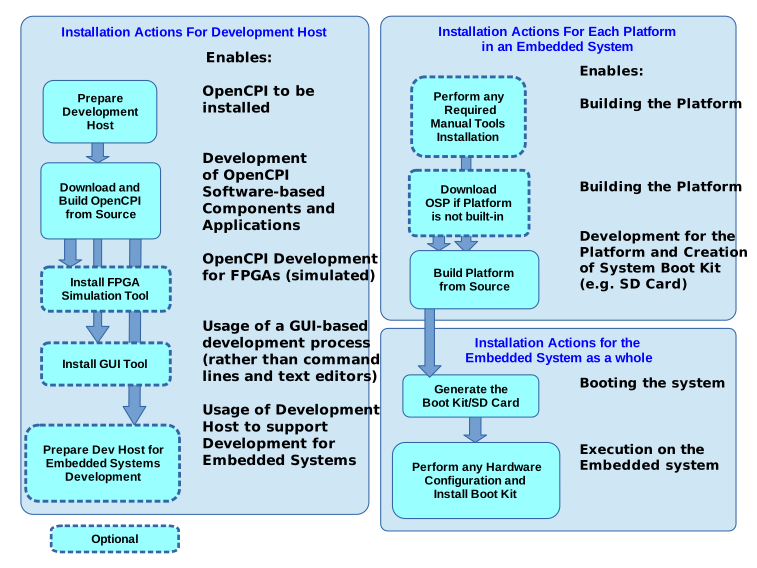
Figure 1: Installation Sequences
The most common installation platform for OpenCPI development hosts is Rocky9 Linux x86_64 (64-bit). Ubuntu20_04 and Ubuntu22_04 are also supported. Other Linux variants and 32-bit systems have been used successfully. Rocky9 64-bit is the default, tested installation for a development host. Development hosts can either be actual physical systems or virtual machine installations.
Additional installation options exist for other typically embedded target processors such as the Xilinx® Zynq® SoC (with ARM® processor cores and FPGA resources) and various FPGAs. For embedded CPUs, OpenCPI uses cross-building on the development host using tools that can target the embedded processors and FPGAs.
This document is divided into sections according to the above diagram.