Component Libraries
OpenCPI components are developed in libraries. OpenCPI component-based applications are defined as a composition of components, and the components are developed and built in component libraries.
A component library is a directory that contains:
Component specifications, OCSs, OPSs in a
specssubdirectory.Component implementations (workers), each in its own subdirectory.
Component tests in
*.testsubdirectories.An XML file, named
<library-name>.xml, for some library options.When built, a subdirectory call
lib/is created and populated with links to the built binaries and metadata files required to use components in the library, from outside the library.
The results of building a library that are made visible to users of the library are in the lib/ subdirectory. That directory is removed when the library is cleaned.
Cleaning an OpenCPI Library
ocpidev clean library
Clean an OpenCPI Library.
Usage:
$ ocpidev clean library [OPTIONS] [Library]
Arguments:
[Library]
Options:
-p, --project Project: Specify the Project that the asset resides in.--rcc-platform RCC Platform: RCC Platform(s) to apply the command for.--hdl-platform HDL Platform: HDL Platform(s) to apply the command for.--hdl-target HDL Target: HDL Targets(s) to apply the command for.-f, --force--help: Show this message and exit.
The binary results of building a library is a collection of heterogeneous built workers for various technologies, along with various XML metadata files.
Component libraries are developed inside OpenCPI projects, as described in the Developing OpenCPI Assets in Projects topic. This defines a larger directory structure containing a variety of OpenCPI assets, including component libraries and applications.
The basic directory structure of a component library is shows in the figure below.
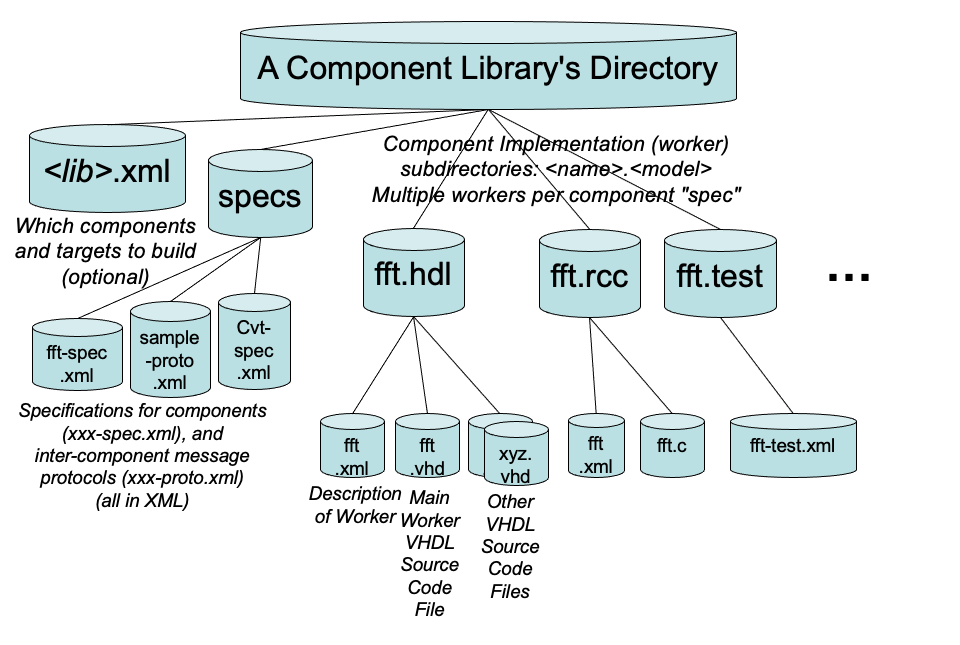
Figure 9: Component Library Directory Structure
The file hierarchy of a component library mycl is outlined below. The library contains a search component with RCC and HDL implementations, and a transform component with only an HDL implementation:
mycl/mycl.xml
    /specs/search-spec.xml
          /transform-spec.xml
    /search.rcc/search.xml
               /search.c    (RCC C source file)
    /search.hdl/search.xml
               /search.vhd  (HDL VHDL source file)
    /transform.hdl/transform.xml
                  /transform.vhd
The Component Library XML File
The <libname>.xml file in the top-level directory of the component library is generated automatically by the ocpidev create command. The file contents look something like:
<library />
One optional attribute in this file is Workers, which is a list of which worker subdirectories to be built in this component library. When the Workers attribute is not set at all, it indicates that all workers found in the component library that contain workers should be built. For example:
Workers='fft.rcc fft.hdl fft-for-xilinx.hdl fir.rcc'
There are two reasons to set this attribute at all rather than using the default.
If you want to temporarily avoid building some workers in the library, you can set this attribute to only the ones you want to build, so any others are ignored.
If you want to specify the order in which the workers are built, you can set this attribute to the workers you want to build, in the order you want them to be built. There are two situations where the order of building workers is important. First, if a worker is a proxy (see the RCC Development Guide) for another, the “slave” of the slave must be built before the proxy. Second, if a subdevice supports another device, the supported device must be built before the subdevice (see the Platform Development Guide).
The ExcludeWorkers attribute can also be used to exclude certain workers from being built when the Workers attribute is unset.
In order to avoid name space collisions when using multiple component libraries, there is also a PackageName attribute that specifies what namespace should be used for the specs and workers in this library. See the Package IDs section for complete information about package IDs.
For all software (not HDL) authoring models, the default RCC platform, if none is specified, is the machine and operating environment of the machine doing the building. Otherwise build targets and platforms can be specified in arguments to the ocpidev build command.
Software targets use the software platform names. Examples are rocky8, rocky9, ubuntu20_04, ubuntu22_04, xilinx24_1_aarch32 (for Xilinx Linux for Zynq).
HDL targets typically contain an architecturally compatible part family (e.g. artix7 or kintex7). See the HDL Development Guide for more details.
If all subdirectories containing workers should indeed be built, and the package name is the default, then no attributes need be set.
Creating a new component library mycl is accomplished by using the ocpidev tool. This tool is described in the The ocpidev Tool for Managing Assets section topic.
Creating an OpenCPI Library
ocpidev create library
Create an OpenCPI Component Library.
Usage:
$ ocpidev create library [OPTIONS] [NAME]
Arguments:
[NAME]
Options:
-p, --project Project: Specify the Project that the asset resides in.--package-id TEXT: The package ID. Defaults to <package_prefix>.<package_name>--package-prefix TEXT: The package prefix.--package-name TEXT: The package name. Defaults to <name>.--xml-include TEXT: Directory to search for XML include files. May be used more than once.--include-dir TEXT: Directory to search for include files. May be used more than once.--primitive-library TEXT: Primitive library asset depends on. May be used more than once.--component-library TEXT: Component library asset depends on. May be used more than once.--exclude-platform Platform: Do not allow building asset for specified platform. May be used more than once.--only-platform Platform: Only allow building asset for specified platform. May be used more than once.--exclude-target HDL Target: Do not allow building asset for specified HDL target. May be used more than once.--only-target HDL Target: Only allow building asset for specified HDL target. May be used more than once.--help: Show this message and exit.
If present, the <library-name>.xml file in the component library’s directory contains settings that should apply to all the workers and tests in the library. This file is read by ocpidev.
The table below lists the attributes settable in this file. They are also usable at the project level in the project’s Project.xml file which has a similar purpose.
Attributes Name in |
Description |
|
A list of primitive libraries built elsewhere. It is searched in this project and in projects this project depends on. |
|
A list of the only targets/platforms for which this worker should be built |
|
A list of targets/platforms for which this worker should NOT be built |
|
A list of directories elsewhere for searching for XML files. |
|
A list of directories elsewhere for searching for files indicated by “include” directives in worker source files such as those in C, C++ or Verilog. |
|
A list of component libraries to search when the worker refers to another worker. The need for this is specific to the authoring model (e.g. proxies for RCC workers, or emulators for HDL device workers). |