E31x MIMO RCVR AD5662 Test App Guide
Description
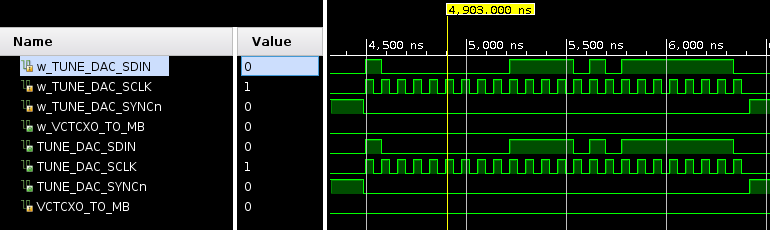
This application is intended to perform a simulation-only test of the e31x_mimo_xcvr_ad5662.hdl device worker. The application is meant to analyze the properties of the device worker in a simulation environment. An emulator of the e31x_mimo_xcvr_ad5662 device was written in order to be able to inspect the timing of the SPI and ensure the transaction was written properly. ocpirun is used to launch the application and then ocpiview is used to analyze the results via manual inspection. The timing diagram should show the property value clocked in on the falling edge of the clock. The data word is formatted as 23..18 don’t-cares, 17..16 power down mode bits, and 15..0 data bits.
Hardware Portability
This application currently requires simulation for verification purposes. The intended assembly for use with this application only has a container for the xsim platform.
Prerequisites
The following must be true before application execution:
The following assets are built and their build artifacts (FPGA bitstream file/shared object file) are contained within the directory list of the OCPI_LIBRARY_PATH environment variable.
for
xsim/HDL platform:empty/cnt_e31x_mimo_xcvr_ad5662_test_xsimassembly/container
Commands
ocpirun -v -l8 -t3 <e3xx-project-dir>/applications/e31x_mimo_xcvr_ad5662_test/e31x_mimo_xcvr_ad5662_test.xml
ocpiview
Verification
The following steps are taken for verification:
In the simulation window, add
ftop->e31x_mimo_xcvr_ad5662_i->worker->signalsto the wave windowThe timing diagram should look like the following (after zooming in), clocking in the word 0x7afe after 6 don’t-care bits and two 0s for shutdown mode