Platform Time (get_platform_time)
Publishes the platform time server’s timestamp as a component property.
Design
The current time component samples the platform’s hardware time source and exposes
the value on the read-only current_time property. The component is a pure
time-sink: it has no stream input or output ports.
A block diagram representation of the component is given in Figure 219:
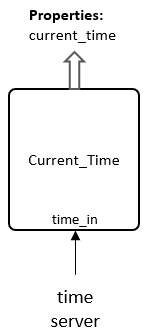
Figure 219: Platform time block diagram
The component is driven by the platform’s time server through the time time interface
and latches the most recent timestamp whenever that time becomes valid.
The latched timestamp is the 64-bit value formed by concatenating the 32-bit seconds field with the 32-bit fractional field of the platform time:
The value is the raw binary encoding of the platform clock (32:32, seconds:
fraction-of-second), not a decimal time. The property is only updated while the
time source is valid; when the time server is unavailable the last latched value
is retained, and the time interface is declared allowunavailable so the
component does not stall the rest of the design.
The component is typically instantiated in an assembly alongside timed sample
paths (for example next to detect_burst_xs) so that assembly-level logic or
a coprocessor can read the current time without parsing a timestamp out of a
sample stream.
Interface
<?xml version="1.0" encoding="utf-8"?>
<componentspec>
  <property name="current_time" type="ulonglong" writable="false" volatile="true"
    description="Contains value of current time derived from platform time_server."/>
</componentspec>
Properties
current_time: Contains value of current time derived from platform time_server. 64-bit (32:32 seconds:fraction) value of the current platform.Type:
ulonglongAccess:
Parameter:
FalseWritable:
FalseInitial:
FalseVolatile:
True
Default value:
None
Implementations
Example Application
<?xml version="1.0"?>
<application>
  <instance component="ocpi.examples.get_platform_time"/>
</application>
Dependencies
The component has no sample-stream protocol dependencies; it is driven by the platform time interface.
There is also a dependency on:
ieee.std_logic_1164
ieee.numeric_stdthe platform time server (
timeinterface, 32-bit seconds, 32-bit fraction)
Limitations
Limitations of get_platform_time are:
The
current_timeproperty is an unsigned 64-bit (32:32) encoding; a readermust split it into seconds (upper 32 bits) and fraction (lower 32 bits) and is responsible for any seconds/fraction scaling.The value is latched only while the time source is valid. While the time server is unavailable the property retains the last value rather than indicating a fault.
There are no output ports: the time is only observable via the property.
Testing
The component has no sample-stream input or output ports, and its only
observable output is the read-only current_time property. This makes it a
poor fit for the standard OCPI unit-test harness, which is built around an
input-stream / output-stream compare: with no output port the generated verify
script is a no-op, and a bare no-port application never reaches end-of-data
under ocpirun (it runs to the per-subcase timeout and exits non-zero). For
that reason this component has no ``ocpidev`` unit-test case. Instead, there
is a standalone harness and an application with assembly are available for user to
verify component fucntionality.
The assembly and ACI application may be built and run with the following arguments:
./get_platform_time_app [delay_ms] [iterations]
To build and manually execute the application, the application files and assembly file must be manually moved to an appropriate directory.
Move application file to:
~/opencpi/projects/examples/applications/get_platform_time_app/
Move assembly file to:
~/opencpi/projects/examples/hdl/assemblies/get_platform_time_assy/
Limitation: When running application as xsim, delay_ms values may not be as precise as with an actual platform.