Signal Analyzer Application (signal_analyzer_app)
Receives sampled waveform data from platform’s rf ouput port and generated Fast Fourier Transform (FFT) samples. Supports web service to send FFT samples to a user’s web interface to display spectrum and waterfall graphs.
Description
The Signal Analyzer example application demonstrates a simple spectrum viewing capability using the OpenCPI framework. Some of the key concepts of this application’s implementation include:
Buffering output samples from the OpenCPI application output and passing them to the ACI application.
Implementation of dynamic control of DRC settings to include changing center frequency, sampling rate, RX gain, etc.
Using WebSockets to pass formatted FFT samples from the ACI application to Web Interface and to receive control messages from the Web Interface.
The OpenCPI application implements OpenCPI components to process complex samples from the SDR’s receiver digitizing front-end to generate a set of FFT output samples as shown in Figure 1.
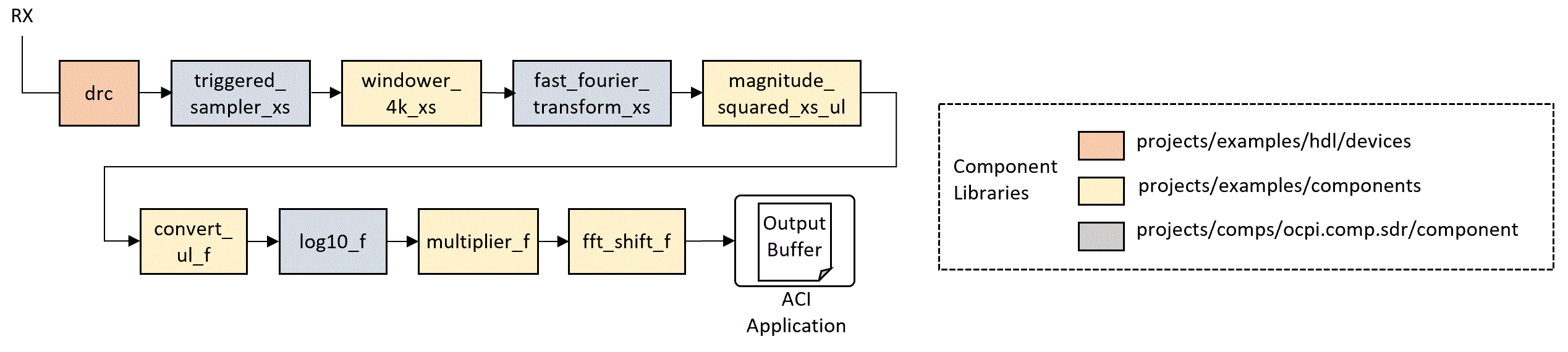
Figure 207: Signal Analyzer Application Components.
Local oscillator configuration, sampling rate, filter selection, and other front-end settings are managed by the Digital Radio Controller (DRC) component. The application is designed to incrementally capture 4096 samples and triggered at user specified intervals. The samples are then filtered using coefficients derived by the ‘blackman-harris’ algorithm prior to the Fast Fourier Transform (FFT). Following the FFT, the logarithmic power envelope is derived by calculating magnitude squared, applying log10, and multiplying by 10.
The final component applies an FFT shift to order the samples for viewing. The application defines an external port as the final interface. The ACI application instantiates an OA::ExternalBuffer object to retrieve these samples for processing.
The ACI application implements a web server using WebSockets. While running, a user accesses the server through a standard web browser and connects using the server’s IP address and port. The default port is 3000. The ACI application functions as a server.
When ACI application is executed, a user accesses the server via a web interface using a web browser and linking to the server which is typically run locally. If run locally, the URL link will be:
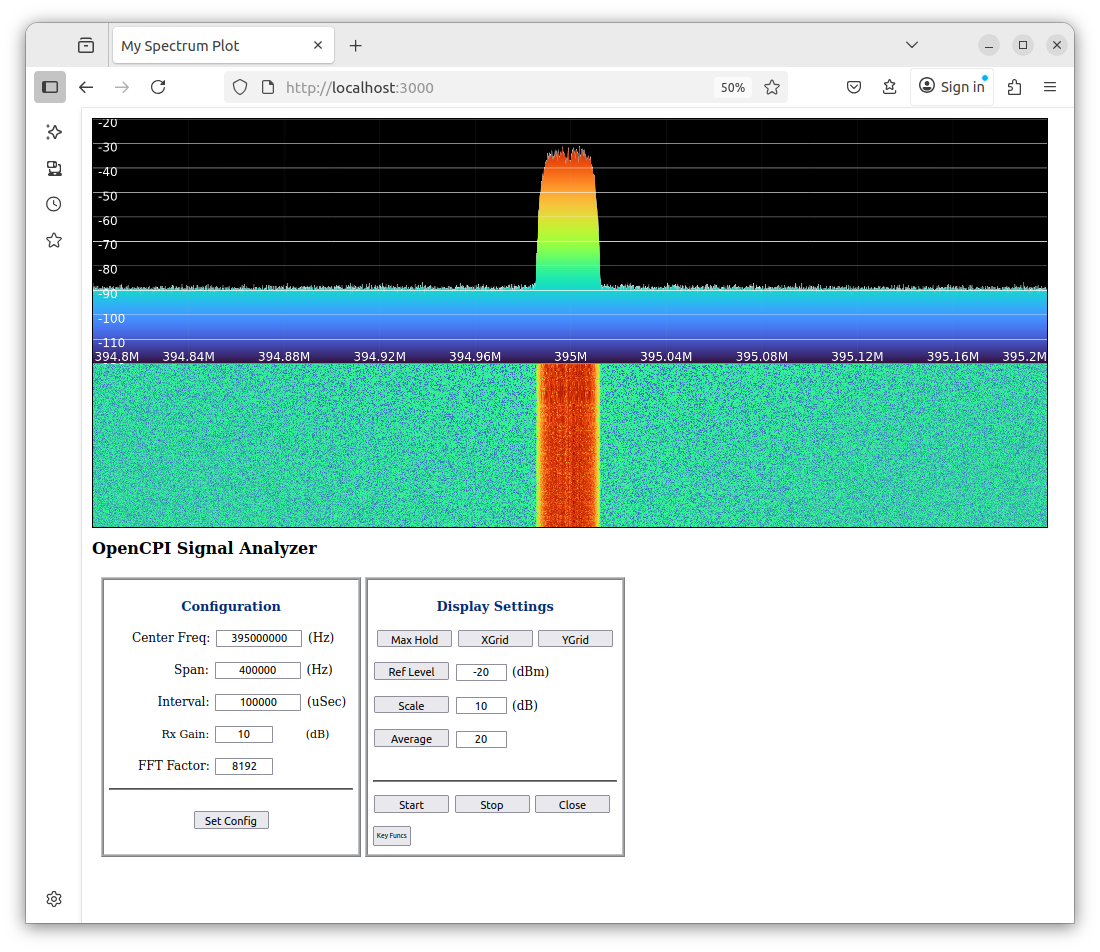
Figure 208: Signal Analyzer Web Interface.
Dependencies
prerequisites
uwebsockets
zlib
Hardware Portability
A single OpenCPI Application and HDL Assembly may be ported to support OpenCPI compliant platforms. Currently, the application has been tested for the following OpenCPI platforms:
Ettus E310
Analog Device ADALM-Pluto
Digilent ZedBoard with Analog Device FMCOMMS2 daughter board
AMD Zynq UltraScale+ MPSoC ZCU104
This application has been tested and verified to execute on the following platforms:
e31x
plutosdr
zed
zcu104
ubuntu22_04
Execution
Please refer to the signal_analyzer_app application README.md file in the project’s git repository for instructions to build and execute the signal_analyzer Application.
Limitations
The Interval field must be set to a value that does not result in significant processing latancy.
Calibration of output display must be set using the Rx Gain and FFT Factor to avaoid saturation and to adequately equate displayed output level to actual input signal power levels.
At this time, the DRC does not implement IQ imbalance correction which may occur due to complex mixing. However, an IQ imbalance component is available in the SDR components library and will be incorporated into the DRC in a future patch release.
Troubleshooting
None at this time.
Worker Artifacts
The application currently supports an all HDL component assembly. The assembly is located in the following directory:
~/opencpi/projects/examples/hdl/assemblies/signal_analyzer_app/
Three platform container files are available to build the assembly for the fmcomms, e31x, and plutosdr platforms and located in the assembly directory.
The fmcomms container supports both the zed and zcu104 platforms.